Baby/Child Blessing Form on LCR

35 postsstarted by ELHawkes 36,713 viewsoriginal topic

Member
#1
I've been hoping to find the Baby/Child Blessing Form on LCR for many months now, maybe I'm just looking in the wrong place.
If it is on LCR, can someone direct me to where to find it.
If it's not there, hopefully this will be some encouragement to have it added to LCR soon.
Thanks a bunch in advance.
Senior Member
#2
You can print a blessing certificate but you can't create a new record in LCR. So it's only really useful to reprint a certificate.

Go to Reports > Certificates > Print Certificates from the LCR menu to print a certificate.

Creating a new record will come in a future release of LCR, probably in the next major release.
Member
#3
Understood. I'm looking for the form itself.
Most of the time we give a form to the parents in advance to fill out.
It would be real nice to be able to print the form from LCR instead of having to go and use the computer at the church with MLS.
Senior Member
#4
ELHawkes wrote: Most of the time we give a form to the parents in advance to fill out.
It would be real nice to be able to print the form from LCR instead of having to go and use the computer at the church with MLS.
That is called the Child Blessing Record and, no, it can't be printed from LCR yet. I'm sure it will be eventually. It might be in the next major release or it might be in the cleanup release after that. We'll just have to wait and see.
New Member
#5
We had an earlier clerk enter in the new child's name and information in MLS but can't figure out to print a new "Child Record Form" for the upcoming membership audit. Should we just fill it in by hand and have the parent's sign or is there something we're missing?
New Member
#6
Are you referring to the "Child Record Form"? If so, it's now available on the Membership => Create Record page. There's a link that says "Blank Create Record Form (seven or younger)" which allows you to download or print a PDF form.
New Member
#7
I've been hoping to find the Baby/Child Blessing Form on LCR for many months now, maybe I'm just looking in the wrong place.
If it is on LCR, can someone direct me to where to find it.
If it's not there, hopefully this will be some encouragement to have it added to LCR soon.
Thanks a bunch in advance.
Community Moderators
#8
It is in LCR > Membership > Create New Record. From there you can print out a blank form by clicking the Blank Create Record Form (seven or younger) link. Or you can fill in the name, gender, and birth date and then click the link for a partially completed form.
JD Lessley
Have you tried finding your answer on the ChurchofJesusChrist.org Help Center or Tech Wiki?
Senior Member
#9
I've been hoping to find the Baby/Child Blessing Form on LCR for many months now...
Did you mean to exactly copy/paste the entire original post from 2016 as your question? Perhaps you accidentally submitted this response, otherwise it seems a bit odd to repeat word-for-word the original question.
New Member
#10
As EQP can I get access to Baby Blessing certificates?
Community Moderators
#11
chokl8bear wrote: Thu Nov 02, 2023 10:52 pm As EQP can I get access to Baby Blessing certificates?
Access is limited to certain callings. Only the bishopric, executive secretary, assistant executive secretary, ward clerk, assistant ward clerk, assistant ward clerk - membership can print certificates. Printing includes viewing certificates.
JD Lessley
Have you tried finding your answer on the ChurchofJesusChrist.org Help Center or Tech Wiki?
New Member
#12
jdlessley wrote: Sat Aug 19, 2023 10:15 pm It is in LCR > Membership > Create New Record. From there you can print out a blank form by clicking the Blank Create Record Form (seven or younger) link. Or you can fill in the name, gender, and birth date and then click the link for a partially completed form.
Am I missing something, or is this form no longer available in LCR? I know I printed a couple of copies about six months ago, but following the link now to Create New Record for me only pulls up the fields to enter the parents information with no option to get a blank form.
Community Moderators
#13
lhippen wrote: Sun Mar 10, 2024 3:56 pm Am I missing something, or is this form no longer available in LCR? I know I printed a couple of copies about six months ago, but following the link now to Create New Record for me only pulls up the fields to enter the parents information with no option to get a blank form.
There are two tabs on the Create Record page, Create Record and Pending New Records. It sounds like there was a pending new record and you ended up on that tab.

Anomalous things happen when the Church website cookies build up. If you didn't have an errant mouse click to end up where you did then try using incognito/private window to rule out a cookie issue.
JD Lessley
Have you tried finding your answer on the ChurchofJesusChrist.org Help Center or Tech Wiki?
Senior Member
#14
It's not a cookie issue. The software has apparently been changed to make it less user friendly. You have to go to create a record and eventually the form will pull up after you put in the head of household, and at least a date of birth for the child, which by the way they are asking for as mm/dd/yyyy, which is totally out of character with what Church systems used to and should ask for. If you are being proactive and printing the form prior to birth, you must dummy in a birth date, or the link to the form does not appear. Actually I see you can print a blank form, but not without a date of birth for the child. You can skip the head of house and name of the child, but only the date of birth triggers the link to the form.
Community Moderators
#15
garystroble wrote: Sun Mar 10, 2024 8:18 pm It's not a cookie issue. The software has apparently been changed to make it less user friendly. You have to go to create a record and eventually the form will pull up after you put in the head of household ...
I don't see any change in the web page design that has been in its current form for a number of years. The form, Blank Create Record Form (seven or younger) link (the one needed for the topic of this thread) is available at the bottom of the LCR > Membership > Create Record page along with two other forms, Blank Create Record Form (eight or older with spouse or children) and Blank Create Record Form (eight or older without spouse or children) links. No data needs to be entered to print the blank forms.

A new record form can be printed with the Individual Information section completed by starting to enter the name, gender and birth date. Once that is entered, additional data/questions the system needs for the appropriate form based on the birth date will need to be filled in. For a baby blessing the parent/guardian permission question and the birth location is the only additional data necessary to print the partially completed form. Once the "Continue" button becomes active then click the "Print Create Record Form" button. If the "Continue" button is clicked then the system will continue the record creation process and the form will not be available.
JD Lessley
Have you tried finding your answer on the ChurchofJesusChrist.org Help Center or Tech Wiki?
Senior Member
#16
What you described used to be there for many years. It is not there now for me. Perhaps it is a weekend server issue and once it is kicked hard Monday things will be back to normal. Or not.

Your August 2023 link is not working either at this point, at least not here.
Community Moderators
#17
garystroble wrote: Mon Mar 11, 2024 12:37 am Your August 2023 link is not working either at this point, at least not here.
I tried the link and got access errors the first time and then got server errors. After waiting a while the link worked. So it looks like there may be temporary problems. But access to the document may require membership edit permissions.
JD Lessley
Have you tried finding your answer on the ChurchofJesusChrist.org Help Center or Tech Wiki?
Senior Member
#18
jdlessley wrote: Mon Mar 11, 2024 12:15 pm I tried the link and got access errors the first time and then got server errors. After waiting a while the link worked. So it looks like there may be temporary problems. But access to the document may require membership edit permissions.
I can confirm the referenced Aug 2023 link also works for me. That said, there may be ongoing access problems, but it does appear to be a valid location.
Senior Member
#19
I am the ward clerk. The link does not work for me still. But there seemed to be cascading server failures over the weekend in Utah which have yet to resolve.
Senior Member
#20
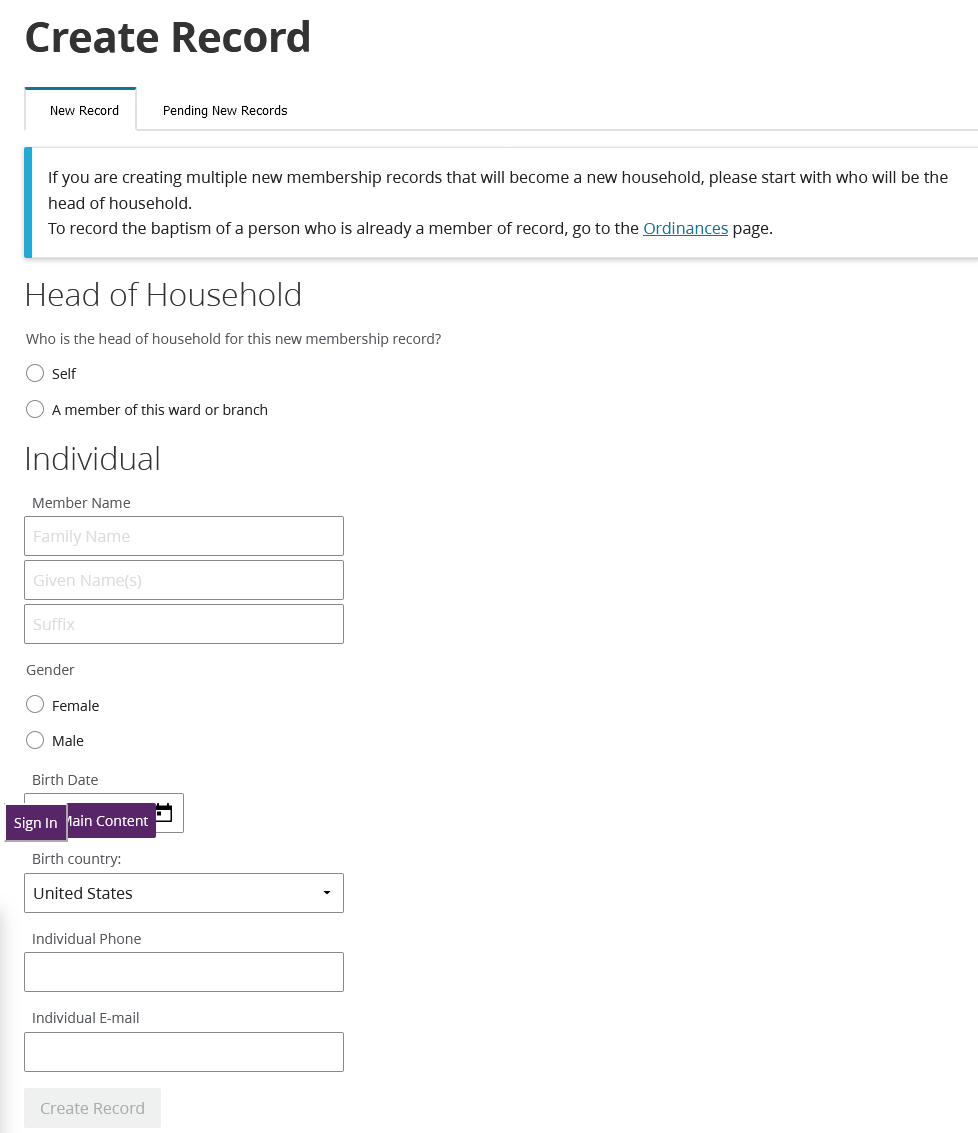
This is all I currently see under Create a Record. The sign in and main content tabs are bogus. They do not appear on my screen there and I am already signed in to LCR.
Screenshot 2024-03-11 at 19-09-07 Create Record.png
Screenshot 2024-03-11 at 19-09-07 Create Record.png (78.82 KiB)
Senior Member
#21
Again, my answer isn't helpful, since it's essentially "it works for me!" :) Although what is displayed for me does differ from what your image shows, it's what first appears when I select "Membership => Create Record". And the three links at the bottom of the image do send me to the valid forms:
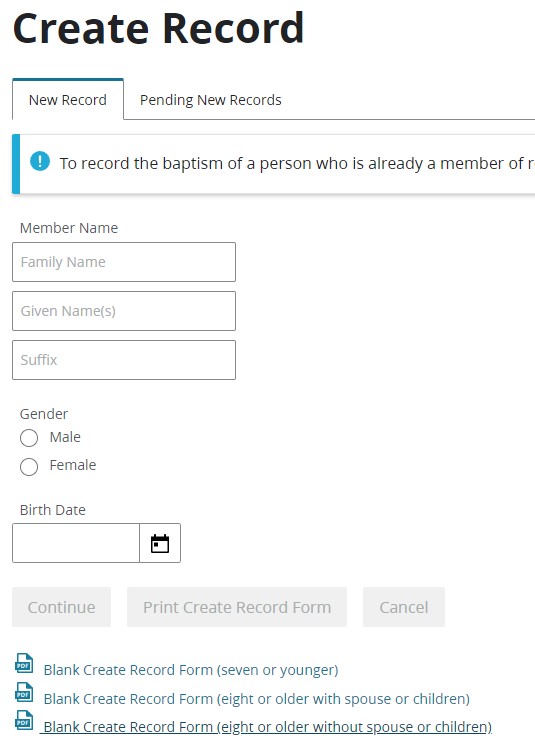
Create_Record.jpg
Create_Record.jpg (55.31 KiB)
Senior Member
#22
The three links you show are missing on LCR for me. Your version starts out with different verbiage too.

Perhaps it will be obvious what is happening some time soon.
Community Administrator
#23
I have to wonder if the difference is due to some kind of roll-out.

I'll note that while both of you are in North America (US), you're in different areas.
Have you searched the Help Center? Try doing a Google search and adding "site:churchofjesuschrist.org/help" to the search criteria.

So we can better help you, please edit your Profile to include your general location.
Community Moderators
#24
That page definitely has some rendering problems. It is displaying more than it should and has content placement errors. Also missing are two control buttons. And as you previously posted the links to the blank forms are missing

The image of the page BrianEdwards has in his post is what I see.
JD Lessley
Have you tried finding your answer on the ChurchofJesusChrist.org Help Center or Tech Wiki?
Member
#25
For two weeks now, I have not been able to print a blessing certificate. The first time I tried was when I created the member record. All subsequent efforts were from the member's (baby's) membership > ordinances page.

In all cases, when I click on the link to print the certificate, an error page returns stating there is no file that exists. The member's page is complete showing the parents and complete family and that he was BIC.

I sent a feedback email to the church last week, but have not heard from them.

Does anyone have any other ideas?

Thank you!
Community Administrator
#26
CWatsonJr wrote: Sun Mar 17, 2024 11:54 am Does anyone have any other ideas?
Did you try incognito mode? Cookie buildup will do things like that.
Have you searched the Help Center? Try doing a Google search and adding "site:churchofjesuschrist.org/help" to the search criteria.

So we can better help you, please edit your Profile to include your general location.
Member
#27
russellhltn wrote: Sun Mar 17, 2024 12:49 pm
CWatsonJr wrote: Sun Mar 17, 2024 11:54 am Does anyone have any other ideas?
Did you try incognito mode? Cookie buildup will do things like that.
I did. I also tried it both ways on my iPad, and I’ve tried it on my home PC (but not incognito there). Everything I’ve tried gives me the same results. Since I am the assistant clerk, I watched our ward clerk get the same results when he tried it.

If others can print a baby blessing certificate, then I have no idea what the problem is on our end.

Thank you.
Community Moderators
#28
@ CWatsonJr,
See my response, post #2, in the thread titled blessing certificate: "Sorry, the requested file does not exist.".
JD Lessley
Have you tried finding your answer on the ChurchofJesusChrist.org Help Center or Tech Wiki?
Member
#29
jdlessley wrote: Sun Mar 17, 2024 4:48 pm @ CWatsonJr,
See my response, post #2, in the thread titled blessing certificate: "Sorry, the requested file does not exist.".
Thank you very much!
New Member
#30
jdlessley wrote: Mon Mar 11, 2024 8:11 pm That page definitely has some rendering problems. It is displaying more than it should and has content placement errors. Also missing are two control buttons. And as you previously posted the links to the blank forms are missing

The image of the page BrianEdwards has in his post is what I see.
Has anyone seen any way to potentially fix this?
Community Moderators
#31
sloanderek wrote: Mon May 20, 2024 4:59 pm Has anyone seen any way to potentially fix this?
Does private/incognito mode help? If so, clearing browser cache and relevant cookies would likely solve it for a good while (until the cookies build up again).
Senior Member
#32
Additionally, having another clerk (or the Bishop) try the same thing, might help identify if it's a problem just for your account, or if it's perhaps more generalized. I still see the same thing as what I previously posted in March, so hopefully using private/incognito mode resolves this for you.
New Member
#33
I am now confused. I use to see this form and it populated a few of the fields.

now the new form. ?
as far as I can tell the new form does not populate parents name. ugh
old form
old form (71.88 KiB)
new form
new form (50.32 KiB)
Member
#34
I just wanted to follow up as I just found this post. I am now seeing what the poster before me was: there is no longer any place to fill in the parents when creating a new record for a Baby Blessing. Is that the same for everyone? You can pick the Head of Household that the baby will go into, but that appears to be it besides providing the baby's name and birthdate. None of the other information is filled in (not the parents names, not the ward/branch where they live, and so on).

So now the parents have to be manually added to the form?

Or am I missing something?
Community Moderators
#35
jgoggan wrote: Sun Aug 02, 2026 12:37 pm ...

So now the parents have to be manually added to the form?

Or am I missing something?
Go to the member profile of the head of household (or perhaps either parent of the child). Click on the 'Family' tab. Scroll down to nearly the bottom of the page. Click on 'Add Child'.