Gospel Library 4.0 for iOS

18 postsstarted by HeidiSueT 5,406 viewsoriginal topic

New Member
#1
Sorry for the newbie question or if I am missing something, but where did updating bookmarks go? I noticed that the Gospel Library for Android forum answered this question in a post, "you will probably notice that updating a bookmark is done using the bookmark's contextual menu." But does that apply to the iOS version too? Where is the contextual menu for bookmarks? I can see where I can drag to reorder them and where I can delete them. But how do I update them?

I used to long hold the bookmark and it would update. Now, I can't seem to find it. The only way I see it now is to create a new bookmark.
Thanks.
New Member
#2
Thank you for posting this, I've been trying for 10 minutes to update the bookmark. Can't figure it out.

I tried the refresh button. Instead of updating the book mark I clicked on it updated a totally different bookmark. A little buggy.
New Member
#3

Re: Updating bookmarks

Yep, same here. Here's the scenario.

I have a bookmark called Daily. It's on 2 Nephi 30.

I read the chapter.

I now want to change the bookmark to 2 Nephi 31.

In the past I would tap and hold the bookmark in the bookmark menu and it would update.

Now, I can't seem to move the bookmark at all to the next chapter. I can still tap and hold the bookmark itself to move it from verse to verse.
New Member
#4
Just got this from support

To update your bookmark, open the bookmarks list and tap on the button to the right of the bookmark (looks like a refresh button; a circular arrow).
New Member
#5
After the update of gospel library I can no longer open it in my iPad
New Member
#6
I can't open mine either this morning after it has updated. I get the screen with the logo for a while and then that closes and I'm back at the home screen. If I double click, I can see that the app is open but frozen. All I can do is close the app (Swiping up).
New Member
#7
I'm have exactly the same problem trying to open the app since I updated to 4.0. I've trying restarting my iPad but nothing seems to help.
Community Moderators
#8
kathiebates wrote:After the update of gospel library I can no longer open it in my iPad
punkquokka wrote:I can't open mine either this morning after it has updated. I get the screen with the logo for a while and then that closes and I'm back at the home screen. If I double click, I can see that the app is open but frozen. All I can do is close the app (Swiping up).
SmithLX wrote:I'm have exactly the same problem trying to open the app since I updated to 4.0. I've trying restarting my iPad but nothing seems to help.
If Gospel Library 4 (iOS) is crashing when you try to open it, see this thread: Crashes on startup
There's an update being tested that will hopefully fix the crash.
Samuel Bradshaw • If you desire to serve God, you are called to the work.
New Member
#9
I was also having the same problems with moving my bookmark to a new verse or chapter. In this process I found 2 issues: #1- I followed the steps given in the answer from support by tapping on the "refresh" arrow icon on the right side of the listed bookmark. It did add a new bookmark symbol by the chosen verse, HOWEVER, it did not change the bookmark title. It still had it listed as being for the previous saved bookmark verse. #2- When I first was trying to figure out how to move my bookmark, I added a bookmark for the new verse. Once I read how to change the bookmark to the new verse, I deleted the new bookmark because I planned on simply updated the previous bookmark to the new verse. Well, the bookmark I deleted is no longer on the list, HOWEVER the bookmark symbol is still by the verse. RESULTS SUMMARY: 1- I now have 1 bookmark listed and know how to change it to a new verse or chapter; 2- However, I now have 3 different gold bookmark symbols by 3 different verses of which only one is actually bookmarked. They are: A- the original bookmarked verse when was changed; B- the moved/changed bookmarked verse (from the original bookmarked verse), which is the one I want; and C- the added bookmarked verse which was deleted from the listed bookmarks (see #2 above). I hope this helps the team and also hope you are soon able to fix this.
New Member
#10
jroylance wrote:Just got this from support

To update your bookmark, open the bookmarks list and tap on the button to the right of the bookmark (looks like a refresh button; a circular arrow).
THANK YOU!
New Member
#11
How can I go back to the old lds library. I do not like the update or the new scripture reader. I want to undo the update.
New Member
#12
I am also having trouble updating bookmarks. When I click on the circular arrow by the bookmark I want to update it doesn't change that bookmark, but assigns a random bookmark from my list to the new scripture I was trying to update with.

I have a bookmark labeled "daily reading." In my list it's bookmarked for Alma 26. I am now in Alma 31. When I click the circular arrow right next to my "daily reading" bookmark, it still still says Alma 26, but now another bookmark I had labeled as "choice" has been assigned the Alma 31 and overwritten whatever reference I had bookmarked to go with the "choice" label. It has done this three times, selecting a different random bookmark from my list, so now I have three bookmarks all assigned to Alma 31 (whatever references were attached to them before have been lost) and my "daily reading" still says Alma 26.

Any suggestions?
New Member
#13
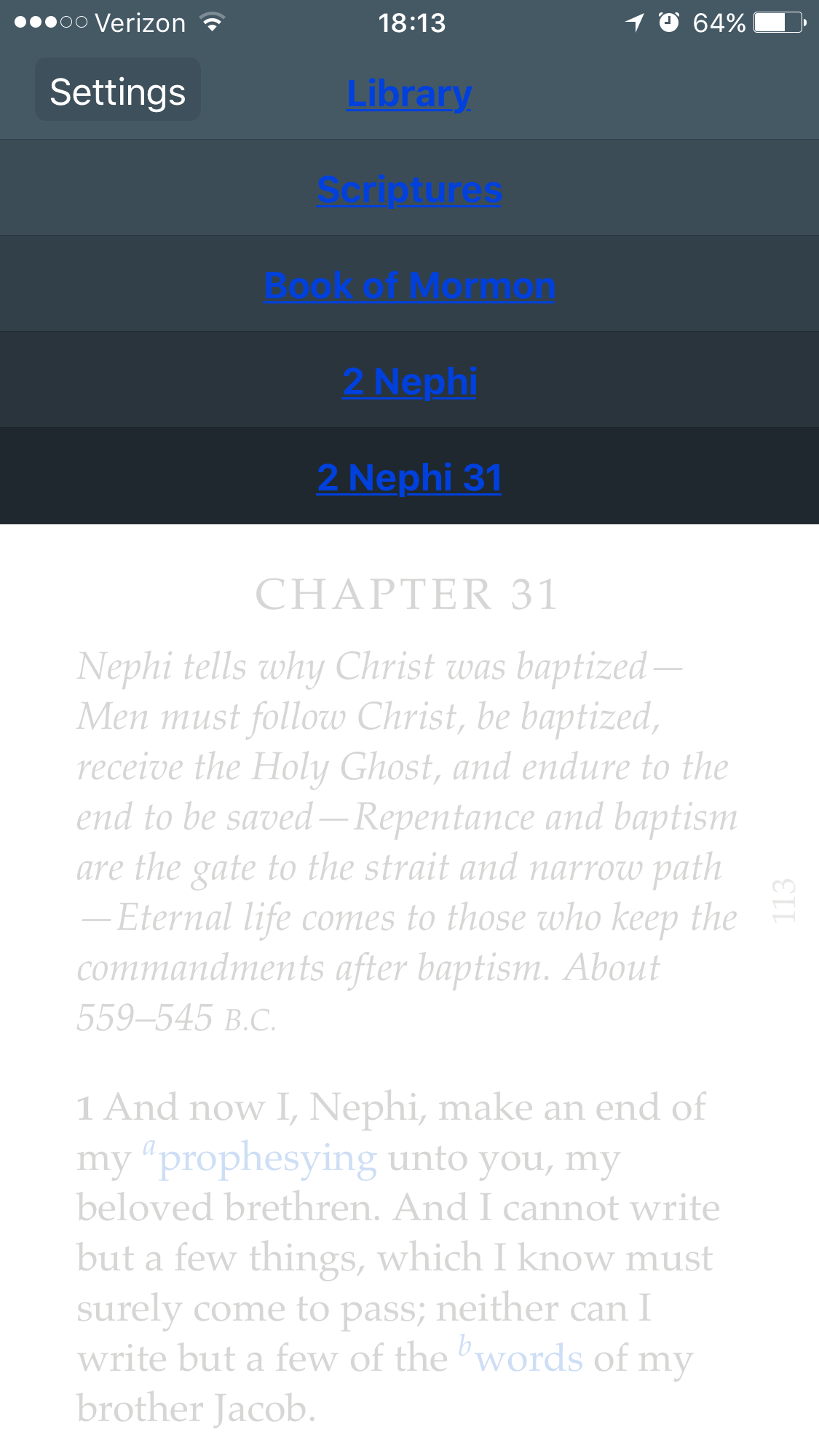
Having the tab labels at the top in a blue font instead of white is extremely difficult to read.
New Member
#14
I found out that the name of your bookmark has to be named something other than the location. My bookmark didn't have a name, it just had a location, so in this app it was named Ether 2:23. It would not update to the next chapter, even when I pushed the gold arrow thing. But when I renamed it "Personal Study," and moved the cursor to the next chapter where I wanted to bookmark it, and then went to the bookmarks menu and tapped on the gold arrow next to my new personal study bookmark, it did update to the next chapter.
Community Moderators
#15
lsumsion wrote:Having the tab labels at the top in a blue font instead of white is extremely difficult to read.
Are you talking about the text on the navigation menu, at the top of the screen?

If you're seeing blue text instead of white, go to Settings > General > Accessibility and switch off "Button Shapes." You may have to force (swipe) close and reopen the app for the change to take effect.
GL menu blue links.png
(217.31 KiB) Not downloaded yet
Samuel Bradshaw • If you desire to serve God, you are called to the work.
New Member
#16
lsumsion wrote: have a bookmark labeled "daily reading." In my list it's bookmarked for Alma 26. I am now in Alma 31. When I click the circular arrow right next to my "daily reading" bookmark, it still still says Alma 26, but now another bookmark I had labeled as "choice" has been assigned the Alma 31 and overwritten whatever reference I had bookmarked to go with the "choice" label. It has done this three times, selecting a different random bookmark from my list, so now I have three bookmarks all assigned to Alma 31 (whatever references were attached to them before have been lost) and my "daily reading" still says Alma 26.

Any suggestions?
My wife reported this same issue on her iPhone 5s
New Member
#17
HELP! ! I'm desperate!! Had tons of notes in Book of Mormon in older version. Without thinking, I deleted the old version and downloaded the new thinking all my notes would transfer over. Someone else do this and could tell me how to restore? :(
Community Administrator
#18
lesmeier wrote:Had tons of notes in Book of Mormon in older version. Without thinking, I deleted the old version and downloaded the new thinking all my notes would transfer over.
Did you sync your note with lds.org? (Via a LDS Account)? If so, then once you sign on with the same LDS Account, the notes should appear in the new version.
Have you searched the Help Center? Try doing a Google search and adding "site:churchofjesuschrist.org/help" to the search criteria.

So we can better help you, please edit your Profile to include your general location.