New Member
Is there a way to sync my lds.org stake calendar into my personal Google calendar?

The checkboxes only affect the display on lds.org - nothing else.BrotherBill wrote:I don't see the "sliders" many of the posts have mentioned.
The sliders determine to which calendars you are subscribed, whether you view them or not, and all of the subscribed calendars sync (or at least are supposed to) through the link.BrotherBill wrote:I don't see the "sliders" many of the posts have mentioned.
The recent change was rolling out calendar 3.0. The limited sync is a known issue. You'll have to wait for a fix.ttraunt wrote:Something changed recently and my LDS calendar is only syncronizing 4 months out to my google calendar. I regenerated the sync URL and it still won't go past four months out on my google calendar. How do I correct this?

There's a refresh function on the calendar on the phone. On mine, it's behind the "three dot" menu. Or, it will likely show up on it's own.clarkhall wrote:How do I get it to show up on my phone?

Do you have Google Calendar on your phone, or are you using another program for calendars?clarkhall wrote:My LDS Calendar is showing up in Google calendar on my computer. How do I get it to show up on my phone?
Are you on an iPhone or iPad? If so, it's probably the default iOS Calendar app. Here are some instructions for adding a calendar to the iOS Calendar:clarkhall wrote:I don’t think it’s Google it is a white box with the day at the top and number in the middle.
Two possible issues:ckeogh wrote:The issue is that there are some events that appear when I copy the url and create a calendar in Google and others don't.
You're at the mercy of when Google decides to do it's sync with the church, as well as when your device decides to sync with your account.timjare wrote:I'm having an issue where I do all the steps needed to sync it all with Google, but when I make a change on the Church's calendar, it takes up to 48 hours or longer for it to sync with Google. Is there something I'm missing?
Sync settings haven't been implemented yet, so I don't think there would be a way to do it.lawrence.sproul wrote: Mon Dec 05, 2022 8:05 am Is there a new procedure to access the calendar settings or to create a sync url?
There were security issues with the old calendar forcing it's replacement before everything was ready. The feature will come back, but not real soon as there's other things ahead of it that need to be done.

Just guessing, but you'd probably have to be hired as a employee to work on anything. Even then, there's no guarantee that you'll be working on the calendar, but whatever "they" think is most important right now.supersickle wrote: Mon Jan 23, 2023 5:48 pm I just got released as Bishop and now have time on my hands if you can use another developer/tester in the endeavor

If you will read more carefully, you will see that is not what is being said. Sync was not yet coded into version 4.0 when it was released, but it is being coded and will be added again.shielalee wrote: Sat Feb 04, 2023 9:25 pm Wait! Are y'all saying that I can't sync my church calendar to my google calendar anymore? Ever?
Unlikelyshielalee wrote: Sat Feb 04, 2023 9:51 pm Will there be an announcement made somewhere when this is done?
I would
No
Jump to step 6 and paste the URL copied from the church calendar.gogogervic wrote: Mon Feb 20, 2023 10:34 am Al ver la ayuda para sincronizar con Outlook me envía a Ayuda Gmail.
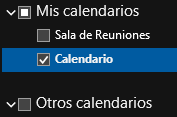
Gracias russell, hice lo que me indicaste, pero sigo sin poder ver el calendario en Outlook, te dejo imagenes:russellhltn wrote: Mon Feb 20, 2023 11:34 amJump to step 6 and paste the URL copied from the church calendar.gogogervic wrote: Mon Feb 20, 2023 10:34 am Al ver la ayuda para sincronizar con Outlook me envía a Ayuda Gmail.
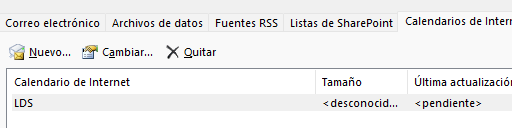
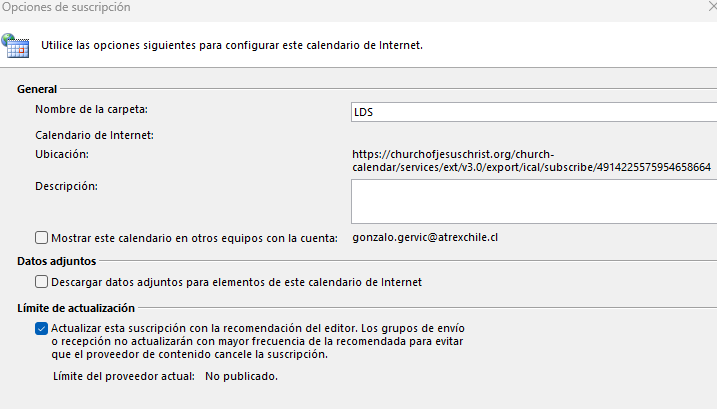


Make sure you have the entire URL in Outlook. As pictured, quite a bit is missing. (Please don't post the whole thing here.)