Can't assign new photos

72 postsstarted by mevans 24,556 viewsoriginal topic

Senior Member
#1
I just discovered today that there's a new interface for uploading and approving photos. I guess this must have shown up with the circle mask (that I'm not too fond of). You can also crop photos now.

I was able to upload new photos. It's nice that I can drag and drop onto the browser now--that's a nice addition. But then when I go to the approval screen, when I try to assign the photo, I keep getting an error when saving the assignment: There were problems saving, please try again.

Is anyone else able to use this new interface to assign pictures? I've tried doing both household and individual photos and neither works.
Senior Member
#2
I just submitted feedback that this doesn't work. I guess for someone else to test you need to have some photos to approve...
Senior Member
#3
I tested it by loading a sample photo, which loaded immediately, but when I attempted to delete it, I got the endless spinner... I finally logged off and then back on and the photo was gone. Not sure if this relates to the original problem... And I do like the new drag and drop and cropping ability.... But like mevans, not fond of the circles.
Senior Member
#4
I got feedback that my issue is being forwarded, but I haven't heard more yet. I see something has changed now, though. I no longer get the error. I get an eternal spinner on the OK button with no error, but no completion. Maybe I'll open the debugger and see what's going on, but I don't have time for that one right now.
Senior Member
#5
The feedback people got back to me and said this should be fixed by the end of the week.
Senior Member
#6
Just an update...it's the end of the week, and it's still not working for me.
Senior Member
#7
Another week gone by and this still isn't fixed. Has anyone else tried uploading photos recently? Does it work for you?
Senior Member
#8
Update: I'm working with one of the programmers at the church in trying to resolve this issue. Meanwhile, I know it's not necessarily every week that people have photos to upload or members upload photos. If anyone has successful or failed assignment attempts, that would be good to know. Specifically, I can upload photos just fine--it's assigning the names that is the problem. I'm uploading as a clerk, so no name is automatically associated with the photo as it might be if an individual uploaded a photo for a household.

The programmer did indicate they've been having some issues with the photo service. Apparently, I have a good reproduction scenario at the moment.
New Member
#9
I am the ward clerk, and am logging onto lds.org with my normal login ID and password. I have uploaded nine photos successfully, but I cannot assign them to members (or households). I have tried to assign them using a Windows 10 PC with Chrome and also with Firefox. I have tried doing it in my iPhone with Safari. I have tried doing it with my Macbook Air and Chrome. All of these have the same problem. After I select the correct name for the photo, and click "Save" it always reports the error "There were problems saving, please try again."

How can I make the photo assignments?
Senior Member
#10
I haven't heard anything back from the church programmers yet. It's good to know someone else is having the problem. I suggest you also send Feedback (see the Feedback link at the bottom of the web page) and include the URL of this thread in it. They may not respond directly through the forum, but they do review what is submitted via Feedback and I actually had a pretty quick turnaround from them on this issue. I think they would appreciate knowing some other people with the problem, as in one of their communications they thought it was just me having the problem.

It's also good to see you're on a different platform (I'm trying from a Mac with Chrome and Firefox).
New Member
#11
Where is the "feedback" link -- don't see it on this web page anywhere.
Senior Member
#12
trohlfing wrote:Where is the "feedback" link -- don't see it on this web page anywhere.
You can use the feedback link on any page of lds.org (including the home page). It's all the same link.
Senior Member
#13
eblood66 wrote:
trohlfing wrote:Where is the "feedback" link -- don't see it on this web page anywhere.
You can use the feedback link on any page of lds.org (including the home page). It's all the same link.
Just to clarify...it's at the bottom of the directory page; it's not on the forums where we're having this discussion. If you don't see it at the bottom of the directory page, use your browser's search feature to look for the word "Feedback" and you should find it.
New Member
#14
I finally found a work-around, and will post it here, in case it helps others who are stuck with this problem. It turns out that lds tools (on my iPhone) was the answer. (Remember, I'm the ward clerk, so this is possible for me.) You can bring up a certain individual, then tap on their photo, then select either Individual or Household, then select Edit. From there you can upload a new photo (Photo Library) or take a new photo (Use Camera). That worked fine, since the photos I wanted were already on my phone. (Some of them I had to email to myself, then save them to my Photos on the phone.)

I hope this will help someone.
Tom
Senior Member
#15
Thanks, trohlfing for your workaround. For people looking for workarounds: I did have some success trying different browsers. I don't know if that was a fluke or a good thing. I have one more photo to approve at the moment and I'm waiting to hear back from the church before I try various ways to get it approved.

I think trohlfing's workaround may also work if you're using the web site. If you edit a family in the directory, there is an option to add a photo if there isn't one already (I'm not sure how to replace an existing photo using this method). That may be another option to help make it work until the problem is fixed.

But if you're having problems with assignment, please also be sure to submit Feedback. The church originally thought I'm the only one facing the "assign" problem. In working with the programmer, I was able to help him better find the code path that was being used; it wasn't what he originally thought. If you're comfortable using the developer tools in your browser, I believe it's helpful for the church Feedback people to have the errors and the URL. In my case, I was getting a 503 error. Don't include your URLs in public posts...just include them in messages to feedback, as some identifying information may be contained in them.
New Member
#16

Assigning names to pictures in the directory.

For some reason, the system is not allowing me to save names to pictures in the directory, I just keep getting an error. I have tried using different browsers, Mozilla, Chrome, and Internet Explorer, but all of the systems give me the same error when I go to save the name. Does anyone know why I am getting an error?
Community Administrator
#17

Re: Assigning names to pictures in the directory.

jeffvandy13 wrote:For some reason, the system is not allowing me to save names to pictures in the directory, I just keep getting an error. I have tried using different browsers, Mozilla, Chrome, and Internet Explorer, but all of the systems give me the same error when I go to save the name. Does anyone know why I am getting an error?
Your post has been merged into an existing topic. There's a known problem. But you might want to read the thread to see the workaround that has been discovered.
Have you searched the Help Center? Try doing a Google search and adding "site:churchofjesuschrist.org/help" to the search criteria.

So we can better help you, please edit your Profile to include your general location.
New Member
#18
It can be done. Take a photo and store it on your device. Go to ward directory, open individual member accounts, on the view/edit button push edit, a pop up will appear. You have to open your device directory where the photo is stored, minimize it so the folder is still available, and drag the photo into the pop up box- then hit save and it should save the photo to the ward directory. Give it a try
New Member
#19
That worked for one photograph, but then it didn't work for any others. I tried using different browsers, and I also cleared by cache and cookies, but that still didn't help.
New Member
#20
Been doing photos for 4 years in the ward directory. The previous way I submitted photos no longer works. I'm having the same problem as others and totally dislike not being able to crop where I'd like (new way cuts people's heads off at the top). The message that photos can't be over 15 MB (which none of mine are) and that they have to be a jpg, (and they always are), is not very helpful. Also, "There were problems saving (and assigning). Please try again" is really frustrating. I don't think this update was tested well enough to make this change.
Senior Member
#21
I asked the Feedback people about the status and I was told that it was on the list of things for the developers to work on, but given no indication as to when the problem will be solved.

If members upload their own photos, it works. I had some new members move in and they uploaded some photos. As an assistant clerk, I was able to approve them. Unfortunately, it's pretty rare for members to upload their own photos. Most of the ward photos are there because a clerk took them and uploaded them, not because a member did. I do hope it gets fixed soon, though, as I find myself not very eager to take photos of ward members because it's more difficult for me to do my job.
Church Employee
#22
We are aware of this problem and once our key developers get back from vacations it will get top attention. What is puzzling is that it is only being seen be select users and we haven't found the pattern yet, but as the developers get back we'll crawl through this deeper. Some things we know:
1. All Ward Webmasters can't assign photos. They can upload them. We know what to do here.
2. Some clerks can't assign photos.
3. Some photos can't be uploaded even though they meet size and type criteria. Connection speed and timeout might be involved here. This is being seen by some clerks and some individuals.
Community Administrator
#23
So a temporary work around for a clerk might be to add ward webmaster to his calling?
Have you searched the Help Center? Try doing a Google search and adding "site:churchofjesuschrist.org/help" to the search criteria.

So we can better help you, please edit your Profile to include your general location.
Senior Member
#24
I just tried Firefox and it worked for me again (although it took a long time to approve, it worked). Chrome still doesn't work. Hopefully I'll get some pictures at church today and I'm going to try Opera and see if that works,
Senior Member
#25
Today I took some photos at church and uploaded them using Chrome. Then I tried different browsers to see if I could use them to assign photos. Here's my experience with assigning (all on a Mac...10.11.5 El Capitan):
  • Chrome: I was able to successfully assign a photo. I was quite surprised, as I haven't been able to do this with Chrome for weeks. That makes me wonder - did my problems have something to do with the uploaded photo instead of it being the browser? I've had an uploaded photo that I haven't been able to assign for weeks using Chrome. It's the one I finally assigned this morning using Firefox.
  • Firefox: I was able to successfully assign a photo.
  • Opera: I was able to successfully assign a photo.
  • Safari: The assignment/cropping interface doesn't work. The frame appears, but the photo never appeared.
I was quite surprised by my results. I didn't expect to have success...at least in Chrome. I thought I had a reproducible problem, but I don't. Maybe I'm starting to understand why this issue is so maddening for the church developers.
Senior Member
#26
This week I tried uploading and assigning more photos. It was a mixed bag: some photos assigned the first time (using Chrome on Mac). Others took a few times in Chrome and they finally worked. I still have one household photo that I can't get to work. They have an existing household photo and I'm trying to put in a new one; I don't know if that's causing a problem with the assignment? Maybe I'll try deleting the existing household photo and see if I have any luck. I'm somewhat hesitant, as I may end up with no household photo.

Also, today, Firefox (Mac) failed miserably; the photo never appeared in the cropping frame, so I couldn't try assigning it. Firefox has worked great on other occasions.

At least the assignment user interface still appears in Opera, but I still couldn't get an assignment to work.

[update]
I tried using the workaround of opening up the family in the directory and selected to change the existing photo. That worked.
Church Employee
#27
Yes, this is a known problem for some users. We believe this one has been figured out.
Senior Member
#28
Thanks for the update, CrockettDR. I'll give it a try next time I have some pictures (not sure when that will be, but maybe I can re-upload some existing photos.
Church Employee
#29
We just released a new version of Directory.
Individual photos should work properly now. Also Assigning should work. If it does not, message and I will try to take a look at the problem.
LDS.org Team
Community Moderators
#30
Just in time for BYU & UVU Fall/Winter semester – very helpful in our stake. Thanks! :)
Samuel Bradshaw • If you desire to serve God, you are called to the work.
New Member
#31
Only occasionally are we able to upload a photo for the directory. We get an error message telling us to try again later. This applies for our own family members and the members of the ward. Today we loaded a photo for one member of a family but it would not accept any other.
Senior Member
#32
davecsmith wrote:Only occasionally are we able to upload a photo for the directory. We get an error message telling us to try again later. This applies for our own family members and the members of the ward. Today we loaded a photo for one member of a family but it would not accept any other.
I haven't had a chance to try if after the update, but if you're having a problem, jeffevannelson asked in a previous message that you send him a private message about the problem so he can look into it. If you just post here, he might not see it.
jeffevannelson wrote:We just released a new version of Directory.
Individual photos should work properly now. Also Assigning should work. If it does not, message and I will try to take a look at the problem.
Church Employee
#33
If your unable to assign photos please send me your ward stake information and who you are in a private message to me. I will try to look into whats going on most people should be fixed.
LDS.org Team
Member
#34
jeffevannelson wrote:If your unable to assign photos please send me your ward stake information and who you are in a private message to me. I will try to look into whats going on most people should be fixed.
Hi Jeff. I sent you a private message last week Sunday regarding this matter. I haven't received a response from you and I still can't assign photos so I was wondering if you saw my PM. If you need me to send you another PM with the necessary info, please let me know. Thanks
Senior Member
#35
I had new photos to upload today and the problems are worse than they were before. Now I'm having problems uploading, too. Some of the photos generate this message:

Make sure photos are either a jpg, png, tiff, or gif, and are not over 15 megabytes in size.

The photos are well under 15 MB and are jpeg.

Then, for the photos that uploaded, I am unable to assign them; it's the exact same problem I experienced previously.

I'll send jeffevannelson a PM with more details; I also wanted to report back on this thread, too.
Community Moderators
#36
mevans wrote:The photos are well under 15 MB and are jpeg.
Just a thought. Is it possible the web site is not seeing jpeg as jpg? Have you tried renaming the file extensions?
Senior Member
#37
lajackson wrote:
mevans wrote:The photos are well under 15 MB and are jpeg.
Just a thought. Is it possible the web site is not seeing jpeg as jpg? Have you tried renaming the file extensions?
I haven't tried that, but the issue is that some files upload and others don't. They all have the same extension. Looking at the developer console in Chrome, I see a 503 error (service unavailable). I haven't tried to dig into the JavaScript code, but I suspect that if there is any error calling the web service for a photo upload that the code running in the browser puts up the same error message.
Member
#38
jeffevannelson wrote:If your unable to assign photos please send me your ward stake information and who you are in a private message to me. I will try to look into whats going on most people should be fixed.
Hmm... I sent a pm too a while ago and haven't heard a response. Is there another way to contact Jeffevannelson directly? I'm wondering if he is like most developers for the church and rarely log into the tech forum to check PMs.
Senior Member
#39
I don't know. jeffevannelson does tend to be on the tech forums with some frequency, but I just looked at his user profile and his last activity was August 15. Maybe he's on vacation? I've not received any answers from my PM either. I also responded to the Feedback email thread I have going and haven't received any response from it, either.
Senior Member
#40
I just responded back to the LDS feedback message again to see if I can get any response.
Senior Member
#41
I received a response from LDS Feedback telling me that they are still working on the problem. They said a high speed internet connection would probably help, but I have a pretty fast connection (60Mbps down/8 Mbps up).
Member
#42
Thanks for that information, mevans. I hope this problem gets resolved pretty quickly.

On another note, a few weeks ago I tried to assign a family photo. As was expected, nothing happened. At least not apparently or initially. A couple of weeks after that, I happened to view this family's profile, and to my surprise the photo that I tried to assign to them had actually been assigned to them as their family photo. Stranger still, their individual photo (which was previously blank) was a photo of just their face that was cropped from the aforementioned family photo. What makes this strange is I didn't upload [cropped] individual photos, much less try to assign individual photos. Does anyone know how this happened?
Senior Member
#43
Hilohi wrote:Thanks for that information, mevans. I hope this problem gets resolved pretty quickly.

On another note, a few weeks ago I tried to assign a family photo. As was expected, nothing happened. At least not apparently or initially. A couple of weeks after that, I happened to view this family's profile, and to my surprise the photo that I tried to assign to them had actually been assigned to them as their family photo. Stranger still, their individual photo (which was previously blank) was a photo of just their face that was cropped from the aforementioned family photo. What makes this strange is I didn't upload [cropped] individual photos, much less try to assign individual photos. Does anyone know how this happened?
Someone else in your unit must have approved the photos. It's possible that the family uploaded photos and someone else approved them. That works. It's assignment that's having the problem.
Member
#44
mevans wrote:
Hilohi wrote:Thanks for that information, mevans. I hope this problem gets resolved pretty quickly.

On another note, a few weeks ago I tried to assign a family photo. As was expected, nothing happened. At least not apparently or initially. A couple of weeks after that, I happened to view this family's profile, and to my surprise the photo that I tried to assign to them had actually been assigned to them as their family photo. Stranger still, their individual photo (which was previously blank) was a photo of just their face that was cropped from the aforementioned family photo. What makes this strange is I didn't upload [cropped] individual photos, much less try to assign individual photos. Does anyone know how this happened?
Someone else in your unit must have approved the photos. It's possible that the family uploaded photos and someone else approved them. That works. It's assignment that's having the problem.
That's possible, but highly unlikely. As the ward clerk, I'm pretty much the only person that approves photos for our ward. Also, I was the person who took the photo in this case and no one else has a copy of it.

I'm aware that uploading photos works and that assigning photos is the problem. In this case, however, the photo was actually assigned despite this problem with assigning photos. Stranger still, as I mentioned, was that individual photos were cropped from the family photo and assigned to the individuals even though I didn't upload nor [try to] assign individual photos.

There are two things that I think could have happened. (1) The directory photo functionality now has face recognition capabilities and will automatically crop individual photos from the family photo. I highly doubt this, though. As advanced as technology is, even if it could recognize individual faces, how would it know to whom to assign each individual photo? (2) Someone (I'm assuming from Church HQ), accessed our directory (in light of my initial post regarding this problem) and assigned the family photo, cropped the individual photos from the family photo, and assigned those individual photos for me.
Community Administrator
#45
Hilohi wrote:That's possible, but highly unlikely. As the ward clerk, I'm pretty much the only person that approves photos for our ward.
Depending on where you're looking, you may see unapproved photos. So, a third possibility is that someone has cropped the face out of the family photo and uploaded it and still awaiting approval.

I highly doubt any automation or anyone at CHQ doing anything.
Have you searched the Help Center? Try doing a Google search and adding "site:churchofjesuschrist.org/help" to the search criteria.

So we can better help you, please edit your Profile to include your general location.
New Member
#46
I am not able to assign names to photos. i have tried Safari, Firefox and Chrome. I have tried on several different days. i get "there were problems saving" anytime i try to assign a name to a photo.
Senior Member
#47
Anzhansen wrote:I am not able to assign names to photos. i have tried Safari, Firefox and Chrome. I have tried on several different days. i get "there were problems saving" anytime i try to assign a name to a photo.
This is a known issue that is being worked on. Some workarounds have been discussed in this thread.
New Member
#48
I'm also having trouble doing this, both on a Mac and PC. I can get the photo to upload to the system, but not to assign it to anyone.
Member
#49
Any word on a fix for this problem? This post was started four months ago and this problem has still not been resolved. Furthermore, the contact person for this problem has been unresponsive. Pretty frustrating.
Community Administrator
#50
I haven't heard. I do know that the already small team got one smaller. Depending on who you tried to contact, that would explain the non-response.
Have you searched the Help Center? Try doing a Google search and adding "site:churchofjesuschrist.org/help" to the search criteria.

So we can better help you, please edit your Profile to include your general location.
Senior Member
#51
Hilohi wrote:Any word on a fix for this problem? This post was started four months ago and this problem has still not been resolved. Furthermore, the contact person for this problem has been unresponsive. Pretty frustrating.
Who are you referring to as "the contact person"? In an earlier post, jeffevannelson invited contact for people still having the problem. Is that who you were trying to contact? Or were you going through Feedback? Or some other method? My primary interaction has been with an anonymous person or people through Feedback. I did speak with one of the programmers back in June and he said I was likely corresponding with his boss through the Feedback thread.

I do hope it gets fixed soon. I've been using one of the workarounds suggested in this thread. It's more time consuming, but works. It's probably been about 3 weeks since I've tried uploading any photos.
Senior Member
#52
I tried uploading a photo this morning and assigning it and it worked. I don't know if it's a fluke (as I've been able to occasionally make it work since this problem started), or if it's been fixed. I'm working on a bunch of photos I shot recently to eventually upload, so I'm really hoping the upload/assign process works.
Senior Member
#53
I've now had the opportunity to upload several photos, including a batch of 30 photos today. I did not experience any errors; however, the performance when assigning photos isn't very acceptable (although I guess it's more acceptable than the failures we experienced for several months). I found that once I press the "Save" button (or whatever it's called), the each photo took anywhere between 14 and 72 seconds to complete the process. I don't understand why it would take so long, but when you're doing 30 photos, it becomes very noticeable.

But on the positive side, yes, it's working.
Member
#54
So this can't assign problem just hit here in North Ogden yesterday. Things were working recently. Can't we get a fix for this? What are the programmers saying? The whole system was a mess yesterday, including rejecting the sign-in. Must have got hacked? or the Gremlins got us???
Member
#55
Oops it just worked now. Gremlins on the loose??? This is scary. No one seems to know who, what, when, how this photos system works, but it does . . . . sometimes! :roll:
Community Administrator
#56
A number of problems will fix themselves once everyone at CHQ returns to work and the IT folks do a status check on the servers and resolve any problems they see.
Have you searched the Help Center? Try doing a Google search and adding "site:churchofjesuschrist.org/help" to the search criteria.

So we can better help you, please edit your Profile to include your general location.
Member
#57
I just tried to assign a photo and I was still unable to. This problem was initially reported six months ago and it's still not fixed. What kind of IT department takes six months to fix what appears to be a pretty simple problem? So far, I've essentially received the following responses: (1) the person that was initially going to fix this problem might no longer work for the Church, (2) the person that was going to fix the problem might have gone on vacation, (3) the person(s) who is going to fix this problem is on Christmas break. Why is it so hard to find someone that can fix this problem? I apologize for my disparaging tone, but this is frustrating.
New Member
#58
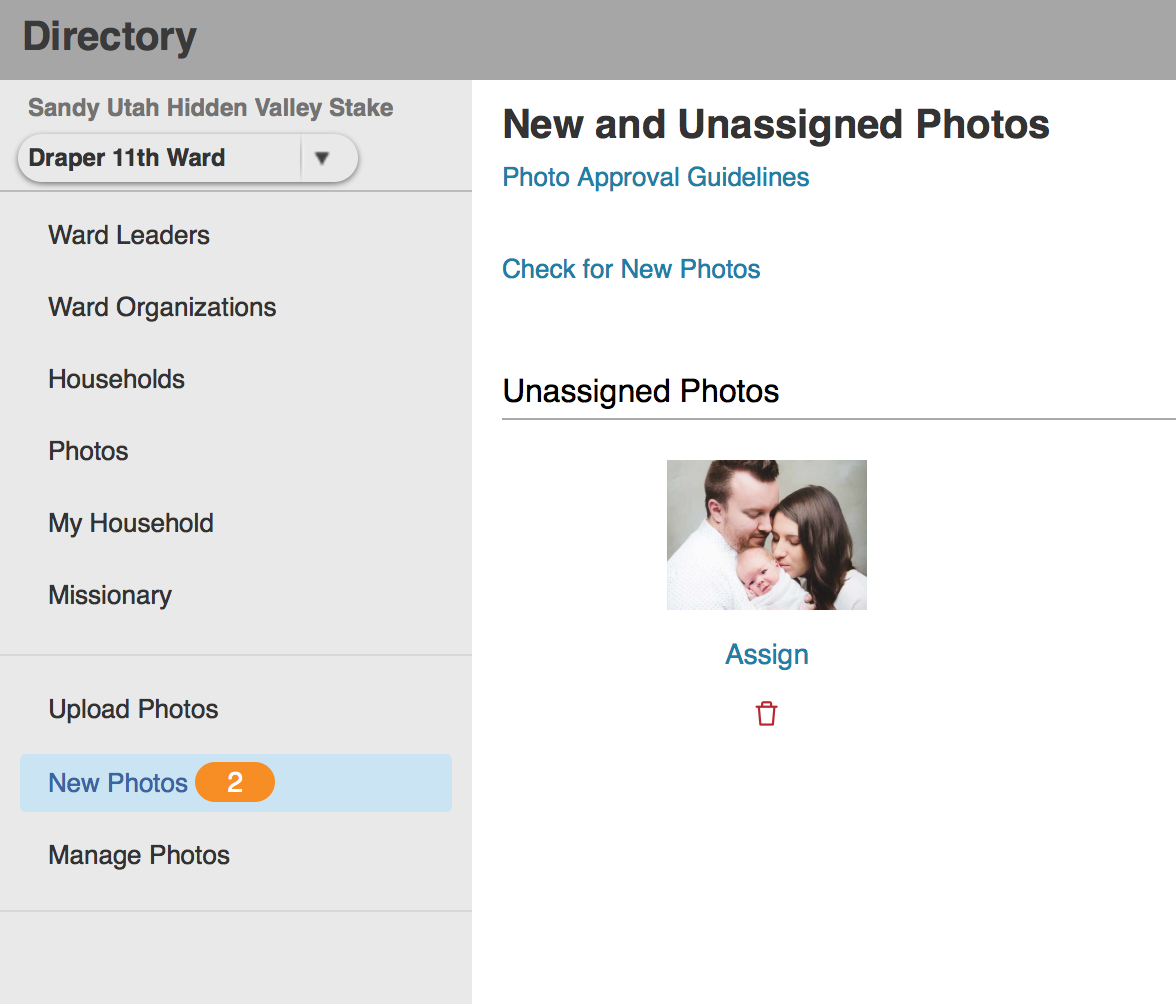
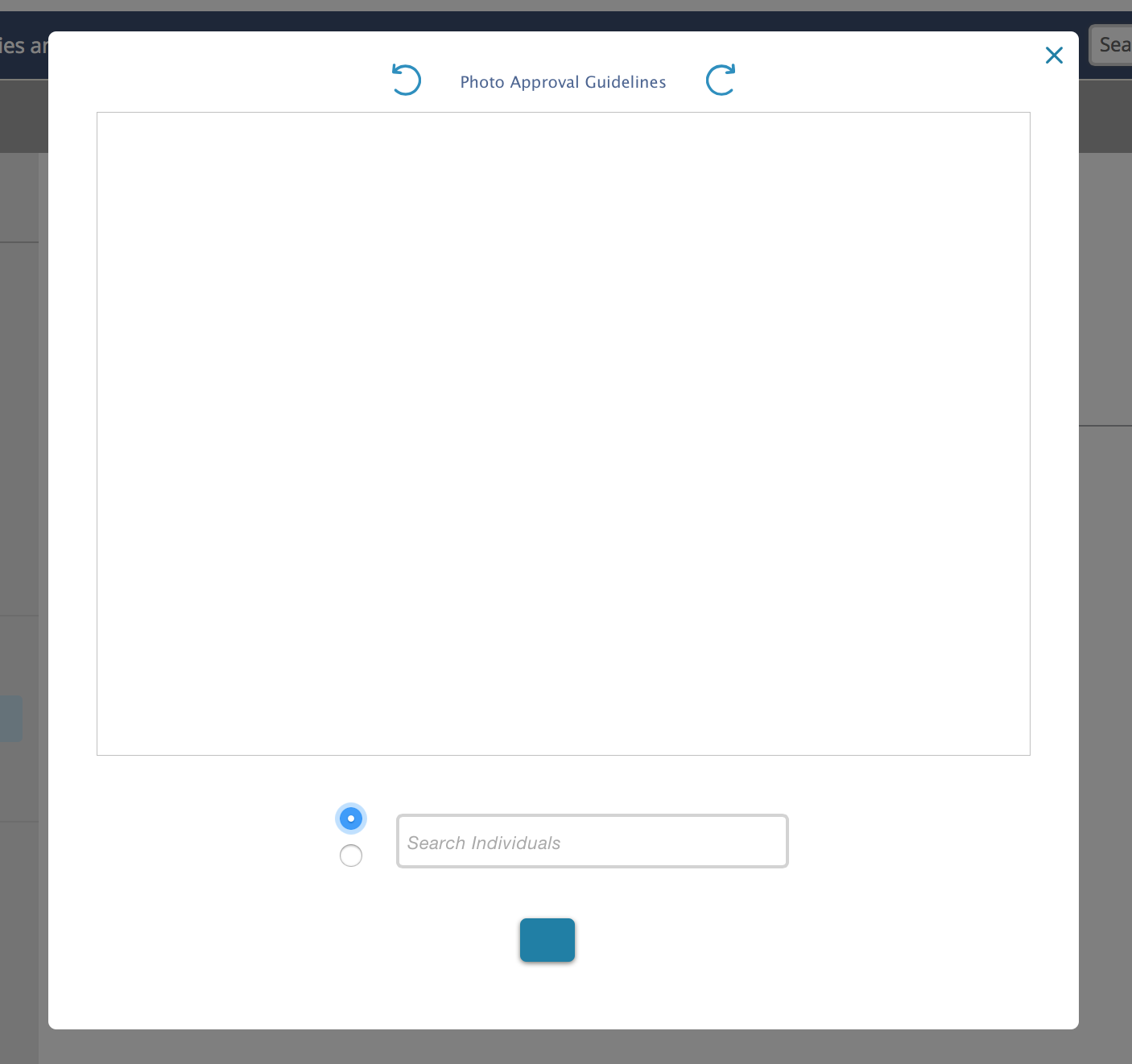
I have this same problem. I took a couple of screen shots as I haven't seen the exact same problem that I'm having. I'm attaching them, but incase that doesn't work, I'm describing them here. After I upload 2 photos it now says I have 2 unassigned photos. I click the "assign" under the photo. A big white blank box appears with the words "Photo Approval Guidelines" at the top with refresh buttons on either side. At the bottom of the screen there are two circle buttons and a larger box with "Search Individuals" written inside. There is also a larger blue button underneath the search individuals box. So I type in a name and nothing. The "Photo Upload Guidelines" works and takes me to the Policy and Principles, etc page. The 2 refresh buttons do nothing. I try typing in the name of the individual and hit return - nothing happens. I try click the larger blue button - nothing happens. Furthermore, I have to back out completely to the lds.org home page because the big white box won't go away. I'm frustrated, because this is my calling and it used to work great, now I can't assign photos and I'm trying to explain this to the Bishop and he shouldn't have to worry about this. I feel like I'm making up excuses. PLEASE HELP!
Community Moderators
#59
jenniferkoplin wrote:I have this same problem. I took a couple of screen shots as I haven't seen the exact same problem that I'm having. I'm attaching them, but incase that doesn't work, I'm describing them here. After I upload 2 photos it now says I have 2 unassigned photos. I click the "assign" under the photo. A big white blank box appears with the words "Photo Approval Guidelines" at the top with refresh buttons on either side. At the bottom of the screen there are two circle buttons and a larger box with "Search Individuals" written inside. There is also a larger blue button underneath the search individuals box. So I type in a name and nothing. The "Photo Upload Guidelines" works and takes me to the Policy and Principles, etc page. The 2 refresh buttons do nothing. I try typing in the name of the individual and hit return - nothing happens. I try click the larger blue button - nothing happens. Furthermore, I have to back out completely to the lds.org home page because the big white box won't go away. I'm frustrated, because this is my calling and it used to work great, now I can't assign photos and I'm trying to explain this to the Bishop and he shouldn't have to worry about this. I feel like I'm making up excuses. PLEASE HELP!
What web browser are you using? Have you tried in a different browser, or on a different computer?
Samuel Bradshaw • If you desire to serve God, you are called to the work.
New Member
#60
I'm on a Mac using Safari.
Member
#61
jenniferkoplin wrote:I'm on a Mac using Safari.
I have the same problem that you described, and I'm using the same type of computer and browser. I just tried Google Chrome and I was able to upload and assign a photo without any problems.
New Member
#62
Thank you. I tried Firefox and it seemed to work too. But I wish it would work with Safari, that's what I normally use.
New Member
#63
I get the error, "There were problems saving, please try again." every time I try to upload. Same error whether I'm on IE, Chrome, or Firefox (on PC). I've even tried uploading from Android. Same issue.

What's going on??
New Member
#64
I just had a member upload two photos and then changed wards before they were approved. The photos became unassigned and now an error pops up when I try to delete them. Is there any way to remove these?
Community Administrator
#65
Loveland2 wrote:I just had a member upload two photos and then changed wards before they were approved. The photos became unassigned and now an error pops up when I try to delete them. Is there any way to remove these?
Do you have any other option besides deleting them?
Have you searched the Help Center? Try doing a Google search and adding "site:churchofjesuschrist.org/help" to the search criteria.

So we can better help you, please edit your Profile to include your general location.
Senior Member
#66
Loveland2 wrote:I just had a member upload two photos and then changed wards before they were approved. The photos became unassigned and now an error pops up when I try to delete them. Is there any way to remove these?
Contact the clerk in the other ward and have the clerk approve the photos. See if they go away from your screen.

I've moved in a handful of records over the last few years that after a few hours end up with photos to approve, so I assume they had been uploaded and the previous ward never approved them.
New Member
#67
Holy cow. I just came across this thread. It is now October 2018 and this has not been fixed. I sent in the problem and all I got back was the instructions on how to do it and to ask my ward clerk for help. It's soooo frustrating because I'm a web developer and I know what I'm doing. It's definitely them, not me. I've used multiple browsers and multiple OS's and multiple devices and it's all the same. I guess if it hasn't been fixed in two years, I shouldn't hold my breath.
Senior Member
#68
slleverino wrote:It is now October 2018 and this has not been fixed. I sent in the problem and all I got back was the instructions on how to do it and to ask my ward clerk for help.
With what, specifically, are you currently having problems. It's been working quite reliably for me recently, but I know experiences can differ for completely unknown reasons. If you share your specific frustrations, people here might be able to help. There are multiple ways of doing things. Sometimes, if one way doesn't work, another will, although it might be more labor intensive. I don't think I've ever been completely defeated, but I have taken a long time trying to accomplish tasks that shouldn't take long.
slleverino wrote:I guess if it hasn't been fixed in two years, I shouldn't hold my breath.
Our belief (most people on the forum don't work for the church or know its inner workings) is that the church has a small team that is called upon to do many things. They are trying to do the best they can, but may be directed to other priorities.

It's all a matter of perspective. Since you're a developer, maybe you've dealt with Jira in your life. There are many bugs in the system, and if you look at Atlassian's backlog, you can see many unhappy users on issues with hundreds of votes that have been open for well over 10 years. If you use that as a perspective, the church actually moves quickly. The church has done major revisions and new implementations of systems during the time that some Jira bugs have been open. ;)
Senior Member
#69
For what it's worth, I have been assigning photos for several years with no problems....
Senior Member
#70
zaneclark wrote:For what it's worth, I have been assigning photos for several years with no problems....
Members in our ward upload their own photos occasionally and I review them (ward clerk). No one has ever reported to me that they had any difficulty uploading their photos. We also called a sister in our ward a couple of years ago to seek out members and ask if she could take their photo and upload it to there lds.org profile - she never reported any problems doing it either.
New Member
#71
Both my son and I have tried uploading different photos with different browsers in different lds accounts, and have received this same error about saving. I have seen threads addressing this topic going back until 2016, but with no definite solution. Does anyone have any idea why this error occurs? Is it file size, name, location? Is it browser type or version? Is it the phase of the moon? If anyone can help, I would be deeply grateful.
Senior Member
#72
swells1975 wrote:Is it the phase of the moon?
I think moon phases are more predictable than the solution to this problem. I don't know that there is a predictable solution. See my post on the Add Pictures thread for the best ways I've found to deal with the problem.