LDSTech forum reverted to phpBB theme after logging in?

59 postsstarted by nathangg 24,753 viewsoriginal topic

Member
#1
Hi!

When I am not logged in to this forum the theme matches the rest of LDS.org.

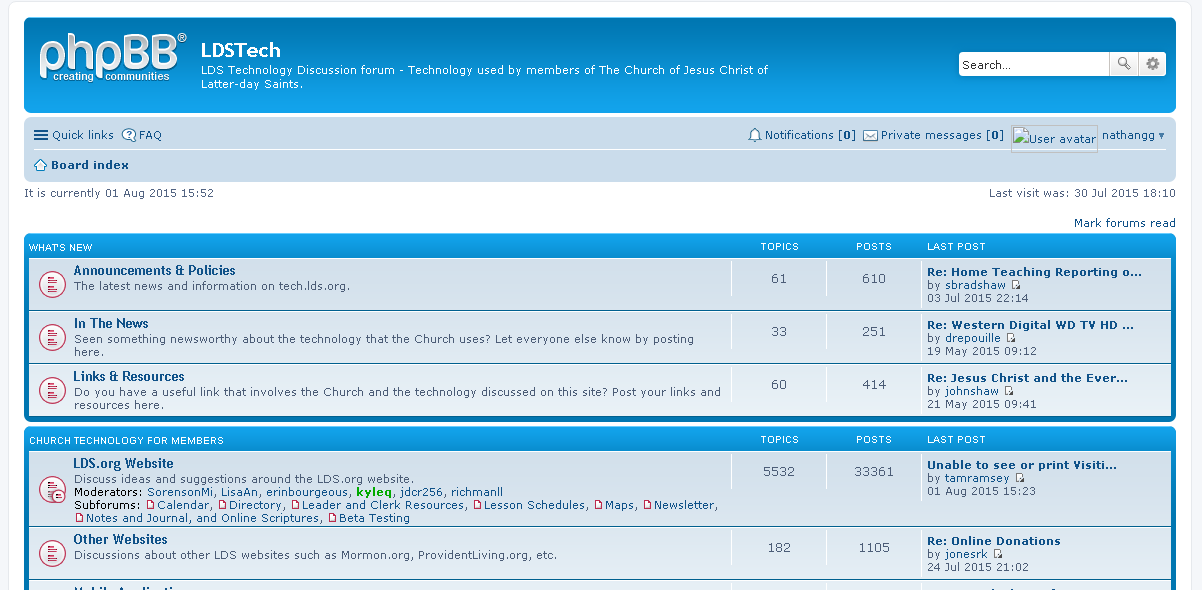
When I do log in to the forum, it looks like phpBB (see attached).

I've tried this in Google Chrome and Mozilla Firefox.
2015-08-01_1653.png
(53.98 KiB) Not downloaded yet
It seems like that there are many 404 errors reported by my browser (images and some css)

Thanks~!
Member
#2
I'm seeing this as well. Started yesterday for me.
Community Administrator
#3
Yes. A software upgrade, I've been told. Apparently a number of issues. There's a LDS theme you can pick from, but it's missing too many controls right now to be very useful.
Have you searched the Help Center? Try doing a Google search and adding "site:churchofjesuschrist.org/help" to the search criteria.

So we can better help you, please edit your Profile to include your general location.
Member
#4
I've seen that too. All these changes this week have been awesome ;-)

I also can't see the page numbers if a topic has multiple pages unless I'm logged in and it shows the phpBB view. So far ctrl+F5 does nothing to get page numbers back. If I sort by descending I can see new posts, but only those on the last page of the topic. Problem seen with: Win 8.1 Firefox and chrome, iphone 6 iOS 8.1.2 safari and chrome, Samsung Galaxy tab 10.1 chrome.
Senior Member
#5
I'm happy it reverted to the phpBB default. I should have manually switched the setting a long time ago. The default icons are so much better. I can now easily discern what has been read and what has not been read. This was a complaint by several people some time ago with the LDS theme.
Member
#6
I like the new theme too (even if it isn't really "new" but a default theme). It took a minute to find the "unread posts" option, but it's nice to have the Back button working properly. With the old theme, I always had to click it twice.
Member
#7
rsidwell wrote:I like the new theme too (even if it isn't really "new" but a default theme). It took a minute to find the "unread posts" option, but it's nice to have the Back button working properly. With the old theme, I always had to click it twice.
I agree, I think the site works better too.
Roland
Church Employee
#8
Tanner and I have pushed up some fixes to the LDS white theme. We updated phpBB to 3.1.x and the underlying structure changed so the old brown themes don't work anymore. The default phpBB theme of prosilver is included, and we are fixing things in the ldswhite so that all the features are there. I like the admin control panel link at the top, and the collapsed menu. The quick-reply is back with the change we just pushed as well as different icons for messages and threads. There are now buttons on the right side of a post header for edit, delete, report, warn, info and quote. Holler if you find more things that work in prosilver and don't work on ldswhite. We'd like ldswhite to be as good an experience as prosilver.

We also upgraded MediaWiki. That was relatively painless as it's just a version bump. Both of these updates had some security fixed upstream.
Church Employee
#9
IMG_ICON_CONTACT_EMAIL_SRC seems to still be missing.

Tanner and I will look into that. Something is funky with avatar images too.
Community Moderators
#10
TimRiker wrote:Holler if you find more things that work in prosilver and don't work on ldswhite.
ldswhite is missing the quick-mod tools that are usually found near the bottom of the page.
So we can better help you, please edit your Profile to include your general location.
Church Employee
#11
Ah yes. missing the "Wrench" and "Hammer" menus. We're on it. Thx!
Church Employee
#12
We've pushed some changes. I reset everyone to the ldswhite theme. Tanner and I talked about it, and I think we'll rebuild the ldswhite theme off of the new theme rather than continue trying to update our old ldswhite to meet the 3.1 requirements. We'll holler as we get closer to releasing the new theme. Anyone interested is welcome to join the LDSTech project and lend a hand. :)
https://tech.lds.org/projects?view=project&Projectid=64
Community Administrator
#13
TimRiker wrote:I think we'll rebuild the ldswhite theme off of the new theme rather than continue trying to update our old ldswhite to meet the 3.1 requirements.
Having used the default phpBB layout, change the banner and add the LDSTech links and I think I'm good. I don't know as there's a need to re-invent a layout that already had a lot of thought put into it.
Have you searched the Help Center? Try doing a Google search and adding "site:churchofjesuschrist.org/help" to the search criteria.

So we can better help you, please edit your Profile to include your general location.
Community Moderators
#14
TimRiker wrote:I reset everyone to the ldswhite theme. . . .
I think we'll rebuild the ldswhite theme off of the new theme . . . .
We'll holler as we get closer to releasing the new theme.
Until then, we switch themes in order to moderate? Or am I not finding a link somewhere?
Church Employee
#15
there is a Moderator Control Panel (MCP) link at the top of the page but the quick moderation tools are not yet in an ldswhite theme. You can use the standard theme if you wish. I may reset the theme again for everyone once we have some more of these issues resolved. Thank you for all you do! Sorry for the pain as we upgrade.
Community Administrator
#16
lajackson wrote:Until then, we switch themes in order to moderate?
Why not stay with phpBB? The only thing I'm missing is the logo at the top, the post number in the thread, and the LDSTech specific links (Code of Conduct, etc.)
Have you searched the Help Center? Try doing a Google search and adding "site:churchofjesuschrist.org/help" to the search criteria.

So we can better help you, please edit your Profile to include your general location.
Community Moderators
#17
TimRiker wrote:there is a Moderator Control Panel (MCP) link at the top of the page
Ah, MCP is the answer. Thanks. I just needed somewhere to go to moderate and hadn't found it slinking around on my own.

Actually I like the ldswhite theme. In fact, it is pretty cool that the lines show up along the messages I have not yet read. Just discovered that today. It does seem to have a bit too much white space, but I prefer that to the cramped look of the phpBB theme.

I used to like compact and efficient. I have gotten a whole lot older since those days.
Church Employee
#18
One thing on the new theme, is all the contact info over on the right of this message is collapsed into a drop down menu. I like that. Hopefully we'll have that with a new ldswhite theme coming soon. :)
Community Moderators
#19
I miss the number of pages for a thread that allows navigating to any one of those pages without having to open the thread first. Without the number of pages feature there is an addition click required to get to the part of the thread I want - an annoyance.
JD Lessley
Have you tried finding your answer on the ChurchofJesusChrist.org Help Center or Tech Wiki?
Community Moderators
#20
russellhltn wrote:
TimRiker wrote:Having used the default phpBB layout, change the banner and add the LDSTech links and I think I'm good. I don't know as there's a need to re-invent a layout that already had a lot of thought put into it.
I tend to agree. The phpBB layout is actually not too bad and would probably only need a few small changes to finish it off.
So we can better help you, please edit your Profile to include your general location.
Member
#21
I may be the only one, but I prefer the LDSWhite theme. However, when viewing new posts, the number of pages shows, but there's no way to navigate to pages beyond the first. (Threads used to have the problem and you guys fixed that (thank you), but new posts has the problem too.) So far, page navigation is the only thing I've noticed still missing.

Thanks,

Liz
Community Administrator
#22
lmcguire wrote:I may be the only one, but I prefer the LDSWhite theme.
You're not the only one. Prosilver was done by folks to live and breathe forums.
Have you searched the Help Center? Try doing a Google search and adding "site:churchofjesuschrist.org/help" to the search criteria.

So we can better help you, please edit your Profile to include your general location.
Community Moderators
#23
The header in the ldswhite theme is acting funny. When I click on Sign in, my browser takes me to a link that ends in signmein and does not work. However, I can right click on the Sign in link, copy and paste the link into the browser URL window, and I am taken via ucp.php to the proper place to sign in.

Once I am signed in, the same thing happens with the Sign out link. Just clicking on it takes me to a link that ends in signmeout and does nothing. I am still signed in. However, you guessed it, I can right click on the Sign out link, copy and paste the link into the browser URL window, and I am signed out and taken to the Single Sign On page.

Why would my browser try to take me to old signmein and signmeout links when I click on them, but still have the correct links for the Single Sign On page when I copy and paste them?

There has always been some magic in the Headers at LDS.org, but this is a first for me.
Community Moderators
#24
What I click "Sign in" the "working" circle appears to the left of the page tab title. It disappears but nothing has happened. I click again and the sign in page appears and I can sign in.
JD Lessley
Have you tried finding your answer on the ChurchofJesusChrist.org Help Center or Tech Wiki?
Member
#25
lajackson: that's weird. I switched back to LDSWhite on the first day the prosilver theme became the default, and I've not had any trouble logging in or out. (I'm using the latest version of Firefox.) I've only used prosilver once, today, when there were multiple pages of new posts and that was the only way to navigate them. But I switched back once I was done with that list.

FWIW,
Liz
Community Moderators
#26
lmcguire wrote:lajackson: that's weird.
I agree. And to make it more interesting, it worked just fine for the first day or two before I started having the problem.

Today the link tries to take me somewhere really weird and different than it did yesterday. Still doesn't work, but I can still copy and paste the link just fine. I just can't click on it.

I can go other places at LDS.org and the header links are dead. They just plain don't work. Then I can go to the same page from a different direction and the links will all work just fine.

But until ldswhite, they always worked here at the Forum before now.
Member
#27
Have you tried blowing away all your cookies from lds.org? And perhaps history? (I know, that can be a pain, but it's the only other thing I can think of that would explain why you see it and others don't - unless your account is in the "special" group <g>.)

Hmm, less drastic would be to try a different browser or computer to see if your account behaves the same there (would tell us if it's the browser vs. your account).

Liz
Community Moderators
#28
lmcguire wrote:unless your account is in the "special" group <g>.
Well, I think I'm special, but I doubt that my account is. [grin]

It does it in variations on two different machines, Win 7/IE 11, and Win 10/FF[latest and greatest]. The Win 7/IE 11 machine comes up new and clean every day. The Win 10/FF[latest] is a normal laptop and usually works better because after a few passes at the site, things settle in and most of the features start to click.

Because the browsers are different, the pages display differently, but I am used to that.

It may have something to do with the convoluted set of callings I have at present. Of course computers are supposed to be programmed to handle challenging situations such as that. (I tell myself this every morning as the sun comes up.)

And I'm not complaining at all. It is more of a morbid fascination, I suppose, and I count my blessings that I am not the one tasked to program the header (or anything else for so many variations of OS/Browser defugalties).

Oh, yes. I've done the cookie/history and dump everything else thing. Personally, I think the site is complicated and takes a long time to load, and the browser gets bored and times out and stops loading just before it gets to some of the things I would really find useful. But no one has ever admitted that this may be a possibility.

And finally, if I had to prioritize the fixing of things such as this on my own personal list of wishes, I would put getting access to Online Donations first. I'll stop rambling now. I do appreciate the interest, though.

EDIT: Today on the Win7/IE11 machine, when I click on the Sign out link it just adds an ampersand and "signmeout" to the end of the current URL. It does this every time I click, so the third time I have the ampersand and "signmeout" added three times to the URL. I'll go sign out for real now. I have skills. :END OF EDIT
Church Employee
#29
We pushed a new "ldswhite" that Tanner made from the new prosilver. It has a similar look and feel to the ldswhite3.1 theme, but it has the online indicator, the quick icons have button borders, the quick moderation menus are back. It should have all the features of prosilver now. I have moved everyone to this new style. You can switch still if you like. Reports?

What are you seeing on the signmein and signmeout? does the url have a # in it? I don't think the redirect code is expecting a #. We'll try to reproduce that. a &signmeout added on won't work at the end of a url containing a #.
Community Administrator
#30
One item - I found it hard to get to my user control panel. I finally found it it was under my name in the top banner. Granted, the prosilver does it the same way, but I wasn't looking in the top banner because I expected that to be consistent across all of lds.org and not have forum-specific functionality. With the prosilver, that drop-down name link is down in a "forum level" section.
Have you searched the Help Center? Try doing a Google search and adding "site:churchofjesuschrist.org/help" to the search criteria.

So we can better help you, please edit your Profile to include your general location.
Community Administrator
#31
My first reaction is the new layout is using a smaller font. On close examination, it's not, but the black print on stark white is harder to read than the prosilver which puts it on a shaded background.
Have you searched the Help Center? Try doing a Google search and adding "site:churchofjesuschrist.org/help" to the search criteria.

So we can better help you, please edit your Profile to include your general location.
Church Employee
#32
Agreed Russell. We pushed your avatar image up there too so it's a bit more obvious that the site level area is changed, but that only helps those with profile pictures. The "quick links" menu is getting long. On a small screen some of the other navigation links collapse into that same drop down. Seemed the best choice for the UCP at the moment.

Anyone else want to comment on this or other layout choices?
Community Moderators
#33
TimRiker wrote:What are you seeing on the signmein and signmeout? does the url have a # in it? I don't think the redirect code is expecting a #. We'll try to reproduce that. a &signmeout added on won't work at the end of a url containing a #.
It is working on the new ldswhite so I switched to ldswhite3.1 where links seem to end with a # symbol. From the unread posts page here (with the # at the end, I notice)
https://tech.lds.org/forum/search.php?s ... nreadposts#
the Sign out link added &signmeout each time I clicked on it to create
https://tech.lds.org/forum/search.php?s ... &signmeout
which did nothing. But if I right clicked and copied the URL I got
https://tech.lds.org/forum/ucp.php?mode=logout
then pasted it into the address bar and it worked.

But as I said, the new ldswhite seems to be working.
Community Administrator
#34
I think I found a bug - I came back to the page after a time out and tried to request "unread posts" - I was directed to a phpBB login page instead of the LDS Account one.
Have you searched the Help Center? Try doing a Google search and adding "site:churchofjesuschrist.org/help" to the search criteria.

So we can better help you, please edit your Profile to include your general location.
Church Employee
#35
Hmm. the phpbb login page should redirect to the single sign on login page. I'll see if I can reproduce this.
Community Administrator
#36
TimRiker wrote:Hmm. the phpbb login page should redirect to the single sign on login page. I'll see if I can reproduce this.
It did redirect - after I temped to use that page.
Have you searched the Help Center? Try doing a Google search and adding "site:churchofjesuschrist.org/help" to the search criteria.

So we can better help you, please edit your Profile to include your general location.
Member
#37
Ditto - I saw the same thing Russell saw. But only if I'm not logged in when trying to go to something which requires login - like the unread posts page, or clicking the link in a notification email.

Liz
Community Moderators
#38
TimRiker wrote:Hmm. the phpbb login page should redirect to the single sign on login page. I'll see if I can reproduce this.
That's where the Sign out link takes me now. [smile]

And as with the others, if you sign in at the phpBB page, you are taken to the SSO page and discover you were only practicing and have to sign in again. This happened once before when we first got the phpBB software.
Community Administrator
#39
Would be possible to have a theme that is prosilver with just the header and footer updated to LDS? No stretching or other changes?
Have you searched the Help Center? Try doing a Google search and adding "site:churchofjesuschrist.org/help" to the search criteria.

So we can better help you, please edit your Profile to include your general location.
Church Employee
#40
Sure, possible. Just not high on the priority list. Why are you looking for this? Is the new ldswhite not as functional as prosilver in some way?
Community Administrator
#41
TimRiker wrote:Is the new ldswhite not as functional as prosilver in some way?
I find it not as readable.
Have you searched the Help Center? Try doing a Google search and adding "site:churchofjesuschrist.org/help" to the search criteria.

So we can better help you, please edit your Profile to include your general location.
Community Moderators
#42
I like the space with the latest ldswhite. I thought ldswhite3.1 had too much white space. I think prosilver is too compact.

I also use a smaller monitor, which has a direct impact on readability, so some extra space is helpful, and a lot is not.

Another issue for me is that I use a touch screen most of the time. So far, I have been able to hit the intended links, but it got close on ldswhite3.1 for a while in a few places.
Community Moderators
#43
I agree with russellhltn that the prosilver theme is more readable. I like the color contrast and compact design. But the official LDS header is nice so it's a hard decision whether or not to switch back to prosilver. I guess you can't please everyone. :)
Samuel Bradshaw • If you desire to serve God, you are called to the work.
Senior Member
#44
Thank you for fixing the "unread" icons so it's easier to see now. That was my biggest gripe with the old LDS theme.
Community Administrator
#45
One thing missing since the upgrade, regardless of which theme (board style) you use is the post number within the topic. That served two purposes: it provided a link to the post, which is still possible using the post icon in the upper left corner just below the post title.

But the second purpose is that it provided a way to refer to specific posts for people who didn't know how to use links to posts (or didn't bother to do so). You'll find many discussions where someone will say something like "In post #13, User X explained this". Now that the post numbers are gone, anyone trying to follow such a discussion will be a bit lost, particularly in topics with dozens of posts.

Admittedly the technique of referring to a post number was not entirely reliable, since deletion or moving of posts, or splitting of topics would make the numeric reference invalid, but in the vast majority of cases it was reliable, and it certainly was used as I described above.

Is there any chance we could get post numbers back?
Questions that can benefit the larger community should be asked in a public forum, not a private message.
Community Administrator
#46
lajackson wrote:I like the space with the latest ldswhite. I thought ldswhite3.1 had too much white space. I think prosilver is too compact.
I did some comparisons, and as near as I can tell, ldswhite and prosilver have exactly the same spacing except for one thing: ldswhite has smaller avatars, so there could be cases in prosilver where the larger avatar would cause a small post to take up more space (since the avatar plus the user information below it would be taller than the height of the post, and so would dictate a taller post).

The font is clearly different, but the overall spacing really seems to be the same. I do think that the font used in prosilver is more readable, which I think is the main factor that leads people to say that the prosilver theme is more readable.
Questions that can benefit the larger community should be asked in a public forum, not a private message.
Community Administrator
#47
It's a different font? I'm not seeing it - at least by looking.

I accidentally switched to 3.1 and found a much bigger font.
Have you searched the Help Center? Try doing a Google search and adding "site:churchofjesuschrist.org/help" to the search criteria.

So we can better help you, please edit your Profile to include your general location.
Community Administrator
#48
russellhltn wrote:It's a different font? I'm not seeing it - at least by looking.
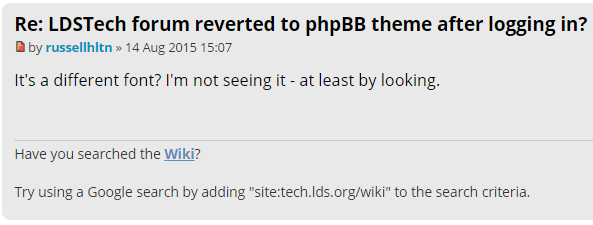
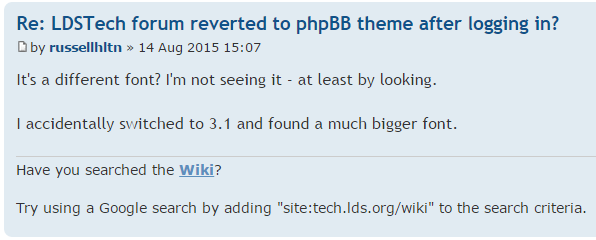
Here are two examples:
ldswhite-font.png
ldswhite-font.png (18.36 KiB) Viewed 3388 times
prosilver-font.png
prosilver-font.png (22.5 KiB) Viewed 3388 times
The font face is definitely different for the line that says "by Russellhtln 14 Aug 2015". Examine the descender of the y in "by" and particularly the "g" in "Aug". The differences for the other elements are not as pronounced, but the sizes are certainly different; the signature font is bigger in prosilver, but the font used in the body of the post is smaller.
Questions that can benefit the larger community should be asked in a public forum, not a private message.
Member
#49
I've noticed when visiting the forum the past few days, I can't see user names unless the name is Green or Red (moderators and administrators). I'm currently seeing the ldswhite on an iPhone 6 using both safari and chrome. It doesn't matter if I'm logged in or not.
Community Administrator
#50
russellhltn wrote:It's a different font? I'm not seeing it - at least by looking.
Pasting into Word, Prosilver comes out Trebuchet MS 10, while the ldswhite is Helvetica 10. Comparing them side-by-side, the Helvetica is a tad scrunched horizontally.
Have you searched the Help Center? Try doing a Google search and adding "site:churchofjesuschrist.org/help" to the search criteria.

So we can better help you, please edit your Profile to include your general location.
Community Moderators
#51
prosilver has well-defined borders around posts (different shades of blue, instead of white being one of the colors), and margins on the left and right of the page to give context.
Samuel Bradshaw • If you desire to serve God, you are called to the work.
Community Moderators
#52
aebrown wrote:Admittedly the technique of referring to a post number was not entirely reliable,
I always laugh when someone says "see the post above this one" because it is always below for me. While I am okay with having post numbers, they are never correct for me. That's why I will usually say "the post before this one", or "two posts back" rather than reference a number.

Long ago, I switched the display so that the newest post is on top. Then I could open a topic, scroll down to where I had read, work my way up, and have all of the menu items immediately available after I finished reading.

So this will be post 1 for me, and post however high for nearly everyone else.
Church Employee
#53
Note: if you copy the url for the specific post title it include the site-wide post number. ie:

https://tech.lds.org/forum/viewtopic.php?p=142700

That post number does not show in the interface though.
Community Moderators
#54
Hovering over the title of the post (for example, "Re: LDSTech forum reverted to phpBB theme after logging in?") also shows the post number, if you don't have your browser's status bar hidden.
Samuel Bradshaw • If you desire to serve God, you are called to the work.
Community Administrator
#55
TimRiker wrote:Note: if you copy the url for the specific post title it include the site-wide post number. ie:
I think he's referring to the thread post number. For example, I think this is post #55.
Have you searched the Help Center? Try doing a Google search and adding "site:churchofjesuschrist.org/help" to the search criteria.

So we can better help you, please edit your Profile to include your general location.
Community Administrator
#56
TimRiker wrote:Note: if you copy the url for the specific post title it include the site-wide post number. ie:

https://tech.lds.org/forum/viewtopic.php?p=142700
No, that's not really true. There's certainly a URL I can grab from the title, but it doesn't look like the example you gave, and it's often not a reliable link to the post.

If you arrived at a page of posts within a topic using one of the page icons (the < 1 2 3 4 5 > near the top or bottom of any page of posts where a topic has more posts than fit on a page), then the URL in the post title looks more like:

https://tech.lds.org/forum/viewtopic.ph ... 50#p142826

Note that such a URL is basically telling phpBB to go to the 6th page of posts for the specified topic, and then tells the browser to go to the anchor on that page labeled p142826. But in my User Control Panel > Board Preferences > Edit Display Options, I can change "Display post order direction" from "ascending" to "descending" (that's the way lajackson orders his posts). If I do that, then the post in question will no longer appear on the 6th page of results -- it will be on the 1st page of results. That page has no anchor labeled p142826, so the post is not displayed.

If you want a reliable link to a post, you have to get one that has a "p=" query parameter. The easiest way to do that is to copy the URL from the little icon immediately below the post title (where the post # used to appear). Then you'll get a URL that looks like:

https://tech.lds.org/forum/viewtopic.ph ... 26#p142826

Such a URL will link to the post, regardless of whether that post gets moved to another topic or forum, and is also independent of any user's post ordering preference. That URL can only be copied from that little icon (and it used to be that you could copy it from the post number within the topic, e.g., "#52", that appeared just below the post title).

One of the reasons I would like to see the post # within the topic to be displayed is that it makes it easier to copy the URL that will reliably allow anyone to get to that post. Other techniques result in unreliable links.
Questions that can benefit the larger community should be asked in a public forum, not a private message.
Church Employee
#57
It does look like using the icon link instead of the title link for a post is more reliable.

I've seen a few plugins that add post numbers. The ones I've seen though, number the posts in the order they are currently displayed. ie: lajackson's #1 and my #1 are different posts. When a post is removed, the posts get renumbered. So, post #23 really does not uniquely identify a post.

I'm working on a "listener" hook now for WAM (our single sign on) that should be better at skipping the phpBB signon page and just using the SSO sign on page. Right now if you follow a link to the "newest post" in an alert email you get the phpBB signon page, where you can enter whatever you like, as you always get the SSO sign on page next which is the one that really matters. We had this working in phpBB 3.0.x but the 3.1.x design changes broke our plugin. This should effectively work the same once I have it done.
Church Employee
#58
the listener event does not happen till later in the process. :(

However, we did overload the get_login_data() interface in an auth provider to do the redirects. This means that links in email to the forum that include login-required things like protected forums or #unread qualifiers will redirect to the SSO signin page first, and then drop you on the requested url target.

Holler if anyone is having signin issues!
Church Employee
#59
kellymab wrote:I've noticed when visiting the forum the past few days, I can't see user names unless the name is Green or Red (moderators and administrators). I'm currently seeing the ldswhite on an iPhone 6 using both safari and chrome. It doesn't matter if I'm logged in or not.
Tanner found and fixed this one. The responsive style sheets were hiding the username on smaller screens which hid it all over the pages. Now it is correctly just collapsing the username in the header and leaves the ones in the posts alone.

Thanx!