Feature to export or print notes

34 postsstarted by NovoGenesis 19,685 viewsoriginal topic

New Member
#1
In our opinion, there is one major feature missing from all versions of the Gospel Library as follows:

Namely, the ability to save or export a comprehensive listing of the user notes, including the associated references, as an independent document in common word processor formats such as DOCX, WPD, PDF, etcetera. Moreover, there should also be an option for printing the same document, or portion thereof, from within the application.

The exported or printed listing should include individual options for listing any combination of the associated references for each note. For example, in the case of a scripture annotation, the reference associated with each note might include: the standard reference (book/chapter/verse), the quoted or highlighted scriptural text, index or tag words, date of note, note author, or assigned subject.

Other options might allow the user to export or print a full or partial listing of personal notes, or the option to sort the exported or printed listing by any of the associated reference fields or other assigned attributes.

While we cannot speak for others, the lack of such a feature has been a major barrier to our adoption of the Gospel Library application as the main tool for our gospel study, especially of the scriptures. Many consider their collection of personal notes a treasure of gospel study discoveries and personal insights. The ability to independently export, print, read, edit, and use their own personal cross-referenced library of notes, as an independent document, would be an incredible addition to the Gospel Library application on all platforms.

Thank you for allowing us to comment.

Community Administrator
#2
richardwilkinson wrote:In our opinion, there is one major feature missing from all versions of the Gospel Library as follows:

Namely, the ability to save or export a comprehensive listing of the user notes, including the associated references, as an independent document in common word processor formats such as DOCX, WPD, PDF, etcetera. Moreover, there should also be an option for printing the same document, or portion thereof, from within the application.
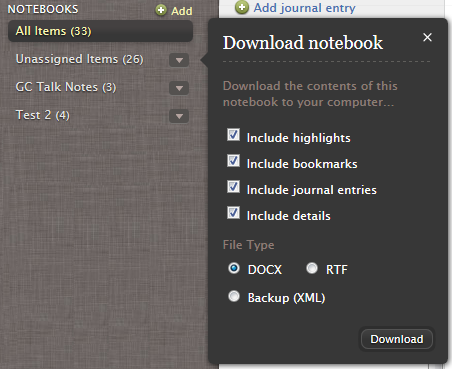
The Notes tool on LDS.org does have a rather rudimentary version of this capability. It allows you to download all the notes in a given Notebook in DOCX, RTF, or XML format.
notes-download.png
notes-download.png (67.62 KiB) Viewed 9678 times
Once you've downloaded the document, you can of course print it the same way you print any DOCX file. There are of course some limitations:
  • The download is available only per notebook, so if you have multiple notebooks, you'll have to do multiple downloads.
  • The download feature doesn't exist in any of the mobile apps. But since your notes/tags/bookmarks/journal entries sync from the mobile apps with LDS.org, you do have access to all the work you did on your mobile device(s).
  • It's tricky to print from mobile devices anyway (independent of this feature).
  • You have no control over the ordering or formatting of individual items in the download.
But it's a start. It sounds like you weren't familiar with this capability, so I thought it would be helpful to mention it, even if at this point it doesn't meet all your requirements.
Questions that can benefit the larger community should be asked in a public forum, not a private message.
New Member
#3
Thank you for your reply and for the helpful information on the current export feature. Your reply gave us substantial insight into the current export capabilities and also the hope that there is, though limited, a method for exporting and managing our notes and references outside of the program.

As you surmised, I am new to the mobile apps and to LDS.org notebooks. As such, I'm just beginning to explore their features, but did not want to invest a huge amount of effort into marking, cross-referencing, or note creation, until knowing what kind of access we might have to our work after the fact.

Most my experience to-date has been with LDS View on a desktop, which may, or may not, have any similarity to Gospel Library for apps or LDS.org notes. In the case of that application, access to notes is extremely limited and we are forced to deal with predefined sets of files that hold our notes in a proprietary format. Likewise, conversations with users of the newer apps has also suggested that access to our custom notes and references may be limited.

I would love to ask several questions, but recognize my need to read the user guide and to do some additional experimentation before bothering others with such questions. Suffice it to say, as you have already inferred, the features for managing and exporting notes appears to be somewhat rudimentary. Nevertheless, we hope our original comments will provide some good ideas to those who may be developing the future features for this program.
New Member
#4
I would also add my voice to the chorus of people who say that this app will never be really adopted until the ability to print documents and notes are made available.
Senior Member
#5
As is often suggested, this forum is user-to-user help. Developers and decision makers on the features of all the LDS apps may or may not visit this forum. Most of us on the forum do not have any direct access to the developers and decision makers at CHQ.

The best way to get your request in front of that group is to use the feedback option within the specific app or tool itself. All those feedback requests are reviewed by those who can get it to the proper organizations for consideration. I would suggest that every individual who wants a specific feature use the feedback individually so it is obvious there are multiple people who desire the feature.
New Member
#6
When I use the export note feature on lds.org, it does not include the author name. I have to re-look up the name of each talk and add the speaker anytime I take notes on a general conference talk. This wastes a considerable amount of time. Am I missing something? How can the author name be added? I've tried including details, highlights, etc. NOTHING works. Also, I have to do rtf format everytime because opening a docx (at least in MS OFFICE 2016) fails everytime.
New Member
#7
What is the point of making notes if I can't:

a) organize them after they're in a notebook
b) look at them cohesively

The note feature is so bad it makes me want to print a paper manual and hand-annotate.
Community Moderators
#8
mynameisnate wrote:What is the point of making notes if I can't:

a) organize them after they're in a notebook
b) look at them cohesively.
What do you mean by "look at them cohesively"?
Samuel Bradshaw • If you desire to serve God, you are called to the work.
New Member
#9
For many years I have used the export feature on the lds.org page to download a backup copy of all my scripture notes and comments. This export feature has helped to give me an assurance that no matter what should happen to my account or the data stored there, I would still have a copy of these very important (to me) notes. Recently I went to do an export and noticed the function is no longer listed on lds.org. Please tell me it has just been moved and not removed?!
#10
I must agree with the foregoing comments - the inability to organize notes (sort them at least) and print a whole notebook (what happen to the export feature?) - means the app/tools will never gain widespread acceptance/use.
New Member
#11
PLEASE reinstate the notes backup feature. I have a lot of journal entries that will be very cumbersome to transfer to something else without being able to just back everything up.
New Member
#12
Why was the export feature removed? I used to write talks in my journals, and then export them and print them. Is this just gone?
#13
I know! I asked the same question. I can't figure our why it has been removed. Without the export feature, there isn't a lot of point to adding things to notebooks. I tried to run this up the flag pole, but the responses I received from technical support was clearly from a younger person who had never seen the whole concept and process as it used to be. I finally just dropped it. It is very frustrating - because the user interface tools via one's phone have finally arrived at a point where they are easy to use - and then I find out I can't export any of my notebooks/journals! The export tool for creating talks, etc. is an absolute necessity to make the notetaking/highlighting/journaling system work. Perhaps you can get further than I did.
New Member
#14
Yes, it frankly terrifies me to not be able to export my notes any more, and I’ve kindly been putting in a word for an import option for years. I’ve been adding study notes since the Gospel Library first arrived, and I think my last backup had over 13,000 notes, including all the notes I transferred by hand from my well-marked physical scriptures. It would devastating indeed to lose them in a database snafu. :)
New Member
#15
Agreed. Please bring back the export functionality. I have spent years of work expecting this feature to remain.
New Member
#16
Piling on here...this seems like such a straightforward request in today’s tech and mobile environment. Users can share/export individual notes, why not allow entire notebooks or tag selections the same function?
Senior Member
#17
bowklook wrote:Piling on here...this seems like such a straightforward request in today’s tech and mobile environment. Users can share/export individual notes, why not allow entire notebooks or tag selections the same function?
As this is a user-to-user tech support forum, posting requests here will do nothing to request changes. If you want your idea/request/question to get to the programmers (and more importantly the decision makers who direct their priorities) you should send feedback from within the app. Posts to this forum will not reach them.

You will most likely NOT receive an individualized response, but others who are more "in the know" than I am have indicated that all feedback is read by service missionaries and forwarded to the appropriate departments for consideration.
New Member
#18
Agreed. I just tried to do this but it appears that this function is no longer available!
New Member
#19
I figured out a work around. When you use gospel library Application make sure you sync with your LDS account. The changes then show up at https://www.lds.org/notes/notebooks?lang=eng
from which you click on the 'share icon' which gives you 3options (facebook, twitter, or email). I then shared as email to my evernote inbox email, so I can back it up.

By the way, I just put a bunch of notes in the Gospel Library Beta version, and sadly it is NOT syncing with either the normal Gospel Library app nor the LDS.org notes.

Lastly, one big plus in my mind in keeping notes in the gospel library is that it's backed up (like familysearch) in the heart of mountains somewhere? Or does that only apply to family history. I would hope that it's all very secure, so that my posterity can have access to it after my death. DOes anyone kinow?
Thanks!
Community Moderators
#20
ddalling1 wrote:By the way, I just put a bunch of notes in the Gospel Library Beta version, and sadly it is NOT syncing with either the normal Gospel Library app nor the LDS.org notes.
Which beta are you on – Android or iOS? Do you see a sync error message if you look under your username in Settings? And which build of the beta are you running (under "App Details") in settings?
Samuel Bradshaw • If you desire to serve God, you are called to the work.
New Member
#21
4.2.5.0 beta version. Your help would be greatly appreciated as I had a lot of good revelation today, that I wrote down, and want access to it. Now it crashes every time I try to launch the beta program. None of the tabs work. It just freezes, so I can't even copy paste or screenshot even my notes.
New Member
#22
the beta version was working just fine until I tried to sync it to LDS account
Community Moderators
#23
I assume you're on Android – 4.2.5.0 is an old version of Gospel Library that's no longer supported. Annotation sync doesn't work from the old version of the app because different URLs are being used, to support a more up-to-date security standard (TLS 1.2). You'll need to update to Gospel Library 5 or later to be able to sync.
Samuel Bradshaw • If you desire to serve God, you are called to the work.
New Member
#24
SOrry I forgot to mention I'm on Windows 10 Dell PC. So I will try to uninstall and reinstall
Community Moderators
#25
ddalling1 wrote:SOrry I forgot to mention I'm on Windows 10 Dell PC. So I will try to uninstall and reinstall
If you delete and reinstall, be aware than anything that hasn't synced will be permanently lost. If you have important notes, I'd recommend getting in contact with someone on the Windows Gospel Library support team first – maybe they can help, or maybe there's something they can debug to prevent the same problem from happening to other users.
Samuel Bradshaw • If you desire to serve God, you are called to the work.
New Member
#26
Great idea. Thanks!
#27
Well it is here now. This squeaky shell got some grease.
New Member
#28
For Swedes:
https://www.lds.org/notes/notebooks?lang=eng
Tryck på "All notes". Exportera genom att trycka på "Export my notes". Då bildas en fil kallad: "annotation_exports.csv". Öppna i t ex Word och "sök och ändra" alla diakritiska tecken:
&#xE5= å
&#xE4=ä
&#xF6=ö osv
New Member
#29
Note that the "export my notes" feature has a bug and only exports a partial number of notes. This thread over on the forum "Main Church Website - Notes and Journal, and Online Scriptures" might be helpful: viewtopic.php?f=19&t=11010&start=10
New Member
#30
I truly wish that our Gospel Library would have a better feature to print on paper, every type of journal entries. Also, the Gospel Library is so much more functionable than the LDS.org notes platform.

I believe that a very important aspect of sacred writ should include family history via journal entries for future generations, as commanded by the Lord. I have through the years received wonderful inspiration and personal revelation regarding the scriptures. And I wish that this gathered information could be part of my sharable, recordable, and transmitted family history for my posterity.

Please know how much I appreciate and love Gospel Library, thanks!
New Member
#31
I wonder if our notes are not printed because the brethren do not want them appearing on the same printed page with the scriptures. If this is the case please tell me. My faith can handle that decision.
Senior Member
#32
danarussell wrote:If this is the case please tell me.
I suspect no one here knows. We are all just members like yourself. The few church employees who show up from time to time are likely not in an official capacity and either they don't know either are are not at liberty to say. The best we can do is request and wait/hope. I don't personally use the note feature (in large part because I'm old school and don't trust this information on a web page that could go away at any time).
New Member
#33
Is it possible to print a talk or article from the Church's website with the footnotes and our own personal highlights and the notes/annotations we have made while reading it? When I am in Adobe Acrobat I can print a pdf with all of my highlights and annotations. Can we do that when we print an article or scriptures as well?
New Member
#34
how do I export a file from my computer to notes in the Gospel app?