Study Notebook Export

36 postsstarted by guffism 20,036 viewsoriginal topic

New Member
#1
It would be neat to be able to research and build a "talk" in the Study Notebook tool and then be able to export the text (and links) into a document app (like Word) for further massage prior to presentation.
Church Employee
#2
If you are using the online version you can export your notebooks. click on the little down arrow next to the notebook name and the first option is download. This gives you several options, including docx (Word).
#3
I am not seeing this option anymore. Is this still possible?
Community Moderators
#4
You can still download annotations at the old Notes page, though that will probably be going away soon as it's being replaced by Notes.ChurchofJesusChrist.org.
Samuel Bradshaw • If you desire to serve God, you are called to the work.
Community Moderators
#5
The Notes page at Notes.ChurchofJesusChrist.org now has a download button that allows you to download/export your notes as a CSV.
The export downloads all of your notes; they're not divided up by notebook.
Samuel Bradshaw • If you desire to serve God, you are called to the work.
Senior Member
#6
sbradshaw wrote:The Notes page at Notes.ChurchofJesusChrist.org now has a download button that allows you to download/export your notes as a CSV.
The export downloads all of your notes; they're not divided up by notebook.
Thanks for telling us about this. I tried it out and have the following observations:
  • The placement of the download icon doesn't seem intuitive. It looks like you want to download a specific note, but it downloads all notes. It seems like it belongs on the left area with the notes/tags/notebooks/search icons.
  • The export doesn't contain a list of tags associated with the note.
  • The export doesn't contain a list of notebooks associated with the note.
  • Not all of the notes are exported. My export only had 997 notes. Looking at the old notes page, I see that I have 5,175 notes total (the new Notes page doesn't give you a count). The dates on my exported CSV notes were from 2011-2016, so maybe it starts at the beginning and only exports a certain number of notes?
Community Moderators
#7
I'm guessing the annotations that didn't download are of a certain type? For example, highlights without notes attached? That's interesting that it didn't download anything more recent – I assume you've written notes since 2016. That definitely sounds like a bug.
Samuel Bradshaw • If you desire to serve God, you are called to the work.
Senior Member
#8
sbradshaw wrote:I'm guessing the annotations that didn't download are of a certain type? For example, highlights without notes attached? That's interesting that it didn't download anything more recent – I assume you've written notes since 2016. That definitely sounds like a bug.
Yes, I make annotations quite frequently. I'm wondering if the export has been tried with a large quantity. My annotations are a mix of highlight-only and highlight with notes. The limiting factor seemed to be quantity. I wonder if something timed out gather that much data?

Often times on systems where a report might take some time, you don't get your results instantly, but instead come back for your results. Take Amazon, for example. If I try to download a purchase history report, I'm telling it to run a report. I don't get an instant download, but have to wait for the report to appear, and then I can download it. I've never seen it take very long for the report to appear, but the interface is designed so that you're not tying up a request waiting for a report to generate.
Member
#9
The download feature referred to above seems to have been changed recently. For a number of months, no download feature was available at all, Recently changed, there is now a download button you can click on, and it does download SOME annotations but certainly not all. In my case, it's downloading annotations created between 2011 and the end of 2014 but nothing more recent. Does anyone know why the download feature does not download all annotations?
Community Moderators
#10
djdinut1 wrote:The download feature referred to above seems to have been changed recently. For a number of months, no download feature was available at all, Recently changed, there is now a download button you can click on, and it does download SOME annotations but certainly not all. In my case, it's downloading annotations created between 2011 and the end of 2014 but nothing more recent. Does anyone know why the download feature does not download all annotations?
I'm not sure, but I'd recommend sending this as feedback using the link at the bottom of Notes.ChurchofJesusChrist.org. Do you have a lot of notes?
Samuel Bradshaw • If you desire to serve God, you are called to the work.
New Member
#11
I have tried the new "download my notes" button and received a file with 997 of my notes. I have many thousands of notes that were not downloaded. I have left feedback and would suggest others who use the note feature try to export their notes. Then verify the notes in the exported file are complete. If you have problems, please leave feedback so that we can get this important feature up and working. It's been years since I have been able to get a full export of my notes. I continue to trust that with all continual changes happening with the online scriptures and apps, that I never lose these important and very personal notes.
New Member
#12
A status update. I reported this issue with the export function not working. After some back and forth and providing additional information to the support folks, I received the following message on March 31, 2020: "Thanks for reporting this. It is in our queue to be prioritized for a fix, but we do not have a timeline for resolution. We apologize for the inconvenience and appreciate your patience."
I did check the export function today and found there appears to have been some changes in the past month. Instead of the first 997 notes, I now receive the first 176 notes as a download CSV file.
New Member
#13
I'm working on this also. I got 801 notes, taking me up to 2017... I left feedback but will go back and leave more specific feedback about being about to download all the notes with their associated text.
New Member
#14
It's been awhile so here's an update. The "export your notes" feature on the web page https://www.churchofjesuschrist.org/notes is still only downloading 728 of my over 6,500 notes. The downloaded notes are dated 2012 to 2014. I am still hopeful that this known issue will make it up the queue and get fixed soon.

If you are wondering how many notes you may have made in the Gospel Library over the years, I have found two ways:
- Install the Windows version of Gospel Library, sign in, then click on Settings, Church Account. Look for Annotations, Total.
- or install the Android version of Gospel Library, sign in, then tap the three dots menu, Settings, App Details. Look for Personal Data, Total annotations.
Community Moderators
#15
Note that the total number of annotations (at least as listed in App Details on Android) includes highlights and bookmarks too, in addition to notes.
Samuel Bradshaw • If you desire to serve God, you are called to the work.
New Member
#16
I really would like to be able to export all my notes, if only for backup's sake. But I also used the note desire to prepare for a book I'm writing, and being able to export only a fraction of my notes makes it virtually useless for that purpose.
Member
#17
I experienced this today as well. I have a copy of my exported notes from 2018. They used to be in xml. Now it's in .csv and not only is the total number of notes incomplete, the content is as well. It looks like only the first line of text of any note is included.

My hope is that at some point I can create a journal of my thoughts over the years to share with my kids. Would like to be able to pull it from an exported file. Maybe worth scripting something to hit the endpoints that the notes app uses and pull it that way, but that would be a lot more work.

I'll submit feedback as well.
New Member
#18
A status update since receiving a reply in March 2020 from support stating this is known issue and that the issue is in the queue for resolution.
Today I ran "export my notes" and only 2 lines of entries in a csv file with dates from 2016. Still hopeful that support will be able to fix this important feature eventually.
New Member
#19
Same experience here - export resulted in 2 very old entries in a csv file. It would be very helpful to be able to export notebooks for backup and local access to the content.
New Member
#20
It was last year, March 2020, when I received a message back from the development team that the "export my notes" feature had a known bug and that it was on the list of things to fix. Still hoping this important feature makes it up to the top of the fixes list. As a status update today, the export of my notes is now down to just 2 older notes from 2016.
New Member
#21
I exported my items, and it appears that everything is there. I have notes from 2013 all the way through to notes from 2021.
New Member
#22
I checked and I am still getting just two notes from 2016. My total should be many thousand. Hopefully others will find the export function has started to work for them.
New Member
#23
Actually, I tried an export from the Windows Gospel Library app and that app produced a spreadsheet with all 7,000+ of my highlights. The export only included the three fields: date of edit, color of highlight, and chapter where the highlight was made. The missing field that I am most wanting is of course the individual notes that I have added to many of those highlights.
New Member
#24
I was interested in looking over all my notes, so I did a Notes export just now, and it worked just fine. Several thousand of them. It’s possible that this has been fixed.
BTW, The website lets you edit and clean up tags which you may have misspelled. Very nice. :-)
Member
#25
Notes export is still not working for me. Whenever I try to export the system times out. Same result every time I try. I have many thousands of notes. I don't know if that complicates things for me when others may not be experiencing the same problem.
Member
#26
The error I get is "Can't Open the Page". Same result every attempt.
New Member
#27
My export is still not working. To clarify, I am going to this web page: www.churchofjesuschrist.org/notes and clicking the "export my notes" icon in the upper right. I do not get an error, just and empty csv file.
New Member
#28
I just tried an export and got exactly the same result. No error, just an empty CSV file.

Would love it if this could be fixed.

Phil


Re: Study Notebook Export

#27

Post by bpurser » Sun Mar 27, 2022 8:37 am
My export is still not working. To clarify, I am going to this web page: www.churchofjesuschrist.org/notes and clicking the "export my notes" icon in the upper right. I do not get an error, just and empty csv file.
Top
Member
#29
I just tried to export my notes again with the same result as I have had for many months (perhaps a couple of years): I get a browser message that says it can't load the page and it times out. I suspect it's because I have so many notes. 10 years ago when I was working with tech support on another issue, they told me I had 65,000 notes or some number such as that, and I have many, many more than that now--maybe double I would suspect. Perhaps their system isn't set up to handle that kind of load.
New Member
#30
I am happy to report that exporting of personal study notes is working again!!! I was able to export all of my personal scripture notes into a CSV file using two methods:
1) Using the Windows Gospel Library app, click the Notes icon on the left, then look for an Export button just above the first note that is shown on the screen.
2) The download button on the personal notes web page also is working: https://www.churchofjesuschrist.org/notes
The format of each CSV is slightly different so if you have a Windows machine you may want to try both methods and see which format is best for your needs.

Many thanks to the developers who added this feature back into the apps!
Member
#31
exporting from within the notes webapp is still not working for me (creates an empty CSV file), so YMMV. I don't have the windows Gospel Library app to try it with.
New Member
#32
My export is still not working. To clarify, I am going to this web page: www.churchofjesuschrist.org/notes and clicking the "export my notes" icon in the upper right. I do not get an error, just a nearly-empty csv file (containing links to the sources I highlighted in, but none of the actual text of what I highlighted within those sources).
New Member
#33
I don't know much about the export format but when I look at my export it does contain the notes for each of the verses where I have made a note for myself as well as a link to the passage associated with my note.
I maybe wrong, but I believe the fourth section of each line (labeled "source location") should contain enough info to recreate the underlined passage.
New Member
#34
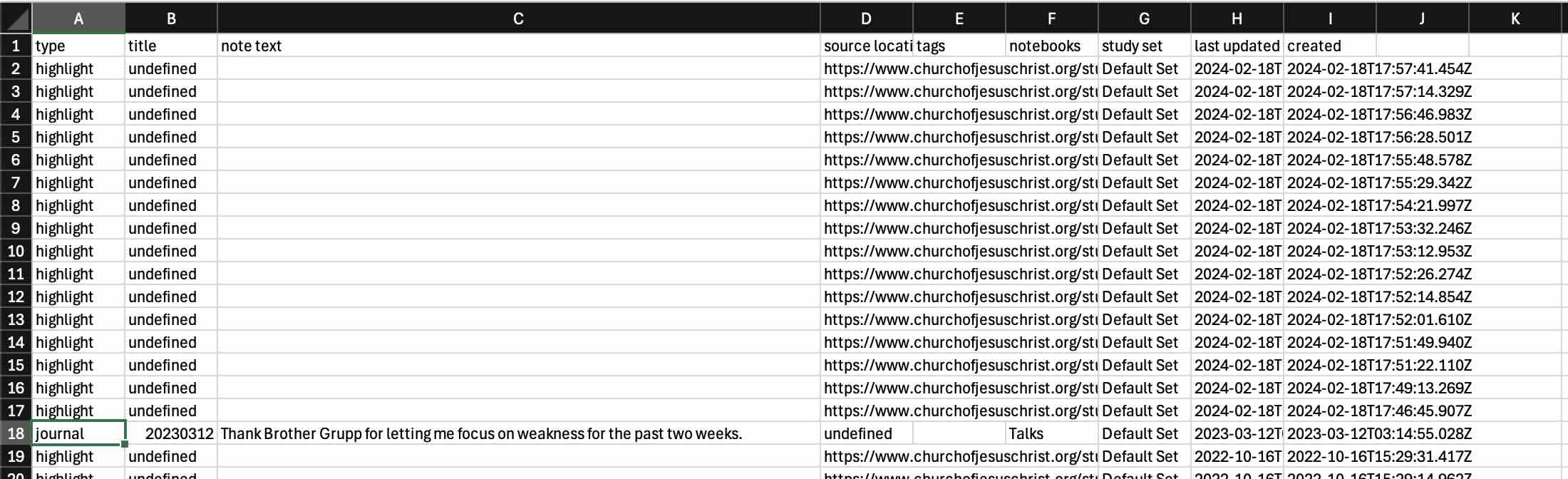
Export has this:
CSV Export.jpg
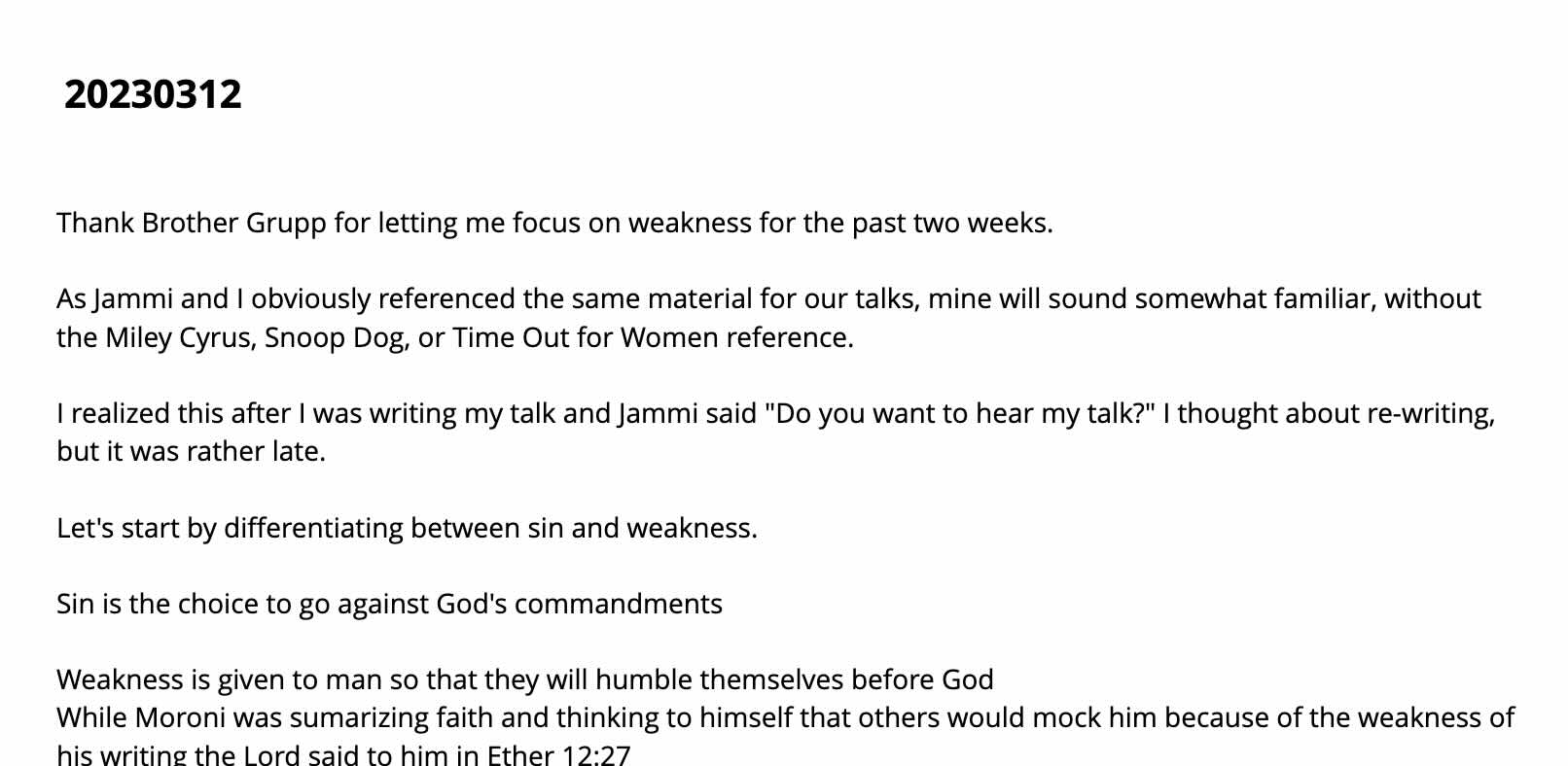
but the note shows this:
Note.jpg
It doesn't seem to work.
Church Employee
#35
Is the rest of the text in that cell but just not showing. If that were Excel (what I'm most familiar with) it could have multiple lines of text there and just now displayed. You can either change the height of the row or start editing the text in C18 to check that.
New Member
#36
I recently downloaded my notes as a backup. One thing I've noticed, though, is that the download gives me a "source" that links to verse / paragraph, but if the annotation highlights only part of the verse, that isn't reflected in the CSV. I guess it isn't absolutely essential, but it is preventing me from being able to exactly recreate what I have in the app / website.