Finding move wards

17 postsstarted by jirp 9,558 viewsoriginal topic

Member
#1
I have used maps to figure out what ward I needed to move people to for a couple of years. It had been a few months since I needed it and now I find it no longer works. It used to be that if I typed an address in it told me what ward that address belonged to. How do you make it work now?

It will now tell me all the wards in the area but it doesn't tell me what ward that address belongs to. The other problem is it gives me wards no where near the one I needed because of some sort of similiar name. I can be looking for a CO ward and get wards from 3 or 4 states and a foreign country in the list. Figuring out what ward I need out of a list of 100 is a pain at best and impossible at worst. The first time I hit it as a problem I got the address up using real google maps. Then went back to the church maps and found the same location to look at ward boundaries and found the only ward building in that boundary. But the one from CO I needed the other night there are no buildings in the ward boundary where the address occurs and one of the neighboring wards apparently has 2 ward buildings in its boundaries and apparently 5 or 6 wards between those 2 buildings. There are 3 or 4 other ward buildings in other wards around the one without a building that are also possibles but I am guessing from distance to the building less likely.

Community Administrator
#2
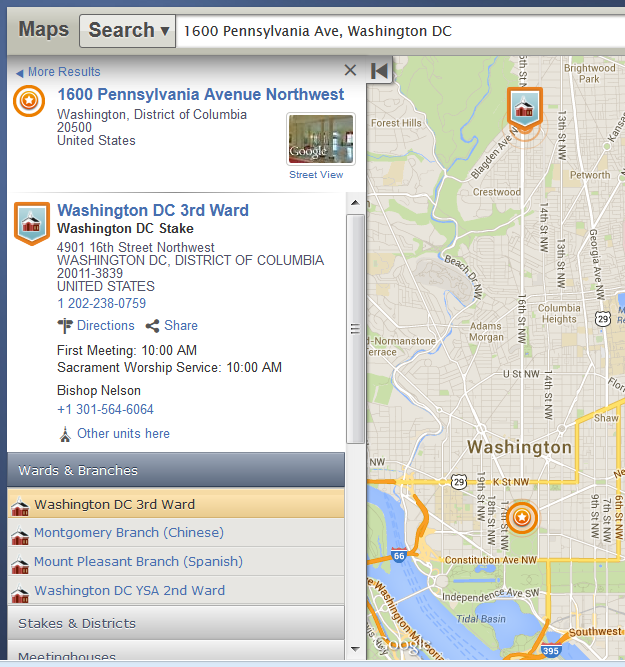
First of all, if you are moving records out of your ward using MLS, in the vast majority of cases you don't need to look up the new ward. In fact, it's best to leave that blank, if the new ward is to be the regular ward for the new address. However, I can't duplicate the problem you report -- when I use LDS Maps, I still see the assigned ward for the given address prominently displayed (see my attached screen shot).

But just about everyone I've ever talked to about this recently has quit using MLS to move records, since moving records using Leader and Clerk Resources is a much nicer experience. It will immediately look up the wards associated with the new address you provide, and even let you choose alternate wards (if you need to choose a YSA ward, or perhaps a language-specific ward for that address).
๐Ÿ“Ž dcmap.png (171.76 KiB)
Questions that can benefit the larger community should be asked in a public forum, not a private message.
Senior Member
#3
jirp wrote:I have used maps to figure out what ward I needed to move people to for a couple of years. It had been a few months since I needed it and now I find it no longer works. It used to be that if I typed an address in it told me what ward that address belonged to. How do you make it work now?

It will now tell me all the wards in the area but it doesn't tell me what ward that address belongs to. The other problem is it gives me wards no where near the one I needed because of some sort of similiar name. I can be looking for a CO ward and get wards from 3 or 4 states and a foreign country in the list. Figuring out what ward I need out of a list of 100 is a pain at best and impossible at worst. The first time I hit it as a problem I got the address up using real google maps. Then went back to the church maps and found the same location to look at ward boundaries and found the only ward building in that boundary. But the one from CO I needed the other night there are no buildings in the ward boundary where the address occurs and one of the neighboring wards apparently has 2 ward buildings in its boundaries and apparently 5 or 6 wards between those 2 buildings. There are 3 or 4 other ward buildings in other wards around the one without a building that are also possibles but I am guessing from distance to the building less likely.
Rather than using map.lds.org it's much better to just use the Move Out support on Clerk Resources. You enter the address and it will give you the assigned residential ward and any specialty wards that apply for that location with the residential ward preselected. Just select the correct one and immediately send the records. Not need for two steps (lookup the ward on the map and then move the record in MLS) and there is less chance for error.

Alternatively, just enter the address in MLS and let CHQ handle assigning the correct ward. There is no need to enter the ward when moving a record out.

However, in regard to your question about maps. As far as I can tell it does still show the assigned ward as long as the address is a valid address (as far as it is concerned). If it doesn't think the address is valid then it displays a list of possible matches which may or may not be correct. So I'd check the address first and make sure it is correct. If it is correct but maps.lds.org just doesn't recognize it as a valid address the I'd find the correct place on the map and the right click. This should show the assigned ward for that location on the map.
Member
#4
I wasn't aware MLS would let me send without knowing the ward.

The online stuff is nice some of the time but it doesn't always work either. Needed to move someone out to a student ward that wasn't coming up in the list of possibles. Just had to track it down on maps to get the name to ship the records to.

And maps not working to find wards throws a minor monkey wrench in tracking down inactives who want no contact with the church. I used to use things like Spokeo and Facebook to get general locations or likely addresses and then check either through the bishop for a given ward or the missionaries for the ward to try and find them. I may be able to pretend to move them online and get the information that way
Senior Member
#5
jirp wrote:And maps not working to find wards throws a minor monkey wrench in tracking down inactives who want no contact with the church. I used to use things like Spokeo and Facebook to get general locations or likely addresses and then check either through the bishop for a given ward or the missionaries for the ward to try and find them. I may be able to pretend to move them online and get the information that way
Try right clicking on a point on the map and selecting Find LDS Places nearby. That should show you the assigned ward.
Community Moderators
#6
Make sure you are logged in. If I use Maps without logging in, I find the information presented is different and less accurate than if I am logged in at the time.
New Member
#7
I still have the same questions posed on the first post. How do we enter an address and find the assigned ward? It used to do this, but now (even when logged in) only shows a list of "nearby" meetinghouses. I could assume that the first one on the list is the assigned ward, but I don't know if I can make that assumption, as it looks like wards are sorted. Why did they take that feature away from maps.lds.org? But more importantly, how can we find assigned an assigned ward based on an address?
Community Administrator
#8
sludgepickle wrote:I still have the same questions posed on the first post. How do we enter an address and find the assigned ward?
If you use "Find Places of Worship" function, in maps.lds.org, and enter an address, you'll get a list of wards. From what I can tell it's the ones available for that address. In my case I see one family ward, one student singles ward, and one language ward.

If I use "Meetinghouses", then I see several meetinghouses with several wards. (Good for traveling.)
Have you searched the Help Center? Try doing a Google search and adding "site:churchofjesuschrist.org/help" to the search criteria.

So we can better help you, please edit your Profile to include your general location.
Senior Member
#9
sludgepickle wrote:I still have the same questions posed on the first post. How do we enter an address and find the assigned ward? It used to do this, but now (even when logged in) only shows a list of "nearby" meetinghouses. I could assume that the first one on the list is the assigned ward, but I don't know if I can make that assumption, as it looks like wards are sorted. Why did they take that feature away from maps.lds.org? But more importantly, how can we find= assigned an assigned ward based on an address?
It does show the assigned ward (rather than 'nearby' results) if it can match the address exactly. It shows the nearby locations when it can't match the address.

Try first going to usps.gov and use it to make sure your address is valid. Once USPS indicates you've got a valid address then try looking it up on map.lds.org. It should then show the assigned ward (along with any specialty wards like russellhltn mentions).
New Member
#10
I looked up my ward meeting house. when I went there it was not my ward. I was told my ward meets in another building.
New Member
#11
https://www.lds.org/maps/#id=ward:559040

This link shows two wards meeting at the same time. How is this done.
Member
#12
heman wrote:https://www.lds.org/maps/#id=ward:559040

This link shows two wards meeting at the same time. How is this done.
I have never dealt with this but my understanding is that the ward is responsible to update the times in MLS and they MUST select a FUTURE date for the change to take effect.
There are 11 types of people. Those who understand Gray Code and those that don't.
Community Moderators
#13
kd7mha wrote:
heman wrote:https://www.lds.org/maps/#id=ward:559040

This link shows two wards meeting at the same time. How is this done.
I have never dealt with this but my understanding is that the ward is responsible to update the times in MLS and they MUST select a FUTURE date for the change to take effect.
It is true the unit sets the meeting times in MLS. But the future date is for notification only within MLS that the meeting time needs to be changed. MLS does not automatically make any changes.
JD Lessley
Have you tried finding your answer on the ChurchofJesusChrist.org Help Center or Tech Wiki?
Community Administrator
#14
heman wrote:I looked up my ward meeting house. when I went there it was not my ward. I was told my ward meets in another building.
I think that comes from the FMAT database which is maintained by FM Group.

Meeting times are set in MLS by the ward. There is no conflict checking for two wards meeting at the same time. (And it's not unusual to have a overlapping schedule.)
Have you searched the Help Center? Try doing a Google search and adding "site:churchofjesuschrist.org/help" to the search criteria.

So we can better help you, please edit your Profile to include your general location.
Community Moderators
#15
The beginning of the new year is a time when many wards adjust their meeting schedules. If one ward has updated MLS and another has not, it may appear that they meet at the same time.

It used to be that in MLS you set the meeting times and told MLS to make them effective on a certain date in the future, but that is no longer necessary. MLS will update the meeting times when you do the Send/Receive. The date in MLS now is just a reminder to the clerk that the times may need to be changed.
New Member
#16
Edited 1 time, last by russellhltn on . Reason: Removed personal information - this is a public forum

5 Hill Drive, Oroville California

Which Ward would you be in at address:
[address removed]
Community Administrator
#17

Re: 5 Hill Drive, Oroville California

dmwheeler wrote: Thu Feb 27, 2025 11:32 pm Which Ward would you be in at address:
Please use the Meetinghouse Locator.

There's a number of options for that location including YSA, Spanish, and Hmong.
Have you searched the Help Center? Try doing a Google search and adding "site:churchofjesuschrist.org/help" to the search criteria.

So we can better help you, please edit your Profile to include your general location.