missing link to videos in come follow me (youth ss)

16 postsstarted by dsesplin 4,394 viewsoriginal topic

Member
#1
Most of the links to videos are missing in the youth come follow me Sunday School lessons. When I go to the internet I can download the videos fine but there is no link in the Gospel Library app. There is just an empty video marker without even a title for the video. I have tried redownloading the content but it hasn't helped. Am I doing something wrong or is it missing for everybody?
Community Moderators
#2
I just tried a video in January: The Godhead > How does the Holy Ghost help me learn? and it worked fine. There's no title on it, but I was able to play it by tapping the circle/triangle play icon in the middle of the video. Does that video work for you?
Samuel Bradshaw • If you desire to serve God, you are called to the work.
Member
#3
Yes, that one works fine. To clarify, the videos for the teachers (in the green box on my phone or in the sidebar on my tablet) usually work fine. It is the ones in the lesson that don't work either on my phone or tablet. For my lesson this week I'm teaching "What does Joseph Smith's example teach me about learning the gospel" (April). The video "teaching the saviors way" works fine, but the video "origin" just has a dead link. I only know what it is called by looking on LDS.org https://www.lds.org/youth/learn/ss/apos ... e?lang=eng . So I go to LDS.org in my browser and download it to use in my lesson. I'd like to be able to just click on the link in GL.
Doug
Community Moderators
#4
"Origin" (that starts with the trees and bird sounds) works for me. It's the video right above the green box in that lesson, and it works when I tap the play button. Have you tried deleting and reinstalling the app? Maybe it downloaded partially and is confused, or something?
Samuel Bradshaw • If you desire to serve God, you are called to the work.
Community Administrator
#5
dsesplin wrote:the video "origin" just has a dead link.
Works fine for me. I did notice that it asked me which app I wanted to use to play the video (choice of "ES Media Player" or "Video Player"), so clearly it calls a external video player app. Perhaps your player doesn't like that video for some reason?
Have you searched the Help Center? Try doing a Google search and adding "site:churchofjesuschrist.org/help" to the search criteria.

So we can better help you, please edit your Profile to include your general location.
Member
#6
Yes, that is the one that is not working for me. It is funny that it doesn't work either on my phone or my tablet. I'll try to reinstall after my lesson today. (our ss is on friday over here).

The videos that work always ask me for the app also. The ones that don't work just don't do anything--there is no link.
Doug
Community Moderators
#7
So, it just occurred to me that this thread is in the Android Gospel Library forum :) The video works fine on iOS Gospel Library, for what it's worth...

Samuel Bradshaw • If you desire to serve God, you are called to the work.
Member
#8
I just reinstalled the app on my phone. It still doesn't work. I even cleared the cache and the data and deleted the gospel library directory before reinstalling. It still has a dead link for the origin video.
Member
#9
Yes, I have the android GL. Anybody have feedback on the Android app? (I have an Asus transformer infinity tablet and a Samsung S4 phone)
sbradshaw wrote:So, it just occurred to me that this thread is in the Android Gospel Library forum :) The video works fine on iOS Gospel Library, for what it's worth...
Church Employee
#10
dsesplin wrote:Yes, I have the android GL. Anybody have feedback on the Android app? (I have an Asus transformer infinity tablet and a Samsung S4 phone)
I just tested with my Samsung S4 and the video played without any issues.
Community Administrator
#11
dsesplin wrote:Yes, I have the android GL. Anybody have feedback on the Android app? (I have an Asus transformer infinity tablet and a Samsung S4 phone)
It works fine for me on Android as well (and RussellHltn's earlier post was also referring to Android).

So there's something about your device, which could be the hardware, the Android version, the external player, or perhaps something else. In my first test, I used the standard Video Player app built into KitKat on my Nexus 5. Which player are you using? Which version of Android do you have?
Questions that can benefit the larger community should be asked in a public forum, not a private message.
Member
#12
scgallafent wrote: I just tested with my Samsung S4 and the video played without any issues.
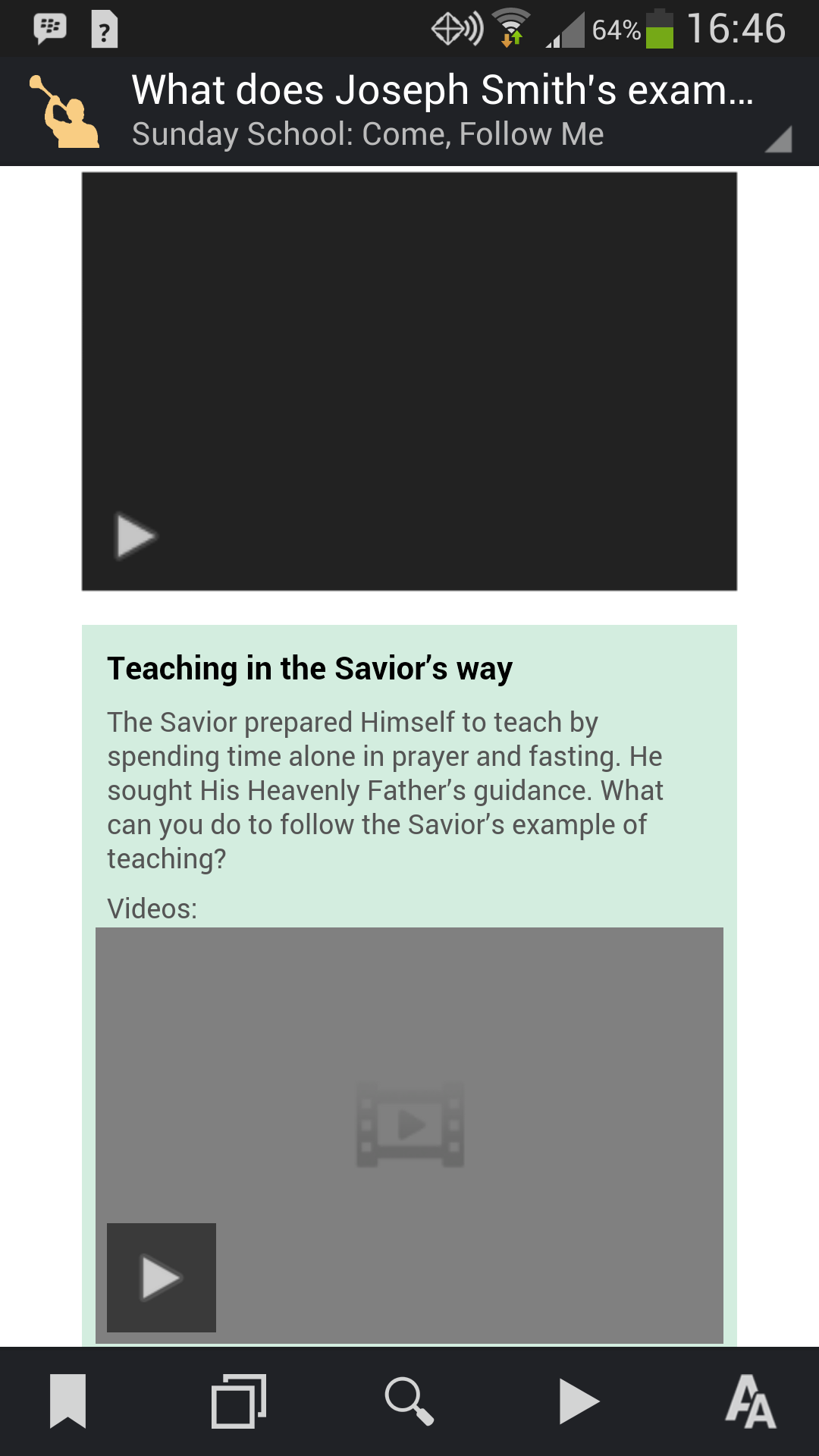
I just "deleted all content data" from the settings menu. Then I uninstalled the app. I checked to make sure I couldn't find any traces on my phone. Then I reinstalled the app from the play store. It still doesn't work. I can play the "Teaching the Savior's Way" video in the green box, but I can't play the one above it which on LDS.org is called "Origin". I have attached a screen shot. The top video is a dead link, the bottom one plays. Is this what you see on your S4? I'm at a loss. Sorry about the big image I didn't know how to reduce it. If you right click and click on view image you can see the whole screenshot.
Screenshot_2014-04-04-16-46-48.png
Screenshot
(130.68 KiB) Downloaded 398 times
Member
#13
aebrown wrote: So there's something about your device, which could be the hardware, the Android version, the external player, or perhaps something else. In my first test, I used the standard Video Player app built into KitKat on my Nexus 5. Which player are you using? Which version of Android do you have?
I have Android version 4.2.2. As I said, the link is totally dead. The bottom link asks which video player I want to use and it works no matter which one I select. The top video doesn't ask anything. It is like I am tapping on any other part of the screen. It works exactly the same way on my tablet. So what ever the problem is, it is affecting both my phone and my tablet exactly the same way.

Doug
Church Employee
#14
dsesplin wrote:The top video is a dead link, the bottom one plays. Is this what you see on your S4?
When I view it on my S4, the top link shows the same video panel (film image in the middle) as the bottom panel. I'm running Gospel Library 3.0.1.2 on an S4 running Android 4.3.
Member
#15
That's what I can't figure out. The link images are different on both my phone and tablet. I am also running Gospel Library 3.0.1.2 on an S4 but with Android 4.2.2. My tablet is running Android 4.2.1. Maybe you have to have 4.3 for it to work. At least you have verified that it should work. I'll keep trying to figure it out. Otherwise I'll just keep downloading the videos from my browser.
Member
#16
Ok, I just went to the tester page http://www.ldsmobiletester.com and downloaded the latest build of gospel library version 3.0.2.1 and installed it. I then deleted the database and reloaded it. Now all the links work. Same story for my tablet except I didn't have to delete the database. It must be a combination of Android 4.2.x and GL 3.0.1.2 that caused the problem. GL 3.0.2.1 works fine. I'm a happy camper now. Thank you everyone who helped me troubleshoot.

Doug