Events with Setup and Cleanup Times Change other Events

11 postsstarted by ZundelMJ 8,631 viewsoriginal topic

New Member
#1
I tried looking to find a solution to a problem that I see. Sorry if it is a duplicate.

I have an event that goes from 6p-7p. I have another event that goes from 7p-8:30p. I have a 3rd event that goes from 8:30p-9:30p. Each have a different room scheduled in the same building.
Showing calendar items
calendar1.jpg (10.63 KiB) Viewed 6535 times
If I add a cleanup time of 30 min to the 7p event, on the calendar the 8:30p even look like it starts at 9p. The more time I add, the later the 8:30p event appears in the calendar. It still says 8:30p, but in the week view it looks later than scheduled.
After adding cleanup time with no setup time
calendar2.jpg (10.76 KiB) Viewed 6535 times
For the pictures, I removed the cleanup time.

If I add a setup time of 30 min to the 7p event, on the calendar the 6p event starts looking like it does not go as long. If I set the time for 1 hour setup time, the 6p event no longer appears on the calendar, but does look like it is merged with the 7p event.
After add setup time with no cleanup time
calendar3.jpg (11.18 KiB) Viewed 6535 times
I would think the setup and cleanup times would be with the event and the events should appear skinny, showing the overlap with the setup/cleanup times.

I have tried Firefox and Chrome: both give the same result.

Any suggestions for a fix or is this a bug?

New Member
#2
I posted this almost a month ago and there are no responses. Am I the only one seeing this as a problem?
Community Moderators
#3
There may be others seeing the same thing but they either don't visit the forums or they haven't seen this thread. The absence of others responding may mean they cannot duplicate the problem. My stake doesn't use the Calendar to schedule resources so I cannot test for the problem.
JD Lessley
Have you tried finding your answer on the ChurchofJesusChrist.org Help Center or Tech Wiki?
Community Administrator
#4
If it was a wide-spread problem, I'd think more people would be talking about it.

I tried it just now and got as far as calendar2.jpg but I was able to duplicate it.
Have you searched the Help Center? Try doing a Google search and adding "site:churchofjesuschrist.org/help" to the search criteria.

So we can better help you, please edit your Profile to include your general location.
Community Moderators
#5
zundelmj wrote: Any suggestions for a fix or is this a bug?
Many (most?) of us are users of LDS.org like yourself, and if we don't have a "fix," we all probably would call it a "bug!"
zundelmj wrote:Am I the only one seeing this as a problem?
I'm glad you posted it here, as it took you some effort to do it. Hopefully someone who can do something about it will look here and see the issue like we did.
"A soft answer turneth away wrath" works great on LDSTech forum boards!
Church Employee
#6
LDS.org Team
Community Administrator
#7
jeffevannelson wrote:ya that was reported here.
https://tech.lds.org/forum/viewtopic.ph ... 3&start=10#
Actually, that's a different problem, although it might be related. The problem you linked to is the one where in Week View the event titles for adjacent events get combined together.

The problem being reported here is one where events that overlap in setup or cleanup time (but not the actual time for the event itself) are not displayed correctly. Such events should be changed to only occupy half the width of the column so that they are not displayed on top of each other. But because their width is not adjusted (even though they do actually occupy some of the same time ranges), the cleanup time for one event is displayed on top of the block for the actual event of the following event.
Questions that can benefit the larger community should be asked in a public forum, not a private message.
Community Administrator
#8
aebrown wrote:But because their width is not adjusted (even though they do actually occupy some of the same time ranges), the cleanup time for one event is displayed on top of the block for the actual event of the following event.
That's true of setup time. Clean-up time pushes the following block out of it's proper position.
Have you searched the Help Center? Try doing a Google search and adding "site:churchofjesuschrist.org/help" to the search criteria.

So we can better help you, please edit your Profile to include your general location.
New Member
#9
I am a new user but i have a couple of questions:

1. Probably obvious but have you assigned each event to specifically different rooms or to the entire building?

2. Have you tried creating the setup & clean-up times as separate events? (This would be a work around).

I add on travelling time to all of my personal calendar events. To avoid confusion I always put the actual start time in the title line after the event title. This last tidbit is only a possible helpful hint.

I hope that this helps.
Becki
Church Employee
#10
rlinstrot wrote:I am a new user but i have a couple of questions:

1. Probably obvious but have you assigned each event to specifically different rooms or to the entire building?

2. Have you tried creating the setup & clean-up times as separate events? (This would be a work around).

I add on travelling time to all of my personal calendar events. To avoid confusion I always put the actual start time in the title line after the event title. This last tidbit is only a possible helpful hint.

I hope that this helps.
Becki
1) it can be to either a 1 room, a set of rooms or whole building. we recommend only reserving the rooms you use of course.
2) if you have a event spanning many days yes you will want to create maybe a repeating event that uses all those days if its within a 24 hour period then we allow for up to 24 hours of setup and cleanup.
LDS.org Team
New Member
#11
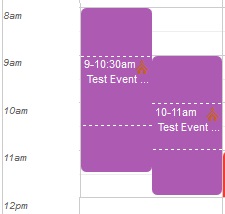
Sorry if I missed it, but I haven't been able to find any updates on this issue. I still see events not displaying at the proper time if the setup/cleanup times overlap, but the events themselves do not overlap. I have two events entered in the image below, but the cleanup time of the first push the second event out of place:
Calendar Issue 1.jpg
Calendar Issue 1.jpg (15.07 KiB) Viewed 2096 times
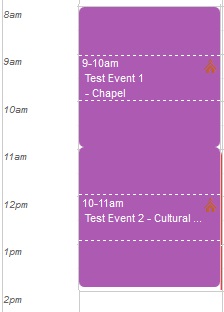
If the time of the events themselves overlap then the events are displayed correctly side-by-side.
Calendar Issue 2.jpg
Calendar Issue 2.jpg (11.55 KiB) Viewed 2096 times
Anyone else still seeing this issue?