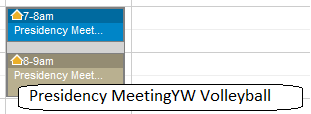
Yes, I see that, too. I can't figure out precisely what the factors are that make it happen, but here's a scenario where I can duplicate the problem at will. First, create two events that are right next to each other in time. They don't have to be on the same calendar, or even in the same building. For my test I chose a "Presidency Meeting" followed by "YW Volleyball" (which use different rooms):
- Overlap2.png (5.32 KiB) Viewed 2329 times
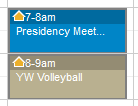
So far, so good. But then I change the YW Volleyball event to have 15 minutes of setup time. The result is certainly confusing:
- Overlap1.png (3.1 KiB) Viewed 2321 times
Note that I had to fake the hover text since my screen capture tool can't capture hover text. But notice that the title of both events is now what is shown in the hover text for both events: "Presidency MeetingYW Volleyball" -- both titles concatenated.
In other cases in my real calendar events I sometimes see this happening when the events are simply one right after another, with no overlap caused by setup or cleanup time. But in my first attempts to duplicate this from scratch, I couldn't get adjoining events to show the problem until I set some setup time.
Questions that can benefit the larger community should be asked in a public forum, not a private message.

 )