Error on store.lds.org

34 postsstarted by morty32 20,481 viewsoriginal topic

New Member
#1
Is anyone else having trouble or aware of a problem when ordering ward materials through store.lds.org?

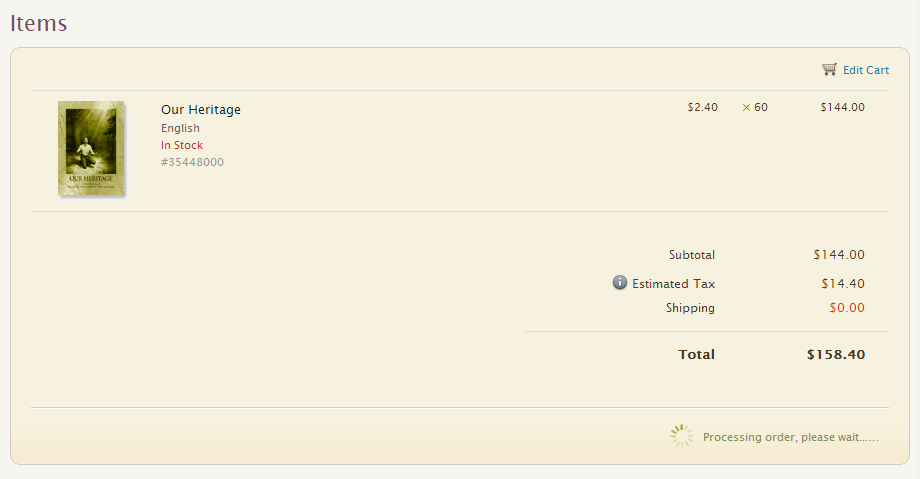
I go through the checkout process, select my payment method, select the address, and then click the "Place Your Order" button. The button disappears and "Processing order, please wait..." appears along with a spinner. That label shows with the spinner spinning indefinitely.

I finally navigate away from the page and log back in and all of the items are still in my cart. This has been happening for me since Sunday (1/27).

I emailed support on Monday, which acknowledged the problem and said that programmers were working on it. On Wednesday, I tried doing feedback through the site. The response I got from that was that they weren't aware of any problem there.

I've tried the process with Chrome, Firefox, and Internet Explorer and get the same result each time. I don't know if it's just a problem with my account, but I've ordered successfully through the website in the past. Just trying to find out if anyone else is having similar difficulties.
Senior Member
#2
My https://tech.lds.org/forum/viewtopic.php?f=46&t=15298 post may or may not be related. Which ward materials are you ordering?
Dana Repouille, Plattsmouth, Nebraska
New Member
#3
storelds.png
Screenshot of error.
(22.49 KiB) Downloaded 847 times
I was ordering "Our Heritage" manuals. Mine seems to be a little different. I can wait for several minutes and the spinner never stops spinning.
New Member
#4
i have had the same problem all weekend. I don't know enough to know if it's a browser problem or something else.
Senior Member
#5
Sounds a little similar to my problems here:
https://tech.lds.org/forum/viewtopic.php?f=46&t=15090#
Dana Repouille, Plattsmouth, Nebraska
New Member
#6
Been having the same problem for the last couple day. Trying to order some "Our Heritage" books as well as Young Women Camp Manuals. I've had no problem in the past ordering. I sent an email to help@store.lds.org, but have not heard back. I hope they can fix this soon.

-Dan
Community Moderators
#7
Until the website is fixed you can always call in the order.
JD Lessley
Have you tried finding your answer on the ChurchofJesusChrist.org Help Center or Tech Wiki?
New Member
#8
Just wondering if there has been any progress in getting this fixed? I tried to order something else just the other day and had the exact same issues.
Senior Member
#9
This must just be a freak issue as I do all the ordering for my ward and have never had any problems.
Church Employee
#10
Is anyone still having this problem or is everyone able to order via store.lds.org?
New Member
#11
I ordered something a a few weeks ago, and it seemed to work fine at that time, so I'm thinking it must be fixed now.
New Member
#12
I can not order via the store.lds.org...I have been getting the error message for over a week, "400 Bad Request."
Community Moderators
#13
daniellebowen wrote:I can not order via the store.lds.org...I have been getting the error message for over a week, "400 Bad Request."
One thing that _might_ help is to clear your browser's cache and delete relevant cookies. If that does not help, please use the Feedback button to inform those charged with keeping the site running.
Community Administrator
#14
daniellebowen wrote:I can not order via the store.lds.org...I have been getting the error message for over a week, "400 Bad Request."
For me, that redirects to store.churchofjesuschrist.org/usa/en

You might try that.
Have you searched the Help Center? Try doing a Google search and adding "site:churchofjesuschrist.org/help" to the search criteria.

So we can better help you, please edit your Profile to include your general location.
New Member
#15
When I complete my order and reach the PAYMENT and choose CREDIT/DEBIT, I receive an error code:
E-1C9CF19CE1094C4FB7DC9FA1C5C87065
Can you help me? I would like to order ASAP
Thank you.
Patty Trexler
Senior Member
#16
pattyanntrexler wrote: Sat Dec 02, 2023 11:47 am When I complete my order and reach the PAYMENT and choose CREDIT/DEBIT, I receive an error code:
E-1C9CF19CE1094C4FB7DC9FA1C5C87065
Can you help me? I would like to order ASAP
Thank you.
Patty Trexler
Suggest clearing your cache and cookies before ordering. If that does not work, try a different browser. I have had issues with Firefox with the on-line store, but Chrome seems to work all right.
New Member
#17
Hi, just need help, my account profile in the online store is of another person's name, maybe because when I enter my brother-in-law's name one time when he asked me to order something for him. There is no option how to update it, please help.
Senior Member
#18
ryangrimps wrote: Sat Jul 13, 2024 4:13 pm Hi, just need help, my account profile in the online store is of another person's name, maybe because when I enter my brother-in-law's name one time when he asked me to order something for him. There is no option how to update it, please help.
Since there's no suggestions yet on what might be happening, I'd suggest working with your local ward clerk. He should be able to help you work out a way to resolve this, and if he also gets stuck, he can connect you with the Church's Global Service Center.
New Member
#19
I am trying to order temple garments from the online store and I have an active recommend, but every time I try the site keeps saying I need to log in, and when I try to log in, it redirects me to the store's home page.
Community Moderators
#20
Lee1995 wrote: Tue Jan 07, 2025 10:22 pm I am trying to order temple garments from the online store and I have an active recommend, but every time I try the site keeps saying I need to log in, and when I try to log in, it redirects me to the store's home page.
Can you describe exactly the steps you take and what happens at each step? If any messages are displayed, what is the content of each message? I ask this because there is a scenario that I experience each time I use the online store that gives the appearance that may be similar to your experience.

There has been a bug/glitch in the store web page that has been ongoing for quite a number of months. If you go to the main Church web page, or any other Church web page, sign in, and then go to the online store web page, it looks like you are not signed in. It is at this point where the bug manifests. The Single Sign-on appears to not be in effect because the 'Sign in' button is displayed for your profile. When the 'Sign in' button is clicked the page disappears and then renders again as it appeared before. It looks like nothing happened. But clicking the 'Sign in' button updated the store web page with your credentials from the Single Sign-on. This can be verified by clicking the profile icon. You are signed in if your profile options appear along with the 'Sign out' button.

Is that similar to your experience? If not, then try using the incognito/private window mode of your browser to avoid the cookie build-up the Church domain has that creates unusual behaviors. You can also go directly to the online store page without signing in to the main Church web page or any other Church web page at https://store.churchofjesuschrist.org and then sign in. This sign in will be a 'normal' sign in as long as there are no cookie buildup problems.

If you cannot resolve the issue you can call the store directly using the Contact Us link at the bottom of the page. The support people will take your garment order over the phone.
JD Lessley
Have you tried finding your answer on the ChurchofJesusChrist.org Help Center or Tech Wiki?
New Member
#21
Lee1995 wrote: Tue Jan 07, 2025 10:22 pm I am trying to order temple garments from the online store and I have an active recommend, but every time I try the site keeps saying I need to log in, and when I try to log in, it redirects me to the store's home page.
I am having this exact same error! I go to the store page, click on the link for ceremonial clothing and it asks me to login. I put in my credentials (I know they are right, they are stored in LastPass and I can login to the main church website) it acts like it’s logging in but then takes me back to the error page saying login. The same think happens if I try to add pants or shoes. I can select the sizes but it says to sign in to ship to me.
I’m attaching a screen recording. It isn’t asking for my credentials because it asked the first time. I have tried clearing cookies and logging in again. I have tried on my iPhone, iPad and desktop over WiFi and on cellular. Don’t know what else to try.
Apparently the forum won’t let me attach video so I am attaching 3 screenshots showing before during and after.
IMG_3791.png
IMG_3791.png (397.75 KiB)
IMG_3792.png
IMG_3792.png (192.33 KiB)
IMG_3793.png
IMG_3793.png (291.89 KiB)
New Member
#22
Jts76 wrote: Wed Jan 08, 2025 10:13 am
Lee1995 wrote: Tue Jan 07, 2025 10:22 pm I am trying to order temple garments from the online store and I have an active recommend, but every time I try the site keeps saying I need to log in, and when I try to log in, it redirects me to the store's home page.
I am having this exact same error! I go to the store page, click on the link for ceremonial clothing and it asks me to login. I put in my credentials (I know they are right, they are stored in LastPass and I can login to the main church website) it acts like it’s logging in but then takes me back to the error page saying login. The same think happens if I try to add pants or shoes. I can select the sizes but it says to sign in to ship to me.
I’m attaching a screen recording. It isn’t asking for my credentials because it asked the first time. I have tried clearing cookies and logging in again. I have tried on my iPhone, iPad and desktop over WiFi and on cellular. Don’t know what else to try.
Apparently the forum won’t let me attach video so I am attaching 3 screenshots showing before during and after.
I'm having the exact same error as well. It's been going on for months. I can't order anything for our ward as well. I've tried from several computers, phone, incognito...You name it! I tried submitting a help request on there, but no one ever got back to me. Glad to know I'm not the only one. Must be a deeper system issue that needs to be looked into.
#23

Store is not working

So, it been 2 years or more, since the store website is not allowing some accounts to sign in. Does anyone knows when this issue will be resolved?

I am able to log in to the main church website and see all my membership information and even the LCR with all the info but I am not able to sign in into the store and buy anything.
Community Moderators
#24

Re: Store is not working

martincasafranca wrote: Tue Jan 21, 2025 6:17 pm So, it been 2 years or more, since the store website is not allowing some accounts to sign in. Does anyone knows when this issue will be resolved?

I am able to log in to the main church website and see all my membership information and even the LCR with all the info but I am not able to sign in into the store and buy anything.
There's a slight possibility clearing your browser's cache and deleting Church-related cookies _might_ help. Trying to visit the store in private or incognito mode is a fairly easy test whether it might.
Senior Member
#25
Another idea for anyone suffering from this and interested in doing their own legwork, would be to find somebody in your ward (your clerk maybe) who can successfully make orders on the store website. Then using their same laptop and their same web browser session, log them out and try yourself to log onto your account and see if you can make an order.

If it consistently works on the same computer and browser session for one member, but then another member consistently cannot use their own account on that same computer and same browser session, then that seems like a good use-case to submit Feedback. I wouldn't be surprised if the Church support team perhaps assumes, that a lot of incoming issues are simply due to cookie buildup, etc. But if you can find this type of definitive scenario where it's fairly conclusive that it's related to a user account and doesn't have anything to do with the computer or web browser themselves, that might help get some action on the Church's end of things. FWIW.
#26

Re: Store is not working

rmrichesjr wrote: Tue Jan 21, 2025 9:15 pm
martincasafranca wrote: Tue Jan 21, 2025 6:17 pm So, it been 2 years or more, since the store website is not allowing some accounts to sign in. Does anyone knows when this issue will be resolved?

I am able to log in to the main church website and see all my membership information and even the LCR with all the info but I am not able to sign in into the store and buy anything.
There's a slight possibility clearing your browser's cache and deleting Church-related cookies _might_ help. Trying to visit the store in private or incognito mode is a fairly easy test whether it might.


I tried that already. I tried in my cellphone and laptop. I even installed 4 different navegators (Mozilla, Opera, Chrome, Firefox, Edge) with no results at all.
New Member
#27
BrianEdwards wrote: Wed Jan 22, 2025 6:09 am Another idea for anyone suffering from this and interested in doing their own legwork, would be to find somebody in your ward (your clerk maybe) who can successfully make orders on the store website. Then using their same laptop and their same web browser session, log them out and try yourself to log onto your account and see if you can make an order.

If it consistently works on the same computer and browser session for one member, but then another member consistently cannot use their own account on that same computer and same browser session, then that seems like a good use-case to submit Feedback. I wouldn't be surprised if the Church support team perhaps assumes, that a lot of incoming issues are simply due to cookie buildup, etc. But if you can find this type of definitive scenario where it's fairly conclusive that it's related to a user account and doesn't have anything to do with the computer or web browser themselves, that might help get some action on the Church's end of things. FWIW.
I've actually already tried this. The login issues persist. I did reach out to the Global Services Department and this is what they said:

"Thank you for reaching out and for sharing the details about the ongoing issue you've been experiencing with the Online store. We truly apologize for the inconvenience this has caused you and others.

I want to assure you that we are aware of the issue and our team is still actively working on resolving this matter. We currently have a case open with our technical partners, and we are awaiting a fix from their team on their end. Unfortunately, at this time, we do not have an estimated time of resolution, but please know that we are doing everything we can to ensure it is addressed as soon as possible."

So it seems this is a known problem and they are trying to resolve.
Church Employee
#28
This issue should be resolved as of today when I post this message. We have had many of our testers who have experienced the problem that are now able to get in.

If you still have problems after trying again. Incognito browser etc. Please PM me with your church account name, contact info, system setup. Hardware, software OS version, browser you are using when you get the error. Add any steps you take so we can recreate the path through the site you use. Finally, add a good time of day you can be reached in case we need to do a troubleshooting session with you.

Thanks

Jim Baird
New Member
#29
jimbaird wrote: Wed Jan 22, 2025 5:39 pm This issue should be resolved as of today when I post this message. We have had many of our testers who have experienced the problem that are now able to get in.

If you still have problems after trying again. Incognito browser etc. Please PM me with your church account name, contact info, system setup. Hardware, software OS version, browser you are using when you get the error. Add any steps you take so we can recreate the path through the site you use. Finally, add a good time of day you can be reached in case we need to do a troubleshooting session with you.

Thanks

Jim Baird
Confirmed! Issue seems to be resolved now. Thank you!
New Member
#30

Store Website Down

The store website seems to be having significant problems. I tried ordering something, and I finally got as far as the checkout page. But, when I submitted my order, I got a 404 error. Not sure if my order got submitted or not. I haven't gotten any confirmation emails from them so far. So, I tried returning to the store to try again, but now I get a 404 error on the sign-in page. Any idea when the store website will be back up?
New Member
#31
Anyone else receiving a 404 page not found on store.churchofjesuschrist.org site?
Community Administrator
#32
mtgomm wrote: Wed Oct 29, 2025 11:52 am Anyone else receiving a 404 page not found on store.churchofjesuschrist.org site?
I've merged another post saying the same thing into this thread. I'm seeing the same thing.
Have you searched the Help Center? Try doing a Google search and adding "site:churchofjesuschrist.org/help" to the search criteria.

So we can better help you, please edit your Profile to include your general location.
Church Employee
#33
When the global outage of Microsoft Azure is resolved Store.ChurchofJesusChrist.org will be available again.

From News Services.

Amazon Web Services and Microsoft Azure, two of the most critical pillars of global internet infrastructure, are experiencing simultaneous outages, disrupting access to websites, apps, and cloud-connected services across industries. The dual failure has triggered widespread connectivity issues for millions of users and reignited concerns about the internet’s dependence on a handful of cloud providers.
What to Know:
Downdetector began logging spikes in outage reports around 11:30 a.m. ET for AWS and shortly after for Azure.
Impacted platforms include Microsoft 365, Xbox, Outlook, Starbucks, Costco, Kroger, Blackbaud, and Minecraft.
Microsoft attributed Azure issues to DNS disruptions and said mitigation efforts are underway.
AWS has not confirmed the cause; this marks its second major outage in under 10 days.
More than 4 million companies use AWS, including 90% of Fortune 100 firms; Azure serves over 550,000 organizations.
Social media users are venting frustration, with some highlighting the risks of centralized internet infrastructure.
Engineers from both companies are investigating; no confirmation yet on whether the outages are related.
Downdetector reports incidents only when problem submissions exceed normal volume thresholds.
Senior Member
#34
Late to reply, but there was a definite system overload on the Church store website related to the availability of the new garment style, this was mentioned in local Utah news outlets. Perhaps your issue was indeed related to AWS, but it may also have been that members swamped the site trying to get access to the new garments, and that overload may have spanned multiple days.