Import ical removed in new version?

11 postsstarted by IsaacKunz 2,241 viewsoriginal topic

New Member
#1
I used to be able to import ical in the previous version. This seems to have been removed for me. What are the permissions that i will need to do this? Did the upgrade to 2.0 change my permission to a category that will now allow me to import ical anymore?

thanks,
Isaac
New Member
#2
aebrown wrote:Your can import an iCal file (which Google Calendar is indeed capable of exporting) into Calendar (it was possible in 1.0 and still is possible in 2.0).

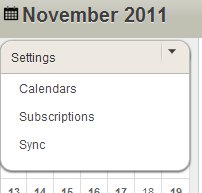
A calendar administrator just needs to go to Settings > Setup & Import. On Step #2 there is a link labeled "Import iCal Files".


Why has this privilege been given only to administrators. I used to be able to do this with view and edit permissions and now i can't in 2.0?
Thanks,
Isaac
Community Administrator
#3
Moderator note: Since this is a new question, a new thread was split off of an existing one.
Have you searched the Help Center? Try doing a Google search and adding "site:churchofjesuschrist.org/help" to the search criteria.

So we can better help you, please edit your Profile to include your general location.
Community Moderators
#4
isaackunz wrote:Why has this privilege been given only to administrators. I used to be able to do this with view and edit permissions and now i can't in 2.0?
Note that unless a Church employee (has ID badge avatar below name) responds, the rest of us can only provide speculation.

Only administrators have access to all calendars. An iCal import may require events to be imported to a calendar for which an editor of another calendar does not have edit rights. This should have been the same for v1. I can't verify this because I have always been an administrator.
JD Lessley
Have you tried finding your answer on the ChurchofJesusChrist.org Help Center or Tech Wiki?
Member
#5
Importing an ics file was available to all users in 1.x. A limitation of our redesign is that we didn't have a general place to put this feature besides the setup and import tab. Unfortunately that tab only shows up for administrators right now. I have added a task to our 2.1 backlog to change this functionality and make available the ics file import available to calendar editors as well as admins. I'm not sure of the timing on the 2.1 release but it will be our next release with new features (after we get done with the 2.0.x bug fix releases).
New Member
#6
calendarclip.jpg
calendarclip.jpg (7.67 KiB) Viewed 1302 times
thanks for the response. So the link to the page was removed rather than changing permissions? would it be possible to get the functionality if i use the proper jsp argument
https://lds.org/church-calendar/setting ... sp#<import or something> It should show the link when you hover over the button.

I just don't have a button. My ward administrator said he has added me as admin and i still don't see it.

Thanks,
Isaac
Senior Member
#7
isaackunz wrote:would it be possible to get the functionality if i use the proper jsp argument
I don't know, but here's the link for you to try:

https://lds.org/church-calendar/setting ... pAndImport
New Member
#8
mfmohlma wrote:I don't know, but here's the link for you to try:

https://lds.org/church-calendar/setting ... pAndImport

Thanks for the reply, unfortunately this does not work. is this import ability scheduled to be released to calendar editors? Where can i see the scheduled feature releases? Is there a place i can submit a feature request?
Thanks,
Isaac
Community Administrator
#9
isaackunz wrote:Thanks for the reply, unfortunately this does not work.

Right. As has been noted, the import capability is currently restricted to calendar administrators. It doesn't matter whether you try to do it by using a URL or navigating through the interface; if you are not an administrator you can't do an import right now.
isaackunz wrote:is this import ability scheduled to be released to calendar editors?

Yes, as kyleq noted in an earlier post in this thread, this change is scheduled for version 2.1.
isaackunz wrote:Where can i see the scheduled feature releases?

There is no single place where you can see scheduled releases. The calendar developers sometimes drop little bits of information about upcoming releases in this forum, which is certainly helpful, but it's not any sort of comprehensive list of features, and there are certainly no specific dates mentioned.
isaackunz wrote:Is there a place i can submit a feature request?

You've already submitted the request for the import ability on this thread, and it's been confirmed by someone on the development team. I don't see much point in trying to submit it any other way. You can always use the Feedback link on lds.org, but that system is notoriously backed up, and slow in responding (if at all).
Questions that can benefit the larger community should be asked in a public forum, not a private message.
Church Employee
#10
aebrown wrote:Yes, as kyleq noted in an earlier post in this thread, this change is scheduled for version 2.1.
To give an update, this item is added to the backlog, but probably won't make the 2.1 release (scheduled for Q1 next year). Keep in mind that we are balancing requests from users, the priesthood department (our official "customer"), and other church departments - all with a small team working on several different projects at once.

We're working as fast as we can, and are making great strides in increasing our velocity, so there is hope for the future... :)

The workaround for now is to work with a default unit admin. There should be several in each ward, not to mention the fact that they can add others as admins as necessary.
New Member
#11
Super!
Thanks,
Isaac
