Can you import from Google Calendar?

13 postsstarted by JohnSutherland 3,057 viewsoriginal topic

New Member
#1
Since Calendar 1.0 did not work very well for Out of Unit Members, my YSA stake has been using a Google Calendar. Is it possible to import events from a Google Calendar into Calendar 2.0? Or will I need to manually add them?

Community Administrator
#2
johnsutherland wrote:Since Calendar 1.0 did not work very well for Out of Unit Members, my YSA stake has been using a Google Calendar. Is it possible to import events from a Google Calendar into Calendar 2.0? Or will I need to manually add them?
You can import an iCal file (which Google Calendar is indeed capable of exporting) into Calendar (it was possible in 1.0 and still is possible in 2.0).

A calendar administrator just needs to go to Settings > Setup & Import. On Step #2 there is a link labeled "Import iCal Files".
Questions that can benefit the larger community should be asked in a public forum, not a private message.
New Member
#3
I can see where in some step it says I can import an ICS file, but I don't know how to tell it where the file is (there is no search for file functionality) and I always get the following error when I try anything:
Screen Shot 2011-11-15 at 5.16.34 PM.jpg
(9.62 KiB) Downloaded 27 times
Thoughts?
Community Administrator
#4
johnsutherland wrote:I can see where in some step it says I can import an ICS file, but I don't know how to tell it where the file is (there is no search for file functionality)
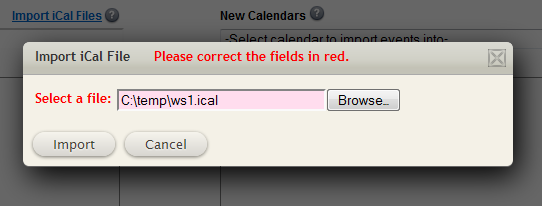
Not to be too picky, but to be clear, it says "Import iCal Files" -- it doesn't say ICS. In the image below, you can see the "Import iCal Files" in the upper left part of the gray region, and you can see the box that lets you search for a file.
import.png
import.png (18.5 KiB) Viewed 2013 times
So are you not seeing the "Import iCal Files" link, or when you click it, do you not see the Import iCal File popup that lets you select a file location?
Questions that can benefit the larger community should be asked in a public forum, not a private message.
New Member
#5
Sorry about iCal versus ICS. I was probably thinking about calling my friend in ICS when I typed that.

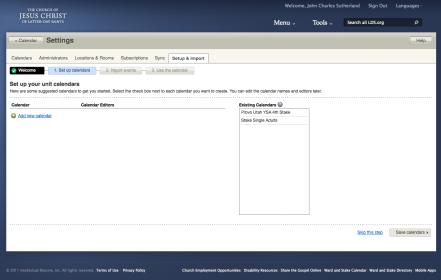
Let's take this slowly. I get to this screen:
Screen Shot 2011-11-16 at 2.56.16 PM.jpg
Screen Shot 2011-11-16 at 2.56.16 PM.jpg (13.36 KiB) Viewed 2012 times
I don't want to add a calendar and I see that my YSA calendar already exists, so I skip this step which takes me to:
Screen Shot 2011-11-16 at 2.56.40 PM.jpg
Screen Shot 2011-11-16 at 2.56.40 PM.jpg (13.02 KiB) Viewed 2012 times
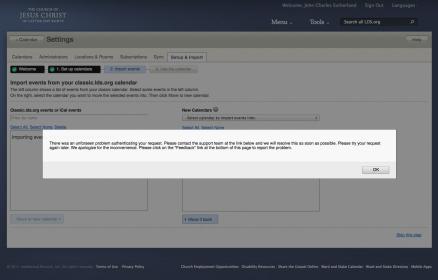
A lovely error screen about an unforeseen (note spelling problem) error with instructions to use a non-existent feedback button at the bottom of the page. So, I do the only thing available to me and hit OK.
Screen Shot 2011-11-16 at 3.05.19 PM.jpg
Screen Shot 2011-11-16 at 3.05.19 PM.jpg (14.87 KiB) Viewed 2009 times
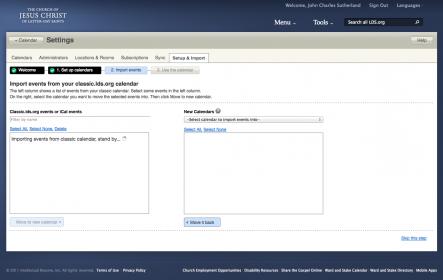
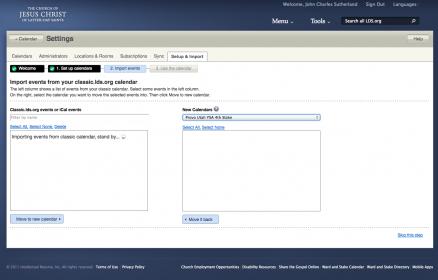
Now we get a spinning Walmart flower in the left box that never stops spinning. Why? I have no idea. So I decide to Select a calendar to import events into.
Screen Shot 2011-11-16 at 3.07.36 PM.jpg
Screen Shot 2011-11-16 at 3.07.36 PM.jpg (15.25 KiB) Viewed 2010 times
And here I don't see the option to import an iCal file as shown in your picture. The only option left is to skip this step at which point it tells me the calendar is ready to use, but I haven't been given the option to import an iCal file.

Where am I going wrong?
Community Administrator
#6
johnsutherland wrote:Where am I going wrong?

Thanks for the details. The place you are going wrong (well, not you personally, but what the system is doing to you) is that the link "Import iCal Files" only appears when the list of events from the classic.lds.org calendars is done being built. The fact that you get an eternal spinner is an indication that that particular process never completes, so the link never appears.

Why does it not appear? I don't know, but it is related to the process of retrieving events from the old calendar. Did your YSA stake use the classic calendar? If so, did it have lots of events? I don't know if that is a problem, but it's not too hard to imagine it timing out if there are too many events (or maybe it doesn't time out, but it takes 5 minutes and you are only waiting 3 minutes before you decide it isn't working. But I really doubt that is the problem -- the fact that you are getting a strange error message immediately upon entering this step is an indication that something unusual is going on.

If you want to analyze this problem with Firebug (as you did with another problem) you might be able to post some details that could help a developer track down the problem.
Questions that can benefit the larger community should be asked in a public forum, not a private message.
New Member
#7
aebrown wrote: Did your YSA stake use the classic calendar? If so, did it have lots of events?
No, we never used the Classic calendar. Full disclosure: I tried to create one once in calendar 1.0 and as I recall it had the same problems of notifying people in the home stake for approval as I'm seeing in calendar 2.0. I recently deleted that calendar which used a BYU stake name.

aebrown wrote: If you want to analyze this problem with Firebug (as you did with another problem) you might be able to post some details that could help a developer track down the problem.
Okay, I'll give Firebug a try.
New Member
#8
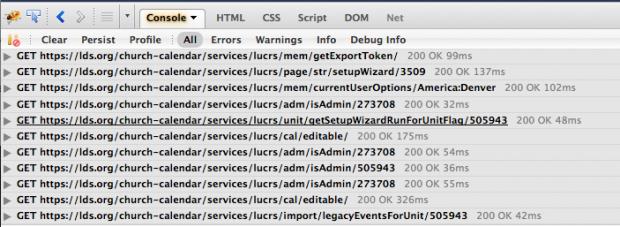
I don't see any errors using Firebug. It almost looks like the import finishes. Is it possible that an empty classic calendar would cause the code to think the import had not happened? Here's the tail of the console window:
Screen Shot 2011-11-16 at 3.53.54 PM.jpg
(43.25 KiB) Downloaded 30 times
Church Employee
#9
johnsutherland wrote:I don't see any errors using Firebug. It almost looks like the import finishes. Is it possible that an empty classic calendar would cause the code to think the import had not happened? Here's the tail of the console window:

Can you expand the last request (/import/legacyEventsForUnit) and let us know what actually came back in that response?
New Member
#10

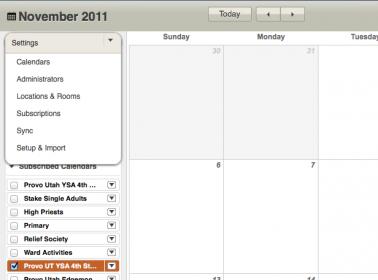
I cannot find the Import Option . . .

. . . altho I've clicked on 'Settings' in two areas on the calendar screen. How do I navigate to the correct 'setting button' & 'import option'?
New Member
#11
jdcr256 wrote:Can you expand the last request (/import/legacyEventsForUnit) and let us know what actually came back in that response?

Here it is:

The response is:
{"good":false,"message":" user not authorized"}
The header is:

Response Headers
DateThu, 17 Nov 2011 16:42:05 GMTCache-Controlmax-age=0, no-cache, no-storeExpires-1Content-Typeapplication/json;charset=UTF-8Content-Length47ConnectionKeep-AliveRequest Headers
Hostlds.orgUser-AgentMozilla/5.0 (Macintosh; Intel Mac OS X 10.7; rv:8.0) Gecko/20100101 Firefox/8.0Acceptapplication/json, text/javascript, */*; q=0.01Accept-Languageen-us,en;q=0.5Accept-Encodinggzip, deflateAccept-CharsetISO-8859-1,utf-8;q=0.7,*;q=0.7Connectionkeep-aliveX-Requested-WithXMLHttpRequestRefererhttps://lds.org/church-calendar/settingsTabPane.jspCookieJSESSIONID=5F2A2A10D1D5991C952E7ABC3724FA3C; TS57a415=764ba5619c0826826b93c91fc2aa7166522c9740cae20f5b4ec52b1494c5a4894438e33960ac0ec5c79468a7; s_vi=[CS]v1|275E0FDB05162618-600001A400007217[CE]; lds-youTube=true; lds-preferred-lang=eng; ObSSOCookie=KA0EAwkZpIJveJRPBorRCtKLJ4F6VhyKKT8QARSk69cnRxlFWFsWN9xEgM4Bj4n40IvRuOt4wdyobh86YoZxz%2F5vdLFKBmX9%2BEDLXqgMMQnwKUIvIIzo75PeydaCSAlgf74i7JrX2oW6HOCmfC6PwMnZcGdE%2BnkT5Qgq5mKuLpcYaiOSZ4tDdd7IBfclvFUsVVi49NZahf4Y2mQnS6OoJ4ThIWb2CAWpQxHXtLLvEE1me72ybpaISxdL%2F7TQddYPyruQeWTHDeiQYHCmOBoFow%3D%3D; TScd105b=740c8e49e7c34b86ed1c48d8d7a0d8b0522c9740cae20f5b4ec5395294c5a489087f761d4f6719a6a7b3c4bc0012469dcee77251; s_ppv=100; s_cc=true; s_sq=%5B%5BB%5D%5D; eventLocationCheckboxStr=; signmeout-goto=lds.org/?lang=eng&signmeout; s_cc=true; mbox=check#true#1321548141|session#1321548080165-587494#1321549941; s_pv=Local%20Unit%20Calendar
The JSON is:

good
false
message
" user not authorized"
So, why am I not authorized?

New Member
#12
BrotherBill, click on the image below and you should see "Setup & Import" in the "Settings" drop down menu.
Screen Shot 2011-11-17 at 9.47.31 AM.jpg
Screen Shot 2011-11-17 at 9.47.31 AM.jpg (12.54 KiB) Viewed 544 times
Church Employee
#13
johnsutherland wrote:" user not authorized"
So, why am I not authorized?
I was able to duplicate this using the headers you sent. We are hoping to get a bug fix release out by tonight, so rather than fixing the 'user not authorized' issue (which I still haven't found the cause of) we are trying to fix it so it enables the ical file link regardless of the response we get.

We may not have our release ready for tonight, and we avoid doing releases on Fridays (too much risk of causing problems on the weekend, when we have the highest traffic). So the fix should be there tonight or early next week.