Duplicate location name showing up for event scheduling

28 postsstarted by krowberry 4,121 viewsoriginal topic

New Member
#1
I am the stake clerk and am working with the building scheduler. When I go into "Settings" and "Location & Rooms," I am seeing one entry for one of the buildings in the stake. When I go to schedule an event, the name of the building is showing up twice in the drop down list. When I edit the location information and turn off the box "This location can be scheduled by Wards and Stakes", the location still shows up for scheduling an event. However, if an event is scheduled at the shown location, it does not show up when looking for the events scheduled for that building. Any ideas on how to solve the problem?

FYI. I changed the name on the location entry from the FM group to a friendly name, which caused a new location entry to be created with the ward names. I am guessing that the issues are related, but I don't know how to get rid of this duplicate entry. Thanks for any ideas.
Community Administrator
#2
krowberry wrote:When I edit the location information and turn off the box "This location can be scheduled by Wards and Stakes", the location still shows up for scheduling an event. However, if an event is scheduled at the shown location, it does not show up when looking for the events scheduled for that building. Any ideas on how to solve the problem?

That's unusual. If I uncheck the "location can be scheduled" box and save the location, I no longer see the location when scheduling events. Could you have browser caching issues that cause the location to still show up even after it's not available anymore?
krowberry wrote:FYI. I changed the name on the location entry from the FM group to a friendly name, which caused a new location entry to be created with the ward names. I am guessing that the issues are related, but I don't know how to get rid of this duplicate entry. Thanks for any ideas.

Other people have reported duplicate entries appearing when they change the names of official locations specified by the FM group. But on the other hand, I have always edited those names and have never had duplicate locations show up.

In any case, it seems like the fix should be to modify one of the names in such a way that you can distinguish the two buildings. One of the buildings should have far less events and reservations than the other, and you should work on moving all those events and reservations to the more commonly-used location. Then disable that building.

I know you said that you are having challenges disabling the building, but one additional thing you might want to check is what a different person's experience is after you have disabled the building. When they use a different computer and account to access the calendar, do they also still have the option of using the disabled building? That might help you narrow down whether it is a system issue or local to your browser.
Questions that can benefit the larger community should be asked in a public forum, not a private message.

New Member
#3
We essentially have this same problem. In our case, we have a building from another Stake showing up on the event pic list. However, it is not on the list of available locations nor any where on the "Locations & Rooms" setting. aebrown suggests modifying the name and working to move all the scheduled events to the correct building and then disabling. For me, the only place this building shows up is on the pic list. I can't modify the name or see events scheduled at that location unless they happen to be on my unit calendar. If they are on other unit calendars I can't see them since there is no available location selection for this building. In my case, I have reset my cache and have tried two browsers, Chrome and IE.

To be clear, there is a complicating factor for us. We were displaced from our building this year for a period of time. One of our units was using the building from the other Stake. So I suspect it is a holdover from that. But even given that, I still have no way to get rid of the building from the pic list. I am checking with our FM group to see if they have assigned us to the building. However, even if they have and they remove it, I don't know how I will get rid of the building from the pic list.
Community Administrator
#4
wkadams wrote:We essentially have this same problem. In our case, we have a building from another Stake showing up on the event pic list. However, it is not on the list of available locations nor any where on the "Locations & Rooms" setting.

I suspect you'll need to contact an admin in the other stake to have them remove you from the list of users for that location.
Have you searched the Help Center? Try doing a Google search and adding "site:churchofjesuschrist.org/help" to the search criteria.

So we can better help you, please edit your Profile to include your general location.
New Member
#5
We're experiencing the same problem. I'm getting the same location displayed several times on both the calendar and locations setup page with no way to delete them. I've tried unchecking the box labeled "This location can be scheduled by Wards and Stakes" but they still show up on the calendar. We are also experiencing problems with locations disappearing from the calendar and dropping the reservations made to it.

Are there plans to keep the old calendar going into 2012 if the bugs with the new system aren't fixed by then?
New Member
#6
We have the same location showing up 6 times on the "locations" screen. I am unable to delete them. Can anyone tell me how to get rid of at least 5 of them?
Community Administrator
#7
gemss wrote:We have the same location showing up 6 times on the "locations" screen. I am unable to delete them. Can anyone tell me how to get rid of at least 5 of them?
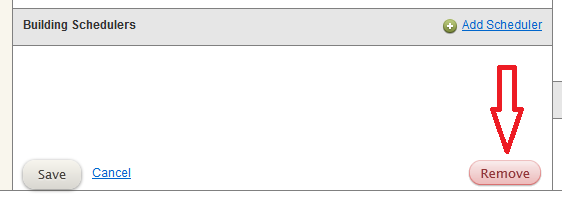
What do you mean when you say you are unable to delete them? To delete a location, you need to first edit it, and then you will see a Remove button to the right of the Save button. You will not see a Remove button, however, for locations that came from the FMAT database -- it is only available for custom locations.

So are you aware that you need to Edit a location in order to be able to Remove it? Or are you trying that, but you don't see a Remove button. And if that is the case, do you not see a Remove button for each of the locations, or just for some of them?
Questions that can benefit the larger community should be asked in a public forum, not a private message.
Church Employee
#8
There is an issue with a very small number of units where our FMAT data duplicated certain buildings multiple times. The bug that caused the duplication was fixed a couple days ago, but we are still trying to clean up the data. The problem in the clean up is that we need to be sure not to delete locations that are being used, we need to find the specific duplicates that are not in actual use within the calendar app. In some cases, there are multiple instances of duplicates that both have reservations/events on them.

As of right now, we have cleaned up all but a small handful of the duplicates. If you have a duplicate, if you could ensure that it is marked as unscheduleable, and does not have any reservations/events scheduled on it. That will make it a lot easier to clean up.
New Member
#9
Thanks for all your help. :D

Yes, I did go into the "edit" location, but it does not let me delete them, so it must be coming from the FMAT as mentioned.

We're in the Rigby Idaho South Stake and the locations that are in multiple are listed as "Garfield 1,2"....we have 6 of them. I tried to change the name of one of them to "Test" but it listed it 6 times as well. So we have 6 locations named Garfield 1,2 and 6 locations named "Test". :o

I created a new location for our Garfield 1st & 2nd ward build....not sure if that's going to create a problem for us later?

Our stake hasn't started using the new calendar yet.....just a few test schedules etc. (we're planning on jumping in head first on January 1) so feel free to do what ever you need to. :-)
Community Administrator
#10
gemss wrote:Yes, I did go into the "edit" location, but it does not let me delete them, so it must be coming from the FMAT as mentioned.

So it does sound like you are afflicted by the problem jdcr256 mentioned.
gemss wrote:We're in the Rigby Idaho South Stake and the locations that are in multiple are listed as "Garfield 1,2"....we have 6 of them. I tried to change the name of one of them to "Test" but it listed it 6 times as well. So we have 6 locations named Garfield 1,2 and 6 locations named "Test".

In order to make your life easier for now, and to make it easier for the developers to clean up this situation, here's what you need to do:
  1. Remove all locations that didn't come from FMAT (they are the locations that have a Remove button available when you Edit the location).
  2. Select one of the locations (the one that has the most events and reservations already created for it would be a good choice) and make sure that as you Edit that location you:
    1. Change the name to something distinct from the others (choose a name you're happy with being the public location name)
    2. Make sure that "This location can be scheduled by Wards and Stakes" is checked.
  3. Review all your existing events and reservations and for any that are associated with the 11 other locations, change them to use the one good location.
  4. For all other locations, Edit them and make sure that "This location can be scheduled by Wards and Stakes" is not checked.
That way you should only have one location that anyone can use for making new events and reservations, and it will be clear to the development team exactly which locations need to be removed (and they can do so with no negative impact on any of your calendar data).
gemss wrote:I created a new location for our Garfield 1st & 2nd ward build....not sure if that's going to create a problem for us later?

Yes, that will cause problems for you later. I'd recommend that you delete that location -- the last thing you need in your situation is one more location! :)
Questions that can benefit the larger community should be asked in a public forum, not a private message.
New Member
#11
Just wanted to say "Thank you".

I logged in to our calendar yesterday and all the duplicate locations have been removed. Our stake will start implementing the new system over the next few weeks. :)
New Member
#12
Thanks for the responses, ideas and suggestions. I have submitted a case to the MLS support team for our situation. We have have removed the check from all of the boxes stating "This location can be scheduled by Wards and Stakes". In theory, no buildings should now show up for members to schedule. However, we still have one location entry showing for one building as I noted previously. I have no way to stop the scheduling of this location. I opened a case with the MLS support team and sent them copies of the different screens so they can see what is happening. I have checked with different users on different machines to validate the situation. I have not checked the situation using different browsers. At this point, I am waiting for the response from the support team. I should also note that some of the duplicate location entries we were seeing previously have been deleted.
Member
#13
Did this issue get fixed for the people that were experiencing it?

Our stake now has this problem. I'm down at the ward level so I don't have visibility to modify locations... but I'd love to suggest a fix up to someone at the stake level.

Should I tell them to follow these instructions posted by aebrown? After the instructions are followed, then what? Should they call someone or email someone to have it fixed from the developer's side?

Thank you!
Church Employee
#14
nathangg wrote:Our stake now has this problem. I'm down at the ward level so I don't have visibility to modify locations... but I'd love to suggest a fix up to someone at the stake level.

The problem of the system automatically creating duplicate locations has been fixed. If a new duplicate has shown up in your stake, my first guess would be that someone created it manually. That's where I'd start investigating.
New Member
#15
jdcr256 wrote:The problem of the system automatically creating duplicate locations has been fixed. If a new duplicate has shown up in your stake, my first guess would be that someone created it manually. That's where I'd start investigating.
I'm a calendar administrator in the Parker Colorado Stake, and the list that shows up when editing an event is not the same list that shows up under Settings->"Locations & Rooms". Is this the same problem or should I open a ticket with MLS?
Community Administrator
#16
adriananderson wrote:I'm a calendar administrator in the Parker Colorado Stake, and the list that shows up when editing an event is not the same list that shows up under Settings->"Locations & Rooms". Is this the same problem or should I open a ticket with MLS?

Unless the check box "This location can be scheduled by Wards and Stakes" is checked when you edit a Location, that Location will not appear in the list of locations when editing an event.

Is that what you are seeing?
Have you searched the Help Center? Try doing a Google search and adding "site:churchofjesuschrist.org/help" to the search criteria.

So we can better help you, please edit your Profile to include your general location.
Community Moderators
#17
adriananderson wrote:'m a calendar administrator in the Parker Colorado Stake, and the list that shows up when editing an event is not the same list that shows up under Settings->"Locations & Rooms". Is this the same problem or should I open a ticket with MLS?
Can you be more specific about the differences between the list in "Locations & Rooms" and what is displayed in the "Location:" list box of an event setup screen? There can be differences depending on the setup of a location.

When a location is not set up with the "This location can be scheduled by Wards and Stakes" checked, the location will not appear on any calendar location list in any unit within the stake.

Another setting that will cause the location to not appear in the list of available locations when creating an event is when units have not been added to a location. A calendar editor in the Hillside Ward will not see the Valley Meetinghouse if the Hillside Ward has not been added to the Valley Meetinghouse location.

See Setting up locations for more information.
JD Lessley
Have you tried finding your answer on the ChurchofJesusChrist.org Help Center or Tech Wiki?
Member
#18
This is what I am seeing when I try to create an event:

http://screencast.com/t/S8nWIbcxaQg

(I'm in the same stake as Adrian... I see things from the ward level and Adrian from the stake level).

Here is what part of the admin locations screen looks like from his end:

http://screencast.com/t/zuR1QhW2S

So it appears that the admin screen is only showing one location for each building, but when I try to schedule an event from my end two locations show up for a few of the buildings.

Hopefully this helps visualize the problem? Would you like me to get more screenshots?

Thanks~!
-- Nathan
Community Administrator
#19
Are the buildings shared between stakes (Parker Colorado and Arapahoe Colorado)? I think what's happened is that the other stake has a location and has shared it with your units. So "their" locations show up when you go to schedule as well as the ones you have at your stake level. But since you don't manage their locations, it doesn't show up in the locations screen.

I'd guess that the buildings should only exist at the stake level in the agent stake and be shared with the non-agent stake/wards. The duplicate location in the non-agent stake needs to be deleted and the associated activities moved to the remaining location.

Because as it stands now, you've got duplicate locations which could cause double-booking of events.
Have you searched the Help Center? Try doing a Google search and adding "site:churchofjesuschrist.org/help" to the search criteria.

So we can better help you, please edit your Profile to include your general location.
Member
#20
RussellHltn wrote:Are the buildings shared between stakes (Parker Colorado and Arapahoe Colorado)? I think what's happened is that the other stake has a location and has shared it with your units. So "their" locations show up when you go to schedule as well as the ones you have at your stake level. But since you don't manage their locations, it doesn't show up in the locations screen.
This is exactly what we found out to be the problem. The other stakes' locations are showing up when we try to create/edit events, but their locations do not show up on our "Locations & Resources" screen.
RussellHltn wrote:I'd guess that the buildings should only exist at the stake level in the agent stake and be shared with the non-agent stake/wards. The duplicate location in the non-agent stake needs to be deleted and the associated activities moved to the remaining location.

Because as it stands now, you've got duplicate locations which could cause double-booking of events.
We've asked the other Stake to delete the extra location so we can share the location with them (we are the agent stake), but they said they can't because it is the FM database. I don't have access to any of the stake screens, so I don't know what to do to "make it right".

Can locations be deleted? I've seen screenshots but I don't see any delete button.

Also, I just read, "Locations and resources shared by multiple stakes" (it is on the bottom of the page). It says that the integration is automatic if locations are entered into the FMAT database.

How can we tell if a location is in the FMAT database vs if it was created through the calendaring system?

Perhaps locations created through FMAT cannot be deleted and locations created through the calendaring system (outside of FMAT) can be deleted?
Community Administrator
#21
nathangg wrote:We've asked the other Stake to delete the extra location so we can share the location with them (we are the agent stake), but they said they can't because it is the FM database. I don't have access to any of the stake screens, so I don't know what to do to "make it right".
Locations created through FMAT cannot be deleted, but they can be effectively disabled. To do that, the other stake needs to:
  1. Go into Settings > Locations & Rooms
  2. Edit that shared location
  3. Uncheck the box labeled "This location can be scheduled by Wards and Stakes"
  4. Save their changes
I'm not 100% certain, but pretty confident that doing this will cause that location to no longer appear as a duplicate on your list of locations when you go to schedule events.
nathangg wrote:How can we tell if a location is in the FMAT database vs if it was created through the calendaring system?

Perhaps locations created through FMAT cannot be deleted and locations created through the calendaring system (outside of FMAT) can be deleted?
Yes, that's the reliable way to tell if a location was created through FMAT -- it cannot be deleted. If the location was manually created, there will be a Remove button (see screen shot below). If it was created through FMAT, there will be no Remove button.
RemoveLoc.png
RemoveLoc.png (7.74 KiB) Viewed 1092 times
Questions that can benefit the larger community should be asked in a public forum, not a private message.
Member
#22
aebrown, and RusselHtn, THANK YOU!

Here is what we figured out:

* We first had to figure out which stake was the agent stake for all three of the shared buildings (yes, our stake shares three buildings with the stake south of us)
* Once we figured out which stake was the agent stake, we decided to use that stake's location [1].
* Once we knew which locations we were going to use, we had to disable all the extra locations (by going into the non-agent stake's admin screens)

Now comes a huge cleanup effort to put all the events back on the right locations.

[1] Note: some of the locations must be set up wrongly in the FM database because the remove button does NOT show up for some shared locations even though the OTHER stake is the agent stake. (Wow, that's a mouthful).

For example, there is a location "Bayou Gulch Building" in the Parker stake admin screens, but the Parker South Stake is the agent stake. There is no "Remove" button when viewing this location on the Parker Stake's admin screens. This makes me wonder that perhaps the FM database has the Parker Stake as the agent stake for this building when in fact the agent stake should be the Parker South Stake.

Should we get this fixed in the FM database FIRST, before changing all of our events around? Or does it matter? Is there any way I can see if the FM database is right/wrong?

Thanks~!
Community Administrator
#23
nathangg wrote:* We first had to figure out which stake was the agent stake for all three of the shared buildings (yes, our stake shares three buildings with the stake south of us)
* Once we figured out which stake was the agent stake, we decided to use that stake's location [1].
* Once we knew which locations we were going to use, we had to disable all the extra locations (by going into the non-agent stake's admin screens)

That's good that you figured out first who was the agent stake. I had incorrectly assumed that your stake was the agent stake. Indeed, the best practice is for the agent stake to define the "official" location, and share it with all other units who share that building.
nathangg wrote:Note: some of the locations must be set up wrongly in the FM database because the remove button does NOT show up for some shared locations even though the OTHER stake is the agent stake.

There have been some communications that lead me to believe that the FMAT database will link that building to all the stakes that use the building, even those stakes that are not the agent stake. Early versions of the calendar documentation indicated that buildings shared among stakes would only be shareable on the calendar if all the stakes involved were connected to the building in FMAT. If I recall correctly, that was before the feature for assigning a unit to a location was created. But in any case, that seems to imply that in FMAT all the stakes are linked to the building. If that theory is correct, all the stakes will end up seeing that location in their list of locations, and the only option they would have is to disable that building from being scheduled.

It would be much better, in my opinion, if the building only showed up in the location list for the agent stake. That would require an adjustment in the linkage between FMAT and the calendar system. But as you have learned by painful experience, it really only makes sense for that location to appear in one stake's list of locations, and that would of course have to be the agent stake.
nathangg wrote:Should we get this fixed in the FM database FIRST, before changing all of our events around? Or does it matter? Is there any way I can see if the FM database is right/wrong?

If my theory is correct, the FM database itself is correct; it's just that the calendar system puts that building in the list of locations for all stakes involved. Fixing that would require a code change, which I don't think you want to wait for. You could (through your stake's PFR) ask the FM Group manager to verify that FMAT is set up correctly for this building.

But in the meantime, I think you've got the right strategy for sorting out events in this shared building: the agent stake shares the location, and the other stakes use that location. For existing events that are on the duplicate locations, move all the events over to the official shared location, and disable the duplicate locations from being available for scheduling.
Questions that can benefit the larger community should be asked in a public forum, not a private message.
Member
#24
aebrown wrote:
If my theory is correct, the FM database itself is correct; it's just that the calendar system puts that building in the list of locations for all stakes involved. Fixing that would require a code change, which I don't think you want to wait for. You could (through your stake's PFR) ask the FM Group manager to verify that FMAT is set up correctly for this building.
Hmm, I'm not so sure that the FM database is correct right now for our stakes because I just got an email from a stake clerk mentioning that the FM Group Manager had found that the wrong wards were assigned to the wrong buildings for these shared locations. Since the Parker South Stake split from the Parker Stake just 10 months ago (and 2 ward splits occurred at the same time, along with some wards going to different buildings) it is possible that some things didn't get updated in the FM database.

I'll suggest that the FM Group Manager verify that the agent stake is setup properly also (via the stake clerk).
But in the meantime, I think you've got the right strategy for sorting out events in this shared building: the agent stake shares the location, and the other stakes use that location. For existing events that are on the duplicate locations, move all the events over to the official shared location, and disable the duplicate locations from being available for scheduling.
Great. I'm glad this plan seems to make sense in how things should be done. Now comes the hard part: getting ALL of our 2012 events on the right locations for three shared locations. :-)
Community Administrator
#25
nathangg wrote:Since the Parker South Stake split from the Parker Stake just 10 months ago (and 2 ward splits occurred at the same time, along with some wards going to different buildings) it is possible that some things didn't get updated in the FM database.

I was just going to suggest that possibility.

Until this calender system came about, I'm not sure what, if any problems would be created by having an out of date database. As such, keeping it up to date may not have been one of their higher priorities. I'm not putting anyone down, I'm just looking at organizational behavior.
Have you searched the Help Center? Try doing a Google search and adding "site:churchofjesuschrist.org/help" to the search criteria.

So we can better help you, please edit your Profile to include your general location.
Member
#26
RussellHltn wrote:I was just going to suggest that possibility.
So, let's guess for a minute. What if a building in the FMAT database has the wrong agent stake AND it gets fixed. Is that going to mess with our calendar events?

For example: the "Bayou Gulch" building originally belonged to the Parker Stake (before the split). After the split, if the FM database wasn't updated, then the Bayou Gulch building still belonged to the Parker Stake, even though it should belong to to the Parker South Stake.

Fast forward 10 months and both stakes have done a lot of their 2012 planning with "Bayou Gulch" being setup wrong (Parker Stake is sharing Bayou Gulch with Parker South instead of vice-versa). Now we are trying to fix all of this... if it is wrong in the FMAT database AND then they change it, are all of the events at the "Bayou Gulch" location going to get wiped out and need to be re-saved?
Community Administrator
#27
nathangg wrote:Fast forward 10 months and both stakes have done a lot of their 2012 planning with "Bayou Gulch" being setup wrong (Parker Stake is sharing Bayou Gulch with Parker South instead of vice-versa). Now we are trying to fix all of this... if it is wrong in the FMAT database AND then they change it, are all of the events at the "Bayou Gulch" location going to get wiped out and need to be re-saved?

The events would definitely not get wiped out; the worst that would happen (and it's bad enough) is that all the events that use that location would suddenly be listed as using "No Location." That happened during the v2 beta a couple of times.
Questions that can benefit the larger community should be asked in a public forum, not a private message.
Member
#28
aebrown wrote:The events would definitely not get wiped out; the worst that would happen (and it's bad enough) is that all the events that use that location would suddenly be listed as using "No Location." That happened during the v2 beta a couple of times.

So perhaps the only way to be 100% sure of what will happen is to 1) see if FMAT is wrong and 2) fix FMAT and see if the events lose the locations? (I'm not upset, just trying to gauge the potential for having to change a bunch of events).

I wonder how often the sync between FMAT and the calendar database happens. Hopefully within 24 hours after the change?