Inability to create new events. Error msg cites a conflict with nonexixtant event

17 postsstarted by KirbyLSmith 3,769 viewsoriginal topic

New Member
#1
I have set the time zones for the locations and reactivated them. I can delete cancelled events but am unable to create a new event.

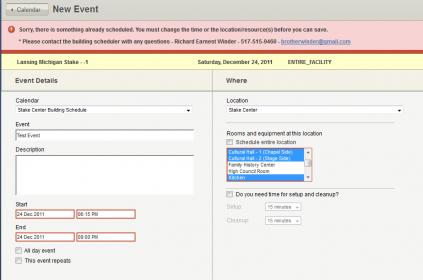
Every time I try to create a new event, I am allowed to set up the event any way I wish but when I click the Create Event Button I receive the same error message, shown in the attachment. It makes no difference what day or month I try to create it, I always get the same error message and all of my input goes away when I back away from the prospective event.

To make matters more frustrating the calendar resets to the current month and I have to click month by month to the future month I am working in.
Test_Event_for_Create_Problem.jpg
Test_Event_for_Create_Problem.jpg (15.78 KiB)
Church Employee
#2
It looks to me like there is a blocked reservation during that time preventing the scheduling of the resource. You should be able to work with a Building Scheduler assigned to that location to work it out.
Community Administrator
#3
KirbyLSmith wrote:I have set the time zones for the locations and reactivated them. I can delete cancelled events but am unable to create a new event.

Every time I try to create a new event, I am allowed to set up the event any way I wish but when I click the Create Event Button I receive the same error message, shown in the attachment. It makes no difference what day or month I try to create it, I always get the same error message and all of my input goes away when I back away from the prospective event.
That message says that the stake has reserved the entire facility. Putting that fact together with the other information you provided, it looks like the stake has reserved the stake center for every day. Is it possible that this is really true?

You didn't mention what your calling is, so I don't know if you can view reservations directly under settings. But in any case, you can go to Week view, then check the box by the stake center location. If indeed the stake has a reservation for the stake center for every day, you should see that reservation appear on every day once you check the box.

If indeed the stake center is reserved every day, you can ask the stake center's building scheduler to remove or adjust that reservation to free up the stake center for scheduling.
KirbyLSmith wrote:To make matters more frustrating the calendar resets to the current month and I have to click month by month to the future month I am working in.
You're not the only one frustrated with this. See the thread Bug: Production calendar returns to the current month when editing an event.
Questions that can benefit the larger community should be asked in a public forum, not a private message.
New Member
#4
KirbyLSmith wrote:
To make matters more frustrating the calendar resets to the current month and I have to click month by month to the future month I am working in.

I agree with KirbyLSmith. The resetting to the current month with every save is very time consuming. It takes a lot of time to enter hundreds of events and having to start at today's date with every entry increases data entry time.
Community Administrator
#5
cindichr wrote:I agree with KirbyLSmith. The resetting to the current month with every save is very time consuming. It takes a lot of time to enter hundreds of events and having to start at today's date with every entry increases data entry time.
That's fine, but please post comments regarding that topic to the thread Bug: Production calendar returns to the current month when editing an event. That issue is a side issue from the topic of this thread (inability to create new events). Posting to the main thread covering a topic will make your comment much more valuable than posting to an unrelated thread.
Questions that can benefit the larger community should be asked in a public forum, not a private message.

New Member
#6
There is no blocked reservation. We never used the blocking capability. I am the Stake Building Scheduler, the only building scheduler in the entire stake. The Stake Clerk, who put in many of the events, from the Stake Calendar draft did make quite a few of the events to use the entire building, because he did not know any better. I spent a good bit of time removing the checks from that box and telling members never to check it. We never schedule the entire building unless the event is actually going to use almost every room in the building, like the Annual Family History Seminar or the Semi Annual Women's Conference.
New Member
#7
If it were true that the stake reserved the entire building for every day of the year (like my Ward Clerk scheduled the monthly ward potluck for every day of the year) it should show up on the calendar (like the potluck did), but it does not.

I am the Stake Building Scheduler, the only building scheduler in the Stake. We have 10 units in the Stake, 3 units meet in the Stake Center, and the other 7 units have their own buildings, which they do not share. There has never been any need for building schedulers in the other 7 buildings, the Bishop or Branch President normally did any needed scheduling. However, the Stake Center is heavily used not only by the 3 wards who meet there but regularly by 5 other units of the Stake, and others outside the Stake because we are the most centrally located building in Michigan. Multi-Stake Activities are normally held in Lansing because of its location. I have held this position for the last 8 years.

I never assign the entire building to a single event unless they are actually going to use almost all of the rooms. I am usually able to work with the individual organizations so that we can have as many as three, four or more events sharing the building at the same time. The very idea that we could allow individual organizations to schedule rooms and thereby block off others from using them sends shivers up my spine. We set up a system in Version 1 so that the organizations could put in their requests similar to the way we did it in the Classic System.I would then come along and work out any conflicts and make the room assignments. I do not yet know if that system has carried over to Version 2. We will see.

However, the situation is that there are no indications that there is a whole building event that is-keeping me from creating new ones. Is there some way that I can get under the hood ans see what is causing the problem. The Stake insists that they have not done anything with their private schedules that could cause the problem. This delay on the heals of the two day delay while V2 was uploaded is causing me real paid.

Help!
Community Administrator
#8
Maybe you know this but unlike V1, in V2 you must go to week view to see events by location. Is that perhaps why you're not seeing the conflicting event?
Have you searched the Help Center? Try doing a Google search and adding "site:churchofjesuschrist.org/help" to the search criteria.

So we can better help you, please edit your Profile to include your general location.
Community Administrator
#9
KirbyLSmith wrote:If it were true that the stake reserved the entire building for every day of the year (like my Ward Clerk scheduled the monthly ward potluck for every day of the year) it should show up on the calendar (like the potluck did), but it does not.

That's not correct. I was talking about a reservation, not an event. There's a big difference. Reservations are entered under Settings > Reservations, not on the main Calendar view. And unless you have checked the box by the location under "Available Locations" on the main calendar view (which you can only do in Week view), you will never see Reservations on the main calendar view -- you will only see actual events.

Now that I know that you are a stake building scheduler, it's easy to check the reservations. Just go to Settings > Reservations and look at the same time period. So far in all your messages I have seen no indication that you have ever checked the Settings > Reservations page to see if there are reservations. So please check that, and report back what you see. From the error message you posted, it would appear that there is a reservation for the stake unit for the entire location. Or it could be some sort of bug, but no one else is reporting anything like that, so first you should check the reservations so we can either confirm or eliminate a major possibility.
KirbyLSmith wrote:I never assign the entire building to a single event unless they are actually going to use almost all of the rooms. I am usually able to work with the individual organizations so that we can have as many as three, four or more events sharing the building at the same time. The very idea that we could allow individual organizations to schedule rooms and thereby block off others from using them sends shivers up my spine.

Each stake needs to make their own decisions, but I would highly recommend that you reconsider this philosophy. Many stakes are using the new scheduling system with many editors and it works wonderfully. It requires quite a shift in thinking, and their are a few rough spots in the transition, but it ends up being quite efficient and saves the building scheduler a ton of work.
Questions that can benefit the larger community should be asked in a public forum, not a private message.
New Member
#10
Thank You, Thank You!

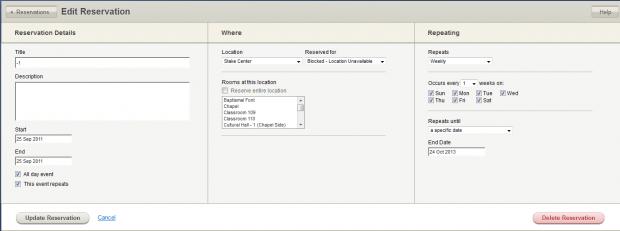
I do not know how it happened or who did it, but there was a reservation called "-1" reserving the entire building for every day of the year. See attachment called Edit Reservation Problem. I have now deleted it and imagine that I will not see this particular problem again.

Please tell me how this could happen and who could have done it.

Again, thank you. Now I can get back to work.
๐Ÿ“Ž Edit_Reservation_Problem.jpg (16.03 KiB)
New Member
#11
Reply to your second question.

I do not have very much experience with V 1. I was handed the job of Building Scheduler when our new Stake Center was completed about 8 years ago (our old SC was burned down by an arsonist). I developed a system using the old Classic Building Schedule that worked reasonably well but was time consuming and frustrating for me because it was completely separate from the Stake and Ward Calendars and I had great difficulty convincing organization leaders that putting the event on the Stake Calendar would not automatically reserve the rooms in the building. Worse yet, was getting the information from the stake leaders to allow me to schedule their event. Every year, around August, the Stake Presidency, High Council, and the Stake Council would sit around the table and agree on the stake events for the next year. Then the Asst. Stake Clerk would enter the basic information into the Stake Calendar and I would re-enter the information into the building schedule. I then added the substantial number of meetings held in the building by the Mission President and other Stake Level organizations. Usually about October or November I would open up the building schedule to requests from the Ward units and organizations to request rooms in the building for the coming year.

I was insistent on sending out an email with a screen shot of the building reservation showing the rooms and times they had and the name, phone number and email address of the contact for the event so that other organizations and members could see who to contact if they had questions about the event. I still insist on this. So when the new calendar system came out (V1) I ignored it and continued to operate the building schedule as a separate system, because SLC promised an update (V2) in June that would include a workable building schedule. In August, the Stake President required me to integrate the two systems. After a lot of effort, I was able to do this. So now we are at V 2. I would love to have a system that reduces the crushing burden of the work needed to keep this kluge of a system operating. However, I do not understand the role of editors, who is going to train and assign them and how I am to coordinate with them. I have a hard enough time convincing the Stake Clerk not to schedule a short event to use the entire building for the entire day. Can you point me toward something that will explain this. I am willing to make a shift in thinking but it needs to be to a system that will work in our situation.
New Member
#12
I do not understand what you mean by seeing events "by Location": only in the Week View. Does this mean that there are events that we will not see in the regular month view?

We effectively have only one Location in our Stake, the Stake Center. Seven of our eight buildings are used by only one unit each. It is the Bishop or Branch President who determines the usage of building rooms. Occasionally, if another unit organization wishes to use one of these buildings, they simply contact the Bishop or Branch President and arrange it. So our calendaring system only assigns rooms in the Stake Center. If the event is to be held in another location it will be shown in the calendar as "other Location" and named in the Event Name or Description.
Community Administrator
#13
KirbyLSmith wrote:I do not know how it happened or who did it, but there was a reservation called "-1" reserving the entire building for every day of the year. See attachment called Edit Reservation Problem. I have now deleted it and imagine that I will not see this particular problem again.

Please tell me how this could happen and who could have done it.

The "-1" tells me it migrated over from the V1 system. The "who" seems to be absent, but was probably someone that wanted to make sure any use of the Stake Center was coordinated through them. Under the V1 system you could have scheduled the event anyway, even with the reservation in place. But there's a bug in V2 that blocked you when it shouldn't have.

Keep in mind that with that reservation gone, any calendar editor that belongs to a unit connected with that building can schedule a room.
Have you searched the Help Center? Try doing a Google search and adding "site:churchofjesuschrist.org/help" to the search criteria.

So we can better help you, please edit your Profile to include your general location.
New Member
#14
Thank you very much!

Now I know how this happened. When I first started merging the old Classic Building Schedule with V-1 last August, I was working with the very tech-savvy 2nd Counselor in the Stake Presidency (who was replaced 2 weeks ago by someone much less tech-savvy). He came up with a way to prevent others from scheduling the building without my approval. by creating a new calendar called "Stake Center Request for Use" which allowed others to enter in the information they needed, requesting the rooms and time. I was to check this calendar daily (because I was not getting email notifications as in the Classic system), go into the events, make any changes necessary and switch them to the appropriate calendar and schedule the rooms. He must have used that blanket reservation to prevent others from making the room assignments.

Because of the bug in V 2. I have no choice but to remove the reservation. How can I be notified as soon as the bug is fixed so that I can re-institute the reservation?
Community Administrator
#15
KirbyLSmith wrote:Because of the bug in V 2. I have no choice but to remove the reservation. How can I be notified as soon as the bug is fixed so that I can re-institute the reservation?
As you can see in this post, the bug has already been fixed for reservations that are assigned to a unit (but not yet for "Blocked" reservations, which is what you previously had in place). So you could reinstitute the reservation right now as being assigned to the stake unit, rather than a "Blocked" reservation. That would mean that any stake administrator (stake presidency member or clerk) could reserve the building, but that's a small set of people -- you could work with the stake presidency to request that none of them schedule an event.

And you can use the forum feature "Subscribe to this thread" (available at the top of each thread under "Thread Tools") to watch the thread I linked to above. I'm sure jdcr256 will post to that thread when the bug with "Blocked" reservations is also fixed.
Questions that can benefit the larger community should be asked in a public forum, not a private message.
Community Administrator
#16
KirbyLSmith wrote:I do not understand what you mean by seeing events "by Location": only in the Week View. Does this mean that there are events that we will not see in the regular month view?
No. Since you are using such a tiny fraction of the capabilities of the calendaring system, you may not care about this issue. But what was referred to is this: in the main calendar view, there is a list of subscribed calendars on the left. You can check boxes by each calendar to show or hide the events associated with each calendar. There is also a list of "Available Locations" below the subscribed calendar list. In Week view only (see a discussion on No checkboxes next to locations for an explanation of why it's not in Month view), each location has a checkbox as well. Checking that box will cause all events and reservations associated with that building to be shown, even if they are not on a calendar that you are displaying (or are even subscribed to).
KirbyLSmith wrote:We effectively have only one Location in our Stake, the Stake Center. Seven of our eight buildings are used by only one unit each. It is the Bishop or Branch President who determines the usage of building rooms. Occasionally, if another unit organization wishes to use one of these buildings, they simply contact the Bishop or Branch President and arrange it. So our calendaring system only assigns rooms in the Stake Center. If the event is to be held in another location it will be shown in the calendar as "other Location" and named in the Event Name or Description.
As I've said before, you're welcome to use the calendaring system however it works for you in your stake. But I would note that in our stake we do all we can to lighten the load on bishops. Not a single one of our bishops has any involvement in building scheduling -- that is delegated to a counselor, or executive secretary, or a clerk, or a website administrator, or a building scheduler.

Even if a building is used only by one unit, there are some very useful capabilities in the calendaring system if you open up the scheduling to a wide variety of editors. But that requires A Cultural Shift in Scheduling that your stake may not be ready for yet. Of course, any ward in a building (except the stake center, which you control) could use the calendar more fully if they choose.
Questions that can benefit the larger community should be asked in a public forum, not a private message.
New Member
#17
I think this must be a rare quirk in the conversion process. After being updated to V2, one of our buildings had the Relief Society Room reserved for a solid week, repeating weekly out to 2013, in fifteen different reservations, five times for each ward in the building. The reservation screen looked really strange until I figured out what it was showing and deleted each of them. I expected the real reservation times present in V1 to disappear by the time I was done, but they did stay in.