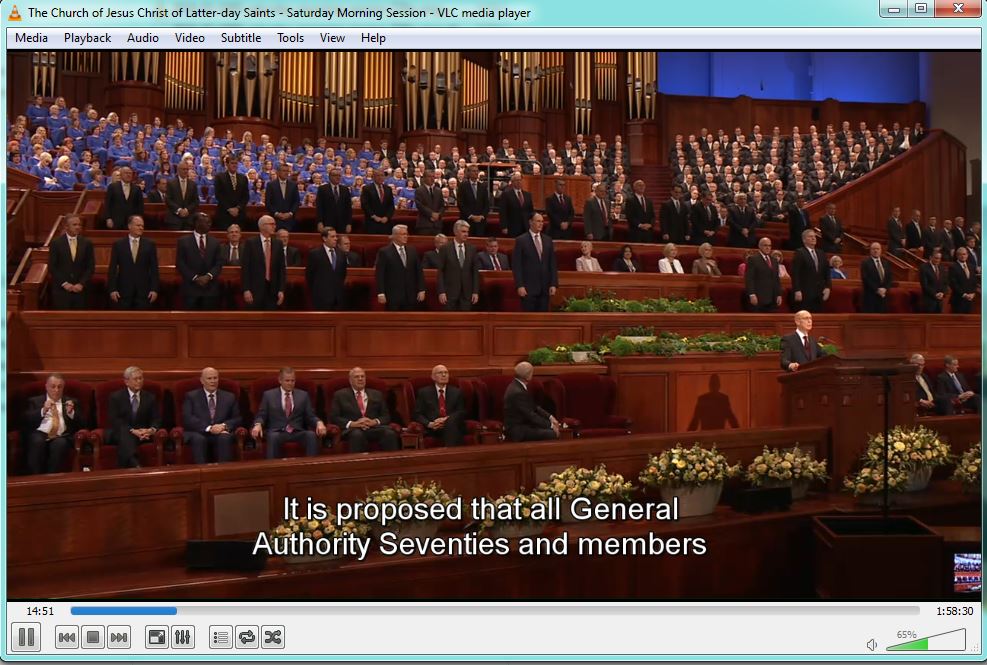
General conference video on media/USB players with subtitles/closed captions

33 postsstarted by jcrosbie 30,746 viewsoriginal topic

New Member
#1
Our stake is now downloading the files after conference in .mp4 video format and playing it on media players at the chapels. I've checked lds.org, posts here, and the wiki but can't find any information on subtitles for the hearing impaired being made available in a file for pairing with video played on media players?

I know that closed captioning comes down via the satellite feed, and that there are subtitles available on the DVD's - but it would be great if a .sub or XML type file with the subtitles for each session was available. Anyone know of anything like this?

Once you get it in any type of subtitle format, then it's not difficult to convert to a format that will play on a particular media player as there are quite a few formats:
http://en.wikipedia.org/wiki/Subtitle_% ... le_formats
New Member
#2

Re: General conference video on media/USB players with subti

Just to follow up on this original request. Is there any movement in getting standalone closed captioning/subtitle files available for general conference sessions? There is a definite need in our stake and we know that quite a few other stakes would also like this.
Member
#3

Re: General conference video on media/USB players with subti

We are currently working on a process to make subtitle files available with downloadable MP4s. The process is a little tricky since each media player wants them embedded in the file in a slightly different way. What media player are you using in your stake and we will test to see if we can make it work on that device?
New Member
#4

Re: General conference video on media/USB players with subti

Hi JD, this is great! We currently use a Western Digital media player, but to be honest if you get us a subtitle file of some sort for the sessions - we're happy to test\convert & play around with it to get it to work with our setup. I know that media players can be problematic, but we can use a laptop too if needed.
New Member
#5

Re: General conference video on media/USB players with subti

We would also very much appreciate any format of the subtitle. It doesn't have to be embedded in the file, and a standalone version may in fact work better for the setup in our stake.
New Member
#6

Re: General conference video on media/USB players with subti

Just following up if there has been any progress on subtitle files being made available for general conference sessions?
New Member
#7

Re: General conference video on media/USB players with subti

With the increased use of multimedia in lessons, this is becoming becoming a need instead of a want.

We are advised to pre-download videos for use in Sunday Lessons, but the closed captioning is not available (that I can tell) on any of the downloaded videos.

With deaf or hard of hearing members in our wards, it would be helpful if we could have progress on this.
New Member
#8

Re: General conference video on media/USB players with subti

I wanted to download some subtitles a while back so I looked into how the online videos did their subtitles and eventually I found a way to download many of the subtitles in an automated fashion. Here are a few different methods you can try.

The way I originally got subtitles was using Firefox's developer toolbox. Specifically, the network monitor feature shows all requests made by the browser as it downloads files off the Internet. To see the subtitle file it downloads I first navigated to the video I wanted to download, then I opened the network monitor. I then pushed the CC button to turn on the subtitles at which point the browser makes a few requests which will show up in the network monitor tool. One of the requests will be for the subtitles file. Right clicking give you the option to open it in a new tab or to copy the URL. The text of the file will also show under the "response" tab, where you could copy/paste it to save it as a new file. Using this method you can download any of the subtitles for videos that have them.

A slightly different approach relies upon the similarity of a video's thumbnail to its subtitle file. If you right click on a video's thumbnail you can "View Image" or "Copy Image Location" to get something similar to media.ldscdn.org/images/videos/youth/mormon-messages-for-youth-2012/2012-08-008-reclaimed-192x108-thumb.jpg. The important part, what I'll call the video ID, is everything after "videos/" up to "-192x108-thumb.jpg", or: youth/mormon-messages-for-youth-2012/2012-08-008-reclaimed. From what I've seen in general, subtitle files all begin with media.ldscdn.org/dfxp and end with this video-specific ID tag. Combining the two and appending .xml you get media.ldscdn.org/dfxp/youth/mormon-messages-for-youth-2012/2012-08-008-reclaimed.xml which happens to be the subtitle file for the Reclaimed video. This works well in general but it doesn't always work.

Lastly, I created a little program to automate downloading subtitle files (using the second method from above) which is handy if you've got a lot of videos you need subtitles for. It is described in detail on the program's Github website. Skip down to the "Exporting to Roku" section where it describes how to use the program to download the subtitle files. Links to download the program and its helper file are at the bottom of the page.

The subtitle files are all in the TTML format. If you need them in a different format there are a few online subtitle converters you can try. I don't know how well they work, unfortunately.
New Member
#9

Re: General conference video on media/USB players with subti

It looks like I need to stand corrected - the closed captioning IS there for many of the videos. I just needed to make sure of how to use it in my video player.
Community Administrator
#10

Re: General conference video on media/USB players with subti

wiscombe.peter wrote:It looks like I need to stand corrected - the closed captioning IS there for many of the videos. I just needed to make sure of how to use it in my video player.
Unlike closed captioning for SD TV, there is no defacto standard for CC in digital streams. So you may have to find a different viewer that supports what is there or covert the CC from what is available.
Have you searched the Help Center? Try doing a Google search and adding "site:churchofjesuschrist.org/help" to the search criteria.

So we can better help you, please edit your Profile to include your general location.
New Member
#11
Once again resurrecting this topic. The week after conference comes out I use paulw's method to rip the subtitles from the Brightcove player, then can convert them to play offline with a downloaded .mp4 file. Unfortunately, these subtitles become available haphazardly afterwards. It's now Friday and the Sunday Afternoon session has subtitles available but Sunday Morning doesn't. Saturday Morning and Priesthood are online, but Saturday afternoon isn't?

I've reposted instructions on how to do this on my personal website and have been contacted by many other people throughout the world who are trying to do the same thing in their stakes - play offline video files with subtitles. So I know that many other stakes are having the exact same difficulties in trying to cater for their hearing impaired members. Many stakes do their sessions the weekend after General Conference in the US, so it makes it very difficult if the Brightcove player subtitles are uploaded late. The only alternative is to try to play off of the YouTube videos or rip the captions from there, but that is even more complicated and messy.

Does anyone know if there is a time-frame or ETA when the closed captions/subtitles for all the sessions will be available in the Brightcove player videos?
New Member
#12
From my experience, the media library every now and then gets videos haphazardly added to it, as you've seen for this most recent general conference. Although it might seem like a lost cause I've actually had great success with submitting feedback via the "Feedback" link at the bottom of problematic pages. They are pretty responsive. I sent them an email just yesterday but you should submit feedback too! (Since I consistently find issues with the hosted content I just email the team directly now.) This most recent conference has misnamed videos, undownloadable videos, missing captions, and this is the first time I've seen videos hosted on cloudfront which is really messing with my web scraping scripts.

The best recourse of action we have is for you to tell everyone to submit feedback detailing the need for links to download the caption files. They most likely assume no one needs to download them because they never hear from anyone. If everyone would file feedback indicating the need they'd be much more likely to provide the link.

I've tried mitigating the lack of download links with a greasemonkey script detailed in a previous post (and I just fixed a bug/regression recently) but my script cannot account for their nonstructured hosting of files... though I'm starting to get a few ideas on things to try to fix that.
New Member
#13
This goes beyond stake usage. I download all of the sessions to a hard drive and use a WD player to watch talks as Sunday afternoon activities and/or to prepare lessons. My wife is not deaf, but her hearing is impaired, and the value of the videos is greatly reduced for her. It would seem that the process ought to automatically imbed CC in its MP4 files. If the files are there, neither my WD player, nor any of my computer-based video players can access them.
Community Administrator
#14
Jimgiles2 wrote:It would seem that the process ought to automatically imbed CC in its MP4 files.
Apparently there is no standard to do so.
Have you searched the Help Center? Try doing a Google search and adding "site:churchofjesuschrist.org/help" to the search criteria.

So we can better help you, please edit your Profile to include your general location.
Church Employee
#15
Here is a list of all the caption files currently available for church videos.
http://media.ldscdn.org/dfxp/2015-12-00 ... dslorg.txt
There's 4454 urls. The listed items are in XML format and they're organized by: genre > product > track. if you scan the list, you'll hopefully catch on to how content is structured, and you'll hopefully be able to find the files you're looking for. This list isn't what we have planned as a long term solution, so new media won't be added to this list.

I work in the Media Library and we're looking for feedback. As far as a long term solution for getting subtitles on video downloads, I have a couple questions:

1. Would it be better to offer a separate subtitle file, or embed the caption file in the video download?
-example of embedded captions in video download
http://media2.ldscdn.org/assets/scriptu ... nload=true

2. For a separate subtitle file, which file format is preferred? (.XML, .SRT, .VTT, etc)

3. For accessibility to these separate subtitle files, is adding them to "downloads" in the Media library a good location? See picture for example
http://media.ldscdn.org/thumbnails/subt ... xample.jpg
This location is just an example, and the download could appear in a different location.

User "paulw" brought to my attention this forum post and I'd like to get things rolling quickly. A bit of a warning, adding a separate subtitle file to all our media would take just a couple weeks, however embedding caption files into the video downloads for all our media may take several years.

We're here to serve our users as best as we can, and your feedback will really help get things moving!
-Pete
New Member
#16
The thing that is confusing to me as a "user" is that the subtitles are often available for streaming videos, but not for the downloaded version. BUT, we are told to make sure to download the videos at home, rather than try to stream them on Sunday morning.

For example, we were showing the LIFT video for our 5th Sunday Priesthood/Relief Society lesson. We have a sister in the ward who is deaf, so we always try to make sure there are captions. The streaming version had captions, the downloaded version doesn't. This is especially ironic considering that the focus of the video is serving someone with a disability.

I appreciate any efforts that are being made to have the subtitles available in the downloaded version as well.

Having the SRT file does work well for certain media players. For the VLC media player, if the name of the video and the caption file are identical except for the suffix, and they are in the same folder/directory, it will play the captions/subtitles automatically.
Community Moderators
#17
petepaulos wrote:1. Would it be better to offer a separate subtitle file, or embed the caption file in the video download? . . .
A bit of a warning, adding a separate subtitle file to all our media would take just a couple weeks, however embedding caption files into the video downloads for all our media may take several years.
Well, that would definitely sway my vote toward separate subtitle files. I am not smart enough to answer the other two questions.
Community Administrator
#18
petepaulos wrote:1. Would it be better to offer a separate subtitle file, or embed the caption file in the video download?
-example of embedded captions in video download
http://media2.ldscdn.org/assets/scriptu ... nload=true
Is that the right link? I clicked on it and got a MP4 file. I played it in Windows Media player, but saw no subtitles. I checked, and that function was turned on.

I think the biggest desire is to support as many players as possible. Both on the major computer platforms as well as any settop boxes that might be used for access (Roku, etc.)
Have you searched the Help Center? Try doing a Google search and adding "site:churchofjesuschrist.org/help" to the search criteria.

So we can better help you, please edit your Profile to include your general location.
Community Moderators
#19
Is it possible to automatically batch-embed subtitle files into MP4s using a script? Like this, for example:
http://forum.videohelp.com/threads/3526 ... -container
Samuel Bradshaw • If you desire to serve God, you are called to the work.
Member
#20
russellhltn wrote:
petepaulos wrote:1. Would it be better to offer a separate subtitle file, or embed the caption file in the video download?
-example of embedded captions in video download
http://media2.ldscdn.org/assets/scriptu ... nload=true
Is that the right link? I clicked on it and got a MP4 file. I played it in Windows Media player, but saw no subtitles. I checked, and that function was turned on.

I think the biggest desire is to support as many players as possible. Both on the major computer platforms as well as any settop boxes that might be used for access (Roku, etc.)
The issue (at least as I understand it) is that Windows Media Player doesn't support embedded captions in an MP4 file. It will only read captions embedded into an WMV file (which would require the production of a whole other file type.) If I open the linked file in QuickTime or VLC I see captions displaying appropriately.
New Member
#21
petepaulos wrote: 1. Would it be better to offer a separate subtitle file, or embed the caption file in the video download?
-example of embedded captions in video download
http://media2.ldscdn.org/assets/scriptu ... nload=true

2. For a separate subtitle file, which file format is preferred? (.XML, .SRT, .VTT, etc)

3. For accessibility to these separate subtitle files, is adding them to "downloads" in the Media library a good location? See picture for example
http://media.ldscdn.org/thumbnails/subt ... xample.jpg
This location is just an example, and the download could appear in a different location.

User "paulw" brought to my attention this forum post and I'd like to get things rolling quickly. A bit of a warning, adding a separate subtitle file to all our media would take just a couple weeks, however embedding caption files into the video downloads for all our media may take several years.

We're here to serve our users as best as we can, and your feedback will really help get things moving!
-Pete
Hi Pete, just chiming in:

1) If there is a way to embed them with good compatibility for all the media library videos then that would be ideal. So have embedded subtitles for all the media library files then just have separate subtitle files for general conference sessions, broadcasts and training videos.

2) For the general conference/broadcast/training videos - XML and SUB or SRT would be great. XML allows for easy conversion into other formats, and SUB/SRT tend to work well with media players like VLC etc.

3) Only a small proportion of users will be using them so I don't think they need to be displayed prominently (ie. on the General Conference page on LDS.org) but just somewhere either in the Media Library or somewhere on LDS.org where those who need them can find them would be terrific.

-Justin
New Member
#22
Following-up to see if there are any further developments on offline mp4 file closed captioning options.
New Member
#23
niederhausern wrote:Following-up to see if there are any further developments on offline mp4 file closed captioning options.
Unfortunately there haven't been any official developments that have been announced. But if you do a Google search for "LDS General Conference Subtitles" some unofficial guides and resources have been posted that may be of help.
New Member
#24
Usually closed captions/subtitles are added to the "Watch" (Brightcove viewer) feature on LDS.org for sessions by now but they don't seem to be there. Previously there were subtitles for the Women's Session on the viewer, and we were able to rip them from:
https://media.ldscdn.org/dfxp/general-c ... ession.xml
for showing at our stake meeting. But now they have disappeared too. Why would subtitles be uploaded for the first session then removed? I tried to submit Feedback through the LDS.org website but submission results in a "Internal Server Error". This whole subtitle situation is getting quite old and frustrating.
Community Administrator
#25
jcrosbie wrote:Usually closed captions/subtitles are added to the "Watch" (Brightcove viewer) feature on LDS.org for sessions by now but they don't seem to be there.
It seems to be there for the individual talks, just not for the whole session.

That seems to be true of the YouTube videos as well.
Have you searched the Help Center? Try doing a Google search and adding "site:churchofjesuschrist.org/help" to the search criteria.

So we can better help you, please edit your Profile to include your general location.
New Member
#26
As an update to this, the church now uses Web Video Text Tracks (WebVTT)/.vtt files for subtitles on their live players. I have sniffed out the URLS for these files and they're listed below for the April 2018 conference. Download and rename them to the same name as the video file, and also place them in the same directory then when you play the video in VLC you will get offline subtitles:

https://media.ldscdn.org/webvtt/general ... on-eng.vtt
📎 Screenshot.JPG (138.8 KiB)
New Member
#27
i am trying to access the subtitles for the new ministering training videos so that we can download them and show them without streaming. Anyone who could help?
Community Administrator
#28
conbward wrote:i am trying to access the subtitles for the new ministering training videos so that we can download them and show them without streaming. Anyone who could help?
I'm not able to access subtitles even viewing on the web page. I can get to the settings, but I can't turn them on. I'm not sure if there are any captions.
Have you searched the Help Center? Try doing a Google search and adding "site:churchofjesuschrist.org/help" to the search criteria.

So we can better help you, please edit your Profile to include your general location.
New Member
#29
For those interested, I was able to sniff out the .vtt subtitle file locations for conference at the following addresses:

Sat AM
https://ldshds-a.akamaihd.net/pd/119719 ... b2636e.vtt
Sat PM
https://ldshds-a.akamaihd.net/pd/119719 ... c7b73a.vtt
Women's Session
https://ldshds-a.akamaihd.net/pd/119719 ... b8eabc.vtt
Sun AM
https://ldshds-a.akamaihd.net/pd/119719 ... fe68aa.vtt
Sun PM
https://ldshds-a.akamaihd.net/pd/119719 ... b08514.vtt

Just rename the file to match your .mp4 video file for that session, place in the same directory and then play the video file with VLC and it should play with subtitles.
New Member
#30
Is there any update on the subtitles/closed captioning being updated for April 2019 General Conference videos on the browser/Brightcove player on the church website? Congregations around the world will begin watching conference tomorrow, and I'm sure like our stake - will have many hearing impaired people that require subtitles. They usually have gone up within a few days for previous conferences?
Community Administrator
#31
jcrosbie wrote:Is there any update on the subtitles/closed captioning being updated for April 2019 General Conference videos on the browser/Brightcove player on the church website?
I just did a spot check of a full-session and I see subtitles. I used the "watch" feature, not download.

I think the subtitle language is set by the language settings you're using on the website.
Have you searched the Help Center? Try doing a Google search and adding "site:churchofjesuschrist.org/help" to the search criteria.

So we can better help you, please edit your Profile to include your general location.
New Member
#32
russellhltn wrote:I just did a spot check of a full-session and I see subtitles. I used the "watch" feature, not download.
Thanks russellhltn, they were just posted a few hours ago. For all those in need of the subtitle files they can be accessed here:

April 2019 General Conference Subtitles
Rename the .vtt file to the same name as the video (ie. 2019-04-1000-saturday-morning-session-720p-eng.vtt) and play in VLC.

Sat AM Session:
https://bcboltlds1-a.akamaihd.net/media ... 4/text.vtt

Sat PM Session:
https://bcboltlds1-a.akamaihd.net/media ... e/text.vtt

PH Session:
https://bcboltlds1-a.akamaihd.net/media ... e/text.vtt

Sun AM Session:
https://bcboltlds1-a.akamaihd.net/media ... 9/text.vtt

Sun PM Session:
https://bcboltlds1-a.akamaihd.net/media ... 5/text.vtt
New Member
#33
conbward wrote:i am trying to access the subtitles for the new ministering training videos so that we can download them and show them without streaming. Anyone who could help?
Hi Brother, if you are looking to use these videos in the future and want to access subtitles they now seem to be posted on the online Brightcove player. To find the subtitle file location, you can use the Firefox web browser -> Web Developer tools -> Network.

Once the network tool is open then open the video, and do a search for the .vtt file and copy the URL to open in a new window. For example for the video "A Vision of Ministering" at:
https://www.lds.org/ministering/a-visio ... g?lang=eng
I was able to use this method to find subtitle file that could be downloaded offline at this URL:
https://media.ldscdn.org/webvtt/leaders ... ip-eng.vtt