How to Share a MS PowerPoint presentation while we are broadcasting...

18 postsstarted by rdmenendez 4,816 viewsoriginal topic

New Member
#1
We are going to use this tool this weekend, but the speaker for this FPE Fireside will present a powerpoint file during his talk, how can we share the presentation by this tool? Because if we do it by the simple camera maybe we are going to lose quality in the image of slides.
#2
Let me see if I understand your question correctly. Do you want to send a PowerPoint presentation from a laptop to another device such as a TV or Webcast Communicator?

If so, you can convert the VGA monitor output (15 pin) of a laptop to standard video (composite or S-video) by using a Scan Converter. These relatively inexpensive devices can be found on eBay (see http://www.ebay.com/sch/i.html?_from=R40&_trksid=m570.l2736&_nkw=vga+to+video+scan+converter for examples).

A scan converter takes the laptop's VGA output and converts it to standard composite video which can then be connected directly to a TV or Webcast Communitcator composite video (yellow) input, S-Video input, or other video device, resulting in a much higher quality picture than by just using a camera pointed to a screen.

To switch from your video camera feed to the scan converter's feed, you can use a video switch (http://www.ebay.com/sch/i.html?_from=R40&_trksid=p3984.m570.l1313&_nkw=video+switch&_sacat=See-All-Categories) or video mixer (preferred see: http://www.ebay.com/sch/i.html?_nkw=videonics+mx-1&_sacat=0&_odkw=mx-1&_osacat=0&_trksid=p3286.c0.m270.l1313)
Senior Member
#3
This discussion is very timely for me. I have one other question though -- my laptop has both an s-video and a VGA output. Does anyone know if it is possible to use both at the same time? I was hoping this would eliminate the need for a scan converter, but I played with it a bit last night and couldn't get it to work.
Craig
Saint George, UT
Member
#4
You probbaly can, but it will require setting all 3 displays (Laptop Screen, VGA Out and S-Video Out) to 480i resolution (~640x480) which may look odd on a projector.

Aaron Z
Senior Member
#5
Thanks, yeah, that wouldn't look that great on the main screen.
Craig
Saint George, UT
#6
The ability to use multiple video outputs from your laptop depends on the laptop and associated display drivers.

A quick, easy solution would be to use a video distribution amplifier. There are several advantages to using one...1) the memory of the laptop's video can be utilized higher resolution because it is running less displays, 2) most distribution amplifiers have 3 outputs so a monitor, projector and building can easily be connected, 3) some units amplify composite video as well as S-Video (either S-Video or composite input and double the number of outputs). These can usually be purchased from $10 to $30 (see http://www.amazon.com/Composite-S-Video-Distribution-Amplifier-Splitter/dp/B003CMDGJK/ref=sr_1_2?ie=UTF8&qid=1313983846&sr=8-2.)
Senior Member
#7
I have a VDA but it only has composite and s-video; I'll have to look for others. Thanks.
Craig
Saint George, UT
New Member
#8

Scan Converter

Hello, I work for a company that does a lot of Audio Video work for the church, in meeting houses, and even in buildings like the conference center, etc...
Scan Converter are not relatively inexpensive as someone previously posted. The cheap ones are inexpensive, but if you want one that will look really good, and not have any scrolling lines, you can easily spend from $800-$2000. These are the ones that are being put into new stake centers.
http://www.extron.com/product/product.a ... vsc500&s=5

Also you do NOT need to make the computers resolution 640x480, most scan converters will accept 1024x768 which is a 4x3 aspect ratio, some will do higher resolutions as well but be mindful of how small the font is, as well as the aspect ratio as a scan converter will NOT change aspect ratio.
-Blake H
Professional Audio Video Technician
Senior Member
#9
craiggsmith wrote:This discussion is very timely for me. I have one other question though -- my laptop has both an s-video and a VGA output. Does anyone know if it is possible to use both at the same time? I was hoping this would eliminate the need for a scan converter, but I played with it a bit last night and couldn't get it to work.

Craig, I have a laptop that has S-video, VGA and the main monitor. I can only use two of the three screens at any one time. However, I have use the S-video out to put pictures to a VCR and it has worked like a champ. The one issue that I see is getting the presentation on to the screen.

I guess that is we have an "old" stake center, we would have to purchase the scan converter?
#10
BTW, I have found that connecting the laptop to the scan converter and then connecting the scan converter to the projector has resulted in a loss of picture quality on the projector.

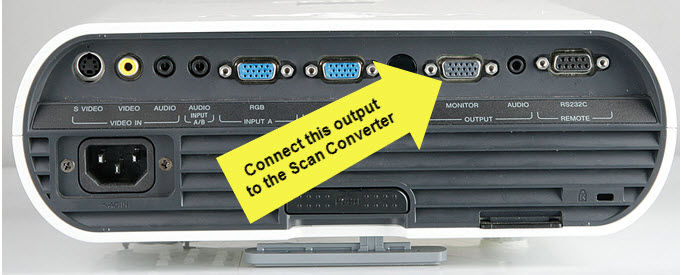
I found that connecting from the computer to the projector (VGA) and using the monitor out jack (VGA) on the back of the projector to connect to the scan converter results in a picture that looks very good and has no scrolling lines.
Community Administrator
#11
michaelfish wrote:BTW, I have found that connecting the laptop to the scan converter and then connecting the scan converter to the projector has resulted in a loss of picture quality on the projector.
How is the scan converter connected to the projector? Via VGA or composite? If composite, the loss of quality is to be expected.
Have you searched the Help Center? Try doing a Google search and adding "site:churchofjesuschrist.org/help" to the search criteria.

So we can better help you, please edit your Profile to include your general location.
#12
RussellHltn wrote:How is the scan converter connected to the projector? Via VGA or composite? If composite, the loss of quality is to be expected.
I'm sorry, I didn't explain this very well. Our Stake uses a Sony VPL-EX50 projector which has a loop through VGA output (labeled Monitor). This VGA 15-pin output is the one that we connect to the scan converter. Then, the composite output of the scan converter is fed to the building video system.

When connected with this output feeding the scan converter, there is NO discernable loss of picture quality of the projected image or video output of the scan converter (picture is great).
10-12-2011 9-36-04 PM.jpg
(51.14 KiB) Downloaded 45 times
Community Administrator
#13
Understood, but how were you connecting it when you did see a loss of quality?
Have you searched the Help Center? Try doing a Google search and adding "site:churchofjesuschrist.org/help" to the search criteria.

So we can better help you, please edit your Profile to include your general location.
#14
I connected the VGA out of the laptop to the scan converter and then the VGA output of the scan converter to the projector. When I did this, picture quality of the projector was diminshed and not as sharp than the original (as compared to being connected directly from the laptop to the projector). The composite and S-Video output of the scan converter was fine. I'm sure the degredation of the picture was due to the low quality of the $50 scan converter.

I did not try spitting the VGA output of the laptop (one to the projector and the other to the scan converter), because the projector already had a VGA Monitor out.
Community Administrator
#15
michaelfish wrote:I connected the VGA out of the laptop to the scan converter and then the VGA output of the scan converter to the projector. When I did this, picture quality of the projector was diminshed and not as sharp than the original (as compared to being connected directly from the laptop to the projector).
Interesting. I wonder why.
michaelfish wrote:I did not try spitting the VGA output of the laptop (one to the projector and the other to the scan converter), because the projector already had a VGA Monitor out.
Unless you had an active splitter, I'd expect poor results. In fact that might have been the problem. The projector may have a buffer on the output making it an active splitter while the scan converter didn't.
Have you searched the Help Center? Try doing a Google search and adding "site:churchofjesuschrist.org/help" to the search criteria.

So we can better help you, please edit your Profile to include your general location.
#16
I think an easier, less expensive solution would be to get the speaker's slides beforehand, and export them to images (using PowerPoint) and then load them into your webcast software as images. It will require more work on your part to follow the slides and put up the right slide at the right time, but is far less complex than getting a scan converter and adding another video input.
Community Administrator
#17
sammythesm wrote:I think an easier, less expensive solution would be to get the speaker's slides beforehand, and export them to images (using PowerPoint) and then load them into your webcast software as images. It will require more work on your part to follow the slides and put up the right slide at the right time, but is far less complex than getting a scan converter and adding another video input.

Less, expensive, yes. But not easier. Keep in mind that some slides may have a special transition that exposes bullet points one at a time. I wouldn't want the risk of the show not flowing the way the speaker intended. Besides, you may not get the presentation ahead of time. You'll get it when the speaker arrives.
Have you searched the Help Center? Try doing a Google search and adding "site:churchofjesuschrist.org/help" to the search criteria.

So we can better help you, please edit your Profile to include your general location.
Member
#18
RussellHltn wrote:Less, expensive, yes. But not easier. Keep in mind that some slides may have a special transition that exposes bullet points one at a time. I wouldn't want the risk of the show not flowing the way the speaker intended. Besides, you may not get the presentation ahead of time. You'll get it when the speaker arrives.
Excellent point. Personally, I am generally too busy with sound and video (yes, I need another person to help so that I am doing sound OR video, not sound AND video) to keep up with a slideshow and I would much rather that the presenter do it with me getting it on the camera, or through a scan converter.

Aaron Z