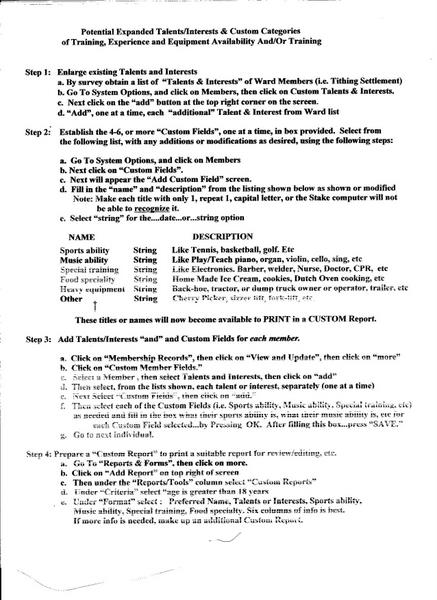
Using Member Custom Field, as I did, makes all Custom Fields Custom Reports Available
Begin: a. Enlarge existing Talents and Interests(at Yearly
Tithing Settlement).
b. By survey, obtain a list of "Talents & Iterests" of Ward Members,then click on Custom & Interests.
c. Next Click on the "add" buttom at the top of
the screen.
d. "Add", one at a time, each "additional" Talent &
Interest from Ward List.
Then: Establish 4-6, or more, "Custom Fields", in box
provided. Select from the list shown below, with any
additions or modifications using the following steps.
Step 1: a. Go to System Options and Click on members
b. Next click on "Custom Fields"
c. Next will appear the "Add Custom Field" screen
d. Fill in the "name"and "description from the
following list, with any additions or
modifications as desired, using the
following steps:
Note: Make each title with only 1 capital letter
only, or the title may not be recognized by
the computer.
e. Select "string" for the ...date....or...string option
NAME DESCRIPTION
Sports ability String Like Tennis, Basketball, golf, etc
Music ability String Like Play/Teach violin,cello
sing, etc
Special training String Like Electronics, Barber, Nurse, Dr,
welder. CPR, etc
Food speciality String Home Made Ice Cream, cookies,
dutch oven cooking, etc
Heavy equipment String Back-hoe, tractor or dump truck
truck owner or operator,trailer,etc
Other String Cherry Picker, sizzer lift, fork- list operator/owner
Each of the above titles or NAMES will now become available to print in a MLS Custom Report.
Step 2: Add Talent/Interests "and" Custom fields for each member.
a. Click on "Membership Records", then click on "View and Update"
b. Click on "Custom Member Fields."
c. Select a Member, then select Talents and Interests, then click on "add".
d. Then select, from the list above, each talent or interest,
separately (one at a time).
e. Next select each of the Custom Fields (i.e. Sports ability, Music ability, Special training, etc) as needed and fill in the box what their sports ability, music ability, special training is forf each each Custom Field selected...by pressing OK. After filling this box,...press "SAVE".
f. Go to next individual.
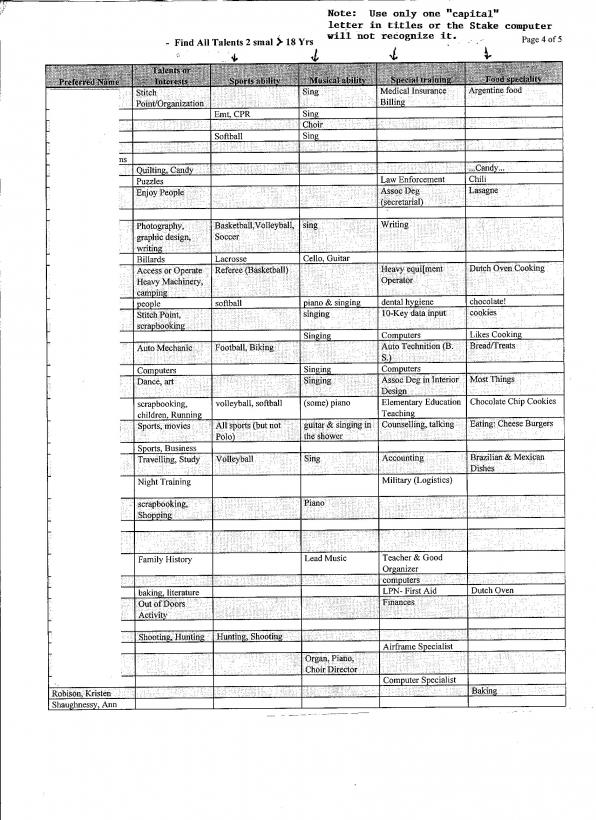
Step 3: Prepare a "Custom Report to print a suitable report for review/editing, and then give to the Bishop or Council member requesting it.
a. Go to "Reports & Forms", then click on MORE.
b. Click on "Add" Report" on top right of screen
c. Then under the "Reports/Tools" column select "Custom Reports."
d. Under "Criteria" select age is greater than 18 years.
e. Under "Format" select: Preferred Name, Talents or Interests. Sports ability, Music ability, Special training, Food Speciality. Six columns of info is best. If more info is needed, make up an additional Custom Report.