Cannot view all aspects of LDS.ORG regardless of browser

21 postsstarted by bishoptaylor 5,160 viewsoriginal topic

New Member
#1
When I pull up LDS.ORG in any browser, I cannot see much of the content. For example, SIGN IN on home page just doesn't display. The same thing happens regardless of which browser I use (Firefox, IE, Chrome, Opera) so I am assuming that there is some component missing or not functioning properly on this particular machine. Any thoughts on what might be going on?

Thanks.
Community Administrator
#2
What is your screen resolution set to? 1024x768 with normal font size is probably the minimum standard these days.
Have you searched the Help Center? Try doing a Google search and adding "site:churchofjesuschrist.org/help" to the search criteria.

So we can better help you, please edit your Profile to include your general location.
New Member
#3
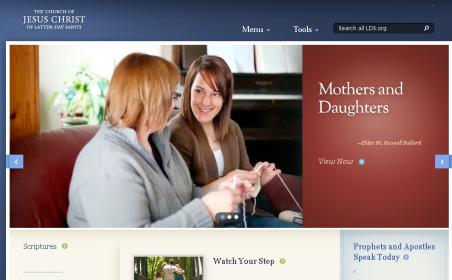
I guess I didn't explain the problem well enough. My resolution is set to 1280X800. I can see the entire screen it is just that certain parts of the website are not appearing. I have attached a screen capture. You can see that, for example, SIGN IN, does not appear. Easy solution is to use another computer but this is my "working computer" and I hate to transfer everything over. It appears that this problem exists only on LDS.ORG - not other websites.
LDS.ORG_Website_Capture.jpg
LDS.ORG_Website_Capture.jpg (20.03 KiB) Viewed 2049 times
Community Administrator
#4
bishoptaylor wrote:You can see that, for example, SIGN IN, does not appear.

Does that change after you've signed in? Note that you can sign in by going to Tools > Directory, for example. Then you will be signed in, and then your name should appear in the header. Does it?
Questions that can benefit the larger community should be asked in a public forum, not a private message.
New Member
#5
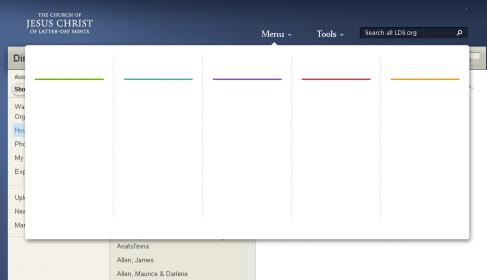
I did that and logged in OK but then clicked on the MENU button and this is what I see -which is essentially nothing.
Loggin_then_went_to_menu.jpg
Loggin_then_went_to_menu.jpg (10.89 KiB) Viewed 2044 times
Community Moderators
#6
bishoptaylor wrote:I did that and logged in OK but then clicked on the MENU button and this is what I see -which is essentially nothing.
This has happened to me before and I found I simply wasn't allowing enough time for it to populate. Sometimes it's pretty slow, and you're right, I also found the delay was not the same for all computers, even on the same LAN.
So we can better help you, please edit your Profile to include your general location.
New Member
#7
Nope. That ain't it. Been sitting there on same screen for 30 - 45 minutes. It just doesn't show anything where there should be text. Some text appears and others do not. As I said earlier, all other website work fine - it just seems to the LDS.ORG related website.
Community Moderators
#8
Have you cleared the browser cache?
JD Lessley
Have you tried finding your answer on the ChurchofJesusChrist.org Help Center or Tech Wiki?
Community Administrator
#9
jdlessley wrote:Have you cleared the browser cache?

Do all those browsers share the same cache?

I know the site uses Javascript and maybe some flash. Updating Adobe Flash wouldn't hurt - on most people's machines it's usually out of date security-wise anyway.
Have you searched the Help Center? Try doing a Google search and adding "site:churchofjesuschrist.org/help" to the search criteria.

So we can better help you, please edit your Profile to include your general location.
Member
#10
Could it possibly be a problem with the Font Files, or the Font File Registration on the machine?
Community Administrator
#11
I notice some elements seem to be pulled from ldscdn.org. I wonder if there's a DNS problem or security software that blocking access to that.
Have you searched the Help Center? Try doing a Google search and adding "site:churchofjesuschrist.org/help" to the search criteria.

So we can better help you, please edit your Profile to include your general location.
New Member
#12
Thanks for all of the good suggestions. I downloaded latest Adobe Flash, updated java, cleared cache and all setting pertaining to LDS.ORG and still the same. I also did a "View Page Source", found the fonts and made sure they were installed (which they were). As an example, on the home page of LDS.ORG, I can see "Prophets and Apostles Speak today" but there is nothing visible under that heading. I sense that it probably may have something to do with the fonts not displaying properly but I checked all the setting on my browser and the java script settings and they all appear to be standard settings. Now it has become of issue of "I want to lick this thing just to get the satisfaction of doing so". Still looking for suggestions.
New Member
#13
I stopped my antivirus stuff and that did not help. Don't know how to check for DNS problem.
New Member
#14
Thanks for all of the good suggestions. I downloaded latest Adobe Flash, updated java, cleared cache and all setting pertaining to LDS.ORG and still the same. I also did a "View Page Source", found the fonts and made sure they were installed (which they were). As an example, on the home page of LDS.ORG, I can see "Prophets and Apostles Speak today" but there is nothing visible under that heading. I sense that it probably may have something to do with the fonts not displaying properly but I checked all the setting on my browser and the java script settings and they all appear to be standard settings. Now it has become of issue of "I want to lick this thing just to get the satisfaction of doing so". Still looking for suggestions.
#15
IF you are using ie9. there is an advanced setting to turn OFF the GPU rendering and go back to software rendering. I have seen some websites that need to have the GPU rendering turned OFF to display properly. I don't think this is your problem but you might give it a try.
Community Moderators
#16
When you mouse over the expected location for the logon link and the languages link, even though they are not visible, do you get any indication the links are there (the mouse pointer changes from an arrow to a finger pointing hand)? It appears that everything that is missing is related to links.
JD Lessley
Have you tried finding your answer on the ChurchofJesusChrist.org Help Center or Tech Wiki?
New Member
#17
jdlessley wrote:When you mouse over the expected location for the logon link and the languages link, even though they are not visible, do you get any indication the links are there (the mouse pointer changes from an arrow to a finger pointing hand)? It appears that everything that is missing is related to links.

Interesting - when I move the mouse over where I think text should be (sign in or other places for example), the pointer turns to a hand. Still cannot see the text but it knows something is there. Same problem with mormon.org but NOT with providentliving.org. So there is something similar with LDS.ORG and MORMON.ORG that causes the problem but not with providentliving.org.
Member
#18
bishoptaylor, Please try going to http://www.fonttester.com/ and test each of the fonts in use on the LDS.ORG main page.
Arial, Georgia, Georgia Italic, Lucida Sans Regular, Lucida Sans Unicode, Palatino Linotype.

What happens when you try "Lucida Sans Unicode" for instance?
New Member
#19
rontilby wrote:bishoptaylor, Please try going to http://www.fonttester.com/ and test each of the fonts in use on the LDS.ORG main page.
Arial, Georgia, Georgia Italic, Lucida Sans Regular, Lucida Sans Unicode, Palatino Linotype.

What happens when you try "Lucida Sans Unicode" for instance?
That's it!!!! Lucida Sans Unicode does not display using fonttester.com. I used Control Panel->Fonts and tried to install that font but it said it was already installed. Now what? Thanks.
Senior Member
#20
bishop, did you try to remove the font and add it back in? The other things that I find a problem is if your computer is running something in the background and not giving JAVA 100% attention, it will be slow. I have had to shutdown stuff like facebook and other items that use JAVA or even flash to get it to work. It is like you get too many JAVA application open then JAVA can't handle it all and won't display what it needs to. I have an application at the office and it is JAVA and when I get too many windows open, it won't display anymore windows and it looks like it hangs and takes forever to shut down, even when I'm trying to get it to shut down.

Hope this helps.
New Member
#21
harddrive wrote:bishop, did you try to remove the font and add it back in? The other things that I find a problem is if your computer is running something in the background and not giving JAVA 100% attention, it will be slow. I have had to shutdown stuff like facebook and other items that use JAVA or even flash to get it to work. It is like you get too many JAVA application open then JAVA can't handle it all and won't display what it needs to. I have an application at the office and it is JAVA and when I get too many windows open, it won't display anymore windows and it looks like it hangs and takes forever to shut down, even when I'm trying to get it to shut down.

Hope this helps.
Problem solved!!!! It was the Lucida Sans Unicode font that was misbehaving. I deleted it from my fonts directory and copied over the font file from another computer I have and it works fine now. Thanks for all the input. I knew it had to be something related to the machine itself not just the particular browser since LDS.ORG did not appear correctly in ANY browser I used on this machine.

Thanks for all the input. Now I don't have to move to another computer just to use LDS.ORG related functions.

By the way, as my username shows, I am a Bishop and have a very large (900+ members) and busy ward. The functionality that has been provided via the web is just tremendous. How did the work of the Church (or anything else for that matter) get done before we had that functionality? I can now access reports and other information that was tedious and time consuming to get. Ecclesiastical recommendations for church schools, missionary submissions, name removal, disciplinary actions, unified calendaring, etc. etc. has made the work much more efficient and manageable and has allowed me to focus (as my Stake President constantly tells me) on the youth and those sheep that have wandered. And I love LDS Tools on my iPhone. Now just get HT/VT Reporting on-line and get a mobile LDS.ORG app and I am a really happy camper. Thanks for the good work and support. It is appreciated.

Bishop Taylor, Shoal Creek Ward, Austin Texas Stake