FamilySearch Indexing: Startup Error: java.lang.ClassNotFound...

14 postsstarted by clayjm 30,708 viewsoriginal topic

New Member
#1
I fixed a problem on a Family History Center running Windows XP Professional Version 2002 Service Pack 3...

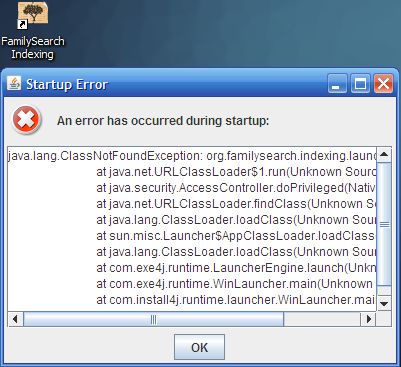
Click on desktop shortcut for "FamilySearch Indexing"...

Startup Error

An error has occurred during startup:

java.lang.ClassNotFoundException: org.familysearch.indexing.launcher.Launcher
at java.net.URLClassLoader$1.run(Unknown Source)
at java.security.AccessController.doPrivileged(Native Method)
at java.net.URLClassLoader.findClass(Unknown Source)
at java.lang.ClassLoader.loadClass(Unknown Source)
at sun.misc.Launcher$AppClassLoader.loadClass(Unknown Source)
at java.lang.ClassLoader.loadClass(Unknown Source)
at com.exe4j.runtime.LauncherEngine.launch(Unknown Source)
at com.exe4j.runtime.WinLauncher.main(Unknown Source)
at com.install4j.runtime.launcher.WinLauncher.main(Unknown Source)
java.lang.ClassNotFound.jpg
java.lang.ClassNotFound.jpg (33.9 KiB) Viewed 20678 times

I uninstalled FamilySearch Indexing, downloaded Indexing_windows_3_7_11.exe from https://indexing.familysearch.org and installed it. Worked fine after that.


Michael Clay
Soldotna STS
Senior Member
#2
That is true, several software updates were made at the same time they moved the infrastructure and backend software to new servers at the Church's farm in northern Virginia. Previously, it was in a small data center in Lindon Utah, but the number of indexers and amount of work done meant they were maxed out on capacity there, hence the upgrades.

All installations of Indexing need to be upgraded to 3.7.11. Last version before the move was 3.7.8.
New Member
#3
java.lang.ClassNotFoundException: org.familysearch.indexing.launcher.Launcher
at java.net.URLClassLoader$1.run(Unknown Source)
at java.security.AccessController.doPrivileged(Native Method)
at java.net.URLClassLoader.findClass(Unknown Source)
at java.lang.ClassLoader.loadClass(Unknown Source)
at sun.misc.Launcher$AppClassLoader.loadClass(Unknown Source)
at java.lang.ClassLoader.loadClass(Unknown Source)
at com.exe4j.runtime.LauncherEngine.launch(Unknown Source)
at com.exe4j.runtime.WinLauncher.main(Unknown Source)
at com.install4j.runtime.launcher.WinLauncher.main(Unknown Source)
:?
#4
I have the same problem as juanjose08. My HP computer runs Windows 10. I get the error whether I download from Chrome or IE. Any suggestions/fixes for this would be greatly appreciated so I can help with the indexing. I've gotten so much info from familysearch.org and indexing is to be my way of saying "thank you".
New Member
#5
I finally got mine installed from this page: https://familysearch.org/indexing/get-started-indexer However that was on a mac under OS/X. Had issues with HP elite revolve 810 under windows 10.
New Member
#6
I was having the same issue on Windows 10. I had to COMPLETELY remove family search from my machine then re-install to get past this error. Steps I took:

1. Uninstall Family search indexing app by clicking on the file at "C:\Program Files (x86)\FamilySearch Indexing\indexing.familysearch.org\uninstall" through the folder file explorer.
2. Delete the folder "C:\Program Files (x86)\FamilySearch Indexing"
3. Download and install FamilySearch Indexing from the website.
New Member
#7
i still get the same STARTUP ERROR again and again for a lot of attempts of downloading family search. can someone help me out here? im using windows7. is there a 3.27.7 version?
#8
Enzashin, has no one yet replied? O.O I've had this problem when I first got my laptop but didn't bother with the app until now. I still receive the same error message and have not figured it out, either. The previous comments are of no help because the suggestions are not applicable. :( Have you fixed it yet?
New Member
#9
I must assume that the software code has broken down and is in the process of being repaired. Sometimes the program will not download properly if your computer already has a version of family search installed. You must locate the "family search uninstaller" program; and then run that. But you must also go into your "programs" file to see if you have any other versions of the program cached. They will be called "windows_indexing" and probably have a number in parentheses to the right (indicating the number of times you have downloaded the program). Delete these as well. When your computer is completely clean of these programs, you can then attempt to re-install family search. This has worked for me multiple times in the past. However, today I attempted re-installs on two different computers (ten times each), using two different Microsoft versions. Nothing worked. So I know it is not my computer, nor my operating systems that is the problem. That seems to leave the family search code itself. We will probably just have to be patient while the code is being fixed.
New Member
#10
hello here
I'm having the same problem. I unistalled twice th program and installed again. I wrote to Support, and they told me about files with problems when opening, but I have the problem just opening the program. Now I saw your comments, but they are quite old. Do you know if they are working on this? I miss indexing :(

Meanwhile, I continue looking for my ancestors :D
New Member
#11
Uninstalling the program and downloading it again finally worked for me. Thanks for the suggestions!
New Member
#12
Seeing answer kdadesmith user.!!!!!!!!!!!
Is 100% sure.
New Member
#13
This problem can be fixed by installing java:

https://www.java.com/en/download/manual.jsp

Go to the link and download the applicable installer. I had the same problem, and installing java fixed it for me. Good luck. :)
New Member
#14
Eu instalei um programa chamado REVO UNINSTALER. Fiz uma desistalação completa, retirando todos os arquivos, incluindo os do registro. Após isto, reinstalei o programa e o problema desapareceu.