New Calendar Managing Resources Assignment Database Error

40 postsstarted by niederhausern 10,383 viewsoriginal topic

New Member
#1
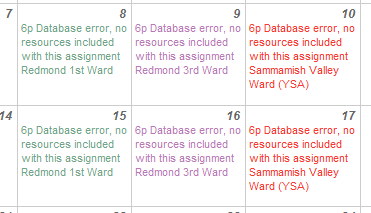
I’m trying to set aside a Location for use by a specific Ward during a specified time block in the new calendar as described at https://tech.lds.org/ldshelp/index.php5/Local_Unit_Calendar:_Reserving_Locations_and_Resources/eng but I’m getting a “Database error, no resources included with this assignment” as shown below in the screen shot. I have selected resources but still get the error and the assignment does not block other wards from scheduling during this time as it should. Please advise.
[attachment=0]ss.PNG[/attachment]
ss.PNG
ss.PNG (15.49 KiB)
New Member
#2
Anyone else having this issue?
Community Administrator
#3
Out of curiosity, what country are you in?

As I understand it, the resources are tied into a database of church properties maintained by your FM group. I wonder if that's the source of the problem.
Have you searched the Help Center? Try doing a Google search and adding "site:churchofjesuschrist.org/help" to the search criteria.

So we can better help you, please edit your Profile to include your general location.
Community Administrator
#4
niederhausern wrote:I’m trying to set aside a Location for use by a specific Ward during a specified time block in the new calendar as described at [/SIZE]https://tech.lds.org/ldshelp/index.php5/Local_Unit_Calendar:_Reserving_Locations_and_Resources/eng but I’m getting a “Database error, no resources included with this assignment” as shown below in the screen shot. I have selected resources but still get the error and the assignment does not block other wards from scheduling during this time as it should. Please advise.

I am able to duplicate this problem. Here's what I did:
  1. In Manage Locations and Resources, I created a new resource for one of our buildings called "test"
  2. In Manage Resource Assignments, I created an assignment for that resource for a series of dates.
  3. Back in Manage Locations and Resources, I deleted the resource "test"
  4. Back in Manage Resource Assignments, all the assignments for that resource now displayed a similar "Database error, no resources included with this assignment" message.
I don't know if you have the same root cause, but this may give you a lead. It certainly makes sense that if an assignment is linked to a resource that no longer exists, it could cause a database error (of course, the code should be cleaning up all database links to a resource when the resource is deleted, but the error is understandable).
Questions that can benefit the larger community should be asked in a public forum, not a private message.
New Member
#5
RussellHltn wrote:Out of curiosity, what country are you in?

As I understand it, the resources are tied into a database of church properties maintained by your FM group. I wonder if that's the source of the problem.

Redmond, WA USA
New Member
#6
aebrown wrote:I am able to duplicate this problem. Here's what I did:
  1. In Manage Locations and Resources, I created a new resource for one of our buildings called "test"
  2. In Manage Resource Assignments, I created an assignment for that resource for a series of dates.
  3. Back in Manage Locations and Resources, I deleted the resource "test"
  4. Back in Manage Resource Assignments, all the assignments for that resource now displayed a similar "Database error, no resources included with this assignment" message.
I don't know if you have the same root cause, but this may give you a lead. It certainly makes sense that if an assignment is linked to a resource that no longer exists, it could cause a database error (of course, the code should be cleaning up all database links to a resource when the resource is deleted, but the error is understandable).

What's interesting is I get the error without the resource being deleted.
Community Administrator
#7
niederhausern wrote:What's interesting is I get the error without the resource being deleted.
I wonder if the resource got deleted/recreated, renamed or otherwise changed.
Have you searched the Help Center? Try doing a Google search and adding "site:churchofjesuschrist.org/help" to the search criteria.

So we can better help you, please edit your Profile to include your general location.
Community Moderators
#8
RussellHltn wrote:I wonder if the resource got deleted/recreated, renamed or otherwise changed.
If the resource was deleted and then added in again it sounds logical that could cause the problem. The record key for the old resource would be different from the new resource even though they have the same name or character string. The event(s) created using the first resource record would be linked to that record. It doesn't exist. The new record, while having the same name, would have a different record key.
JD Lessley
Have you tried finding your answer on the ChurchofJesusChrist.org Help Center or Tech Wiki?
New Member
#9
niederhausern wrote:What's interesting is I get the error without the resource being deleted.

Likewise. The resources haven't been changed (since I'm the one who created them) and I'm getting this "Database error" too, but only when I try to reserve resources for new events. The previously scheduled events still show their correct resources (i.e. Kitchen).

Ideas? Thanks.
New Member
#10
mawhiteley wrote:Likewise. The resources haven't been changed (since I'm the one who created them) and I'm getting this "Database error" too, but only when I try to reserve resources for new events. The previously scheduled events still show their correct resources (i.e. Kitchen).

Ideas? Thanks.
Looks like that makes two of us getting the same error which leads me to belive it's not local to our site. Anyone else get this error? Anyone from lds.org know what's up?
New Member
#11
niederhausern wrote:Looks like that makes two of us getting the same error which leads me to belive it's not local to our site. Anyone else get this error? Anyone from lds.org know what's up?

I have seen this error for at least two months. I have held off from implementing the ability to scheduled resources until it gets resolved. Over the past several months I have experimented with the resources so I am not sure I can determine what the root cause would be. Any help in getting this resolved would be greatly appreciated.
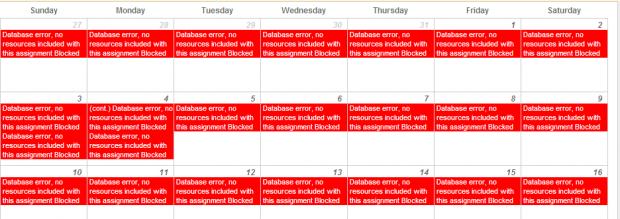
📎 DBerror.jpg (35.92 KiB)
Community Administrator
#12
kmertlich wrote:I have seen this error for at least two months. I have held off from implementing the ability to scheduled resources until it gets resolved. Over the past several months I have experimented with the resources so I am not sure I can determine what the root cause would be. Any help in getting this resolved would be greatly appreciated.
This is the Manage Resource Assignments page, in case anyone is wondering.

Clearly there is some database link from the existing assignments to the resources that is broken. I would suggest the following:
  1. Add a new assignment for a resource, assigned to some ward. See if it works properly.
  2. If a new assignment can't be created without the same problem, then you have major problems and you should contact Local Unit Support for guidance. But I think this is unlikely.
  3. If you can create a new assignment, then the problem is most likely only a problem with existing assignments. So delete the existing assignments, and recreate them.
If new assignments can be created without error, deleting the old and creating new should fix the problem moving forward.
Questions that can benefit the larger community should be asked in a public forum, not a private message.
New Member
#13

Resources are not recognized

aebrown wrote: Clearly there is some database link from the existing assignments to the resources that is broken. I would suggest the following:
  1. Add a new assignment for a resource, assigned to some ward. See if it works properly.
  2. If a new assignment can't be created without the same problem, then you have major problems and you should contact Local Unit Support for guidance. But I think this is unlikely.
  3. If you can create a new assignment, then the problem is most likely only a problem with existing assignments. So delete the existing assignments, and recreate them.
Continue getting the same error message. See attachement that defines the steps I took to research problem. What should I do next?
Stake Clerk
New Member
#14
Yes, it is only the new assignments that have database errors. It just dawned on me that our stake removed all the calendars because of problems with the new system. I'm still still playing with it at the ward/building level. But I wonder if that is the problem with the database, even though our building resources are still there.

Humm....
New Member
#15
mawhiteley wrote:Yes, it is only the new assignments that have database errors. It just dawned on me that our stake removed all the calendars because of problems with the new system. I'm still still playing with it at the ward/building level. But I wonder if that is the problem with the database, even though our building resources are still there.

Humm....

So how best do we escalate this to the lds.org folks to take a look at these errors?
Community Moderators
#16
niederhausern wrote:So how best do we escalate this to the lds.org folks to take a look at these errors?
Submit a description of the issue through the feedback link. Use the link on the lds.org home page or the link in the calendar Help. You can direct them to this thread for additional information.
JD Lessley
Have you tried finding your answer on the ChurchofJesusChrist.org Help Center or Tech Wiki?
New Member
#17
niederhausern wrote:So how best do we escalate this to the lds.org folks to take a look at these errors?

My database errors have disappeared in the last couple days. No changes on my end.
Member
#18
The database error is a result of altering a resource in some way (renaming, deleting etc). If you have a schedule that is displaying the error you will need to delete that schedule and create a new one in its place. With the most recent release of the calendar (1.6.6) we have included better error handling and warnings when changing resources.
New Member
#19
mawhiteley wrote:My database errors have disappeared in the last couple days. No changes on my end.

Nope, short lived, they are back. No changes on my end.
New Member
#20
kyleq wrote:The database error is a result of altering a resource in some way (renaming, deleting etc). If you have a schedule that is displaying the error you will need to delete that schedule and create a new one in its place. With the most recent release of the calendar (1.6.6) we have included better error handling and warnings when changing resources.

I'm getting these errors without any changes to our building resources. Sometimes if I go back and edit an event a couple days later, the database error will go away. But it is usually present when I first create the event.

Thanks.
New Member
#21
kyleq wrote:The database error is a result of altering a resource in some way (renaming, deleting etc). If you have a schedule that is displaying the error you will need to delete that schedule and create a new one in its place. With the most recent release of the calendar (1.6.6) we have included better error handling and warnings when changing resources.

Reported the problem to Local Unit Support yesterday. Still getting the same error message tonight. Not fixed yet. How can I tell what release I am working with?
Community Administrator
#22
kmertlich wrote:Reported the problem to Local Unit Support yesterday. Still getting the same error message tonight. Not fixed yet.
Have you taken the steps to remove the resource assignment that shows the problem and then create it again?
kmertlich wrote:How can I tell what release I am working with?
Everyone uses the same release, so you must be using 1.6.6. But I can't find anything in the page that shows that version number.
Questions that can benefit the larger community should be asked in a public forum, not a private message.
Senior Member
#23
aebrown wrote:Everyone uses the same release, so you must be using 1.6.6. But I can't find anything in the page that shows that version number.
As far as I can tell the only way to find the version number is to use something like Firebug or IE Developer tools to look at the version attribute on the head element on the main page. It doesn't look like it shows anywhere that is visible during normal browsing. The current version does show 1.6.6.
New Member
#24
aebrown wrote:Have you taken the steps to remove the resource assignment that shows the problem and then create it again?
Yes. If I understand your question - I have removed all of the resource assignments from "Manage Resource Assignments" for all locations. Then I have tried to "Add New Assignments" to each location but still get the error.
aebrown wrote:Everyone uses the same release, so you must be using 1.6.6. But I can't find anything in the page that shows that version number.
The version number is what I was looking for but I haven't seen one posted anywhere either.
New Member
#25
eblood66 wrote:As far as I can tell the only way to find the version number is to use something like Firebug or IE Developer tools to look at the version attribute on the head element on the main page. It doesn't look like it shows anywhere that is visible during normal browsing. The current version does show 1.6.6.
Not a part of my tool kit. But thanks for the info.
New Member
#26
niederhausern wrote:Looks like that makes two of us getting the same error which leads me to belive it's not local to our site. Anyone else get this error? Anyone from lds.org know what's up?
I'm also getting the same/similar error. Mine comes as "9 Database error, no resources included with this assignment Waterloo Ward". The resources button is checked - it's the entire building I'm reserving. I'm a building scheduler for this building. Any helps? Thanks.
New Member
#27
jolleyjamie wrote:I'm also getting the same/similar error. Mine comes as "9 Database error, no resources included with this assignment Waterloo Ward". The resources button is checked - it's the entire building I'm reserving. I'm a building scheduler for this building. Any helps? Thanks.

Still waiting to get some answers from Local Unit Support. Re-submitted the problem again yesterday. They did respond back April 1st indicating that an answer would be provided that day or within a few days. I will let you know what I hear.
New Member
#28
Could this error be related to user site permissions, or browser versions? The Stake Executive Secretary had the building schedulers over for a training the other night. Of the five people at the meeting only two were not getting the error message.

"Database error, no resources included with this assignment" As a note the number value prior to the word "Database" appears to be the time of the assignment, and the word after applies to the assignment type, more specifically the name of the Ward, Stake, or Blocked.

Our Stake Executive Secretary was not getting the error, regardless of which resource or assignment type he chose, so it would not appear to be related to the resource being deleted, changed, or not accessible. If one of the schedulers edited the assignment as a test the error appeared when the assignment was saved.
New Member
#29
I received an answer back from the Local Unit Support yesterday. Here is what was stated:

"[Answer to your message]

Dear Brother,
Thank you for your reply. We apologize for the delay in our response to this inquiry. Unfortunately, this bug is still a pending issue and we do not have a resolution for it at this time. We are working to get a fix prepared, and anticipate it to be available no later than the start of the 3rd quarter. We will have it released sooner if at all possible. We apologize for the inconvenience.

MSR Support Staff -jw:"
New Member
#30
Viola!, Eureka!, Yeehaw!, Wahoo!, Yippee!, Yay!, By jove I think I've got it! or whatever phrase you choose to express excitement.

The database error is a bug with the browser being used. It doesn't seem to be related to the user, or the resource. Internet Explorer 8 doesn't work. Mozilla Firefox 3.6.10, Google Chrome 10.0.648.151, and whatever browser and version our S.E.S. has on his Mac work just fine.

The developers may be still be working on resolving the bugs in Internet Explorer, but in the meantime there is a work around for all of you who need to move forward.
New Member
#31
josephcreed wrote:Viola!, Eureka!, Yeehaw!, Wahoo!, Yippee!, Yay!, By jove I think I've got it! or whatever phrase you choose to express excitement.

The database error is a bug with the browser being used. It doesn't seem to be related to the user, or the resource. Internet Explorer 8 doesn't work. Mozilla Firefox 3.6.10, Google Chrome 10.0.648.151, and whatever browser and version our S.E.S. has on his Mac work just fine.

The developers may be still be working on resolving the bugs in Internet Explorer, but in the meantime there is a work around for all of you who need to move forward.

Awesome!!!! I believe you have found the problem. They need to pay you more. The only browser I had quickly available was Safari on my iPhone (what a challenge that was) but it worked!

I will report this back to the support/developers just to make sure they know (if they don't already). This will be a great workaround

Thanks very much for your investigation on this along with your Stake Exec and building schedulers. I will download Firefox so that we can move forward with the use of the calendar options.
#32
Tested on ie9 and it works fine. so the problem seems to be ONLY ie8?
Community Administrator
#33
KenRichins wrote:Tested on ie9 and it works fine. so the problem seems to be ONLY ie8?
It must be only IE8 under certain conditions. I wonder what happens if a IE8 user tries "Compatibility Mode" (or is that the problem?)
Have you searched the Help Center? Try doing a Google search and adding "site:churchofjesuschrist.org/help" to the search criteria.

So we can better help you, please edit your Profile to include your general location.
New Member
#34
You are awesome!! As soon as I updated to IE9, I didn't have the problem anymore. I didn't even need to completely resubmit my events. I just clicked on each and resaved it and it cleared the Database error. Thanks so much!!
New Member
#35

Still having the problem.

I updated to IE9 and I'm still having the problem. I've been dealing with this for months now. It's enough to make a person go inactive!
New Member
#36
outonawhim wrote:I updated to IE9 and I'm still having the problem. I've been dealing with this for months now.
I am sorry to hear that you are still dealing with the problem.

Have you had an opportunity to use a different browser, not Internet Explorer? Have you had success with the other browsers?
#37
make sure the site is in the trusted site zone and that your internet security program is NOT causing the problem. Symantec LOVES to block ports and not tell you
New Member
#38
I am the Stake Exec Sec and I am also getting this message. Around November and December 2010, I did not have this issue, it seems to happen more fequently in the past few months, but based on this email chain it is an issue that has been going on for awhile. I used to only have the problem at night and now it does not matter when.
New Member
#39
I had the same problem. I called into the church headquarters. They said it was a bug in the system and would be fixed at a later time.
I've asked them when but they have no time table for this. They have a major update scheduled for June (from the first page of the help documentation) but the guy I talked to had no idea when this would really be and if this problem would be resolved. Bottom line - we will have to wait and see... JP
New Member
#40
Google Chrome worked for me. I had to open each assignment and save it again, then it all looked great.