What's the DIN-8 for in the C-hall PA cabinet?

19 postsstarted by rmrichesjr 12,500 viewsoriginal topic

Community Moderators
#1
What is the purpose of the DIN-8 jack in the PA control cabinet in the cultural hall?

I have been asked to do sound for an event in the cultural hall of the meetinghouse in Newberg, Oregon. It appears the cultural hall was built in 1976 and the PA system updated since then. The current cultural hall controls are located on a 3-gang surface-mount box inside what was apparently the old/original PA system cabinet. One gang has an RCA jack marked mike-level record and a 1/8" phone jack marked aux level. The middle gang has a three-position red and green rocker switch: local microphone, off, chapel overflow. The third gang has a DIN jack that appears to have 8 pins, 7 in a ring and one in the center. I haven't found any gain controls anywhere for the cultural hall system. So far, I haven't found anyone who knows whether that DIN jack might be for inputs, a remote control box for mike gain, ... There doesn't appear to be anything resembling an athletic scoreboard in that cultural hall.

Does anyone have any clues about what the DIN jack might be for, the pinouts, etc.?

Thanks.

In case they might help, here are a few other clues that might help date the PA system update. It was done prior to 2004, because it differs from (is less modern than) systems I saw installed in 2004. The amplifiers are in a big black hinge-out cabinet on the cultural hall stage. The cabinet appears similar to those installed in another building in 2004 except for color. The speaker grilles in the cultural hall and perhaps elsewhere have a wider solid rim outside the screened grille area. (Grilles installed around 1981 have a narrower solid outer rim.) The system may be one of the earlier DSP-based ones, because a loud 'P' sound in the chapel makes an enormous crackling sound, what might be expected from unmanaged digital clipping/overflow.
Community Moderators
#2
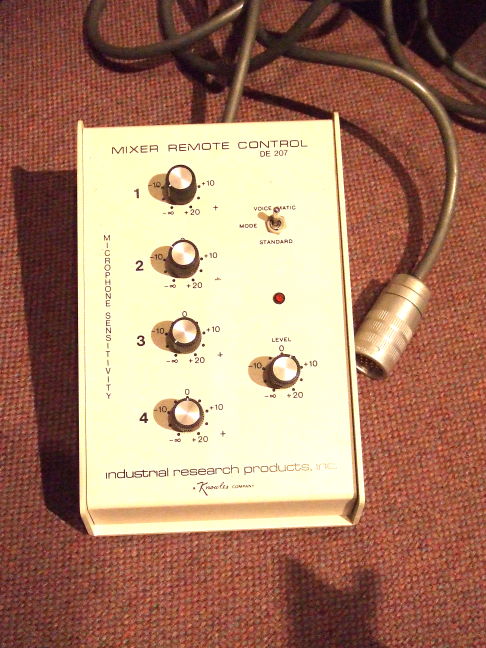
The jack, if it is the one I am thinking, was for the old system so that you could control the individual inputs for the rooms mics into the sound system. There was a box that would plug into it that had 4 volume control knobs for 4 separate mic inputs. It used to be kept in the library.
- David
Community Moderators
#3
thedqs wrote:The jack, if it is the one I am thinking, was for the old system so that you could control the individual inputs for the rooms mics into the sound system. There was a box that would plug into it that had 4 volume control knobs for 4 separate mic inputs. It used to be kept in the library.
Cool!

Does anyone have a schematic diagram of the box, preferably with the resistance values of the potentiometers and whether they are linear or audio taper?

Or, does anyone have an old box sitting around they can't use? I'd be happy to reimburse the shipping cost.
Community Administrator
#4
Use attached photo and go hunt the library or other such areas. Someone probably stuck it in a "safe place", everyone else didn't know what it was and so it's in limbo somewhere.
๐Ÿ“Ž 2007_09170183s.JPG (84.95 KiB)
Have you searched the Help Center? Try doing a Google search and adding "site:churchofjesuschrist.org/help" to the search criteria.

So we can better help you, please edit your Profile to include your general location.
Community Moderators
#5
RussellHltn wrote:Use attached photo and go hunt the library or other such areas. Someone probably stuck it in a "safe place", everyone else didn't know what it was and so it's in limbo somewhere.
Cool!!! Thanks!!!

One question, though. The picture makes it look like the plug on your unit might have multiple pins in the center of the outer ring of pins. The jack in my meetinghouse has only one pin in the center of the outer ring of pins.
Community Administrator
#6
Yes, the one I posted has a large connector with multiple pins and a set of rings that mate in a bayonet style (1/4 turn to lock in place). I wouldn't call it a DIN jack.

Now that I think about it, I have seen a DIN jack on newer systems, but I don't think I've seen the device that goes with it. Or maybe I have and I've just forgotten. CRS and all that.

On low-end setups, I just plug in the mics and they get what they get. It's pretty close to max performance (if you're using the mics the system was set up for) so unless you need to turn something down, there's not much you can do even with the extra knobs. For higher-end setups, I just run an external board and feed one input.
Have you searched the Help Center? Try doing a Google search and adding "site:churchofjesuschrist.org/help" to the search criteria.

So we can better help you, please edit your Profile to include your general location.
Community Moderators
#7
RussellHltn wrote:Yes, the one I posted has a large connector with multiple pins and a set of rings that mate in a bayonet style (1/4 turn to lock in place). I wouldn't call it a DIN jack.

Now that I think about it, I have seen a DIN jack on newer systems, but I don't think I've seen the device that goes with it. Or maybe I have and I've just forgotten. CRS and all that.

On low-end setups, I just plug in the mics and they get what they get. It's pretty close to max performance (if you're using the mics the system was set up for) so unless you need to turn something down, there's not much you can do even with the extra knobs. For higher-end setups, I just run an external board and feed one input.
Yes, but it's so much fun to twiddle the knobs. :-)

The quarter-turn to lock your connector in place does sound different from the DIN connectors I'm acquainted with.

The picture you so kindly posted may have yielded fruit. Putting the three word company name into a search engine directed me to http://www.irp.net/ where I found a product archive section with PDF manuals for a DE-4024E mixer that looks very similar to the voice-matic units I have seen in some meetinghouses. The manual shows complete technical details of a DE-209E remote that has an 8-pin DIN connector. There is enough detail in the manual to build a replica DE-209E.

Thanks.
Member
#8

PA remote

rmrichesjr wrote:Yes, but it's so much fun to twiddle the knobs. :-)

Thanks.
My old meetinghouse had a DIN connector with a box very similar to the one pictured above.

The way it was described to me by the General Communications rep, the mixer tries to do auto-mixing and chooses levels best it can. The remote turns off the auto-mix, and allows you to fix the gain for a given mic. The remote would allow you to turn the gain down, but it still seemed to limit the upper end, so it was difficult to get feedback and the like even with the remote gain all the way up.

In our meetinghouse, the auto-mixer was great, but it was a bit slow. You would have someone start talking, and then the mic would come up a fraction of a second later. That worked ok for meetings, but stage productions were annoying. We would also have problems with off-stage mics not being turned off or disconnected. The remote was at the back of the house, so we couldn't have someone run the sound and lights at the same time, so we generally used a separate sound board and mixed backstage, with the only function of the remote to turn off the auto-mix.

The auto-mix should work for most stuff, but if you have the above problems, the remote will help.

It might be interesting to build a dongle that would set the mixer to manual and a mid-gain for all the mics. Then you could just plug that in and use a board backstage like we did w/o trying to reproduce the whole device.

My 'new' chapel has a remote panel at the back that performs a similar function without trying to find the remote box.

Barrie
Church Employee
#9
rmrichesjr wrote:Or, does anyone have an old box sitting around they can't use? I'd be happy to reimburse the shipping cost.
The old boxes were made by IRP, or White depending on what was installed in your building. If yours is lost ask Your FM if they have one, they usually keep a couple of spare parts form old sound systems that have been upgraded. If that fails, check with General Communications Inc, or Marshall Industries, they are 2 of the larger LDS Sound contractors, and might have one lying around. But I wouldn't bet on it.
Steve Poulsen - Meetinghouse Facilities Technology Engineer
New Member
#10
Does anyone have a pinout or could take a picture of the way a DE-209E Remote Control is wired? Ours got the cord yanked out of the connector, and without it we can't use the wall jacks in the cultural hall in our building. Our FM group doesn't have any idea how to fix it or a replacement, so I am trying to fix it myself, since if I had the pinout I could fix it.
Community Moderators
#11
The irp.net domain mentioned earlier in this thread has apparently been taken over by a generic advertiser. I could not find the technical documentation that I'm pretty sure used to be there. However, I have a local PDF file with two pages that give a complete pinout and schematic for the DE-209E. I'll try to attach it to a second posting here, but I suspect it's too large. If that fails, achip3, I'll PM you with an email address so you can send me an email address to send the PDF file to.
Community Moderators
#12
No luck attaching the file, so email will have to do.
Community Administrator
#13
How big is the PDF?

(I'm wondering if I can modify the older box by changing the plug.)
Have you searched the Help Center? Try doing a Google search and adding "site:churchofjesuschrist.org/help" to the search criteria.

So we can better help you, please edit your Profile to include your general location.
Community Moderators
#14
It's just a little over 1MB, 1194107 bytes to be precise.
Community Administrator
#15
rmrichesjr wrote:It's just a little over 1MB, 1194107 bytes to be precise.
That's odd. It looks to me like the limit is 5MB.
Have you searched the Help Center? Try doing a Google search and adding "site:churchofjesuschrist.org/help" to the search criteria.

So we can better help you, please edit your Profile to include your general location.
Community Moderators
#16
Yes, that is odd. Tried again. The 'submit' button visually responds to clicking on it, but there's no evidence of any activity beyond that point. The post with attachment just doesn't go through. I have uploaded lots of files in the past, but maybe not since the move to the new platform (phpBB, IIRC). I watched /var/log/messages to see if this uploader used an odd port that I have blocked, but nothing there. Switch and router activity lights don't show anything substantial being sent over the wire.
Community Administrator
#17
Different browser?
Have you searched the Help Center? Try doing a Google search and adding "site:churchofjesuschrist.org/help" to the search criteria.

So we can better help you, please edit your Profile to include your general location.
Community Moderators
#18
I'll try to do some experiments to characterize the situation.
New Member
#19
I was searching for information regarding the IRP DE-209E and its use. I looks like it is old stock, but if anyone needs one- I have it. Let me know. lfugate@verizon.net