Webcast streams

39 postsstarted by harddrive 11,291 viewsoriginal topic

Senior Member
#1
My stake president has given me the go ahead to start the process to do webcasting at our June stake conference. So I'm moving forward. Eventually he has on his mind to be able to have speakers not only at the stake center, but also at another building in the stake. I can see this being done for two buildings, but to broadcast to multiple buildings is a different matter.

Last night while trying to sleep, the thought came to me on how it can be done. It would require a video switcher at the stake center and have a broadcast from another building be put into a video mixer and then rebroadcast out.

My question is when you set up the web casting software to connect to the server in SLC, there needs to be a unit number and then an event number. My question is can the stake have multiple broadcasting going on at the same time from different locations. For instance, the main feed be on like 123456-00001 and the feed from the other building be 123456-00002?

If not, then can the wards/branch put their unit number in and we connect to that feed?

Thanks for letting me know.
Community Administrator
#2
harddrive wrote:It would require a video switcher at the stake center and have a broadcast from another building be put into a video mixer and then rebroadcast out.

The question is how much lag is in a broadcast by the end of the session? Because that lag is going to show up as you switch between buildings.
Have you searched the Help Center? Try doing a Google search and adding "site:churchofjesuschrist.org/help" to the search criteria.

So we can better help you, please edit your Profile to include your general location.
New Member
#3
I suspect the lag would be around 1 minute or more to catch the new feed. This thought presents some interesting challenges - like having projectors and sound systems being able to switch quickly and having screens and projectors set up at the front of the stake center to view the feed from the second location. You would need screens and projectors in front of every pair of eyes in all buildings.

Some other thoughts - to try to minimize the lag.
1. Could you have a stream going from each end and just swap the feeds over? This could end up with too much overhead on one internet connection and the extra hardware could be a challenge too.
2. Sing a rest hymn live in each building while you switch things around?
Cool idea - I see lots of potential hurdles and failure would not be an option.
Can't wait to see what others thoughts are.
Senior Member
#4
troywo wrote: Some other thoughts - to try to minimize the lag.
1. Could you have a stream going from each end and just swap the feeds over? This could end up with too much overhead on one internet connection and the extra hardware could be a challenge too.
2. Sing a rest hymn live in each building while you switch things around?
Cool idea - I see lots of potential hurdles and failure would not be an option.
Can't wait to see what others thoughts are.

I agree that there would be some lag. Also it would be a challenge because of the sound. My thinking would be to have a laptop in the back near the video mixer. Have it connected so that I could see the other unit of the person who is going to speak and then when it is time, just switch it to camera 4 say. If we did more than we would need more computer to allow the switch over to be quicker. There are logistic on this and I would need to test and work things out.

My biggest question is can I send multiple feeds to the server in SLC using the same stake unit number with a different event ID? I will attempt that at home when I get a few minutes to test.

I think it would work and it is just a matter of testing.
Community Administrator
#5
troywo wrote:I suspect the lag would be around 1 minute or more to catch the new feed.

That's what I was afraid of. I don't see how you can work around that "live". The biggest issue is getting the second speaker to start at an appropriate time so a building at the first location doesn't have a long time lag. And I don't know as it would be practical to start the second speaker before the first one is done.

Then there's the issue on setting up each location with both a screen, podium, cameras and crew.

If the issue is travel, I'd suggest pre-taping the remote talks. But then you very well might end up sending the techs around just to save the speakers from traveling.

The only time I've seen locations switched is with satellite broadcasts - that's only a half second delay.
Have you searched the Help Center? Try doing a Google search and adding "site:churchofjesuschrist.org/help" to the search criteria.

So we can better help you, please edit your Profile to include your general location.
Member
#6
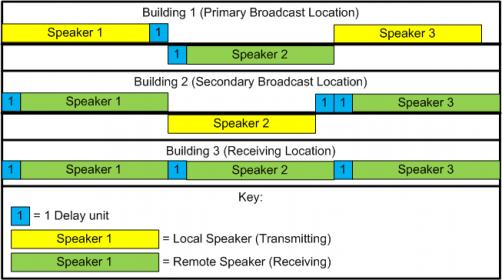
Attached is a diagram of where you will find delays when running a multi-homed conference webcast:
MultiHomedBroadcastDelay.jpg
MultiHomedBroadcastDelay.jpg (28.64 KiB) Viewed 2268 times
Aaron Z
#7
How many endpoints are you expecting, including the two broadcasting buildings? If you're planning to stream only to church buildings, the scenario you describe could be addressed using video conferencing software rather than webcast. This would reduce your issues with lag time and bandwidth.

But to answer your question, yes you can broadcast more than one stream using the same unit number but different event IDs.
Community Administrator
#8
lionelwalters wrote:If you're planning to stream only to church buildings, the scenario you describe could be addressed using video conferencing software rather than webcast. This would reduce your issues with lag time and bandwidth.

I'm sure conferencing does have a lower lag to allow communication, but how does the video quality compare? Is it suitable to be projected?
Have you searched the Help Center? Try doing a Google search and adding "site:churchofjesuschrist.org/help" to the search criteria.

So we can better help you, please edit your Profile to include your general location.
Senior Member
#9
The other issue with video conferencing is the size of the chapels and getting good video and audio. Also to be able to have multiple cameras, titles and other stuff broadcast out.

I am planning to broadcast to 5 buildings at most. I see switching between video feeds using a mixer as 1 second delay, because the video input would be from a laptop, which would already have the web cast from the other building that has the speaker going, going to the mixer, which then would go to the closed circuit TV in the stake center, which in turn would go back to the main webcasting unit. So everything would be controlled at the stake center and the other units would connect to the main web casting server and not have to connect to the other webcasting stream. I would be the only one connecting to the other webcasting stream.

So basically each building in the stake would connect to the main web casting stream originating at the stake center. Then at the building that has a speaker that we want to broadcast, I would connect to that web casting server using my laptop. Then I would feed that into the projector and sound at the stake center and then send that signal back through the main web casting server at the stake center. This way, none of the other buildings, including the one that the 2nd speaker is at, would have to connect to a new web casting stream.
Member
#10
harddrive wrote:The other issue with video conferencing is the size of the chapels and getting good video and audio. Also to be able to have multiple cameras, titles and other stuff broadcast out.
Use a camera that meets the church's standards and you shouldn't have any issues with video quality (assuming that it is well mounted/controlled)
I am planning to broadcast to 5 buildings at most. I see switching between video feeds using a mixer as 1 second delay, because the video input would be from a laptop, which would already have the web cast from the other building that has the speaker going, going to the mixer, which then would go to the closed circuit TV in the stake center, which in turn would go back to the main webcasting unit. So everything would be controlled at the stake center and the other units would connect to the main web casting server and not have to connect to the other webcasting stream. I would be the only one connecting to the other webcasting stream.
All well and good, but in my experience (2 stake conferences and a priesthood leadership meeting with V2 of the webcast software) you should plan for a MINIMUM of 60 seconds delay when running the webcast.
So basically each building in the stake would connect to the main web casting stream originating at the stake center. Then at the building that has a speaker that we want to broadcast, I would connect to that web casting server using my laptop. Then I would feed that into the projector and sound at the stake center and then send that signal back through the main web casting server at the stake center. This way, none of the other buildings, including the one that the 2nd speaker is at, would have to connect to a new web casting stream.
Look at my timeline above. I was planning on that type of setup when I drew it. Each "Delay unit" is at least a minute (we have seen delays of 2 to 5 minutes near the end of a session)

You will have people sitting for a minimum of 2 minutes in buildings 1 and 2 while you wait for the webcast buffering delay.

Aaron Z
Senior Member
#11
Aczlan wrote:Use a camera that meets the church's standards and you shouldn't have any issues with video quality (assuming that it is well mounted/controlled)


All well and good, but in my experience (2 stake conferences and a priesthood leadership meeting with V2 of the webcast software) you should plan for a MINIMUM of 60 seconds delay when running the webcast.


Look at my timeline above. I was planning on that type of setup when I drew it. Each "Delay unit" is at least a minute (we have seen delays of 2 to 5 minutes near the end of a session)

You will have people sitting for a minimum of 2 minutes in buildings 1 and 2 while you wait for the webcast buffering delay.

Aaron Z

Aaron, thank you for the information and I will agree with you on the delay. However, as I stated, my laptop would already have buffered the other web server before the speaker is ready to go and it would be a matter of uncovering the projector at the stake center, switch the mixer to camera 4 and away we go. None of the other buildings would be connecting to the web server at the other building. it would all go through the stake center.

Again, I see the delay because it would be a delay from the other building to my laptop and then from the web server in the stake center to the other buildings.

it is something to try.
Member
#12
harddrive wrote:Aaron, thank you for the information and I will agree with you on the delay. However, as I stated, my laptop would already have buffered the other web server before the speaker is ready to go and it would be a matter of uncovering the projector at the stake center, switch the mixer to camera 4 and away we go. None of the other buildings would be connecting to the web server at the other building. it would all go through the stake center.

Again, I see the delay because it would be a delay from the other building to my laptop and then from the web server in the stake center to the other buildings.

it is something to try.

but because of the delay the speaker at the other location would need to start his talk at least "1 delay unit" before the stake center is ready for the stream (2 delay units from the other buildings perspective) you would have a "Live" speaker and a broadcast stream for aprox. 2 min overlap in the other building unless the other speaker is broadcasting from a classroom
There are 11 types of people. Those who understand Gray Code and those that don't.
Member
#13
kd7mha wrote:but because of the delay the speaker at the other location would need to start his talk at least "1 delay unit" before the stake center is ready for the stream (2 delay units from the other buildings perspective) you would have a "Live" speaker and a broadcast stream for aprox. 2 min overlap in the other building unless the other speaker is broadcasting from a classroom

Exactly, you one of two problems:
  1. A 2 delay unit break when switching between the speaker in building 1 and the one in building 2 (note this is NOT due to starting a streams, this is the delay between sending the stream and receiving it)
  2. The speaker in building 2 speaking from somewhere other than the podium (not much point in having them there unless you want to save on travel)
If you really want to do this, look into another video transmission program to send the video from building 2 to building 1. That will drop your break between speakers from 2 delay units to just over 1.

Aaron Z
Member
#14
One other thing, there are 2 buffers, an uplink buffer on the servers in SLC (I believe that the servers in salt lake buffer about a minute of video before sending it out) and the buffer on each local computer (The length of this buffer will be different for each computer receiving the broadcast as it is based on how much video has been buffered by that computer and how long it has had to wait while the video buffered).
So, I would say that 60 seconds is the minimum delay between when the feed leaves building 1 and when it is seen in building 2.


Aaron Z
Senior Member
#15
Aczlan wrote:One other thing, there are 2 buffers, an uplink buffer on the servers in SLC (I believe that the servers in salt lake buffer about a minute of video before sending it out) and the buffer on each local computer (The length of this buffer will be different for each computer receiving the broadcast as it is based on how much video has been buffered by that computer and how long it has had to wait while the video buffered).
So, I would say that 60 seconds is the minimum delay between when the feed leaves building 1 and when it is seen in building 2.


Aaron Z

Aaron in my few test that is exactly what I am find out. There is about a minute to a minute and fifteen seconds of delay. So to do that to another building would be two minutes.
Member
#16
harddrive wrote:Aaron in my few test that is exactly what I am find out. There is about a minute to a minute and fifteen seconds of delay. So to do that to another building would be two minutes.
How long did you let it run before testing? In my experience that buffering delay will get longer as the session progresses. Try running it for an hour then measure the delay. It will probably be at least 2 minutes for each delay unit.

Aaron Z
Senior Member
#17
Aczlan wrote:How long did you let it run before testing? In my experience that buffering delay will get longer as the session progresses. Try running it for an hour then measure the delay. It will probably be at least 2 minutes for each delay unit.

Aaron Z

Ok, will have to give it a try.
Senior Member
#18
FWIW, we had stake conference webcast today and last night, and the delay was 90 seconds or more between the stake center and our building.

While what your stake president is hoping for is technically possible with other software like iChat AV, Skype, or other video conferencing software, it exceeds the intent of the current webcast offerings provided by the Church. I think it is worth noting that the Church has rarely even attempted this with General Conference, likely due to the complexity involved.
Member
#19
jbh001 wrote:While what your stake president is hoping for is technically possible with other software like iChat AV, Skype, or other video conferencing software, it exceeds the intent of the current webcast offerings provided by the Church. I think it is worth noting that the Church has rarely even attempted this with General Conference, likely due to the complexity involved.
Complexity and risks. It is probably not worth the risk of having the transmission from the remote site interrupted during a talk in general conference.

Aaron Z
#20
jbh001 wrote:While what your stake president is hoping for is technically possible with other software like iChat AV, Skype, or other video conferencing software, it exceeds the intent of the current webcast offerings provided by the Church. I think it is worth noting that the Church has rarely even attempted this with General Conference, likely due to the complexity involved.

It's entirely possible, and quite easy to achieve. ooVoo has a simple web interface that you could use (you can use that free at try.oovoo.com), but I would recommend WebEx (again, a free instance is available at meet.webex.com) as a comprehensive solution with low bandwidth overhead and no delays. If you're using a USB capture device, you can still use multiple cameras and audio sources. The full screen video view in WebEx shows the active speaker with the other participants in smaller windows below - which means there's no complicated process for switch streaming sites, just have the other sites muted until it's time for them to speak then it will automatically switch the video based on the site that is speaking. Although you can't do video overlays with WebEx, you can share PowerPoint and other documents as an alternative for displaying hymn lyrics, etc. But I think the benefit of being able to connect buildings with interactive video outweighs the limitation of having names and lyrics overlayed.
Community Moderators
#21
I would like to try and refocus the original question and the problems that have been presented, because we would like to do exactly the same thing. If I understand correctly, the objective is:

Stake Conference originates in Building A and is broadcast to Building B (and possibly others).
A speaker in Building B will speak during the conference session to the entire stake.

As I originally pondered how this might be done, the procedure for the Bldg B speaker originally seemed to be a variant of how technically to have the Bldg B speaker speak live from the podium and feed Bldg A, which in turn would feed the rest of the stake.

Having read this thread, I have understood that the real problem is not so much a technical problem, but a timing problem.

The feed from Bldg A to Bldg B is not real time. It is going over the Internet, through servers, being buffered, etc., and is ultimately delayed by up to a minute at the beginning of the conference and possibly several minutes toward the end of the conference.

So the real problem is that when Bldg A calls on the speaker from Bldg B, it will be a measurable amount of time (up to several minutes) before the Bldg B speaker even knows it is time to begin, because the broadcast is delayed at Bldg B. And while Bldg B is catching up with the conference broadcast, Bldg A (and any others) are waiting.

The only real workaround I have seen mentioned so far in this thread is to have the Bldg B speaker in another location in that building, and then have that speaker speak in real time on cue to Bldg A, which in turn continues to feed the conference to Bldg B in a buffered/delayed fashion. This, of course, defeats the whole purpose of having the speaker speak live in the first place.

If this assessment is correct, and timing is the problem, has anyone overcome that problem? It is our feeling that if the speaker in Bldg B is not going to speak live from the podium in that building, it is just as well that the speaker travel to Bldg A where the conference is originating.

I can only think of two solutions.

1. A more real-time method of transmission of the broadcast (in both directions). This would probably be very expensive and certainly require other equipment than boxes handling Internet streams.

2. A very carefully implemented timing scheme where Bldg A sings a verse of a hymn, or does something else for the delay time, until the Bldg B speaker begins speaking on Bldg B time. This would also require the same filler time action (at Bldg B) as the broadcast switches back to originating from Bldg A.

Am I missing something, or is this the crux of the problem?
Does anyone have any other ideas for overcoming this problem so far?

We would really like to make this work, but the timing delays in using the Internet streaming broadcast solution to distribute the stake conference seem to preclude it.
#22
lajackson wrote:Am I missing something, or is this the crux of the problem?
Does anyone have any other ideas for overcoming this problem so far?

We would really like to make this work, but the timing delays in using the Internet streaming broadcast solution to distribute the stake conference seem to preclude it.

To be honest, I just don't think that webcast is the right solution for this kind of scenario. There are FREE (or very inexpensive) software video conferencing solutions out there that provide video quality comparable to webcast in real-time and would enable a seamless transition from speakers at several buildings. Speakers at both buildings could speak from the pulpit - they'd just see an empty podium (i.e. nobody standing there) projected from the other site. There is no more equipment needed than would be used for a standard software-based webcast, and as I mentioned in my previous post, you still have the same flexibility and control for multiple video and audio sources.

I'm confused as to why this is being discarded as a non-option...
Senior Member
#23
lionelwalters wrote:To be honest, I just don't think that webcast is the right solution for this kind of scenario. There are FREE (or very inexpensive) software video conferencing solutions out there that provide video quality comparable to webcast in real-time and would enable a seamless transition from speakers at several buildings. Speakers at both buildings could speak from the pulpit - they'd just see an empty podium (i.e. nobody standing there) projected from the other site. There is no more equipment needed than would be used for a standard software-based webcast, and as I mentioned in my previous post, you still have the same flexibility and control for multiple video and audio sources.

I'm confused as to why this is being discarded as a non-option...
Lionelwalters, I don't think this is being discarded as a non-option. I understand the concept of video conferencing, but as far as I know it take a server outside of the church and I thought it was more of a "telephone" call, where you dial into it.

If you can point us to where the software is. It would also be good for me, at least, to have you describe how the computer with the cameras attached would connect to it. I just may be missing what you are driving at.

thanks for enlightening me.
Community Moderators
#24
lionelwalters wrote:I'm confused as to why this is being discarded as a non-option...

I am not discarding the option. I just don't understand it. So you are saying that, rather than an internet streaming solution, we ought to consider videoconferencing to do what we would like to do.

How would this work? Can the video conference be tied into the satellite system so that everyone in a particular building, including overflow rooms, can see and hear the incoming videoconference?

And I suppose there would be the phone charges for each location to dial into the videoconference.

And is there a way to put multiple cameras and sound sources (pulpit, organ, choir) into the outgoing videoconference from the main location?

Again, I do not discard the idea. I just need to know how it would actually work and be implemented.
Member
#25
harddrive wrote:Lionelwalters, I don't think this is being discarded as a non-option. I understand the concept of video conferencing, but as far as I know it take a server outside of the church and I thought it was more of a "telephone" call, where you dial into it.
If you can point us to where the software is. It would also be good for me, at least, to have you describe how the computer with the cameras attached would connect to it. I just may be missing what you are driving at.
thanks for enlightening me.
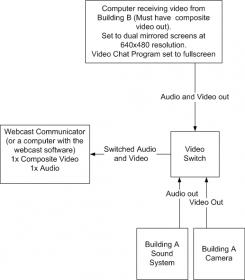
Try Google Voice and Video Chat. It reportedly does fullscreen video. What I would do would be to have a computer with composite video out running a video chat program with the screens set to "duplicate" or "mirror" each other. I would run the audio and video out from that computer into one side of a video switch and run the building audio/video into the other. Then you could switch from one to the other when you switched from a local speaker to a remote one. See my attached diagram for how I would connect the pieces.
MultihomedVideoLogicalLayout.jpg
MultihomedVideoLogicalLayout.jpg (10.02 KiB) Viewed 1845 times
I would recommend having the speaker at Building B be one of the first speakers so as to reduce the wait caused by buffering.

Aaron Z
Community Administrator
#26
lionelwalters wrote:There are FREE (or very inexpensive) software video conferencing solutions out there that provide video quality comparable to webcast in real-time and would enable a seamless transition from speakers at several buildings.

And that's the key - cheap, near real-time and good quality video. It will also depend on the demands it makes on the connection.

Someone will have to check them out and see if it lives up to the promise.

Given that it will need to be real-time, I'm sure it will be much more sensitive to any issues (burps) in the data stream.

I'll also point out that you'll end up with needing a lot more equipment to cover both locations as well as a larger tech crew to make it run. I'd make sure to put together a budget as to what it will take and get an OK from the Stake President before proceeding in earnest.
Have you searched the Help Center? Try doing a Google search and adding "site:churchofjesuschrist.org/help" to the search criteria.

So we can better help you, please edit your Profile to include your general location.
#27
harddrive wrote:Lionelwalters, I don't think this is being discarded as a non-option. I understand the concept of video conferencing, but as far as I know it take a server outside of the church and I thought it was more of a "telephone" call, where you dial into it.

If you can point us to where the software is. It would also be good for me, at least, to have you describe how the computer with the cameras attached would connect to it. I just may be missing what you are driving at.

thanks for enlightening me.
My apologies for being dramatic. :-) The two software options I've described include built-in VoIP audio so it would just be a matter of running the sound through and from the PC. I'll try to put together some diagrams and perhaps a demo video. I've done this sort of thing for church and community meetings so have seen the benefits.
Community Moderators
#28
lionelwalters wrote:My apologies for being dramatic. :-) The two software options I've described include built-in VoIP audio so it would just be a matter of running the sound through and from the PC. I'll try to put together some diagrams and perhaps a demo video. I've done this sort of thing for church and community meetings so have seen the benefits.
I attended a leadership training meeting last November that included six remote sites. We all discussed matters freely in that environment, with no more than a one or two second delay.

I should have asked them how they did it, and if it would scale to the stake conference level.
#29
lajackson wrote:I attended a leadership training meeting last November that included six remote sites. We all discussed matters freely in that environment, with no more than a one or two second delay.

I should have asked them how they did it, and if it would scale to the stake conference level.

I expect that would have been some kind of video conferencing solution. I'm curious, how were the cameras positioned at the main site (where the speakers were originating from) and at the other sites? In other words were you looking at the stand in all sites or at the congregation, or did it switch?
#30
I have attached a diagram to show what the hardware setup would look like at ALL locations. The only difference in setup at the different sites would be that sites that won't have people speaking at the stand just need the congregation-facing camera. Note that the conferencing software would need to handle echo cancellation when using the chapel sound system for both input and output.
Conference Meetings.pdf
(330.45 KiB) Downloaded 298 times

As mentioned previously, there are several software options, but for the best quality for audio (including echo cancellation) and video, most flexibility and simplicity to manage, I would recommend WebEx, which is free for up to 5 locations at http://meet.webex.com. I will update the document with end-to-end software instructions, and when I get some time I'll post a video to show how a final event would work (but in harmony with church policy, in a location other than the chapel).

I hope you can see that this option requires NO additional hardware and, once I publish the software instructions you'll see that it requires only one person with minimal technical expertise (besides optional camera operators) at each location to execute. If you have any questions, please let me know.
Community Moderators
#31
lionelwalters wrote:I expect that would have been some kind of video conferencing solution. I'm curious, how were the cameras positioned at the main site (where the speakers were originating from) and at the other sites? In other words were you looking at the stand in all sites or at the congregation, or did it switch?
Both stand and congregation at each site. I was at the originating site, and at some point during the meeting we saw both views from each of the remote sites. They also showed a short video and several powerpoint slides to everyone, but those would not be needed for a stake conference.
Community Administrator
#32
lionelwalters wrote:Note that the conferencing software would need to handle echo cancellation when using the chapel sound system for both input and output.

I think it would be best to simply switch the microphone off when not in use. You'd need the echo cancellation for actual conversation, but in a "stake conference" format with the formal handing off of speaking duties, I think a mic switch would be far better.
Have you searched the Help Center? Try doing a Google search and adding "site:churchofjesuschrist.org/help" to the search criteria.

So we can better help you, please edit your Profile to include your general location.
#33
RussellHltn wrote:I think it would be best to simply switch the microphone off when not in use. You'd need the echo cancellation for actual conversation, but in a "stake conference" format with the formal handing off of speaking duties, I think a mic switch would be far better.
Good point. There is a mute function within the software that would suit this purpose.
#34
Please find the updated document attached with both hardware and software instructions.
Conference Meetings.pdf
(521.3 KiB) Downloaded 557 times

I welcome your comments or questions.
Member
#35
lionelwalters wrote:Please find the updated document attached with both hardware and software instructions.

I welcome your comments or questions.
Wow. Good writeup and nice graphics.

I will have to take this to our meeting on the subject this Sat.

Aaron Z
Member
#36
lionelwalters wrote:Please find the updated document attached with both hardware and software instructions.

I welcome your comments or questions.
One question, is it possible for the "Host" of the session to remotely enable/disable the audio for the remote sites?

Aaron Z
#37
Aczlan wrote:One question, is it possible for the "Host" of the session to remotely enable/disable the audio for the remote sites?

Aaron Z

Yes, definitely. In the participant list, you can see who's talking because the speaker icon is animated whenever there is audio. The host would just right-click the "noisy" participant and select the option to mute them. I have attached some screen shots to show this.
Conference Screenshots.pdf
(549.42 KiB) Downloaded 520 times
Community Administrator
#38
Can you give a screen shot of what you'd expect to see on the projector at a given site? The screen shot you've given show most of the space for a power-point like presentation. That's not what we'd want for a general session of Stake Conference.
Have you searched the Help Center? Try doing a Google search and adding "site:churchofjesuschrist.org/help" to the search criteria.

So we can better help you, please edit your Profile to include your general location.
#39
RussellHltn wrote:Can you give a screen shot of what you'd expect to see on the projector at a given site? The screen shot you've given show most of the space for a power-point like presentation. That's not what we'd want for a general session of Stake Conference.

The second of the two screenshots my last attachment shows the "full-screen" mode. I understand that WebEx are working on making the active speaker show in true full screen as opposed to the boxes they appear in currently. In the meantime, you can blow up the main window by adjusting the zoom and position settings on the projector.

ooVoo, as an alternative, displays in true full screen, but you'd have to manually switch between the site you see - but that's just a case of using the left and right arrows to change sites.