Member
This may only be a problem for people who have calendar editing abilities but...
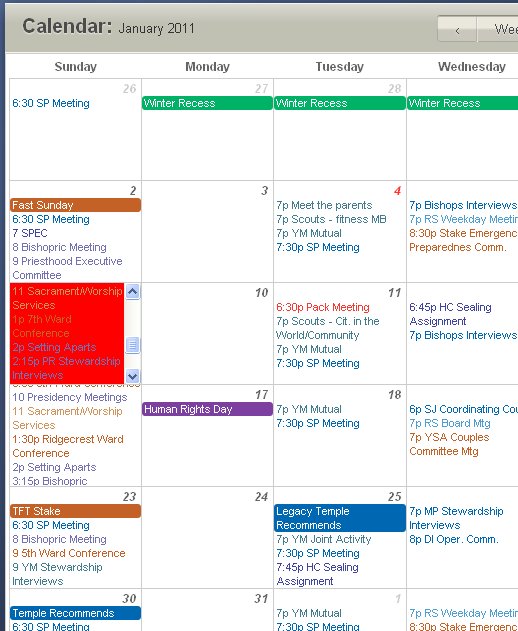
When I go to a day that has so many items on the calendar that they cannot all fit in one square (like most Sundays), the square automatically gives me a scroll bar. This is fine. However, when I click on the scroll bar, the whole date is selected (and for me turns red) and as soon as I release the mouse button it opens up a dialog box as if to add a new item to that date. I had my wife try the same thing and it did the same for her except that, since she is in the Primary presidency, it came up with a new calendar item for the Primary.
**edit** I just tried it again but this time when I mouse over the date and the scroll bar shows, I just rolled my mouse wheel and that allowed me to get to the bottom and click an item without it turning red and opening a new calendar item. The original problem is still there but this is some kind of work around.**
Additionally, it would be nice to allow calendar editors to turn on and off the calendar editing so that you can see what a "normal" member sees when they view the calendar items.
I was going to put this info in the feedback portion but I couldn't find that on the calendar page (I'm sure I'm just being blind).
When I go to a day that has so many items on the calendar that they cannot all fit in one square (like most Sundays), the square automatically gives me a scroll bar. This is fine. However, when I click on the scroll bar, the whole date is selected (and for me turns red) and as soon as I release the mouse button it opens up a dialog box as if to add a new item to that date. I had my wife try the same thing and it did the same for her except that, since she is in the Primary presidency, it came up with a new calendar item for the Primary.
**edit** I just tried it again but this time when I mouse over the date and the scroll bar shows, I just rolled my mouse wheel and that allowed me to get to the bottom and click an item without it turning red and opening a new calendar item. The original problem is still there but this is some kind of work around.**
Additionally, it would be nice to allow calendar editors to turn on and off the calendar editing so that you can see what a "normal" member sees when they view the calendar items.
I was going to put this info in the feedback portion but I couldn't find that on the calendar page (I'm sure I'm just being blind).