help! meetinghouse communicator software

26 postsstarted by stephen500 8,116 viewsoriginal topic

#1
On Sunday at home the meetinghouse communicator software worked fine.
I even did a test broadcast using still slides.
However when it came to the real event tonight I had problems.
Due to a hardware failure for the hardware meetinghouse communicator it had to go back.
So I took my windows 7 desktop which has the beta 3.0 version installed and attempted to connect it wirelessly.
When I started up the meetinghouse communicator software I got a message dialog box from windows that there was a problem with the programme and it would have to close and seek a solution.
I tried uninstalling and reinstalling.
After a reinstall i even got the message that it needed windows media encoder 9, which I had already installed.
Btw the message you get when you attempt to start the meetinghouse comm software beta 3.0 on start up "you need to install windows media encoder 9" click yes to install takes you to a defunct page.
However I had already installed encoder 9 and it still asked for it!
However again even when I had the programme installed normally windows still said there was a problem with the programme.
I wonder if it is because I attempted to connect using wireless?
I will try when I get home this morning (UK time) and if it works with the lan cable I will buy 50 metres of it and try it in the building.
Another thought is could it be the cisco firewall?
I even tried deleting the comm software of the registry, which I was a bit worried about, but that made no difference.
I think it is wrong that global services don't support official church software!
Worst of all I had two Area Seventies and a host of Stake presidents due to watch the broadcast.
I couldn't help the hardware failure, but the software failure nearly had me in tears!
Any suggestions and help would be much appreciated.
Community Moderators
#2
stephen500 wrote:So I took my windows 7 desktop which has the beta 3.0 version installed and attempted to connect it wirelessly.
When I started up the meetinghouse communicator software I got a message dialog box from windows that there was a problem with the programme and it would have to close and seek a solution.
This thread describes the solution to some of the problems you are having. There are a number of other threads in the Building-to-Building Communications Forum that may be of assistance to you.
Church Employee
#3
Greetings Stephen,

During a routine upgrade of our authorization server, we experiencing a momentary glitch, which may have affected your ability to log in to either the 2.0 or 3.0 software. 2.0 users experienced an error that closed their application, while 3.0 users were presented with a message that they had an invalid UN or PW. The issue has since been resolved. Please accept our apologies in this matter and let us know if you experience any additional issues with launching the software.

Thank you,
Jacob
Senior Member
#4
spoken like a true IT person... experienced a momentary glitch :) starkjs... a service oriented staff refers to that as an Interruption of Service :)
“A long habit of not thinking a thing wrong, gives it a superficial appearance of being right, and raises at first a formidable outcry in defense of custom.”
― Thomas Paine, Common Sense
#5
starkjs wrote:Greetings Stephen,

During a routine upgrade of our authorization server, we experiencing a momentary glitch, which may have affected your ability to log in to either the 2.0 or 3.0 software. 2.0 users experienced an error that closed their application, while 3.0 users were presented with a message that they had an invalid UN or PW. The issue has since been resolved. Please accept our apologies in this matter and let us know if you experience any additional issues with launching the software.

Thank you,
Jacob
Dear Jacob, thanks for your prompt reply.
I have sent you an e-mail and would be grateful if you could contact me.
My problem for the benefit of the forum as far as sound issues go.
1) I have on the settings tab and the live input ("cog") set the audio default as line in. I plugged into the line in my ipod with general conf session on. The live input cog i used was the jvc camera one with the audio set to default to "line input" ie ipod.
Despite this and the sound bars showing the line input as working in the configure box and start webcast the sound output to broadcast is my jvc digicam and not the line input to which we want to attach a mixer too.
2) I tried also to run standard version 2.0 rather then beta 3.0.
But on installation I am presented with a message that i need encoder 9 or later. Despite the fact that I have already installed encoder 9, and have tested it to see it is running, from the installer at https://webcast.ldschurch.org/ClientDow ... lient.aspx
Btw when you get the message that you need encoder 9 and you click yes, it directs you to an error page as the link is no longer the valid.
So either the link needs correcting or taking out as the installation packager is already available via https://webcast.ldschurch.org/ClientDow ... lient.aspx
Please stop the dialog box asking for media encoder 9 and just instruct to install from the link above, where you can click below to install encoder 9

http://download.microsoft.com/download/ ... ncoder.exe
It is really frustrating that the link produces an error page and that despite installing it from the above installer package on the 2.0 installer page that it will not work.
I have ordered 50 metres of lan cable today in the hope that we can solve this problem by Tues when we are due to broadcast to young marrieds over the UK and too stake presidents and area presidents.
I had to aplogize and explain that tech is never straightforward and appreciate that we won't always get it right.
I would be grateful if we could solve this by next tues so the broadcast can go ahead by the Area Seventy.
Btw we chose this software alternative as back up and the hardware communicator broke and is in for repair.
Many thanks for help in advance,
Bro Sinclair,
Chester England Stake.
Please call me at the phone number I gave you.
Thanks for all you do.
Senior Member
#6
Windows 7.... 32 bit or 64 bit? If 64 bit then things could be difficult.
#7
64 bit....trying to find the download for windows media encoder 9 (64 bit) is hard enough.
It will get worse for the church as Microsoft have announced that over 50 % of windows 7 computers purchased are 64 bit ones.
So over half the new computers bought will be incompatible with version 2.0 of meetinghouse communicator software.
#8
I am almost at the stage where I will give up on the software.
I tried to sell the software to the stake pres, who is hooked on the hardware version, as a back up and it really is not selling itself.
Such a shame.
I have had help from church hq and they are trying to help but both the 2.0 version and beta 3.0 have problems.
Beta 3.0 cannot, despite showing in the sound bars seperate audio outputs, actually feed the audio input for streaming.
It gives the appearence of doing so, but does not.
I just get the sound of the camera mic, even though the audio defaults are set for line in.
Member
#9
stephen500 wrote:64 bit....trying to find the download for windows media encoder 9 (64 bit) is hard enough.
It will get worse for the church as Microsoft have announced that over 50 % of windows 7 computers purchased are 64 bit ones.
So over half the new computers bought will be incompatible with version 2.0 of meetinghouse communicator software.
If you can find the WME 9 for 64 bit, it will work on Win 7. Or at least it does for me. I have meetinghouse communicator (2.1.01) and WME 9 x64 installed on my Win 7 Pro laptop. It has worked well for broadcasting a priesthood leadership session and for the testing that we have done.
I still have the WME installer if you cannot find an x64 version.

Aaron Z
Senior Member
#10
Windows 7 64 bit is not supported under WME 9. You should give up and look for other options. Fortunately, you have two.

1. Download and install Expression 4, which is the replacement for the discontinued WME 9. Please note that the free edition is limited to 10 minute sessions.


2. If your machine is running Windows 7 PROFESSIONAL then set up XP Mode (not compatibility mode) which runs a virtual copy of XP. You can install communicator and the old WME in there and it will work without difficulty.
Member
#11
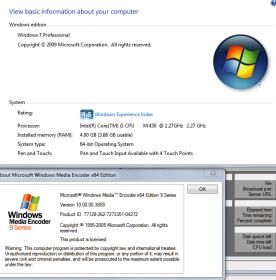
aclawson wrote:Windows 7 64 bit is not supported under WME 9. You should give up and look for other options.
I beg to differ.
Win7AndWME9.jpg
Win7AndWME9.jpg (14.48 KiB) Viewed 2109 times
Aaron Z
Senior Member
#12
Speaking within the context of the meetinghouse communicator, installing WME 9 on a 64 bit machine is NOT SUPPORTED by SLC, as in they couldn't help me find a solution running MC2. I went back and forth with SLC support several times and they told me that MS discontinued WME without notice - for machines that were running an existing copy it seemed to be working ok but *NEW* installs (such as the one attempted by OP) were not working properly. As a workaround I was told to install MC3(beta) and was able to get it running but using the Expression encoder, not WME.

Installing MC2 in XP mode worked without a hitch.
#13
Dear Jacob, I just send you an email can you reply asap, thanks. Bro Sinclair.
#14
I would be so grateful if you could send me the 64 bit version of wme 9. I tried searching every where and got incompatible. Wil windows 7 allow me to install it and does it cause any comp problems? Also do I need to take encoder off first? Please do send me the installer. Stephensinclair8@aol.com please label e mail as wme installer so I know who you are thanks. Btw the prob I had was seperating sound and video as the beta version would not work with a line in. So with your install I will try version 2.
#15
aclawson wrote:Windows 7 64 bit is not supported under WME 9. You should give up and look for other options. Fortunately, you have two.

1. Download and install Expression 4, which is the replacement for the discontinued WME 9. Please note that the free edition is limited to 10 minute sessions.


2. If your machine is running Windows 7 PROFESSIONAL then set up XP Mode (not compatibility mode) which runs a virtual copy of XP. You can install communicator and the old WME in there and it will work without difficulty.
So are you saying that with expressionsns, that the church supply as a link, I am limited to 10 min sessions. That would not go down to well, rebooting broadcast for stake conf every 10 mins!
Senior Member
#16
The problem appears to be with the 64 bit version of Windows 7 only - when I started the machine in XP Mode (included with Windows 7 Professional, you just have to download a couple of components) I had everything working without difficulty.

Expression has a couple of flavors (like everything else MS does), with the free version limited to 10 minutes and the paid versions without this timer. When I was looking into it the MC3 beta hadn't even been released yet and SLC had known of the discontinuation of WME was a relatively recent development that they still hadn't addressed.

It is something that is going to have to be resolved - and I have no doubt that it eventually will. For the moment I strongly encourage you to try the XP mode to see if that resolves your issues for the immediate future.
Member
#17
stephen500 wrote:So are you saying that with expressionsns, that the church supply as a link, I am limited to 10 min sessions. That would not go down to well, rebooting broadcast for stake conf every 10 mins!
As I understand it, the expressions program limits you to 10 minutes, but the Meetinghouse Communicator just uses the codecs (the software that instructs the computer how to digitize the video) from it, so you are not limited to 10 minutes.
I could be wrong (I have been in the past), but that is how it appears to me.

Aaron Z
Member
#18
aclawson wrote:Speaking within the context of the meetinghouse communicator, installing WME 9 on a 64 bit machine is NOT SUPPORTED by SLC, as in they couldn't help me find a solution running MC2. I went back and forth with SLC support several times and they told me that MS discontinued WME without notice - for machines that were running an existing copy it seemed to be working ok but *NEW* installs (such as the one attempted by OP) were not working properly. As a workaround I was told to install MC3(beta) and was able to get it running but using the Expression encoder, not WME.
Installing MC2 in XP mode worked without a hitch.
So, new installs of WME9 x64 are not working, where old ones are? Sounds odd. I emailed the WME9 x64 installer to stephen500, lets see if it gets there and how it goes for him.

stephen500, if you don't get an email from me with the program attached, let me know and I will put the file up on an FTP site where you can download it.

Thanks

Aaron Z
Member
#19
stephen500 wrote:Beta 3.0 cannot, despite showing in the sound bars seperate audio outputs, actually feed the audio input for streaming.
It gives the appearence of doing so, but does not.
I just get the sound of the camera mic, even though the audio defaults are set for line in.
stephen500 wrote:Btw the prob I had was seperating sound and video as the beta version would not work with a line in. So with your install I will try version 2.
It sounds like either the 3.0 was not letting you switch where it looks for sound, or you somehow missed that setting.

Aaron Z
Senior Member
#20
aczlan wrote:So, new installs of WME9 x64 are not working, where old ones are? Sounds odd. I emailed the WME9 x64 installer to stephen500, lets see if it gets there and how it goes for him.

stephen500, if you don't get an email from me with the program attached, let me know and I will put the file up on an FTP site where you can download it.

Thanks

Aaron Z
Use iSendr.com - better than ftp.
Senior Member
#21
aczlan wrote:As I understand it, the expressions program limits you to 10 minutes, but the Meetinghouse Communicator just uses the codecs (the software that instructs the computer how to digitize the video) from it, so you are not limited to 10 minutes.
I could be wrong (I have been in the past), but that is how it appears to me.

Aaron Z
One way to find out....
Senior Member
#22
Stream has been running for 19:30 and still going.... can anybody else verify so we can rule out something else that might have been loaded on my machine?
#23
aczlan wrote:So, new installs of WME9 x64 are not working, where old ones are? Sounds odd. I emailed the WME9 x64 installer to stephen500, lets see if it gets there and how it goes for him.

stephen500, if you don't get an email from me with the program attached, let me know and I will put the file up on an FTP site where you can download it.

Thanks

Aaron Z
Aaron Z, As i said in my e mail many thanks for mne 9 (64 bit) edition.
it worked a treat.
It stopped working once and all I had to do was reinstall meetinghouse communicator 2.0 again. Which if I even had to do for every broadcast would be easy!
I tried to attach it here, but it won't let me.
So if any one needs it contact me, Aaron z, or Jacob Stark.
I have sent it to jacob stark, who works for the church and helped me with this problem.
Once again many thanks to all and Aaron Z for the attachment.
#24
Thanks for everybodys help. The broadcast went well, we had one outage.
Funny how we had no outage for two hours before the event.
I booted it up two hours before and was afraid to turn it off it case it stopped, which it did for a few moments during the broadcast!
Church Employee
#25
I see a few comments about the stream only lasting for 10 minutes with expression. Can anyone else verify this? The free version works without any time constraint so I am not certain why users are experiencing this behavior. @Stephen, I'm extraordinarly happy to hear that you were able to get this solution working in time. What was the nature of the outtage that you experienced?
#26
aczlan wrote:It sounds like either the 3.0 was not letting you switch where it looks for sound, or you somehow missed that setting.

Aaron Z
Both Jacob Stark and myself checked it and found that it just did not work.
On the encoder it worked fine and expressions and version 2.0 when I managed to install wme 9, 64 bit.