Leadership tools -Beta

37 postsstarted by jbpreston-p40 16,258 viewsoriginal topic

New Member
#1
I've noticed the leadership tools portion over at the lds beta site is down...anyone know if this is temporary or have a status?
Church Employee
#2
jbpreston wrote:I've noticed the leadership tools portion over at the lds beta site is down...anyone know if this is temporary or have a status?
Try the new.lds.org versions. They are moving over that way.

I don't know if you are referring to the leader experiences or to the online mls tools.

I don't have access to either in non-test areas but I get access denied in new.lds.org as apposed to Invalid Request on beta.lds.org, which seems to be a good sign that new will work for those with rights.
New Member
#3
These are links are not working for me.
Community Administrator
#4
They work, but clearly I'm not privileged enough to use them (Access Denied).
Have you searched the Help Center? Try doing a Google search and adding "site:churchofjesuschrist.org/help" to the search criteria.

So we can better help you, please edit your Profile to include your general location.
#5

Tools for Your Callings and Responsibilities

I'm not seeing them either, not how I am used to seeing (and using) them, nor via the links. This may be a temporary outage though since they were reported to be working earlier today.

To be clear, when you have a calling in MLS that allows you to see the new applications (which allow you to see some of the things that you would otherwise need to view in MLS, like the Bishopric Action and Interview List) they show up as tools under the new lds.org beta (which is traditionally accessed via beta.lds.org). They would also show up as separate tools when you choose "See All Tools" under the tools menu under the first of the two sections that are there:

Tools for Your Callings and Responsibilities
Tools for General Membership

Directory, Calendar and a few other items are under the latter category, but I currently don't see the other items under the Tools for Your Callings and Responsibilities when I am logged in. (They won't show up unless you are logged in with an account that is also marked as one with an authorizing calling in MLS.) Currently I see nothing there, even though I have had them before. Yes, I know it's still beta, but my Bishop called me and asked me why they're not there anymore. :D Hopefully they'll be back soon. They come in very handy.

Church Employee
#6
dobrichelovek wrote:I'm not seeing them either, not how I am used to seeing (and using) them, nor via the links. This may be a temporary outage though since they were reported to be working earlier today.

To be clear, when you have a calling in MLS that allows you to see the new applications (which allow you to see some of the things that you would otherwise need to view in MLS, like the Bishopric Action and Interview List) they show up as tools under the new lds.org beta (which is traditionally accessed via beta.lds.org). They would also show up as separate tools when you choose "See All Tools" under the tools menu under the first of the two sections that are there:

Tools for Your Callings and Responsibilities
Tools for General Membership

Directory, Calendar and a few other items are under the latter category, but I currently don't see the other items under the Tools for Your Callings and Responsibilities when I am logged in. (They won't show up unless you are logged in with an account that is also marked as one with an authorizing calling in MLS.) Currently I see nothing there, even though I have had them before. Yes, I know it's still beta, but my Bishop called me and asked me why they're not there anymore. :D Hopefully they'll be back soon. They come in very handy.
I know that the tools aren't showing up in the tools menu. That is why I was giving direct links. I can't verify that they are working any further than getting Accessed Denied.
Community Administrator
#7
ryan jones wrote:I don't have access to either in non-test areas but I get access denied in new.lds.org as apposed to Invalid Request on beta.lds.org, which seems to be a good sign that new will work for those with rights.
For a ward clerk in my stake, the direct link to beta works: http://beta.lds.org/leader and once he is in, the tools menu works (it displays the Leader and Clerk Resources and other clerk-related links). For new.lds.org, the direct link http://new.lds.org/leader gives a Page Not Found error. So at least from that report, beta works better than new.
Questions that can benefit the larger community should be asked in a public forum, not a private message.
New Member
#8

working link found above

to echo, the beta.lds.org/leader link works for me
-mike
New Member
#9
Having the proper access to get to https://new.lds.org/leader, I now get the following error...
SRVE0255E: A WebGroup/Virtual Host to handle /leader/ has not been defined.


SRVE0255E: A WebGroup/Virtual Host to handle new.lds.org:80 has not been defined.


IBM WebSphere Application Server
So, they must be getting close in migrating those over to the new webservers...
Church Employee
#10
NateDavis wrote:Having the proper access to get to https://new.lds.org/leader, I now get the following error...
So, they must be getting close in migrating those over to the new webservers...
The leader application hasn't released yet, so I don't know how the release of some parts to new.lds.org on Aug 31 would have affected the leader application. Have you tried the https://beta.lds.org/leader version? I don't have rights to it, but it looks like it might work better for now until the leader release that is coming.
New Member
#11
http://beta.lds.org/leader does work. So, I will use that when needed up until the move happens. Thanks!
Member
#12
WOW oh WOW!!! check: new.lds.org/leader

totally awesome!!!

• Just been looking at the graphs for my wards key indicators… fantastic.
• Full action and interview list - perfect!
• Callings by organisation is just a big long list really - showing evey possible calling - and those that are filled. Does give some ideas for potential callings that could be extended though

There seems to be a bit of menu duplication too - with a couple of items listed under more than one heading.

Anyhow - it's all good :)
New Member
#13

curious

i don't have access to the new program but i'm curious to know what exactly you can do with the new leadership tools. I think this is a very good idea for the members to have and will help the wards out a lot. Can someone just list some of the new things you can do with it?
Member
#14
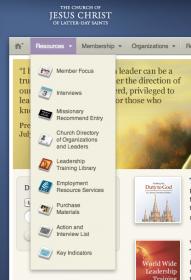
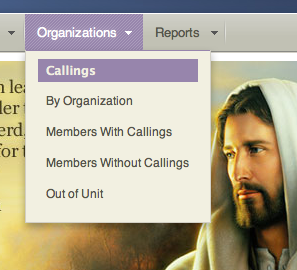
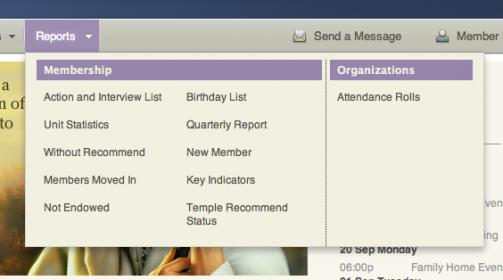
here's some screenshots of the menus currently available:
Screen shot 2010-09-12 at 22.12.33.jpg
Screen shot 2010-09-12 at 22.12.33.jpg (10.84 KiB)
Screen shot 2010-09-12 at 22.12.46.png
Screen shot 2010-09-12 at 22.12.46.png (80.97 KiB)
Screen shot 2010-09-12 at 22.12.49.jpg
Screen shot 2010-09-12 at 22.12.49.jpg (18.3 KiB)
New Member
#15
wow, thanks for the images. It makes perfect sense for members to be able to work on their ward from home. They will be able to accomplish a lot without wasting time traveling to the actual building just to look up information and so forth.
Community Administrator
#16
Just to be clear, this isn't for members. It's for leaders.
Have you searched the Help Center? Try doing a Google search and adding "site:churchofjesuschrist.org/help" to the search criteria.

So we can better help you, please edit your Profile to include your general location.
Member
#17
there are still some areas that I hope are being addressed, such as home teaching, auxiliary & quorum organisation, and hopefully even finance reports… but overall - it's brilliant.

imagine being able to see the tithing status report, and schedule tithing settlement appointments right there and then! woohoo!!
Senior Member
#18
It goes without saying that these are leader tools, not member tools. I see these expanding more than can be done now with just MLS on the desktop computer at the meetinghouse.

The screenshots above indicate that those are largely tools for the bishopric. However, I see another level for like EQ presidents, auxiliary heads, and maybe a level for members to do things like home teaching reports.

For example, if it could be put in, an RS president could take a paper food order, get the information, then go in and check off items and load quantities, then the bishop can review it, make needed changes or adjustments, then after doing any other work, sending it off electronically to the storehouse for filling.

I see the HT/VT reporting matter discussed here in the past ending up as a module, with the EQ president and HPGL seeing things from the member side app after it has been ported in much the same way that things are moved from one leader to another during the missionary process. The member would see only those they were assigned to and enter whether they visited or not, the leader would see all families in the group or quorum.
#19

Interviews

First, thanks for all the hard work and foresight to create these tools. I'm pleased that they have already provided our bishopric with a simpler way to get to some of the information we need.

Now, the Interviews Resource under the Leader and Clerk Resources... Should I assume this is a preview of a not-yet-fully implemented resource? :o

I am excited to use it, though, as it would work well as a place to keep the bishop informed as to upcoming interviews. There is a link to the Action and Interview list. Does this imply that I might be able to schedule an appointment from there, the Member Focus list, or the general directory? Also, is there a location where these leader resources/ new tools are documented (like help/instruction) similar to this? :
https://tech.lds.org/ldshelp/index.php5/Main_Page

The reason I ask is I would like to bring these things to the attention of the Stake, since they should be prepared to support the use of these resources well before the full GA release of these tools. Such a page would help me to point them to something more concrete that might discuss the Stake vs. Ward aspects of this and other pieces that are already in place (I'm thinking calendar and resource responsibilities, which have clear Stake requirements). Of course, I'd be happy to help with content, if there was a Wiki page set up for just this purpose. ;) (I also wonder if any of this will be reflected in the new Handbook material coming out in November... )

Thanks.
Senior Member
#20
dobrichelovek wrote:There is a link to the Action and Interview list. Does this imply that I might be able to schedule an appointment from there, the Member Focus list, or the general directory?
Historically, the "Action and Interview List" got it's name from a report in MLS. The function of this report was to inform the Bishop of upcoming interviews that should happen because of age or a certain period of time has passed. Things like yearly interviews with youth, overdue priesthood ordinations, or children approaching the age of 8 getting ready for baptism (does anyone know if it also tracked interviews that should happen for newly baptized converts?).

So I wouldn't be surprised if the report very closely mimics the same functions from the MLS report and not much else.
Member
#21
mkmurray wrote:So I wouldn't be surprised if the report very closely mimics the same functions from the MLS report and not much else.
it does do just that and nothing else. There is some duplication between that report, and the 'interviews' item.

And to answer the other question, no the MLS report didn't track interviews for recent converts.
#22

Interviews

Basically I was trying to figure out how the interview list worked, because the first time I saw it, it was not populated at all, and I didn't see a way to fill it in. Today when I look, I see that it is now automatically populated and has a list of those individuals who are on the Action Interview list in a task-list type of application, meaning that I can check them off as they have their interviews and then hide those who are checked off, if so desired.

The individuals that are there range from those who need baptismal interviews to those who need advancement and annual/semi-annual interviews with the bishop. For now, it seems to be restricted in scope to those parts of the Interview list that are current interviews for the bishop only. It looks like counselor interviews are not reflected.

I just didn't quite know what to make of this list, since it wasn't initially populated, but now that I see what it is, I appreciate that it will be a useful tool.
Member
#23
I am a member of a bishopric and don't have access to these. Any reason why? Seems kinda of odd. Would REALLY like to have access to this info via the web. Is there any date when bishopric members can expect access?
Church Employee
#24
dshep2020 wrote:I am a member of a bishopric and don't have access to these. Any reason why? Seems kinda of odd. Would REALLY like to have access to this info via the web. Is there any date when bishopric members can expect access?
They started with bishops and clerks. I know that they are working on councilors/assistant clerks now, but I don't know when they are expecting to have it ready.
New Member
#25
ryan jones wrote:They started with bishops and clerks. I know that they are working on councilors/assistant clerks now, but I don't know when they are expecting to have it ready.

I'm the assistant stake clerk over all of this for our Stake. Any idea when I'll get information or access? There are many things going on in our Stake that this will have an impact on and will change the decisions and current efforts of so many. It would be good to know what is coming so that we don't waste time on other endeavours that will be changed by this.
Member
#26
Is there a location in which callings and access granted from SLC is laid out? We want our RS president to have access to the tools, but are not sure if she has that right. She says she can see nothing. Similarly, we'd want our EQ President and HP Group Leader to have access.

In our case, we want them to see the current recommend status of the members of their quorum. The members of the Bishopric have that access, but we're not sure about the others. Would be nice to know what they are SUPPOSED to see, since I know that sometimes the calling "rights" do not follow and we need to call local support to get it fixed.
Community Administrator
#27
tortdog wrote:Is there a location in which callings and access granted from SLC is laid out? We want our RS president to have access to the tools, but are not sure if she has that right. She says she can see nothing. Similarly, we'd want our EQ President and HP Group Leader to have access.

In our case, we want them to see the current recommend status of the members of their quorum. The members of the Bishopric have that access, but we're not sure about the others. Would be nice to know what they are SUPPOSED to see, since I know that sometimes the calling "rights" do not follow and we need to call local support to get it fixed.
The list of callings with access is laid out in the help system under Callings with Leader and Clerk Resources access. You'll note that at this point quorums and auxiliaries do not have access.

But since things like home and visiting teaching are mentioned in the Roadmap, I'm guessing such access will come at some point -- of course, what a particular person can see will depend on their calling.
Questions that can benefit the larger community should be asked in a public forum, not a private message.
Senior Member
#28
aebrown wrote:The list of callings with access is laid out in the help system under Callings with Leader and Clerk Resources access. You'll note that at this point quorums and auxiliaries do not have access.

And even all the callings listed in that page do not have access to the temple recommend status that tortdog is referring to. See this recent thread. The general issue is the same: Access online is hard-wired to callings, even though local bishoprics might decide to grant access in local MLS. This is by design, and I know of no plans to give local priesthood leaders the ability to grant such access online.
Community Moderators
#29
aebrown wrote:The list of callings with access is laid out in the help system under Callings with Leader and Clerk Resources access. You'll note that at this point quorums and auxiliaries do not have access.
I will echo that not all callings on that list have access to the Leader and Clerk Resources yet. As an assistant clerk I have but access to CDOL and no other tools beyond normal membership access. If I try to go direct to the link lds.org/leader I get an access denied. But it is coming as described in the Help.
JD Lessley
Have you tried finding your answer on the ChurchofJesusChrist.org Help Center or Tech Wiki?
Community Administrator
#30
That page is a bit out of date. As I STS, I do have access. But it only brings up resources for my calling - sort of like a Wiki page. I don't get any tools for membership or any other dynamic content. I don't have the "Resources", "Organizations" or "Reports" as shown on that page.
Have you searched the Help Center? Try doing a Google search and adding "site:churchofjesuschrist.org/help" to the search criteria.

So we can better help you, please edit your Profile to include your general location.
Community Administrator
#31
jdlessley wrote:I will echo that not all callings on that list have access to the Leader and Clerk Resources yet. As an assistant clerk I have but access to CDOL and no other tools beyond normal membership access. If I try to go direct to the link lds.org/leader I get an access denied. But it is coming as described in the Help.
Yes, you're right. It looks like the author did a shortcut and didn't distinguish between assistant clerks at the stake level (who do have access) and assistant clerks at the ward level (who, according to you do not). And the term "assistant clerk" refers to a regular ol' assistant clerk -- not a financial or technology specialist assistant clerk (although an STS does have access to some other features, as RussellHltn just pointed out).
Questions that can benefit the larger community should be asked in a public forum, not a private message.
Community Moderators
#32
I should have mentioned that I am one of those financial clerks who do not have access because of the financial aspects which they have not finished programming. I can't speak for the regular assistant ward clerks.
JD Lessley
Have you tried finding your answer on the ChurchofJesusChrist.org Help Center or Tech Wiki?
New Member
#33
How long does it take for your user security to be updated? I was sustained as the bishop on Sunday and my stake clerk submitted the changes through MLS on Sunday afternoon. How long will I need to wait before I have access to the leader site?
Church Employee
#34
mkoyle wrote:How long does it take for your user security to be updated? I was sustained as the bishop on Sunday and my stake clerk submitted the changes through MLS on Sunday afternoon. How long will I need to wait before I have access to the leader site?
Normally 1-2 days.
The first step is that your position ends up in CDOL. Bishops have to wait to be reviewed by someone at CHQ. Once your position is in CDOL the next evening about 6 pm mountain time the processes begin that move your info into the authorization for lds.org. If everything works right you are in there by the next morning.

In your case I don't see you in CDOL (in fact your ward doesn't even have a bishop at the moment). I'll pass that along and see what happened.
New Member
#35
Thanks. I'm anxious to start using these tools. We have a pretty tech-savy bishopric. Let me know if you need any additional info for checking into it, I can email them to you.
Church Employee
#36
mkoyle wrote:Thanks. I'm anxious to start using these tools. We have a pretty tech-savy bishopric. Let me know if you need any additional info for checking into it, I can email them to you.
It appears that none of your information came up, just the release for the old bishop. That isn't suppose to happen. Can you have the stake try and send the info again?
New Member
#37
JonesRK wrote:It appears that none of your information came up, just the release for the old bishop. That isn't suppose to happen. Can you have the stake try and send the info again?

My stake clerk submitted the change again, still no dice so far. Is there any other way to get this submitted? Kind of frustrated.