Calendar/Directory August release issues

46 postsstarted by jdcr256 13,688 viewsoriginal topic

Church Employee
#1
Calendar and Directory just released yesterday to new urls - new.lds.org/directory, and new.lds.org/church-calendar. I'm looking to get feedback on how they are working for you.

To be specific, I'm not looking for feedback (at least in this thread) on features that are missing, or improvements you would like to see. What I would like to know is:
  • Are you able to log in to the directory and/or calendar?
  • When you log in, do you see the functioning application?
  • Do you get a blank screen?
  • Do you see the UI, but no data?
  • Any other similar issues?
Basically, several people yesterday reported they were not able to see data in the application. I want to confirm if this was just a problem during the downtime that we were doing the deploy, or if the problem continues.

Thanks again for your help and feedback.

Church Employee
#2
I was able to sign-in to both applications with these new URL's and move around within the applications and see all the data without any issues.
Community Administrator
#3
jdcr256 wrote:Basically, several people yesterday reported they were not able to see data in the application. I want to confirm if this was just a problem during the downtime that we were doing the deploy, or if the problem continues.
Since the new deployment, the calendar is not functional for me. I verified this just moments ago, so it is not a temporary issue. Specifically:
  • I can login just fine, but that's about all that works
  • Nothing displays at all in the main calendar frame -- I just get an eternal spinner.
  • I can change from week view to month view (and the displayed date changes properly: from "8 August - 14 August" to "August 2010") I still have the eternal spinner where the days and calendar events should show up.
  • Under "Options" I only have "Select Subscriptions", "Create Calendar" and "Sync" (I no longer see the other options, IIRC they were Manage Calendars and Permissions). Of those, only Sync works properly; Select Subscriptions and Create Calendar take me to the correct pages, but the data areas of those pages are completely blank.
So the calendar just doesn't work for me. It's a good thing that my big presentation to our stake presidency was Wednesday night -- just hours before it stopped working.

On the other hand, the directory works just fine; its performance seems to be noticeably better than before, which I appreciate.

UPDATE: I removed my session cookie from the calendar, and now it seems to be working again. I should have thought of that before making such a big report. But for others who are having issues, they might want to try that simple fix.
Questions that can benefit the larger community should be asked in a public forum, not a private message.
Community Moderators
#4
jdcr256 wrote:Calendar and Directory just released yesterday to new urls - new.lds.org/directory, and new.lds.org/church-calendar. I'm looking to get feedback on how they are working for you.

To be specific, I'm not looking for feedback (at least in this thread) on features that are missing, or improvements you would like to see. What I would like to know is:
  • Are you able to log in to the directory and/or calendar?
  • When you log in, do you see the functioning application?
  • Do you get a blank screen?
  • Do you see the UI, but no data?
  • Any other similar issues?
Basically, several people yesterday reported they were not able to see data in the application. I want to confirm if this was just a problem during the downtime that we were doing the deploy, or if the problem continues.

Thanks again for your help and feedback.
For the Calendar, I'm able to login but after that I get a blank screen.
For the Directory, I can login and then I get the shaded background and page framework but no text.
๐Ÿ“Ž directory.jpg (19.61 KiB)
Have you read the Code of Conduct?
Member
#5

Same here

For the Calendar, I'm able to login but after that I get a blank screen.
For the Directory, I can login and then I get the shaded background and page framework but no text.
Community Administrator
#6

New URLs for new.lds.org

Alan_Brown wrote:Since the new deployment, the calendar is not functional for me.
I would also note that I read right over the rather important note that there were new URLs. What I reported was for beta.lds.org; almost everything works fine for new.lds.org.

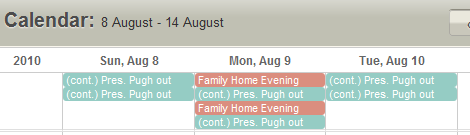
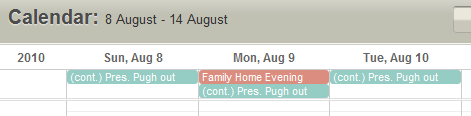
There is one odd problem that seems to be new. When the data first displays after I sign in to the calendar, it defaults to the week view, so it is displaying August 8-14 right now. That's fine. The problem is that for August 8-10 the all day events are duplicated. For example, we have Family Home Evening on Monday; it appears twice. But when I refresh or move to a different week or to the month view, the double display stops happening.

UPDATE: Before I even posted this message, when I went back to try to get a screen shot, I now get a 502 error whenever I hit new.lds.org and can't see any page at all. Here's the text:
Proxy Error The proxy server received an invalid response from an upstream server.
The proxy server could not handle the request GET /.
Reason: Error reading from remote server
Additionally, a 502 Bad Gateway error was encountered while trying to use an ErrorDocument to handle the request.
UPDATE to the UPDATE: Before I even posted the above update, I hit the site one more time. Now it's working again; there is no 502 error, and the duplicate events no longer appear. I'd better post this soon -- who knows what else will change if I keep looking at the site?
Questions that can benefit the larger community should be asked in a public forum, not a private message.
New Member
#7
macsense wrote:For the Calendar, I'm able to login but after that I get a blank screen.
For the Directory, I can login and then I get the shaded background and page framework but no text.
I am getting a blank screen as well. Do I need to clear cookies?
Update: Cleared cookies and cache in FF and still getting blank screen.
Community Administrator
#8
Alan_Brown wrote:There is one odd problem that seems to be new. When the data first displays after I sign in to the calendar, it defaults to the week view, so it is displaying August 8-14 right now. That's fine. The problem is that for August 8-10 the all day events are duplicated. For example, we have Family Home Evening on Monday; it appears twice. But when I refresh or move to a different week or to the month view, the double display stops happening.
I spoke too soon about this problem going away; it's still happening. When I first enter the calendar, I see:
Calendar-Doubled.png
Calendar-Doubled.png (7.48 KiB) Viewed 2840 times
but after I move to any other page and back again, or do a browser refresh, I see:
Calendar-Single.png
Calendar-Single.png (7.93 KiB) Viewed 2839 times
Questions that can benefit the larger community should be asked in a public forum, not a private message.
Member
#9
As for me, I did clear cookies and was going to the new URLs. Still nothing as previously posted.
Member
#10
I can log in to the directory and calendar

After log in, I see the UI for the directory, but no data appears to be attempting to load. I just get a white screen for the calendar.

cleared my cookies and cache, tried again, got nothing.
New Member
#11
My source tells me there will be some transition glitches as calendar migrates from beta to new.lds.org servers. Give it a few days to see if it works itself out.
Member
#12
I get blank screen on the calendar and a blank UI on directory
Senior Member
#13
I get a blank screen on both the calender and the directory using the new url's/ But at least I am not getting the spinning wheel!:D
#14
Blue background on Calendar Page ONLY
Blue Backgroug with Brown background form for Directory Page ONLY
Church Employee
#15
It looks like there are a lot of you that see this:
  • Directory: Blank UI - the background UI loads, but no data
  • Calendar: Just a blank white screen
If you see either of these results, and have not yet posted, do so to let me know. We know what is causing the problem, but I am trying to determine how widespread it is.
Senior Member
#16
jdcr256 wrote:It looks like there are a lot of you that see this:
  • Directory: Blank UI - the background UI loads, but no data
  • Calendar: Just a blank white screen
If you see either of these results, and have not yet posted, do so to let me know. We know what is causing the problem, but I am trying to determine how widespread it is.
I get the same thing for the directory but for the Calendar I get redirected to https://new.lds.org/denied.html and it says that I'm not authorized to access the page.
#17
jdcr256 wrote:
  • Directory: Blank UI - the background UI loads, but no data
  • Calendar: Just a blank white screen
I get exactly what you describe. I noticed that the page title for the Calendar is "!Home - localUnit and parentUnit Calendar!"
Senior Member
#18
jdcr256 wrote:It looks like there are a lot of you that see this:
  • Directory: Blank UI - the background UI loads, but no data
  • Calendar: Just a blank white screen
If you see either of these results, and have not yet posted, do so to let me know. We know what is causing the problem, but I am trying to determine how widespread it is.
Same for me...
Community Moderators
#19
I get what eblood66 describes.

Update: the access denied page is a result of an incorrect URL being entered. The calendar must use the new.lds.org/church-calendar URL instead of new.lds.org/calendar. But even after entering the correct URL I get the blank blue screen.
JD Lessley
Have you tried finding your answer on the ChurchofJesusChrist.org Help Center or Tech Wiki?
Senior Member
#20
jdlessley wrote:I get what eblood66 describes.

Update: the access denied page is a result of an incorrect URL being entered. The calendar must use the new.lds.org/church-calendar URL instead of new.lds.org/calendar. But even after entering the correct URL I get the blank blue screen.
You're right. I missed the change in URL. With the right URL I get the blank screen too.
Senior Member
#21
I log in and then when I try to see the calendar I get a blank, white screen. This happens with a Windows XP system using Internet Explorer 8 and with a Mac using OSX 10.6 (Snow Leopard?) and Safari.

With both systems, when I try to look at the directory I get what looks like the frames for the directory (including a search box) but no text at all.
My real name is Greg Anderson.
Community Administrator
#22
Neither of the applications are working for me at new.lds.org. Just blank pages after logging in. I haven't tried clearing cookies yet.
Have you searched the Help Center? Try doing a Google search and adding "site:churchofjesuschrist.org/help" to the search criteria.

So we can better help you, please edit your Profile to include your general location.
Community Moderators
#23
new.lds.org/directory/ Works as before, except directory pictures missing again. Sometimes pages "hangs" but a refresh usually brings up the page. Never the pictures.

new.lds.org/church-calendar
Works nice with improved functionality...at least I didn't notice these until now...
  • new expanded colors, Thank you-needed for many calendars
  • Print function, appears finally operational (at least on screen, I'll play with it more)
  • conflict checking, appears to have arrived in bottom right corner, and on new and edit event screens. I haven't figured it out yet, but looks promising.
  • help button is nice and helpful! (not sure when this button actually arrived)
thank you!
"A soft answer turneth away wrath" works great on LDSTech forum boards!
New Member
#24
New directory - I can login and see member data - but it is minus the 180 photos I had loaded for families and individuals. [ What does it mean when NEW PHOTS had a (-1) next to it? Do I need to re-upload our photos? When should I do this?] The Ward Leaders & Other Orgs is not working.

New Calendar - I can login and see the data.
Community Administrator
#25
rrr wrote:it is minus the 180 photos I had loaded for families and individuals. [ What does it mean when NEW PHOTS had a (-1) next to it? Do I need to re-upload our photos? When should I do this?]
The photos are still not working, but I don't know that you need to re-upload them. It appears that upload is not working right now, anyway. I'd wait until the feature is working again, and then hopefully all the previously uploaded photos will reappear.
rrr wrote:The Ward Leaders & Other Orgs is not working.
I find the leadership area to be flaky -- sometimes it displays, and sometimes it dooesn't. But if I refresh, or visit another part of the site and come back, or logout and login, sometimes the leadership will appear.
Questions that can benefit the larger community should be asked in a public forum, not a private message.
Community Moderators
#26
Out of curiosity I'm wondering if anyone with the proper credentials has actually checked the performance of the Leadership area? I serve as an Asst. Stake Clerk and don't have access to this area.

In the calendar feature I often see multiple entries when the page is loaded. If I refresh the page the duplicates disappear and I'm back to single entries as it should be.

One suggestion. In the Resources function, it would be nice to be able to reset the default resources. The helps indicate that when a resource is checked as a Meetinghouse, that a default set of resources are loaded. If these are accidentally removed, how do you put them back aside from manually creating each one.
Have you read the Code of Conduct?
Community Administrator
#27
techgy wrote:Out of curiosity I'm wondering if anyone with the proper credentials has actually checked the performance of the Leadership area? I serve as an Asst. Stake Clerk and don't have access to this area.
What are you asking about? I think you're confusing the "Ward Leaders and Organizations" area of the Directory on new.lds.org (which is what the previous post was about) with the "Leader and Clerk Resources" area (which only appears for people with certain callings, but has not been discussed in this thread).
techgy wrote:In the calendar feature I often see multiple entries when the page is loaded. If I refresh the page the duplicates disappear and I'm back to single entries as it should be.
I think what you're reporting here is what I described in this post.
techgy wrote:One suggestion. In the Resources function, it would be nice to be able to reset the default resources. The helps indicate that when a resource is checked as a Meetinghouse, that a default set of resources are loaded. If these are accidentally removed, how do you put them back aside from manually creating each one.
I think you're concerned about a non-issue here. The set of default resources for a meetinghouse location is fixed and cannot be changed, so there's no way to remove one. Those resources appear, by the way, only when you have decided not to treat a location as a single resource. All you can do with the default resources is check them on so that they appear or check them off so they don't -- they cannot be deleted. In addition to the default resources you can add any number of custom resources for a location. Those can be deleted as you wish.

FYI, the default resources for a location are:
  • Baptismal Font
  • Chapel
  • Cultural Hall
  • Kitchen
  • Chapel Overflow
  • Primary Room
  • Relief Society Room
  • Stage
  • Young Women's Room
  • Nursery Room
Questions that can benefit the larger community should be asked in a public forum, not a private message.
Community Moderators
#28
Alan_Brown wrote:.....I think you're concerned about a non-issue here. The set of default resources for a meetinghouse location is fixed and cannot be changed, so there's no way to remove one. Those resources appear, by the way, only when you have decided not to treat a location as a single resource. All you can do with the default resources is check them on so that they appear or check them off so they don't -- they cannot be deleted. In addition to the default resources you can add any number of custom resources for a location. Those can be deleted as you wish.

FYI, the default resources for a location are:
  • Baptismal Font
  • Chapel
  • Cultural Hall
  • Kitchen
  • Chapel Overflow
  • Primary Room
  • Relief Society Room
  • Stage
  • Young Women's Room
  • Nursery Room
I don't know where you are seeing the above list of Default Resources, but the only resource I show under "Manage Resources" are the 4 buildings in our stake. There are no other choices possible.

When I create an event for a given date I have a choice of "Other Resource" or the 4 buildings in our stake. If I un-check the box that says "Use Entire Resource" I'm not able to enter any information about any additional resource.

Either I'm missing something or else there's another bug somewhere.
Have you read the Code of Conduct?
Community Administrator
#29
techgy wrote:When I create an event for a given date I have a choice of "Other Resource" or the 4 buildings in our stake. If I un-check the box that says "Use Entire Resource" I'm not able to enter any information about any additional resource.
You need to edit the location. In there is an option to create resources within the location. Once in there, you see what Alan is saying. I'm pleased to find that I can individually turn those resources on/off as our Stake Center has an interesting layout: no chapel overflow (the area between the chapel and the cultural hall.)
Have you searched the Help Center? Try doing a Google search and adding "site:churchofjesuschrist.org/help" to the search criteria.

So we can better help you, please edit your Profile to include your general location.
Community Administrator
#30
I've found setting up the resources to be flaky. I click on a check box and it doesn't toggle. I save and I don't get what I had checked. I try to go back and change it, and it won't change.

This is not ready for use. :(
Have you searched the Help Center? Try doing a Google search and adding "site:churchofjesuschrist.org/help" to the search criteria.

So we can better help you, please edit your Profile to include your general location.
Community Moderators
#31
RussellHltn wrote:You need to edit the location. In there is an option to create resources within the location. Once in there, you see what Alan is saying. I'm pleased to find that I can individually turn those resources on/off as our Stake Center has an interesting layout: no chapel overflow (the area between the chapel and the cultural hall.)
Duh!! Now that I feel completely stupid. I hadn't scrolled down far enough. Sorry ..my mistake.
Have you read the Code of Conduct?
Community Moderators
#32
RussellHltn wrote:I've found setting up the resources to be flaky. I click on a check box and it doesn't toggle. I save and I don't get what I had checked. I try to go back and change it, and it won't change.

This is not ready for use. :(
The Resources definitely need some work. Consider the following;

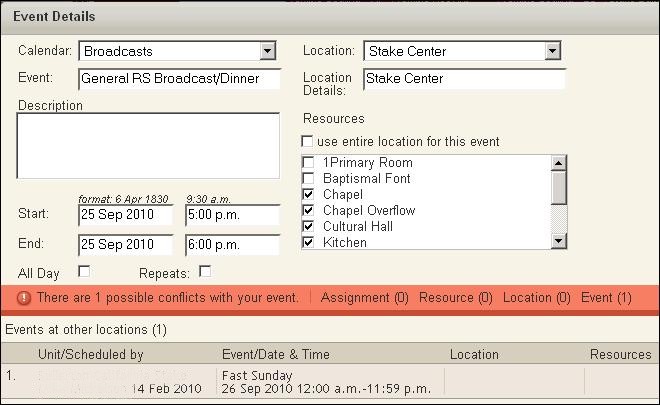
Sept 25th 3:00 pm to 4:00 pm - Stake Baptism using the Baptismal Font Resource. Also on the same date the General RS Broadcast at 5:00 PM (Pacific Time) in the Chapel with a dinner following in the Cultural Hall. Both of these events are currently on a calendar with "Other Resource" status.

These two events do not overlap, yet if I attempt to assign a resource to the baptism (Baptismal Font) and then check for a conflict. I am told that there's another event that's in conflict - the broadcast.

The only way to avoid this problem is to enter the events new and assign resources as the events are created. If both events are already on the calendar and given "Other Resource" status, there's no way of changing the resources without getting a conflict.
Have you read the Code of Conduct?
Community Administrator
#33
techgy wrote:The only way to avoid this problem is to enter the events new and assign resources as the events are created. If both events are already on the calendar and given "Other Resource" status, there's no way of changing the resources without getting a conflict.
What do you mean by "Other Resource" status? Do you mean "Other Location"?

The "Other Location" status means that no resource has been assigned. It should be "Stake Center" or "Elm Street Building" or something like that if you have assigned a resource to the event.

Existing events that predate the recent introduction of resources would all have an "Other Location" status, but as I have gone into each event and assigned a specific resource, they no longer have "Other Location" status.
Questions that can benefit the larger community should be asked in a public forum, not a private message.
Community Moderators
#34
Alan_Brown wrote:What do you mean by "Other Resource" status? Do you mean "Other Location"?

The "Other Location" status means that no resource has been assigned. It should be "Stake Center" or "Elm Street Building" or something like that if you have assigned a resource to the event.

Existing events that predate the recent introduction of resources would all have an "Other Location" status, but as I have gone into each event and assigned a specific resource, they no longer have "Other Location" status.
That's correct - I mean "Other Location". I think the problem is related to the fact that the program is checking for conflicts on Sunday when the event scheduled is for Saturday - see the attachment. The Broadcast/Dinner is calendared for Saturday 9/25. Yet a conflict is being reported for Sunday 9/26.
๐Ÿ“Ž resource_conflict.jpg (67.52 KiB)
Have you read the Code of Conduct?
New Member
#35
Here is what is happening for me and the new sites:

Maps: I really like many of the new features (verified, member verified, boundaries within stake etc.) However, when I click to see my ward, the map does not populate with the members as it did on the beta site.

Calendar: This is working better for me than it did on the beta. Other members can now see the calendars I have created. Before they could not.

Directory: I can look up all of the members of the ward just fine. However, none of the pictures I uploaded on the beta site are showing up. Both the family and individual pictures are missing. An issue on the beta site with the leadership directory was that if a person had more than one calling in an organization (say EQP and HT district leader) their picture would only show up for the first calling (EQP) and not for the second (HT district leader). I can't see if this is still the case on the new site, since none of the pictures work.

I am excited to share these sites with my ward once everything has been worked out. Thanks to the designers and programers, it is looking very good!
Member
#36

Link for feedback on new calendar

I don't see a link for feedback on the new calendar. I'm having a few issues I would like to report.

1-I cannot unsubscribe from a calendar. I click on the unsubcribe link but when I log out/in I'm showing subscribed to the calendar again. This particular calendar is a stake calendar.

2-Syncing is not working. Ahead of this new August release, syncing with my Mac iCal worked fine. I suspect there is a problem with new calendar because when I look at the Bishop Overview page under Leader and Clerk Resources section of the beta site, it is no longer bringing in calendar items as it was before.

3-I long for an option to select Month as the default calendar view rather than Week.

I plan on testing the location & resources functionality today with some stake people.

This is getting exciting and I can't wait to roll this thing!
Community Administrator
#37
macsense wrote:I don't see a link for feedback on the new calendar.
The Feedback link is on the bottom of the main new.lds.org page (the calendar pages don't have that link).
macsense wrote:1-I cannot unsubscribe from a calendar. I click on the unsubcribe link but when I log out/in I'm showing subscribed to the calendar again. This particular calendar is a stake calendar.
This seems to be a bug in the "Auto Subscribe To New Calendars" feature. If you turn that off, I think you'll find that you can indeed unsubscribe. My guess is that you can unsubscribe even with auto subscribe turned off, but then when you return to the calendar, the system erroneously thinks that the unsubscribed calendar is new and subscribes you right back again.
macsense wrote:2-Syncing is not working. Ahead of this new August release, syncing with my Mac iCal worked fine. I suspect there is a problem with new calendar because when I look at the Bishop Overview page under Leader and Clerk Resources section of the beta site, it is no longer bringing in calendar items as it was before.
I still see my synced events on my Google Calendar, but there's always a delay before any changes show up. So I'm not sure if changes to the new calendar are coming across.
macsense wrote:3-I long for an option to select Month as the default calendar view rather than Week.
I agree. I always want to work with the month calendar. I only occasionally switch to the week view when I want to see the time slots on an individual day.
Questions that can benefit the larger community should be asked in a public forum, not a private message.
Member
#38

Managing Locations & Resources issue

I'm following the new calendar's Help instructions but still having a problem as outlined below. If someone sees something we're doing wrong, please let me know.

I had a member of the stake presidency give Approval rights to the High Councilor over buildings. According to the instructions, this should have allowed the High Councilor to see the section under Options called Manage Locations & Resources. However, when that High Councilor logs in, he still does not have that Locations & Resources option but he does now have rights to Approve calendars.

Am I missing something?
Community Administrator
#39
macsense wrote:I'm following the new calendar's Help instructions but still having a problem as outlined below. If someone sees something we're doing wrong, please let me know.

I had a member of the stake presidency give Approval rights to the High Councilor over buildings. According to the instructions, this should have allowed the High Councilor to see the section under Options called Manage Locations & Resources. However, when that High Councilor logs in, he still does not have that Locations & Resources option but he does now have rights to Approve calendars.

Am I missing something?
I assume you're referring to the instructions which say: "Stake administrators will need to designate the stake building scheduler as a stake approver before the stake building scheduler can manage locations and resources."

That seems to imply that the high councilor you mentioned would have to be added as a building scheduler AND be specified as an approver. I haven't been able to test that theory, since at least of my stake it is currently impossible to add a building scheduler (but I was able to do so last week). I wonder if both conditions have to be satisfied.
Questions that can benefit the larger community should be asked in a public forum, not a private message.
Member
#40
Alan_Brown wrote:I assume you're referring to the instructions which say: "Stake administrators will need to designate the stake building scheduler as a stake approver before the stake building scheduler can manage locations and resources."

That seems to imply that the high councilor you mentioned would have to be added as a building scheduler AND be specified as an approver. I haven't been able to test that theory, since at least of my stake it is currently impossible to add a building scheduler (but I was able to do so last week). I wonder if both conditions have to be satisfied.
Yes, those are the instructions to which I'm referring. Where would he be designated as a stake building scheduler? In the Stake MLS or online somewhere in the calendar system?
Community Administrator
#41
macsense wrote:Yes, those are the instructions to which I'm referring. Where would he be designated as a stake building scheduler? In the Stake MLS or online somewhere in the calendar system?
Each location has a building scheduler as designated in the online calendar system. It's under Manage Locations and Resources. You select the location, then click Edit, then there is a box containing all the building schedulers, and an Add Building Scheduler button to add additional schedulers.

But note that for me at least, adding a scheduler and clicking Save Changes results in an eternal spinner. The changes are never saved. This worked last week, but not now.

Another ambiguity I see in that passage I quoted is that it says "... before the stake building scheduler can manage locations and resources." Does that mean that he would have access to the "Manage Locations and Resources" page, where he could then manage all locations and resources, just like any administrator? Or is it speaking more generically, and it simply means that he can manage those locations and resources for which he has been designated as Building Scheduler? I could read it either way. If it's the former, then it shouldn't matter if they have been designated as a building scheduler; if it's the latter, then it would make perfect sense for them to be required to be a Building Scheduler.
Questions that can benefit the larger community should be asked in a public forum, not a private message.
Member
#42

Manage Locations & Resources issue

Also in the Help section under the heading Rights and Roles it states:

"At the stake level, approvers can also manage locations and resources."

So, with those instructions in mind, it would seem that anyone that is designated as Stake approver should have rights to and be able to see the Manage Locations and Resources option. This does not seem to be occurring in our case as both myself and the high councilor are designated as stake Approvers and neither of us can see the Manage Locations and Resources option.

I hope someone closer to this project can chime in here and help clarify.

Thank you.
Community Administrator
#43
macsense wrote:Also in the Help section under the heading Rights and Roles it states:

"At the stake level, approvers can also manage locations and resources."

So, with those instructions in mind, it would seem that anyone that is designated as Stake approver should have rights to and be able to see the Manage Locations and Resources option. This does not seem to be occurring in our case as both myself and the high councilor are designated as stake Approvers and neither of us can see the Manage Locations and Resources option.
As I mentioned before, I still see that statement from the help page as ambiguous; although it would seem that the most reasonable interpretation is as you mentioned above, the alternate reading I mentioned is also possible.

There is one more detail that makes me wonder about the current approver page and the rights given to an approver. For the list of stake approvers, the default list of approvers (stake presidency, clerks, and executive secretary) are all listed in the UNIT column as being in the stake (not their respective wards). But if you click the Add Approver button and add a new approver, they will be listed in the UNIT column as being in their ward. Is their unit (a ward, not the stake) an indication that they are not a stake approver with full permissions?

One other approach you might try is to have the stake clerk go into MLS and give the high councilor in question the standard calling "Stake Website Administrator"; I have that standard calling and am listed in the stake approver list (with the stake as the UNIT) with that calling.
Questions that can benefit the larger community should be asked in a public forum, not a private message.
Senior Member
#44
jdcr256 wrote:Calendar and Directory just released yesterday to new urls - new.lds.org/directory, and new.lds.org/church-calendar. I'm looking to get feedback on how they are working for you.

To be specific, I'm not looking for feedback (at least in this thread) on features that are missing, or improvements you would like to see. What I would like to know is:
  • Are you able to log in to the directory and/or calendar?
  • When you log in, do you see the functioning application?
  • Do you get a blank screen?
  • Do you see the UI, but no data?
  • Any other similar issues?

Thanks again for your help and feedback.

As of today, I can see all the data for our ward and other wards in the stake, but for stake leaders, I only get the spinning wheel. Also, I can ONLY login with the "new" and not the "beta" designation in the url.
New Member
#45

Problem editting events on Calendar

jdcr256 wrote:Calendar and Directory just released yesterday to new urls - new.lds.org/directory, and new.lds.org/church-calendar. I'm looking to get feedback on how they are working for you.


...
Thanks again for your help and feedback.
I get into the Calendar and see existing events, but when I click on an event nothing happens. A message then appears at the bottom left of my IE window that says Error on Page. When I click it is says:
Line: 114
Char: 478
Error: Type mismatch.
Code: 0
URL: https://new.lds.org/church-calendar/

If I enter the calendar and click Create Event before clicking on an existing event, then the Create Evemt window opens. But if I have tried to click an existing event first, then the Create Event window will not open. I have cleared cookies and still have the problem. Any other info that would be helpful?

Thanks for all the great work.
Member
#46

Update on Locations & Resources editing

As of today, someone at the stake level with granted Approval rights still doesn't have access to the Locations & Resources section of the new calendar. I have not tried to get them with Authorized Approver access by putting them in the stake MLS system as web site administrator as I don't think this is supposed to be necessary. I'm still hoping someone will read these comments as well as the bug reports and emails I've submitted and fix the problem soon.

Thank you.