Church mags on iPad

24 postsstarted by theotherdrummer-p40 15,205 viewsoriginal topic

#1
I'd love to see Ensign/Liahona/Friend/New Era apps for the iPad.

In addition to being able to download it and have it with me wherever I go (hugely convenient), the multimedia aspects could be very impactful.

SOME IDEAS

Instead of having sidebars with quotes from General Authorities, the reader could hit Play and watch a video of it.

The artwork would look amazing and the use of music could be very powerful.

Articles could easily be shared with others/to social network profiles and commented on in-app.

Home and Visiting Teachers could highlight sections of their respective messages, insert notes and share other content right from their device during their visits.

What would you like to see in a Church mag app?
@theotherdrummer
Senior Member
#2

iPad ready lds.org?

I'm sure the the Church will make its web content iPad ready once it decides there is enough demand/benefit to do so. Personally I hope it does that sooner than later.
Community Administrator
#3
jbh001 wrote:I'm sure the the Church will make its web content iPad ready once it decides there is enough demand/benefit to do so.
And prioritizes it with other needs.
Have you searched the Help Center? Try doing a Google search and adding "site:churchofjesuschrist.org/help" to the search criteria.

So we can better help you, please edit your Profile to include your general location.
#4
True, both points.

But what would you ideally like to see them do? Dream big. What do you picture?
@theotherdrummer
Senior Member
#5
I suspect there are lots of folks (I am one of them) who will be first in line for the inevitable next-generation iPad. I'm guessing that Apple will release it at their annual iPod event (usually in September). (Be smart, people. Never buy a first-generation device from Apple.) Then, I'd say, the demand for official LDS apps will be huge.

Since one of the iPad's top uses is supposed to be as a reading device, I can hardly wait to see all of the church publications currently available online loaded onto this handy device and formatted to match the stuff that's printed on paper. I'm getting tired of following along with a Priesthood lesson on my Pocket PC and hearing someone say, "Would you please read the last paragraph on page 14?" and, of course, I have no idea where that is. (I know I could get the PDF versions but, on that little, Pocket PC screen, they're not the best choice.)
My real name is Greg Anderson.
Community Administrator
#6
GregAnderson wrote:I'm getting tired of following along with a Priesthood lesson on my Pocket PC and hearing someone say, "Would you please read the last paragraph on page 14?"
I don't think that's a problem unique to your phone. Perhaps it's time to educate the instructors. As more members turn to electronic formats, fewer members are going to volunteer to read if the instructor uses page numbers.
Have you searched the Help Center? Try doing a Google search and adding "site:churchofjesuschrist.org/help" to the search criteria.

So we can better help you, please edit your Profile to include your general location.
Community Moderators
#7
RussellHltn wrote:I don't think that's a problem unique to your phone. Perhaps it's time to educate the instructors. As more members turn to electronic formats, fewer members are going to volunteer to read if the instructor uses page numbers.
So far, I've only used the Windows Mobile platform and my reader of choice has been YanCeyWare. It has page numbers available as links at the beginning of each chapter and they are also visible as you scroll through the book (along with the illustrations, I might add). It makes it very easy to, "Read from the first paragraph on page 92", if instructed.
So we can better help you, please edit your Profile to include your general location.
Community Moderators
#8
RussellHltn wrote:I don't think that's a problem unique to your phone. Perhaps it's time to educate the instructors. As more members turn to electronic formats, fewer members are going to volunteer to read if the instructor uses page numbers.
Our instructors have learned to ask us to read, "the paragraph that begins" and then quote the first few words.

Although very few of us have anything electronic at this point.
Member
#9

Ensign PDF viewing problem on iPad

There is some problem with the way the Ensign pdf file creators have set up their formatting since some images are blocking text when viewed on the iPad. The reason I believe it's a file formatting problem is that I have tried viewing it on three different iPad apps (iBooks, GoodReader and CloudReader) and all have the same result.

The most recent example is the Jan 2011 issue of the Ensign. I downloaded the pdf file to my iPad and discovered that on several pages images block text. This is not true viewing it on a desktop computer, only the iPad. I have never had this problem with any other pdf file on my iPad so I believe it must be the way the Ensign pdf file creators have set up their formatting.

Examples from the Jan 2011 issue would be page Ensign pg 14 (16 of 86 on iPad), Ensign pg 15 (17 of 86 on iPad), Ensign pg 18 (20 of 86 on iPad), Ensign pg 19 (21 of 86 on iPad), Ensign pg 56 (58 of 86 on iPad), Ensign pg 57 (59 of 86 on iPad), Ensign pg 58 (60 of 86 on iPad), Ensign pg 66 (68 of 86 on iPad), Ensign pg 67 (69 of 86 on iPad), Ensign pg 68 (70 of 86 on iPad), Ensign pg 69 (71 of 86 on iPad), Ensign pg 74 (76 of 86 on iPad), Ensign pg 78 (80 of 86 on iPad).

I see only one problem on the Dec 2010 issue of the Ensign: Ensign pg 16 (18 of 84 on iPad). The fact that the Dec 2010 issue has only one problem but the Jan 2011 has multiple leads me, again, to suspect it must be a formatting issue.

Has anyone else noticed this problem?
Senior Member
#10
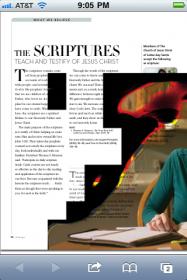
Hear is a screen shot of how page 14 of the 2011 January Ensign PDF shows up on the iPhone when viewed from the built in Safari browser.

I pointed the browser at the PDF file on classic.lds.org.
Ensign.2011.01.P14.jpg
Ensign.2011.01.P14.jpg (11.87 KiB) Viewed 5217 times
Community Administrator
#11
djdinut1 wrote:There is some problem with the way the Ensign pdf file creators have set up their formatting since some images are blocking text when viewed on the iPad. The reason I believe it's a file formatting problem is that I have tried viewing it on three different iPad apps (iBooks, GoodReader and CloudReader) and all have the same result.

But how do you explain the fact that these PDFs all look fine in regular desktop PDF viewers? I don't see how one can assume that the PDF file creators made a mistake. It seems much more reasonable to say that the PDF viewer on the iPad doesn't fully support all aspects of the PDF format. And it's likely that the PDF viewer that is on the iPad is shared by applications (why would you write your own if one is available on the system?), so it makes sense that all those apps on the iPad would work the same way.
Questions that can benefit the larger community should be asked in a public forum, not a private message.
Senior Member
#12
aebrown wrote:But how do you explain the fact that these PDFs all look fine in regular desktop PDF viewers? I don't see how one can assume that the PDF file creators made a mistake. It seems much more reasonable to say that the PDF viewer on the iPad doesn't fully support all aspects of the PDF format.
In addition to the possibility that Apple might not have fully implemented the published Adobe PDF spec on iOS devices (just like it chose not to allow Flash on iOS devices yet), it is also possible that if the Church is using Adobe's PDF authoring tools, there might be some undocumented features Adobe has implemented that are not part of the published Adobe PDF spec Apple used in iOS (or that a recent security patch has introduced a bug).

It is also possible that the Church is using non-Adobe PDF authoring tools that don't fully implement the published Adobe PDF spec, thus creating a heretofore unknown problem on iOS devices.

Bottom line is that there is a problem somewhere in the mix that is making potions of Church-produced PDF content not readable on iOS devices.
Member
#13
i thought they were using InDesign, which would mean that the PDFs were as compliant as could be?! Surely more likely a PDF rendering issue with IOS devices.
Community Administrator
#14
jbh001 wrote:Hear is a screen shot of how page 14 of the 2011 January Ensign PDF shows up on the iPhone when viewed from the built in Safari browser.

I see the same thing on my Droid running QuickOffice. It looks to me that whoever put the page together used some page layout tools to do the final cropping of the image in the lower right corner. (As opposed to importing a fully cropped and feathered image). Unfortunately, it appears that our mobile PDF readers for whatever reason doesn't support the layer that's being used to mask the image. (Or puts it in the wrong order).
Have you searched the Help Center? Try doing a Google search and adding "site:churchofjesuschrist.org/help" to the search criteria.

So we can better help you, please edit your Profile to include your general location.
Member
#15
Is this an issue Church Magazines could be made aware of so they could correct the way they create the images so that it works? The reason I think they should be willing to do this is that I have not viewed another pdf document on my iPad that has a problem. I downloaded an online magazine pdf a while ago that appeared to have complicated image layering and I could view it without a problem. It seems to me this may be a simple editing issue if the magazine people were made aware of it.
New Member
#16
Same problem here. Wonder if simplest solution for now is magazine viewer app? Either that or altering their pdf editing and publishing text and image format. Wish i had the expertise to contribute towards this.
New Member
#17
I just want to comment that all the LDS church tech seems to be aimed at supporting Apple products. Iphone, Iphone, Ipad, Ipad. Is that where you should be, supporting a specific manufacturer? Reminds me of the Romney Rambler days. There is an ever increasing number of Androids out there, you are ignoring them, and one of them is rated higher than the Iphone. By the way, I do get the mags on my android, I get all the stuff on android, and it's great.
Senior Member
#18
danielbaker2 wrote:I just want to comment that all the LDS church tech seems to be aimed at supporting Apple products. Iphone, Iphone, Ipad, Ipad. Is that where you should be, supporting a specific manufacturer? Reminds me of the Romney Rambler days. There is an ever increasing number of Androids out there, you are ignoring them, and one of them is rated higher than the Iphone. By the way, I do get the mags on my android, I get all the stuff on android, and it's great.

The church mobile apps are actually being developed by volunteers, not church employees. The order in which apps have been developed has more to do with how many people have volunteered to develop for that platform than any endorsement of specific devices or technologies. There have just been more developers interested in developing for Apple products.

Note, however, that there are Android versions of all the church mobile apps (Mormon Channel, Gospel Library and LDS Tools). The Gospel Library and LDS Tools are lacking some of the features of the iPhone version but the developers are working on that.
New Member
#19
I would like to see the Friend and New Era 2011 uploaded to the Church Library for the Iphone/Ipad. Thanks for the wonderful work you provide!
New Member
#20
I have a workaround for the pdf formatting issues - works on my iphone4 so I assume it would work on iPad. I use windows - i assume there would be a similar workaround for Mac or Linux.
1st - Download and install the free program CutePDF. This creates a PDF printer driver which appears in your printer list. Whatever you print to that printer becomes a PDF file.
2nd - Download the ensign from the church website and open in Adobe PDF viewer (interestingly the builtin PDF reader in Chrome has issues too, so it is not just apple).
3rd - Print the Ensign and choose the CutePDF printer. The settings to use are "Fit To Printable Area", untick "Auto Rotate and Centre", and tick "Choose paper source by PDF page size". After a couple of minutes of thinking it will prompt you to save the new PDF file - this is the file you copy onto your iDevice.
There is a drawback though - it increases the size of the files dramatically. Eg April went from 8MB to 48MB. The pages are perfectly viewable though.

It would be nice if the Gospel Library app allowed the full graphical view, and with hotlinks etc.
Community Administrator
#21
grahamf72 wrote:There is a drawback though - it increases the size of the files dramatically. Eg April went from 8MB to 48MB. The pages are perfectly viewable though.

That's a great work around -- thanks for posting it. One thing you might try to help with the file size is to use PDFCreator instead of CutePDF. On the June Ensign I found that the size only increased from 9.4M to 11.8M when I printed it with PDFCreator, which is not bad at all.
Questions that can benefit the larger community should be asked in a public forum, not a private message.
#22
Wonderful suggestion! I've been looking for a solution for this for ages and I can't believe it was so simple! Incidentally, I've used Acrobat 9 Standard to create the PDFs and they're coming out about /half/ the size of the original! Bonus!
New Member
#23

I can't export to a file that works

I am on a mac and can't print to a PDF file that will work (they all do the same thing). Any other thoughts?

Scott

***Update***

I found the solution for the mac. I am using Acrobat Pro and was trying to "Save as PDF" from the print menu. It wasn't letting me, it kept saying that save from print was not allowed (in acrobat) select file-save. I kept trying to save the pdf as many different files and couldn't find a solution. Finally I tried printing to the PDF printer (a virtual printer in the list of printers). This was installed with acrobat pro and uses Distiller. This fixes the problem (you have to create a custom paper size to match the magazine). It looks great on the I-Pad!

Thanks for all the posts, they led me to the solution. :)

Scott
#24
I've just downloaded the latest (July) issue of the Ensign and it renders fine on iPad/iPhone, so hopefully they'll be fine in the future too. For those who are interested, I have "fixed" the earlier 2011 issues and packaged them up. You can download them here.