New Member
One of the challenges for stake conferences is having everyone singing. Including those who don't speak English as their native tongue. My stake has a Spanish speaking ward so this how to is written from that perspective.
About 2 months before stake conference I remind the stake presidency and stake music coordinator of the need to have hymns that have a Spanish equivalent. The new hymn book is easy as each page number is the same. For the old hymn book we reference a correlation chart made by BYU in 2017. This allows them easily pick out what hymns will be sung.
Once the hymns are selected the text needs to be put in a PowerPoint that will be used during stake conference. It has a green background with text boxes that have the hymns. English is on the top line and Spanish on the bottom. It starts with a blank screen, goes through the hymn, and then I end blank again. To get the text I open the Church's website to the page with the hymn. For instance Press Forward, Saints https://www.churchofjesuschrist.org/stu ... s?lang=eng
For the second language I open an incognito window so it doesn't mess with my language settings, copy and paste the link, then change the last three letters of the web address to change the language. For Spanish it is spa https://www.churchofjesuschrist.org/stu ... s?lang=spa
I then copy and paste (without formatting) the hymn text into PowerPoint for each line. Sometimes the Spanish lines will be longer and it requires two English lines for every Spanish. The text size is set to accommodate this. When done I save the PowerPoint with the hymn number so I can use it in the future.
Now for the really technical part. My stake is using an ATEM Mini Pro from Blackmagic design to manage the video switching during stake conference. It can do a lot of stuff. But for now we're focusing on the hymn text. The same can be done with OBS or Vmix but you're going to be encoding the video on the fly which creates a lag. The more powerful the computer, the lower the lag will be.
On the ATEM the chapel camera is fed into the Camera 1 input. The laptop goes to Camera 2. The ATEM output goes to the HDMI input on the A/V rack. Set your video switcher in the rack to HDMI input.
In the software control you need to create a Chroma Key with the fill source from Camera 2. This tells the ATEM to put the video everywhere that is green, effectively overlaying the hymn text on the video.
Put the PowerPoint in presentation mode, turn the key on, and as you scroll through the PowerPoint the hymn text will change. When the hymn is done, turn off the key, close the PowerPoint, open up the next hymn, put it it presentation mode, turn the key on, and you're ready for the next hymn.
My saved configuration file for the mixer won't attach. If you would like it email me at andrewglds2@gmail.com and I'll get it to you. Make sure to save your own configuration file as you make adjustments as the ATEM won't save the configuration when unplugged. You have to restore it each time.
About 2 months before stake conference I remind the stake presidency and stake music coordinator of the need to have hymns that have a Spanish equivalent. The new hymn book is easy as each page number is the same. For the old hymn book we reference a correlation chart made by BYU in 2017. This allows them easily pick out what hymns will be sung.
Once the hymns are selected the text needs to be put in a PowerPoint that will be used during stake conference. It has a green background with text boxes that have the hymns. English is on the top line and Spanish on the bottom. It starts with a blank screen, goes through the hymn, and then I end blank again. To get the text I open the Church's website to the page with the hymn. For instance Press Forward, Saints https://www.churchofjesuschrist.org/stu ... s?lang=eng
For the second language I open an incognito window so it doesn't mess with my language settings, copy and paste the link, then change the last three letters of the web address to change the language. For Spanish it is spa https://www.churchofjesuschrist.org/stu ... s?lang=spa
I then copy and paste (without formatting) the hymn text into PowerPoint for each line. Sometimes the Spanish lines will be longer and it requires two English lines for every Spanish. The text size is set to accommodate this. When done I save the PowerPoint with the hymn number so I can use it in the future.
Now for the really technical part. My stake is using an ATEM Mini Pro from Blackmagic design to manage the video switching during stake conference. It can do a lot of stuff. But for now we're focusing on the hymn text. The same can be done with OBS or Vmix but you're going to be encoding the video on the fly which creates a lag. The more powerful the computer, the lower the lag will be.
On the ATEM the chapel camera is fed into the Camera 1 input. The laptop goes to Camera 2. The ATEM output goes to the HDMI input on the A/V rack. Set your video switcher in the rack to HDMI input.
In the software control you need to create a Chroma Key with the fill source from Camera 2. This tells the ATEM to put the video everywhere that is green, effectively overlaying the hymn text on the video.
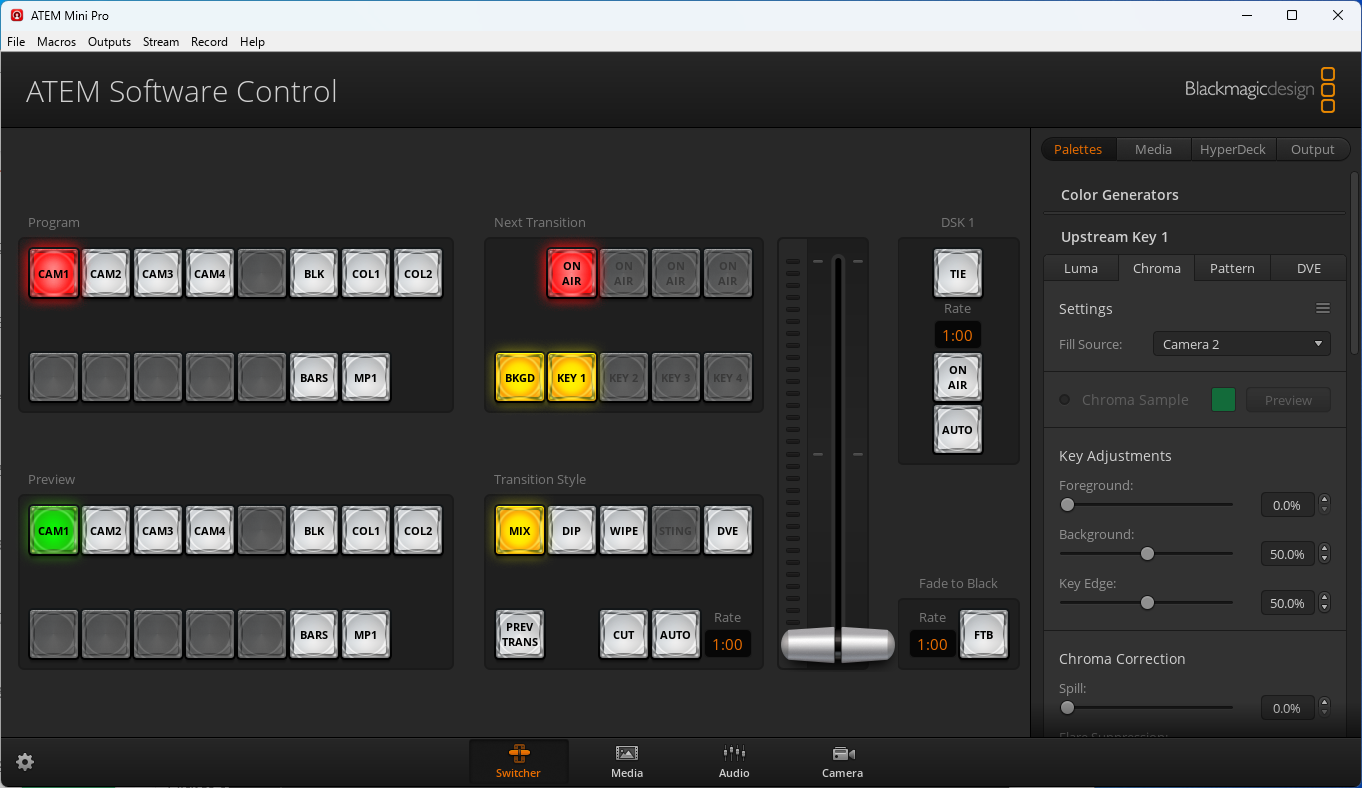
My saved configuration file for the mixer won't attach. If you would like it email me at andrewglds2@gmail.com and I'll get it to you. Make sure to save your own configuration file as you make adjustments as the ATEM won't save the configuration when unplugged. You have to restore it each time.
