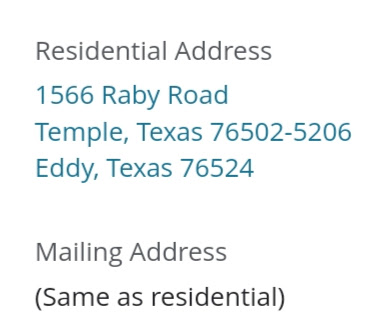
Current and Former Cities Appear in Member's Address

3 postsstarted by jagflynn 769 viewsoriginal topic

New Member
#1
View and compare two attached screenshots. A family recently moved into my ward. In LCR and Member Tools, the city, state, and zip code of their former address appear between their current street address and their current city, state, and zip code. When I open the edit screen, the city, state, and zip code of their former address does not appear. Any suggestions about how to resolve this issue?
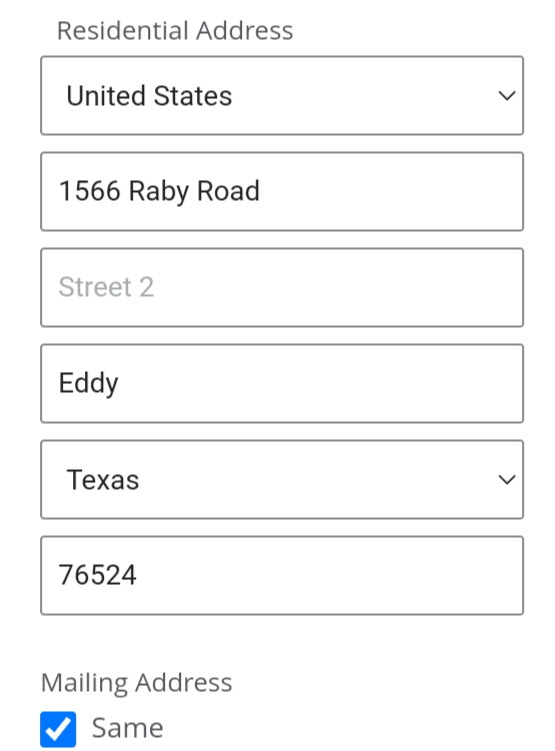
edit address.jpg
edit address.jpg (40.47 KiB)
two cities.jpg
two cities.jpg (32.81 KiB)
jagflynn@hotmail.com
Community Administrator
#2
I'd give support a call on Monday.
Have you searched the Help Center? Try doing a Google search and adding "site:churchofjesuschrist.org/help" to the search criteria.

So we can better help you, please edit your Profile to include your general location.
Community Moderators
#3
I ran into this when I moved a record into the ward this past spring. I waited a few days into the week and edited the address. It took a couple of tries over a week before the correct address took. I believe that I had to enter some minor changes in each of the text boxes, save, wait a couple of hours and then re-enter the correct address and save to get the correct address in both LCR and Member Tools.
JD Lessley
Have you tried finding your answer on the ChurchofJesusChrist.org Help Center or Tech Wiki?