Beta Calendar Issues

72 postsstarted by jdlessley 27,865 viewsoriginal topic

Community Moderators
#1
I want to get a discussion of things I am finding in the beta calendar before I submit feedback to the developers. I am not sure I am aware of how to use the beta calendar correctly yet and that may be adding to issues I am finding.

Since I am a stake administrator I find that I cannot view calendar event details the same way a regular user can. For example: when I click on an event the edit event window is displayed. My desire is to view (preview) the event to see how it is displayed for everyone else. I can't seem to find a way to do this. As a comparison to the current LUWS calendar I know that when the blue pages are dispayed the calendar will display the event details when the event is clicked.

Any thoughts?
JD Lessley
Have you tried finding your answer on the ChurchofJesusChrist.org Help Center or Tech Wiki?
Senior Member
#2
I just had my wife log in to see what an event would look like. It's pretty much the same window, but the fields are not editable. Not very readable in my opinion. It's the only way I could think of seeing what a non-editor would see.
Senior Member
#3
I found it was possible to remove all editors from a calendar, including myself. Sort of a problem if no one is an editor...

Also found that I could not delete a calendar even though I created it. It never showed up in my Calendar Admin page.
Community Moderators
#4
crislapi wrote:I found it was possible to remove all editors from a calendar, including myself. Sort of a problem if no one is an editor...

Also found that I could not delete a calendar even though I created it. It never showed up in my Calendar Admin page.
There's a difference between an Editor and an Administrator.
Have you read the Code of Conduct?
Senior Member
#5
Techgy wrote:There's a difference between an Editor and an Administrator.
Agreed, but as an administrator, I couldn't get back into it to edit it either. And therefore I couldn't add editors either. And neither explains why I still can't delete it. The help files seem to be a little behind the current version. Screen shots and position instructions don't match what I see, although I can still figure out what they mean.
Community Moderators
#6
crislapi wrote:Agreed, but as an administrator, I couldn't get back into it to edit it either. And therefore I couldn't add editors either. And neither explains why I still can't delete it. The help files seem to be a little behind the current version. Screen shots and position instructions don't match what I see, although I can still figure out what they mean.
Sounds like another bug. Use the feedback system and send them a notice detailing what you found. They've been very good at getting back to me.
Have you read the Code of Conduct?
Senior Member
#7
jdlessley wrote:I want to get a discussion of things I am finding in the beta calendar before I submit feedback to the developers.
Probably should be another thread, but I'm having difficulty entering anything for February. Every time I do, it ends up on the same date in March instead of February. Basic functionality? I have sent feedback but have not heard back yet.
Community Administrator
#8
oregonmatt wrote:Probably should be another thread, but I'm having difficulty entering anything for February. Every time I do, it ends up on the same date in March instead of February. Basic functionality? I have sent feedback but have not heard back yet.
Are you in the Week view? In my experience, trying to add an event to any date after January in the Week view brings up the wrong date in the event popup. But the monthly view brings up the correct date.
Questions that can benefit the larger community should be asked in a public forum, not a private message.
Member
#9
oregonmatt wrote:Probably should be another thread, but I'm having difficulty entering anything for February. Every time I do, it ends up on the same date in March instead of February. Basic functionality? I have sent feedback but have not heard back yet.
I'm having some problems with the monthly view too. I was going to wait until next week to report it, but all of my events are being shifted a day in the monthly view (they're fine in the weekly view).

Your issue isn't actually a bug though. You should be getting the letter from the First Presidency on Sunday stating that March will now be known as February and vice versa. Also, two will now be known as three within the Church.
Community Moderators
#10
Alan_Brown wrote:Are you in the Week view? In my experience, trying to add an event to any date after January in the Week view brings up the wrong date in the event popup. But the monthly view brings up the correct date.
I'm seeing just the opposite. A repeated entry for every Monday in the year (FHE) ends up being display on Sundays for the 3rd-5th week of March if I'm in the "Month" view. If I view the entries by using the "Weekly" view, they're all correct.

Perhaps we should just skip March ~!
Have you read the Code of Conduct?
Member
#11
Techgy wrote:I'm seeing just the opposite. A repeated entry for every Monday in the year (FHE) ends up being display on Sundays for the 3rd-5th week of March if I'm in the "Month" view. If I view the entries by using the "Weekly" view, they're all correct.

Perhaps we should just skip March ~!
What I'm actually seeing is the events listed at a specific time are advanced a full day in the monthly view. But events listed as all-day events are still placed correctly. Are you getting that too?
Community Moderators
#12
nutterb wrote:What I'm actually seeing is the events listed at a specific time are advanced a full day in the monthly view. But events listed as all-day events are still placed correctly. Are you getting that too?
No. I'm seeing "All Day" events that are appearing one day off.

Image

It doesn't matter what process I used to create the event.
1) "Add Event"
or
2) click on a date and enter it from there.

Both entries will show a time 12:00am even though the time may not be specified in the entry.
Beta_Calendar.jpg
Beta_Calendar.jpg (15.84 KiB)
Have you read the Code of Conduct?
Senior Member
#13
Alan_Brown wrote:Are you in the Week view? In my experience, trying to add an event to any date after January in the Week view brings up the wrong date in the event popup. But the monthly view brings up the correct date.
I was using week view. I just tried it in month view and the same thing happened. I clicked on February 3rd, entered an event, hit save, and the event shows up on March 4th. Pretty slick... :confused: Other events entered in February end up on the following "day" in March. Events entered in March end up on the subsequent day in March. Something's wrong with the database date encoding.
Community Moderators
#14
oregonmatt wrote:I was using week view. I just tried it in month view and the same thing happened. I clicked on February 3rd, entered an event, hit save, and the event shows up on March 4th. Pretty slick... :confused: Other events entered in February end up on the following "day" in March. Events entered in March end up on the subsequent day in March. Something's wrong with the database date encoding.
Thirty days hath September, April, June and November, all the rest have 31, except for March which we skip.
Have you read the Code of Conduct?
Community Administrator
#15
Techgy wrote:I'm seeing just the opposite. A repeated entry for every Monday in the year (FHE) ends up being display on Sundays for the 3rd-5th week of March if I'm in the "Month" view. If I view the entries by using the "Weekly" view, they're all correct.
I wasn't talking about how the events are displayed, so your experience isn't really the opposite. What I was talking about is when you click on a date to add a new event, the date displayed in the popup that has the event properties is often wrong.

You're talking about the flip side of that -- once you specify dates in the event properties, how they are displayed on the week or month view.
Questions that can benefit the larger community should be asked in a public forum, not a private message.
Member
#16

Existing events also shifting

I can confirm this problem of events not posting on the requested day. I also just noticed that an event I had listed for several weeks for this Sunday has all of a sudden shifted to this coming Monday. So it isn't just new events.
Community Moderators
#17
nutterb wrote:Your issue isn't actually a bug though. You should be getting the letter . . . stating that March will now be known as February and vice versa. Also, two will now be known as three within the Church.
No, no, no. This is the time travel option we have been hearing about. Must be nearly out of beta now! [grin]
Community Moderators
#18
Alan_Brown wrote:I wasn't talking about how the events are displayed, so your experience isn't really the opposite. What I was talking about is when you click on a date to add a new event, the date displayed in the popup that has the event properties is often wrong.

You're talking about the flip side of that -- once you specify dates in the event properties, how they are displayed on the week or month view.
I haven't experienced the problem that you're referring to.
The only issue I've seen is with the display of the calendar AFTER events have been entered.
Have you read the Code of Conduct?
Senior Member
#19
oregonmatt wrote:Probably should be another thread, but I'm having difficulty entering anything for February. Every time I do, it ends up on the same date in March instead of February. Basic functionality? I have sent feedback but have not heard back yet.
I have heard back now. I expect the issue to show up in the bug tracker soon.

BTW: Kudos to all of you working on this project. I'm sure keeping up with not-so-well formatted feedback is tricky enough, let alone answering within the same day. I only wish I knew enough java to help.
Community Moderators
#20

How to identify who the ward calendar administrator is

I have been helping others in my stake learn the beta calendar. One issue that seems to evade me is how a user can identify who the calendar administrator is. For now we know who the administrators default to. But if those default administrators create other administrators and then remove themselves...

There are some actions that can only be done by an administrator. One of those actions is deleting a calendar. This issue has already arrisen. Currently with the beta the feedback link is to the developers and not the local administrator(s). We have already come upon this problem. Because I am a stake LUWS admin I have received messages asking me to delete a ward calendar. Since I am not a member of that ward I have to research who the defaults are and then send a message back asking the member to contact them. As time goes by I can expect that the default admins are going to add others and remove themselves because they are not comfortable with holding that responsibility. Then even I will not know who the ward admins are.

The help for the calendar has tips for creators and editors to contact the administrator for certain actions. One tip recommends a creator contact an "approver" (admin) to let them know a calendar is awaiting approval. Deleting a calendar is another area a creator would have to contact an administrator.

Edit: I found a partial answer to the issue. The default administrators are not removable except when they are released from their callings. But that now creates another issue for those default admins who do not want that position. (For example when they are not comfortable with technology or just don't want to be bothered.)
JD Lessley
Have you tried finding your answer on the ChurchofJesusChrist.org Help Center or Tech Wiki?

Senior Member
#21
lajackson wrote:No, no, no. This is the time travel option we have been hearing about. Must be nearly out of beta now! [grin]
And I was thinking they had just figured out how to accommodate "deadline scheduling" in software, where if it the deadline is February 3rd, it doesn't really get completed until March 4th. Isn't that usually the way it seems to work anyway in the real world? [grin]
Community Moderators
#22
oregonmatt wrote:I was using week view. I just tried it in month view and the same thing happened. I clicked on February 3rd, entered an event, hit save, and the event shows up on March 4th. Pretty slick... :confused: Other events entered in February end up on the following "day" in March. Events entered in March end up on the subsequent day in March. Something's wrong with the database date encoding.
So, Heres the trick. Using the logic that your event will appear one month and one day late: Go to a january date, such as the first sunday, enter your date, make it repeat every first "saturday." And there you go! Of course, your event won't show at all in January, let alone on the first saturday... it will show on the first "sunday" in Feb., and every first sunday, except in August, where it will show on the second sunday....

It really works this way...I don't think I'll use the calendar for anything "real" just yet!
"A soft answer turneth away wrath" works great on LDSTech forum boards!
Community Moderators
#23

"drag and Drop" feature - be careful

I find the "drag and drop" feature, where you click on an event in month view, and drag it to another date, is problematic. I messed up my calendar quickly and couldn't restore it easily.

1) As you drag an event, it never quite lands on the date you think. Perhaps this is related to the other problems of displaying on the correct date.

2) It's easy to accidentally pull your event off the correct date and drop it somewhere, without any "confirm," and sometimes without even knowing. It seems to me that if I enter a date for an event, such as feb 22, I shouldn't be able to drag it from that date to another date without some kind of "double-check" or "confirm" from the calendar: "are you sure you want to re-schedule your event to Feb 23?" And there is no "undo" or "restore" option.

3) Once you've "dragged" ("drugged?":)) it to another date, and you pull up the details, it is still listing the original entered date, which it should not, if you really meant to move it to a new date. It should update the event with the new date you dragged it to, or confusion will rule!
"A soft answer turneth away wrath" works great on LDSTech forum boards!
Senior Member
#24

Please remember

Ranting here is fine, but please remember to document your problems with the feedback link to the developers. By working together, we can all get these bugs worked out quickly.
Senior Member
#25
oregonmatt wrote:I was using week view. I just tried it in month view and the same thing happened. I clicked on February 3rd, entered an event, hit save, and the event shows up on March 4th. Pretty slick... :confused: Other events entered in February end up on the following "day" in March. Events entered in March end up on the subsequent day in March. Something's wrong with the database date encoding.
This seems to have been fixed. (At least I can't break it the same way again.) Can anyone else confirm?
New Member
#26
It appears to be fixed in my case too. My events which were being displayed in the wrong day boxes in the monthly view are now displayed in the correct places. Thanks.
Community Moderators
#27
oregonmatt wrote:This seems to have been fixed. (At least I can't break it the same way again.) Can anyone else confirm?
Sorry, but it's still there - at least for me.
First of all let's be sure we're talking about the same calendar site.
http://labs.lds.org

A repeating event entered for all Mondays (FHE) will appear just the same as it did back in my earlier post.
Have you read the Code of Conduct?
Community Administrator
#28
Techgy wrote:First of all let's be sure we're talking about the same calendar site.
http://labs.lds.org
Throughout this thread (which is titled "Beta Calendar Issues"), I have assumed we are talking about the Beta site at https://beta.lds.org/church-calendar, not the labs site. The beta site indeed seems to be fixed.
Questions that can benefit the larger community should be asked in a public forum, not a private message.
Community Moderators
#29
Alan_Brown wrote:Throughout this thread (which is titled "Beta Calendar Issues"), I have assumed we are talking about the Beta site at https://beta.lds.org/church-calendar, not the labs site. The beta site indeed seems to be fixed.
Yup. The beta site is indeed fixed. It would seem that the same problem is present on the labs.lds.org site, so I've sent in some feedback to inform them about it.
Have you read the Code of Conduct?
Member
#30

Admin designated how? and Calendars migrated?

I've been reading the thread and have visited the new calendar site, which looks nice. I have two questions:

1- I don't have any of the approver actions available. I am the stake website admin. Or, maybe only partially? Is there now a designation in MLS that's necessary for admin rights, at least in the beta calendars? (It's been a couple years since I had an MLS-using calling.)

2- There's nothing in it. Please tell me that the currently calendared events will be transferred!

Thanks,
D.G.
Community Moderators
#31
duanegrasse wrote:1- I don't have any of the approver actions available. I am the stake website admin. Or, maybe only partially? Is there now a designation in MLS that's necessary for admin rights, at least in the beta calendars? (It's been a couple years since I had an MLS-using calling.)
Our stake admin does not have administrator privileges on the beta calendar either. I reported this discrepancy to the developers.

My guess is that MLS does not have the stake admin as a standard calling.

You could ask one of the stake presidency, the stake clerk, the stake executive secretary, or the stake technology specialist to add you to the list of administrators. You will be able to manage the calendars but you will not be able to add other administrators.
duanegrasse wrote:2- There's nothing in it. Please tell me that the currently calendared events will be transferred!
We've already been told that is not going to happen. The beta calendar will become the calendar for the LUWS on 1 January 2011. There is enough practice time until then to learn how to use it and populate the events for 2011 before that date.
JD Lessley
Have you tried finding your answer on the ChurchofJesusChrist.org Help Center or Tech Wiki?

Member
#32
Thanks for the quick reply, JD.
Community Moderators
#33

Yes, beta calendar is ready!

kisaac wrote:I don't think I'll use the calendar for anything "real" just yet!
But I will now!

Yes, several issues, some in this thread, seem to have been fixed fairly quickly, and YES, it does seem stable enough now to give it a real try. I've got three calendars going now, and am very impressed.

Perhaps this thread can continue about issues, but I think I'll start a new thread, not about technical issues as much as a dialog about enhancements, observations and improvements. That new thread for a calendar enhancement wishlist is here.

While I know this forum is not the direct dialog with developers that the "feedback link" on the beta calendar page is, this forum has the advantage of a community of users to brainstorm ideas and develop suggestions. I hope the developers are taking advantage of that.
"A soft answer turneth away wrath" works great on LDSTech forum boards!
Church Employee
#34
jdlessley wrote: My guess is that MLS does not have the stake admin as a standard calling.
There is a standard calling for Stake Website Administrator and Website Administrator (Ward level) defined in CDOL. I don't know for sure if those are accessible in MLS (there are several people using them so I think that they are available in MLS), or if the calendar looks at those callings.
jdlessley wrote:Our stake admin does not have administrator privileges on the beta calendar either. I reported this discrepancy to the developers.
Your stake doesn't have a Stake Website Administrator defined in CDOL.
Community Moderators
#35
ryan jones wrote:
jdlessley wrote:My guess is that MLS does not have the stake admin as a standard calling.
There is a standard calling for Stake Website Administrator and Website Administrator (Ward level) defined in CDOL. I don't know for sure if those are accessible in MLS (there are several people using them so I think that they are available in MLS), or if the calendar looks at those callings.
I just checked and MLS does now have those positions included in the standard positions lists. They were not available in MLS versions before 3.1.4.
JD Lessley
Have you tried finding your answer on the ChurchofJesusChrist.org Help Center or Tech Wiki?
Community Administrator
#36
jdlessley wrote:I just checked and MLS does not have Website Administrator in the standard positions lists for either the stake or ward.
I'm not sure where you were looking, but those callings are most definitely in the standard callings lists for MLS. They are listed under Other Callings; at the ward level it is called "Website Administrator" and for the stake level it is "Stake Website Administrator."
jdlessley wrote:For those who want to have their web administrators added to CDOL, how is that done?
If you use the standard callings in MLS, they will be added to CDOL. I know that for certain, since I am a stake website administrator, properly entered in MLS with a standard calling, and I appear in CDOL with that calling.
jdlessley wrote:I just checked and MLS does now have those positions included in the standard positions lists. They were not available in MLS versions before 3.1.4.
I don't recall when they were added to MLS, but they were definitely available in 3.1.0. So they have been around for some time.
Questions that can benefit the larger community should be asked in a public forum, not a private message.
Community Moderators
#37
Alan_Brown wrote:Throughout this thread (which is titled "Beta Calendar Issues"), I have assumed we are talking about the Beta site at https://beta.lds.org/church-calendar, not the labs site. The beta site indeed seems to be fixed.
How are these two sites related?
I would assume that the Beta site is being used to "beta" test new software and that corrections to the beta calendar would eventually be incorporated into the calendar on the "labs" site. True?
Have you read the Code of Conduct?
Senior Member
#38
Techgy wrote:How are these two sites related?
I would assume that the Beta site is being used to "beta" test new software and that corrections to the beta calendar would eventually be incorporated into the calendar on the "labs" site. True?
I doubt it. The labs site is for experimental sites/features that may or may not ever go live. It's more like a technology preview than a beta.

Since calendar and directory have moved on to beta, those labs sites are probably abandoned, at least until there is some new experimental feature that they want to get feedback on.
Senior Member
#39
Alan_Brown wrote:I'm not sure where you were looking, but those callings are most definitely in the standard callings lists for MLS. They are listed under Other Callings; at the ward level it is called "Website Administrator" and for the stake level it is "Stake Website Administrator."


If you use the standard callings in MLS, they will be added to CDOL. I know that for certain, since I am a stake website administrator, properly entered in MLS with a standard calling, and I appear in CDOL with that calling.


I don't recall when they were added to MLS, but they were definitely available in 3.1.0. So they have been around for some time.

Just curious, but does a Stake Website Administrator have CDOL access?
Church Employee
#40
zaneclark wrote:Just curious, but does a Stake Website Administrator have CDOL access?
No. The list of those who do can be seen here.
Senior Member
#41
Techgy wrote:How are these two sites related?
I would assume that the Beta site is being used to "beta" test new software and that corrections to the beta calendar would eventually be incorporated into the calendar on the "labs" site. True?
I imagine you are thinking that "beta" means still under active development and feature addition. But I think that most companies actually attribute the term with the idea that the product is pretty much done as planned and is undergoing extensive testing to work out any last bugs before major release.

In this case, the "labs" site is more like an "alpha" release or "CTP (Community Technology Preview)" of the product. Going from "labs" to "beta" would be a promotion toward official release for the product, within LDSTech's definition of the terms.
Community Moderators
#42
mkmurray wrote:I imagine you are thinking that "beta" means still under active development and feature addition. But I think that most companies actually attribute the term with the idea that the product is pretty much done as planned and is undergoing extensive testing to work out any last bugs before major release.

In this case, the "labs" site is more like an "alpha" release or "CTP (Community Technology Preview)" of the product. Going from "labs" to "beta" would be a promotion toward official release for the product, within LDSTech's definition of the terms.
Given this definition I would assume that the "labs" site would probably not be updated and that any corrections to the software would be handled in the "beta" directory - assuming the software in labs made it that far. As a general statement.

I would also believe that any suggestions for additions or corrections would of necessity have to be given from the "beta" site to most effective.
Have you read the Code of Conduct?
#43

Beta calendar/directory issues/questions.

Calendar:

I have not seen it explicitly stated, but since I am a ward website administrator, and I do not have admin rights on the beta calendar site, I would guess that the automatic admin rights only apply when such a calling is designated in MLS and the LUWS admin designation doesn't apply here, is that accurate? If it's not, then I am confused as to why I don't have access.

Directory:

I don't really get anything in the beta directory site at all besides seeing that there are three columns, a search bar, and a print button. Basically no data. I would assume that beta would suggest that I should be getting at least some basic data at this time. I am guessing that this needs to be reported, but I wanted to check here first. Since I wasn't given access during the labs trial, I am wondering if there is still a restriction to certain units in place that needs to be lifted.
Senior Member
#44
dobrichelovek wrote:Calendar:

I have not seen it explicitly stated, but since I am a ward website administrator, and I do not have admin rights on the beta calendar site, I would guess that the automatic admin rights only apply when such a calling is designated in MLS and the LUWS admin designation doesn't apply here, is that accurate? If it's not, then I am confused as to why I don't have access.
One of the great things about the new calendar system is that the source code is available to the community. Looking at the source code it indicates that the following positions get default approver rights (this is for a ward--it's similar for the stake):
  • Bishopric
  • Ward Clerk and all assistant clerks
  • Executive Secretary
  • Website Administrator
To get the right you have to be listed in CDOL with one of these positions. To be listed in CDOL you have to have the position listed in your ward's MLS using the correct standarized calling. If you are website administrator and you don't have approver rights then you probably aren't listed with the calling in MLS or you're listed using a non-standard calling.
dobrichelovek wrote: Directory:

I don't really get anything in the beta directory site at all besides seeing that there are three columns, a search bar, and a print button. Basically no data. I would assume that beta would suggest that I should be getting at least some basic data at this time. I am guessing that this needs to be reported, but I wanted to check here first. Since I wasn't given access during the labs trial, I am wondering if there is still a restriction to certain units in place that needs to be lifted.
I'd report it. I expect it's some other problem but if there are restrictions it should probably tell you that rather than just showing no data. I never asked for access to the labs site but I have full access to the beta so I don't think it's related to labs access.
Community Administrator
#45
Does the beta have any events pre-defined? I think you're supposed to see a blank calendar if no one else has put anything there for you ward/stake.
Have you searched the Help Center? Try doing a Google search and adding "site:churchofjesuschrist.org/help" to the search criteria.

So we can better help you, please edit your Profile to include your general location.
Member
#46

MLS Ward or MLS Stake callings list

Alan_Brown wrote:I'm not sure where you were looking, but those callings are most definitely in the standard callings lists for MLS. They are listed under Other Callings; at the ward level it is called "Website Administrator" and for the stake level it is "Stake Website Administrator."

If you use the standard callings in MLS, they will be added to CDOL. I know that for certain, since I am a stake website administrator, properly entered in MLS with a standard calling, and I appear in CDOL with that calling
do I login to the ward level of MLS or Stake level to identify "Stake Website Administrator"
Community Administrator
#47
srweight wrote:do I login to the ward level of MLS or Stake level to identify "Stake Website Administrator"
Stake (.....)
Have you searched the Help Center? Try doing a Google search and adding "site:churchofjesuschrist.org/help" to the search criteria.

So we can better help you, please edit your Profile to include your general location.
Community Administrator
#48
srweight wrote:do I login to the ward level of MLS or Stake level to identify "Stake Website Administrator"
You have to login to Stake MLS to specify the person with the standard calling "Stake Website Administrator".
Questions that can benefit the larger community should be asked in a public forum, not a private message.
Senior Member
#49
RussellHltn wrote:Does the beta have any events pre-defined? I think you're supposed to see a blank calendar if no one else has put anything there for you ward/stake.
No events are pre-defined. The calendar is blank unless someone else in your ward has already been busy.
Senior Member
#50
dobrichelovek wrote:Directory:

I don't really get anything in the beta directory site at all besides seeing that there are three columns, a search bar, and a print button. Basically no data. I would assume that beta would suggest that I should be getting at least some basic data at this time. I am guessing that this needs to be reported, but I wanted to check here first. Since I wasn't given access during the labs trial, I am wondering if there is still a restriction to certain units in place that needs to be lifted.
I have full access to my ward's directory. The only thing I can think of is to make sure you are indeed logged in.
Senior Member
#51
eblood66 wrote:If you are website administrator and you don't have approver rights then you probably aren't listed with the calling in MLS or you're listed using a non-standard calling.
Actually I just looked at the list of approvers for our ward and our website administrator does not show up even though he is listed in CDOL. There must be a problem with how it checks for the position. My guess is that the numeric code for the position in the calendar doesn't match the one used in CDOL. In any case, it looks like there is a bug, at least at the ward level but probably at the stake level too. An issue was opened in the Jira issue tracker about this a couple hours ago so the developers should be looking into it.
Community Administrator
#52
eblood66 wrote: In any case, it looks like there is a bug, at least at the ward level but probably at the stake level too.
All the approvers look correct at the stake level for my stake. Everyone is in CDOL correctly, and the stake presidency, clerks, and executive secretary all show up as approvers. So it may be that the problem you're seeing is only at the ward level.
Questions that can benefit the larger community should be asked in a public forum, not a private message.
Senior Member
#53
Alan_Brown wrote:All the approvers look correct at the stake level for my stake. Everyone is in CDOL correctly, and the stake presidency, clerks, and executive secretary all show up as approvers. So it may be that the problem you're seeing is only at the ward level.
Do you have a stake website administrator who is not stake clerk or an assistant clerk? What I'm seeing on the ward level is that the bishopric, clerks and executive secretary all show up fine but the website administrator (who is not an assistant clerk in our ward) does not show up.
Community Administrator
#54
eblood66 wrote:Do you have a stake website administrator who is not stake clerk or an assistant clerk? What I'm seeing on the ward level is that the bishopric, clerks and executive secretary all show up fine but the website administrator (who is not an assistant clerk in our ward) does not show up.
I can see how that might possibly be different. No, we don't have a separate stake website administrator. But nonetheless, I am the stake website administrator, and I am listed separately as a clerk and as the stake website administrator on separate lines of the approver list. I would think that if there were a problem with stake website administrators being on the approver list, I wouldn't be on the list with that calling, regardless of whether I were there as a clerk.
Questions that can benefit the larger community should be asked in a public forum, not a private message.
Senior Member
#55
Alan_Brown wrote:I can see how that might possibly be different. No, we don't have a separate stake website administrator. But nonetheless, I am the stake website administrator, and I am listed separately as a clerk and as the stake website administrator on separate lines of the approver list. I would think that if there were a problem with stake website administrators being on the approver list, I wouldn't be on the list with that calling, regardless of whether I were there as a clerk.
I agree. If you are showing up with both the clerk and website administrator positions, then it doesn't look like there is a problem at the stake level. Previously I hadn't dug into the code far enough to tell whether all positions would be displayed for each approver but it looks like they are.

So this does look like a ward level problem.
Church Employee
#56
eblood66 wrote:I agree. If you are showing up with both the clerk and website administrator positions, then it doesn't look like there is a problem at the stake level. Previously I hadn't dug into the code far enough to tell whether all positions would be displayed for each approver but it looks like they are.

So this does look like a ward level problem.
I was recently working on reviewing the constants that are being used, and it appears that the ones that have been used in the past had a WEBSITE_ADMINISTRATOR with an id of 96. This has been clarified to be the district website administrator. The new id is 1559. If there is a jira logged for this then I will see if I can talk to the developers so they can see the problem.
Senior Member
#57
ryan jones wrote:I was recently working on reviewing the constants that are being used, and it appears that the ones that have been used in the past had a WEBSITE_ADMINISTRATOR with an id of 96. This has been clarified to be the district website administrator. The new id is 1559. If there is a jira logged for this then I will see if I can talk to the developers so they can see the problem.
The Jira entry is here: https://tech.lds.org/jira/browse/LUC-653

It looks to me that the most recent version in SVN uses the 1559 ID so it may be that the beta site just hasn't been updated since that change was made (2/10/2010). I couldn't find any way to tell the build ID or date of the beta site.
#58

Directory issues.

oregonmatt wrote:I have full access to my ward's directory. The only thing I can think of is to make sure you are indeed logged in.
I am logged in, and I just tried again with the same result. I can confirm that I am logged in by going to the beta calendar site, adding a new calendar, and adding my wife as a calendar editor. I hardly think that her name would be showing up if I wasn't properly logged in. :) But I appreciate the experiences that you probably have had with some end-users that would have prompted you to suggest this. ;)

I reported this to the link that I found in the page source. Hopefully we'll find something cool that will make it better for everyone going forward. This is what I love about participating in Betas. :D
Community Moderators
#59
dobrichelovek wrote:Calendar:

I have not seen it explicitly stated, but since I am a ward website administrator, and I do not have admin rights on the beta calendar site, I would guess that the automatic admin rights only apply when such a calling is designated in MLS and the LUWS admin designation doesn't apply here, is that accurate? If it's not, then I am confused as to why I don't have access.
Has anyone checked CDOL to see if you are listed there as the ward website administrator? I ask because our stake website administrator was listed in MLS using the standard positions as stake website administrator yet he was not listed in CDOL and therefore was not included in the list of default approvers for the stake.
JD Lessley
Have you tried finding your answer on the ChurchofJesusChrist.org Help Center or Tech Wiki?
#60
jdlessley wrote:Has anyone checked CDOL to see if you are listed there as the ward website administrator? I ask because our stake website administrator was listed in MLS using the standard positions as stake website administrator yet he was not listed in CDOL and therefore was not included in the list of default approvers for the stake.
Nobody has yet checked. I'm pretty sure I'm not in there though. My bishopric has asked me to hold the position of backup ward website administrator, but it's just because they know I know what's going on (thanks tech.lds.org) and want me to always be there to support the 'official' ward website administrator while still having me fulfill other callings. So I'm uniquely assigned by the bishopric with Ward administrator privileges, but not as a ward clerk or in MLS as anything to have to do with the calling as far as I know. I was guessing that the disparity between the LUWS callings list and the callings represented in MLS would eventually be resolved by returning to MLS dominance, so I'm not at all surprised by this move, but it does make it a little more difficult for me to stay an expert on what is happening without the bishopric directing that I get marked in the right place in MLS so that I can inherit those admin abilities. I do believe it's the proper way to do it though.

I am curious if the beta directory issues I'm seeing aren't being seen by anyone else here because they have the privileges which I lack. I would guess that the vast majority of the lurkers here are officially in positions where they would have the needed permissions, so if that truly is part of the problem, then I am in a unique position to see it. :)

Thanks all for the clarification on the need to be designated properly in MLS. Even though it made sense to me, the docs simply state that people in those positions get the proper permissions, not that those callings as specified in MLS get those permissions. I simply wanted to clarify the source, since my permissions come exclusively from the fact that I am a LUWS admin, and nowhere else is that specified.
Community Moderators
#61
You can be added as an approver (admin) by someone who is a default approver. You will then have most of the same capabilities except adding other approvers.
JD Lessley
Have you tried finding your answer on the ChurchofJesusChrist.org Help Center or Tech Wiki?
#62

Verification of directory issue.

jdlessley wrote:You can be added as an approver (admin) by someone who is a default approver. You will then have most of the same capabilities except adding other approvers.

I'll see if I can get that taken care of today. :)
Senior Member
#63

Editors by calling

While setting up calendars for each of the Young Men quorums, I realized it would be much more useful to set edit permissions by calling, rather than by name. As the youth leadership is changed, the permissions would automatically transfer as they do for the overall admin function. This would be useful for practically any calendar you can think of: RS, Activities, etc.

I submitted this as feedback.
Member
#64
oregonmatt wrote:While setting up calendars for each of the Young Men quorums, I realized it would be much more useful to set edit permissions by calling, rather than by name. As the youth leadership is changed, the permissions would automatically transfer as they do for the overall admin function. This would be useful for practically any calendar you can think of: RS, Activities, etc.

I submitted this as feedback.

This issue was entered into JIRA back in July '09, it also hasn't been updated since July '09.

I am also waiting for this functionality
There are 11 types of people. Those who understand Gray Code and those that don't.
Senior Member
#65
oregonmatt wrote:I submitted this as feedback.
This was the response I got:
agreed - coming later this year
New Member
#66
This may have been answered before. Sorry. In the beta version, will the information I enter be used or erased for the final release? Will the calendars/leadership actions/other updatable fields be saved?
Community Moderators
#67
This was answered in another thread, but, yes the beta data will be there for the final release.
JD Lessley
Have you tried finding your answer on the ChurchofJesusChrist.org Help Center or Tech Wiki?
New Member
#68

New Issue

Along with the issue I found in the Directory (if anyone read it) I found this:

I recently changed stakes, whole new set of info... and I did my best (with moderate success) to get my old branch to start using the beta site...

The problem is that now that my records have switched I assumed that my calendar would automatically unsubscribe from all the calendars I had been subscribed to... Which it didn't... so I hoped for a brief moment that under manage subscriptions I would be able to unsubscribe from calendars outside of my current unit if an active subscription existed... Which I wasn't able to...

So now that my old branch is using the calendar effectively (YAY) I am stuck here with all of their events showing up in my list (BOO)...

I guess this is more of a warning to unsubscribe BEFORE changing wards since we can't do anything but wait till it's fixed, but I don't think I'll be pushing the Calendar use much at BYU for now until this issue is fixed, it would make for a wonderfully jumbled mess with people changing wards so often wouldn't it? :)
Community Administrator
#69
Kyrandita wrote:The problem is that now that my records have switched I assumed that my calendar would automatically unsubscribe from all the calendars I had been subscribed to... Which it didn't... so I hoped for a brief moment that under manage subscriptions I would be able to unsubscribe from calendars outside of my current unit if an active subscription existed... Which I wasn't able to...
This is an important bug to find and fix. Have you reported it using the Feedback mechanism on the new Beta Calendar site?
Questions that can benefit the larger community should be asked in a public forum, not a private message.
New Member
#70
I have... Hopefully this can get fixed soon...
Member
#71

Cannot edit calendar I created

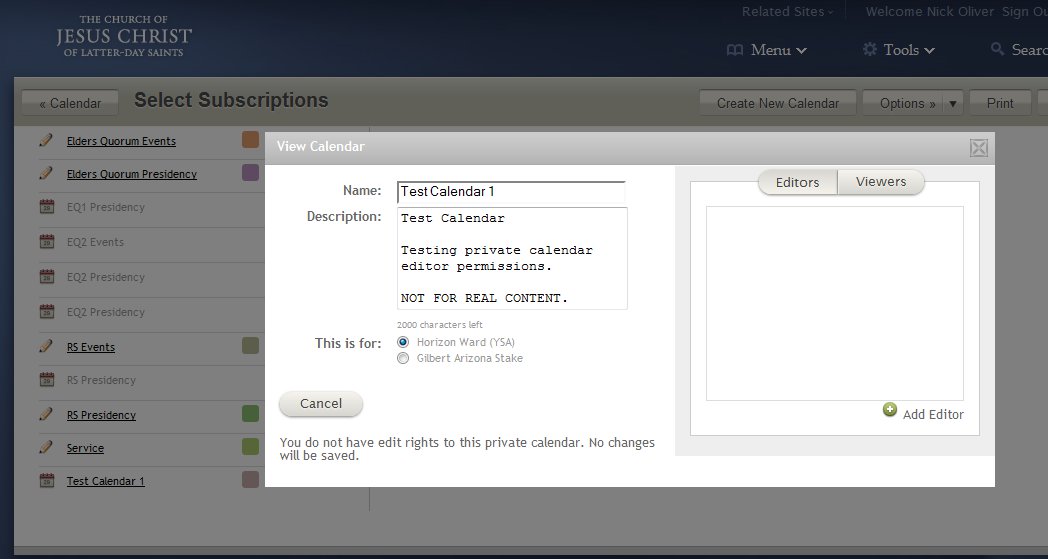
I created a new calendar and made it private. Now I cannot edit it. It says:

"You do not have edit rights to this private calendar. No changes will be saved."

I am the ward clerk and am listed as an approver. What's going on? Why can't I edit a calendar I created?
New Member
#72
I noticed when I was creating a few private calendars a few weeks ago that it did not automatically add me as an editor. Luckily I saw this before I saved the calendar, but that means I haven't had the experience yet.

I just tried to create a new private calendar. I didn't add any viewers or editors. Opening it back up to edit it again I saw my profile listed as an editor and a viewer. I then removed my name from the editor list and saved the calendar. Now when I open the settings of the calendar (same as before) I don't have privileges to edit it.

Perhaps for now another admin (ward clerk, etc.) could edit the calendar (& add you to the list of editors)? I hope so anyway.

But yes, this does seem to be a bit goofy. There should probably be a check to ensure that an admin or approver can't delete themselves from the list of editors when they are the only one listed as such. Not to mention that ward admins should probably have the permission to edit any of the calendars in their jurisdiction anyway... (automatic entry in the editor list)

Screenshot:
๐Ÿ“Ž CalendarBETAeditorPrivs.jpg (56.26 KiB)