How to get meeting times fixed on meetinghouse locator?

11 postsstarted by jasonpbyu-p40 4,713 viewsoriginal topic

New Member
#1
All the wards in Lubbock TX are listed with wrong start times.

the 1st ward starts at 8:30, the 2nd ward at noon.
The 3rd ward at 9:00 and the 4th ward at 11:30

I believe the problem has to do with the fact that Lubbock does not change times on Jan 1, they wait until September when the new school year starts, due to the large # of Texas Tech students.

Community Administrator
#2
jasonpbyu wrote:All the wards in Lubbock TX are listed with wrong start times.
Each ward clerk needs to change the meeting times in MLS. From MLS the information will flow to CDOL and to various other systems such as LUWS and the Meetinghouse Locator.

It really shouldn't matter what date the meeting times change -- the times can be changed at any point. It takes a few days for the changed times to propagate to all the systems.
Questions that can benefit the larger community should be asked in a public forum, not a private message.
Church Employee
#3
jasonpbyu wrote:All the wards in Lubbock TX are listed with wrong start times.

the 1st ward starts at 8:30, the 2nd ward at noon.
The 3rd ward at 9:00 and the 4th ward at 11:30

I believe the problem has to do with the fact that Lubbock does not change times on Jan 1, they wait until September when the new school year starts, due to the large # of Texas Tech students.

The fix is to make sure you are on MLS version 3.1.3 and then you can change the time in MLS then change it back to the correct time then do a send/receive it will send another file with the correct time in it. That change will make it up to CDOL within an hour (may be several hours on Sunday). Then about 2 days later it will make it to the wards website.

For all the details see this thread
Community Administrator
#4
ryan jones wrote:The fix is to make sure you are on MLS version 3.1.3
By this time everyone should be on 3.1.4, correct?
Have you searched the Help Center? Try doing a Google search and adding "site:churchofjesuschrist.org/help" to the search criteria.

So we can better help you, please edit your Profile to include your general location.
Church Employee
#5
RussellHltn wrote:By this time everyone should be on 3.1.4, correct?
Most units are but there are still a fair number that show 3.1.2 as the last version sent to CDOL.
Community Administrator
#6
ryan jones wrote:Most units are but there are still a fair number that show 3.1.2 as the last version sent to CDOL.
I had one like that. The computer log showed last boot-up was over two weeks ago. After reboot, it was 3.1.4. And this was on dial-up with no other network connection.
Have you searched the Help Center? Try doing a Google search and adding "site:churchofjesuschrist.org/help" to the search criteria.

So we can better help you, please edit your Profile to include your general location.
Community Moderators
#7
ryan jones wrote:Most units are but there are still a fair number that show 3.1.2 as the last version sent to CDOL.

It may be time for a reminder. I had two computers that would not upgrade from 3.1.2 to anything, no matter how many send/receives I did.

I force loaded them directly to 3.1.4 because of it.

Perhaps a note to any stake that still has 3.1.2 versions running would be in order. This has been done before with earlier versions that needed to be upgraded.

If you do that, you will get one of ours. It shares a box that has been upgraded, but this specific unit has not transmitted since 3.1.2 was in vogue. This would be the rare exception, however.
Member
#8
ryan jones wrote:Most units are but there are still a fair number that show 3.1.2 as the last version sent to CDOL.
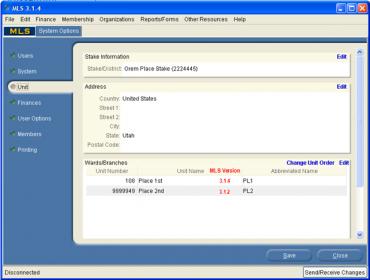
With the information about versions in the "master" database, what is the possibility of showing the MLS version a unit is running on the SMLS in the Unit tab?

Image
ShowVer.jpg
ShowVer.jpg (16.77 KiB)
Community Moderators
#9
MRK wrote:With the information about versions in the "master" database, what is the possibility of showing the MLS version a unit is running on the SMLS in the Unit tab?
You will note the MLS version number on the upper left of the MLS UI. Your graphic shows version 3.1.4
JD Lessley
Have you tried finding your answer on the ChurchofJesusChrist.org Help Center or Tech Wiki?
Senior Member
#10
jdlessley wrote:You will note the MLS version number on the upper left of the MLS UI. Your graphic shows version 3.1.4
I believe that what MRK is suggesting is that on stake MLS, he wants to be able to see which MLS version is installed on the administrative computer of each unit in the stake.
Community Moderators
#11
danpass wrote:I believe that what MRK is suggesting is that on stake MLS, he wants to be able to see which MLS version is installed on the administrative computer of each unit in the stake.
You are right. That would be nice. But the help desk did say they would be willing to run a report for a stake that asked.