Getting started with Webcast - challenges and solutions

21 postsstarted by michaelfish 9,310 viewsoriginal topic

#1
Since most building-to-building setups will experience similar technical problems, here is an opportunity to monitor questions and solutions as an STS in Colorado works through his issues as he gets his set up worked out. The Stake in Colorado is using the Webcast Communicator in their setup. My Stake in Arizona has a microwave network between buildings that uses Slingboxes for feeds. Although there are differences in the way we transmit, we both faced similar technical problems. Hopefully this dialoge can be of assistance to others to resolve similar technical problems.
#2

Video Switching, Camera Control

(Colorado STS)
I am the STS for our stake and have been struggling with the webcast setup for a few months and was wondering if you could give me some advice. I have read pretty much every post on the forums, wikis and spent a lot of time talking with the webcast team and am just not finding acceptable solutions. We are purchasing our own gear and there are several problems we want to solve for our next conference.

The specific problems (requested by visiting authorities and echoed by our Stake President) I need assistance with are:

1. Video Switching - we were requested to broadcast PowerPoint presentations. We simply video-taped the overhead screen in the chapel but the remote sites couldn’t make them out. So I thinking of using a scan converter and switch between the camera and computer video output. I've found 2 methods discussed in the forums: $1000 video switching hardware and computer based software. Can you think of a simple and/or less expensive solution? I would rather avoid the computer solution. I have a firm grip on the computer but others that will replace me in the future may not.

2. Camera Controller - the visiting authority wanted to walk around in one meeting which made using the EVID70 a bit of a challenge. The IR remote that comes with the camera is really lousy as the pan/zoom is not smooth. Also the IR remote failed to work after 1 hour into the broadcast in all 3 meetings so it’s pretty unreliable. I found 2 solutions: a $1350 Sony controller which seems very nice but also very expensive. I've also thought about buying a $300 10" notebook PC and using the free camera controller software available from Sony and others. Do you have any thoughts or ideas on this subject?

If you have some expertise in this area it would be helpful to STS out there if someone could put together some recommended low-cost configurations. I know one size won’t fit all but I bet we could come close. A great example is the character generators being used for hymn text by stakes. We used a $0.25 overhead transparency in the overflow areas and it was awesome!

#3
Here are some inexpensive solutions ($ are approximate e-bay prices):

a) PowerPoint presentations: A very simple and cost effective way of getting the output of a laptop distributed to TVs is to use a laptop (or PC) with a Composite or S-Video output. Although the picture quality will not be as good as the RGB output, I have found that it is adequate (and much better than taking a picture of the screen). In addition, composite video allows the use of a video distribution amplifier ($20) to distribute the video to the communicator, TVs and projector. (Depending on the computer, you may be able to clone the output to both the projector VGA input [for better results], and distribution amplifier at the same time). BTW, I have not had any luck with scan converters that are less than $100 - the picture was too poor.

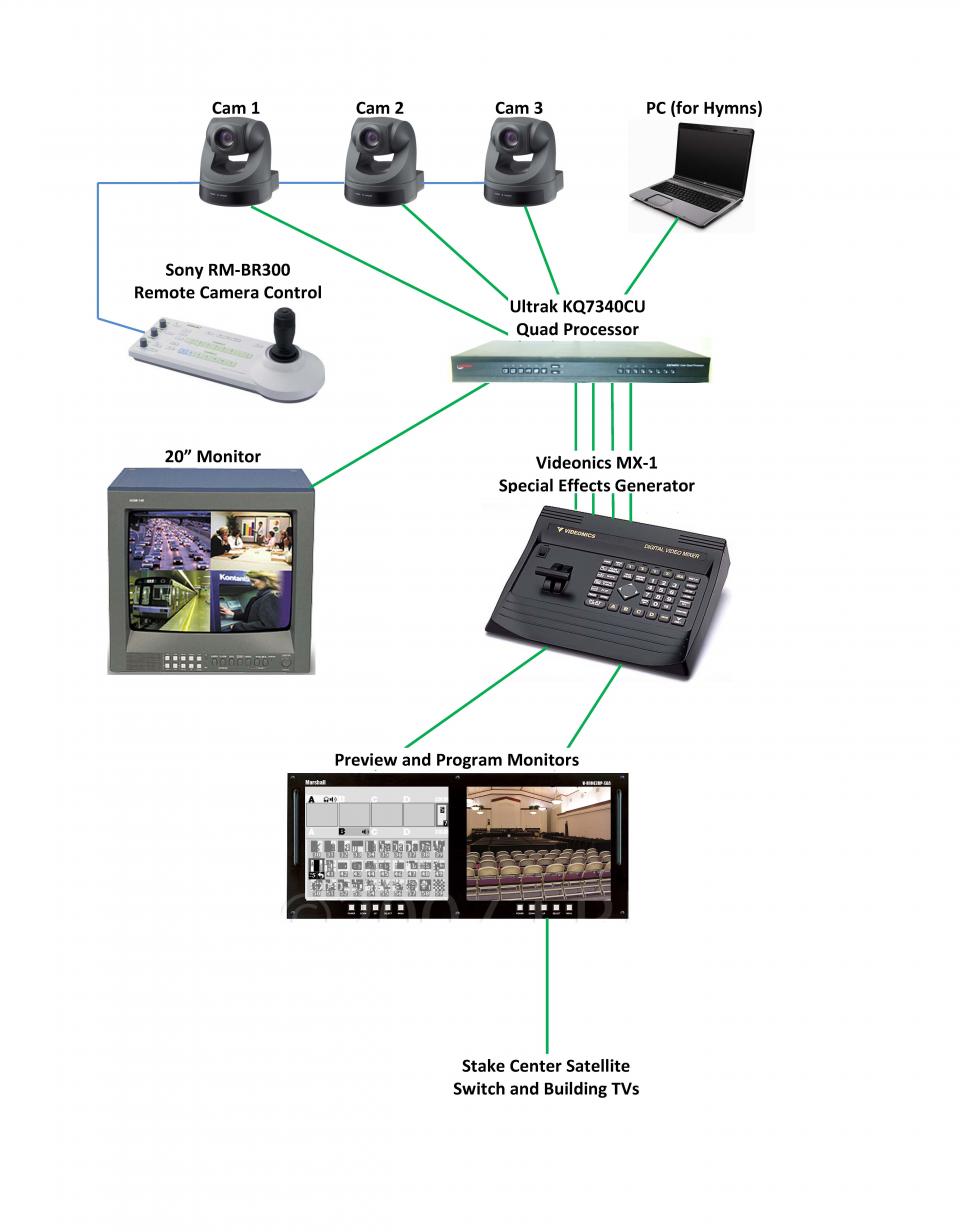
b) Video Switching: An inexpensive A/B video switch will do the job ($5) to switch between the camera and laptop, with a momentary disruption of the signal. However, a Videonics MX-1 Digital Video Mixer ($300-400) allows professional switching/dissolving of up to 4 cameras and the ability to professionally superimpose text of Hymns (PowerPoint) over video.

c) Camera Controller: Using the EVI-D70 is great for pre-programmed shots. However, when the target is moving, it is not practical to use computer software or RM-BR300 controller and still have professional results (I've tried both). It is better to zoom back a little (which makes panning movements less noticeable) and give the speaker more room to move within the frame before having to adjust the camera's position - the RM-BR300 obviously does a better job in this area – the proportional joystick control is a better way to go, but still, panning extreme close-up shots are still rough. In our stake, we use one camera operator and two EVI-D70s. There is no substitute for the quick camera response and smooth pan of a good operator and professional tripod.

I'm not sure what you have in the budget, but here's an example of our setup:


Image

1 – 19” Rack and Shelf (donated)
2 – JVC TMR-9U 9” Monitors $250.00
1 – Extron 12 x 8 Matrix Switcher $200.00
1 – Ultrak Quad Color Processor $20.00
1 – Videonics MX-1 Digital Video Processor $350.00
1 – Sony RM-BR300 Remote Control $850.00
2 – Sony EVI-D70 Cameras $1,250.00
Cable, connectors, power strip, misc. $150.00
The total investment was approximately $3,070.00

This is quite an elaborate setup for Stake Conference, but it can give you an idea of what can happen – thanks to e-bay. Other volunteers supply the professional video camera and tripod, a laptop with S-Video out for superimposed graphics, etc. It’s a team effort and we could not do it without the support and dedication of the team. The results are very close to professional!
#4
(Colorado STS)

Video Switching
I guess I thought an A/B switch would show a glitch or other video noise on the output, have you tried this? If it goes black for a frame or two then shows the new video source that may not be too bad. If it's going to look bad it may detract from the spirit of the meeting which would be bad.

Do you use the Quad Processor or MX-1 for video switching?

Our budget will allow us to buy an MX-1 or even a DataVideo SE-500. I'm just trying to keep costs down as much as possible while maintaining a good broadcast. We are also going to be doing 4 way video conferencing this year so I need to be careful where I spend our money. I'm going to be sharing as much of the gear between video conference and webcasting as I can. But it's a bit tricky trying to figure it all out.

Camera:
I'm disappointed to hear the EVI-D70 can't be better controlled. We haven't received ours yet however I planned on getting hold of some of the source code for a few of the control projects I've seen and tweaking it to our needs. Do you think the lack of fine panning & zooming is a camera or software limitation? If it's a software problem I can probably write a better program to control it. That's where my skill set really is. :)

What do you use the matrix switcher for?

Thanks again. My Stake President and I have searched hard for someone with video experience in our stake and haven't found anyone yet. I do have someone that has run our camera and other video equipment for years. So right now that's our "team". :) So I really appreciate your help!
#5
I’ve been doing this for a long time and I also want to do a professional job on a tight budget. The system has taken years to acquire. Stakes are usually more agreeable to spending money just before a big conference but it takes time to find bargains, hook them up and work out bugs. Hopefully I can be of assistance to you along the way. I also want you to know that the stake did not purchase this equipment (although they have approached me). Video production has always been my hobby and I donate the use of the equipment for Stake Conferences.

A/B switching
Using a simple A/B switch does have distracting effects if switched during live video due to the time necessary for the picture to stabilize. However, if there is a black transition between cuts (PowerPoint presentations could start and end with a black slide) the cut will not be as noticeable. This was the method television broadcasters used (early days) when they switched between the national and local feeds.

Video Switching
A digital mixer is the solution to the switching problem. Between the MX-1 and the SE-500, even if the price was equal, I would prefer the MX-1. It has the ability to key video or text and superimpose it on top of existing video (how they do the weather on TV). This allows the Hymn text from PowerPoint to be professionally superimposed on top of live video. The SE-500 does not have the Chroma Key feature. The strength of the SE-500 is in the audio sliders for control, but we only need video. The MX-1 audio is set up a little different. It has 3 stereo audio (line) inputs for 3 of the camera inputs so audio can follow video. This could be useful if the MX-1 was used for DVD, VHS, Satellite or some other feed that did not use separate audio routing (building sound reinforcement). Lastly, the MX-1’s 239 different transitions are also cool (SE-500 has only 15). The SE-500 has RS239 control, tally light capability and MIDI, but these are not necessary for conferences.

Quad Processor – not necessary but it was only $20.
The Quad Processor is used to monitor the 4 inputs of the MX-1. The MX-1 preview screen sizes (shown) are too small.

Image

In addition, the Quad processor also allows quick ‘full screen’ previewing of any one of those inputs.

Camera Control
The limitation of the EVI-D70 is in the camera, not the software. According to the EVI-D70’s VISCA command list, there are only 18 steps for pan and 17 for tilt.

Image

Although the minimum pan/tilt speeds are still very good, when the camera is framed to an extreme close-up, the movement at step one is still some-what jerky. It’s NOT bad, just not professional.

Matrix Switcher – not necessary but I couldn’t pass up on purchasing this bargain
Any of the 12 Inputs (from Cam1, Cam2, Cam3, Cam4, [or even more], Laptop, Satellite, DVD, VCR, Quad monitor feed, program feed from MX-1, etc) can be distributed and routed to multiple outputs (fed to MX-1 input’s A, B, C, and D, building TVs, chapel projector, camera operator’s monitor, DVD recorder, Catalina Building Slingbox, Ray Building Slingbox) all independently. That way, the limitation of the MX-1’s 4 video inputs is increased to 12. In addition, the routing configurations can be instantly recalled using 1 of 12 presets. This flexibility eliminates having to switch video cables to route and distribute. The matrix switcher could be used to switch video and audio.

Planning in Phases
Start small and grow conference by conference. We started by renting the services of a microwave company and eventually decided that for the price of one weekend of rental, we could purchase our own equipment. After the first microwave radios were installed and used a video streamer and X-Box to one building, then added the second building microwave radios, and finally we switched to Slingboxes. There was a lot of working out bugs with the microwave radios, network accessibility (Internet access for genealogy classes – a WHOLE other story), bandwidth resolution, audio from the choir and prelude, simplifying the set-up and making it more reliable, cleaning up our cable messes, etc.

It has been SO worth it
Going little by little and learning along the way has been fun and rewarding. A year ago, I introduced the MX-1 for superimposing the text of the hymns and the member’s responses seeing professional results was very positive. Then last Christmas, I introduced the multi-camera setup for a Christmas concert, which was also used for the conference earlier the same day, and it was successful. I worked hard to conceal all cables and wires, hide the EVI-D70 camera on the ledge in the overflow area, and suspended the other EVI-D70 camera from the ceiling (the cultural hall’s projection screen hid it from view from the back).

Want to help others
Other people’s success is rewarding for me and I want to share what I’ve learned. I’m glad to help you in any way I can. Call on me if you want to bounce things back and forth. Our Stake has a great STS team. I am only a small part of the team but we all have great attitudes and a dedication towards the work, to professionally and reliably get God’s messages out and maintain the Spirit.

If you could find someone with a similar attitude in your stake, it could prove very helpful. We’re always looking for others to help us but we’ve found that knowledge isn’t as important as the willingness to work is. I think that is the way the Lord wants us.
#6
(Colorado STS)
So would you recommend using the EVI-D70 or go with something with better control? I do want to mount the camera out of sight and possibly up-side-down. (In fact I had plans to hang it in front of the screen in the overflow. I was glad to hear you had the same thought?)

Another question - I need to come up with a good audio-only backup plan in case the webcast fails for one or more of the end-points, or the origination point. We have a Polycom conference phone at the stake center that we tried to use. There are problems with feed-back from the audio system etc. I can make it work but its less than ideal. I'm looking for a way to take the audio signal from the audio/video panel and connect it directly to the phone. Then on the receiver side, take the phone directly into the CRAB. Any thoughts on this?

The 1st counselor in the Stake Presidency was the person helping me last time. (When he had time.) But he was very helpful. After the last broadcast, he was made the Stake President so it's harder to get his time than before. I did spend an hour with him Sunday going over what I had learned. Between his and your inputs I feel like I have a good plan and having you available for a resource to bounce ideas off of really helps. His next project for me is to setup 4-way video conferencing that can be used in stake presidency meetings of various types as well as Stake Training sessions at conference time. Instead of webcasting the training sessions we will be using the 4-way conferencing with overhead projectors so we can have a live question-answer sessions. This is one area where webcasting really doesn't work well because of the delay. However, the video quality of the conferencing isn't good enough for the other 2 sessions of conference and firesides, so we need a combination of both.
#7
michaelfish wrote:(Colorado STS)
Another question - I need to come up with a good audio-only backup plan in case the webcast fails for one or more of the end-points, or the origination point. We have a Polycom conference phone at the stake center that we tried to use. There are problems with feed-back from the audio system etc. I can make it work but its less than ideal. I'm looking for a way to take the audio signal from the audio/video panel and connect it directly to the phone. Then on the receiver side, take the phone directly into the CRAB. Any thoughts on this?

Oh, this brings back frustrating memories. We tried and tried and tried to get a telephone back up working and finally decided to purchase a decent telephone interface. We looked at many brands and models but decided that we would have to spend about $100 for a decent one.

Then I got the idea to do some research and see if there were any used radio station units up for auction and I ran into the Symetrix TI-101. This what I purchased for getting the feed of the sound system to the telephone line. It solved our problem PERFECTLY!

The Symetrix TI-101 is a PROFESSIONAL telephone interface used in radio stations to put callers on the air for conferencing. Our unit was a fantastic solution and I paid $80 and that was a bargain.
#8
(Colorado STS)
I plan on using our Polycom again this conference and actively look for a better backup audio solution for next conference. The Polycom works ok for the Stake side but I need to find some sort of hack for the receiving side. We use the conference phone line and ask the operator to put the 3 remote sites in listen-only mode to prevent noise from their end if they forget to mute.

We have 2 locations that have their own building and have a CRAB to connect to their audio system. The 3rd location is a small branch of a dozen people or so and will be using a webcast receiver, projector and computer speakers. (This is how we set them up last time and they loved it.) Last time at the 2 wards with buildings, we used a speaker phone outside the chapel doors (to prevent feedback). This was less than desirable but at least it worked. However, the branch just had a speaker phone and they couldn't all hear it. So maybe just a better speaker phone for them.

I will keep my eyes out for a TI-101, that looks like an excellent solution for the Stake side. I still need ideas for the remote locations.
#9

Solution: Telephone Audio into Building Sound System

Getting the remote site’s audio set up is easier than you think.

Have you tried using the CRAB at the remote building? You will get great results (and no feedback) if you use the CRAB.

1. Plug a telephone cord from the wall telephone jack into LINE jack on CRAB
2. Plug a telephone into the PHONE jack on CRAB
3. Plug the microphone cord from the CRAB into a microphone jack in the Chapel
4. Turn the phone switch on the CRAB ON
5. Place the call, connect
6. Turn the phone switch on the CRAB OFF

If the output (volume) is too low, use a microphone mixer between the CRAB and the Chapel microphone jack to boost the signal.

Most CRAB models are meant to be used with speaker level outputs, not line level outputs. The output of our CRAB was so attenuated (low) that the only way to boost it up to the normal audio level was to increase it using a microphone mixer. Do NOT go into the building sound cabinet and increase the gain on the microphone input, (you probably don’t have keys, the FM group will get upset, it is easy to mess things up, and it is out of STS jurisdiction).

We connect the phone line to the CRAB, connect the CRAB’s microphone output cord to a mixer, and plug the mixer into the building sound system.

I chose a professional Shure M67 mixer that has both line and microphone level outputs. By connecting the CRAB into the mixer, not only can the volume of the telephone signal be adjusted, it can also be boosted to a decent level without distortion (or going into the sound cabinet).

Do a search on ebay for “Shure M67” I paid $18 for one.

The microphone mixer has other useful features as well. For instance, the backup audio feed can instantly be turned on (up) without having to swap cords or cables (this is especially useful if something goes wrong – it’s always difficult thinking, plugging, and panicking at the same time).

We found another advantage of the mixer is the ability to control the volume (at the remote building) to increase the gain when the choir sings, thereby eliminating the need to set up extra microphones at the Stake Center to mic the choir.

Also, we utilize the 2 stereo channels, utilizing one channel for the main sound (pulpit) and the other exclusively for the organ, which is especially useful for clean, clear prelude music.

The addition of a mixer provides total local control of voice, music and backup audio, but that may be a little complicated right now. Let’s just concentrate on getting the basics done first.
#10
michaelfish wrote:(Colorado STS)
So would you recommend using the EVI-D70 or go with something with better control? I do want to mount the camera out of sight and possibly up-side-down. (In fact I had plans to hang it in front of the screen in the overflow. I was glad to hear you had the same thought?)

The EVI-D70 is the best solution for a camera that I can think of. It is small, has very good picture quality, great zoom (18x optical), it is relatively inexpensive, can be mounted upside down, can store 6 camera angles with their zoom and focus settings and it takes only a second to recall/position a preset, the included I/R remote can set and recall the 6 presets as well as control pan, tilt, zoom and focus. Almost every function of the camera can be controlled remotely with a computer and free software, and the computer (or controller) can be as far away as 4,000 feet, etc. I think it is the perfect solution for a Stake Conference camera.
Member
#11
michaelfish wrote:Have you tried using the CRAB at the remote building? You will get great results (and no feedback) if you use the CRAB.
It should be noted that this only works if you have EJ-10 CRAB boxes at your remote sites. The newer EJ-8 boxes do not have the RJ-11 connectors. There is a box that is supposed to be included with the EJ-8's that does connect to a telephone in line with the telephone's handset, but we have a couple of buildings that never received theirs, so I'm in the process of getting them.

In the meantime, I purchased a $20 phone recording device from Radio Shack that works well enough to be used for that purpose. It is also our current solution for injecting the sound into the phone bridge. It isn't ideal, but it works. I too will have to keep my eyes open for a better solution. I'm a computer guy, not an audio guy, so I'm learning about all this stuff as I go along.
Community Administrator
#12
natet wrote:There is a box that is supposed to be included with the EJ-8's that does connect to a telephone in line with the telephone's handset,
That's the first I've heard of that. I don't see any reference to it in the EJ-8 manual. The spec sheet explicitly says it has no telephone capability. I wonder if that's just something the FM group or the contractor was including?
Have you searched the Help Center? Try doing a Google search and adding "site:churchofjesuschrist.org/help" to the search criteria.

So we can better help you, please edit your Profile to include your general location.
#13

Meetinghouse Webcasting Cost Options

Need your input about the draft of cost options for some of the units in our area

-----------------------------------------
The following are some cost ranges that will vary with your expertise and purchasing skills


Level 1 cost is about $ 95.00 - assuming that you can borrow a video camera and use a laptop/desktop (borrowed or from a FHC) with Meetinghouse Webcast application installed and laptops/desktops (borrowed or from a FHC) at the receiving locations

Level 2 cost can be from $600 to $1,500 for a Pan, Tilt, and Zoom, (PTZ), networked IP Video camera, laptop/desktop (borrowed or from a FHC) with Meetinghouse Webcast application and laptops/desktops (borrowed or from a FHC) at the receiving locations

Level 3 cost can be from $840 to $2,040 for a Meetinghouse Webcast Communicator, a PTZ networked IP Video camera, and laptops/desktops (borrowed or from a FHC) at the receiving locations

Level 4 cost can be from $850 to $4,200 for a
PTZ networked IP Video camera(s), audio microphone(s), audio mixer, video mixer (etc.), laptop/desktop (borrowed or from a FHC) with Meetinghouse Webcast application and laptops/desktops (borrowed or from a FHC) at the receiving locations

Please have your Stake Technology Specialist click here to review the Meetinghouse webcasting information at tech.lds.org/wikiand contact us if he has any questions
We need at least four (4) months to get things set up for the webcast of a Stake conference or other meetings

Some of the items that need to be researched are the availability of high speed Internet services from Internet Service Provider (ISP) at the sending Stake Center, local Facilities Management workload, and budgets (etc)

Authorization:

[list]
[*]General Authorities must provide authorization before you can webcast and/or record Stake Conferences or other meetings that are being presided over by General Authorities
[*]Stake Presidents must provide authorization before you can webcast and/or record Stake Conferences or other meetings within their stake boundary
[*]A webcast is an extension of the originating meeting and all rules apply at remote sites [/list]

Thanks,
:cool:Your Fellow Member,
Pete Arnett
Sunny South Florida, USA
#14

Question about IP cameras

Has anyone had experience with IP cameras? If so, I have some questions for you.
  1. What was the cost of the IP camera?
  2. Did the camera have PTZ (pan, tilt and zoom) capabilities?
  3. Brand and model number of camera?
  4. Did you experience the quality of the IP camera as being typical, better or worse than standard SD (consumer) camera?
  5. What was the throughput bandwidth between the IP camera and receiving PC?
  6. Did you run Webcast Communicator on a separate box (PC or laptop) from the capturing video feed or on the same computer that receives the IP camera feed?
  7. Did you notice the CPU being overworked running cameras and communicator at the same time? If not, what is the configuration of the PC (processor, speed, memory, etc.)
  8. Did you receive more than one IP camera stream on the same box? If so, how many? How was your experience with the set-up?
  9. Did you notice audio synchronization problems using IP cameras?
  10. Did you run any additional programs on the PC receiving the IP camera streams (Webcast communicator, video/audio mixer, etc.)
#15

IP Video Cameras

michaelfish wrote:Has anyone had experience with IP cameras? If so, I have some questions for you.
  1. What was the cost of the IP camera?
  2. Did the camera have PTZ (pan, tilt and zoom) capabilities?
  3. Brand and model number of camera?
  4. Did you experience the quality of the IP camera as being typical, better or worse than standard SD (consumer) camera?
  5. What was the throughput bandwidth between the IP camera and receiving PC?
  6. Did you run Webcast Communicator on a separate box (PC or laptop) from the capturing video feed or on the same computer that receives the IP camera feed?
  7. Did you notice the CPU being overworked running cameras and communicator at the same time? If not, what is the configuration of the PC (processor, speed, memory, etc.)
  8. Did you receive more than one IP camera stream on the same box? If so, how many? How was your experience with the set-up?
  9. Did you notice audio synchronization problems using IP cameras?
  10. Did you run any additional programs on the PC receiving the IP camera streams (Webcast communicator, video/audio mixer, etc.)

Hi Michael - I'll try to take a whack at a few of these. Due to my work, I had easy access to a bunch of IP cameras, which I thought might work for webcasting, but as I experimented with them, I found that I could not really put together a workable solution for webcasting.

1,2, & 3 - You can get PTZ surveillance grade IP Cameras for much cheaper than the Sony EVI-D70 - however the optics of these cameras are significantly poorer than the EVI. Optical zoom on most IP cameras is extremely limited, and the maximum resolution you will get is a grainy 640x480. Most cameras have tiny CMOS sensors, so they just don't put out great video. Companies make IP cameras this way because they are mostly used for surveillance, not serious video broadcast, so grainy video is OK for most applications and they have to offset the cost of putting more microprocessing components in there by scrimping on the optics.

4 - Worse.

5 - Throughput is negligible. I don't think you have to worry here, especially if you're running GigE in your network. We've routinely tested these types of surveillance cameras in configurations of up to 48 cameras, and only then do you start saturating a network interface. I wouldn't worry about this.

6 - Well, here was the biggest problem. There weren't any good ways I came up with to convert IP video stream(s) into a video feed the Webcast system could digest. Axis does have a 'driver' which allows 1 video feed to be captured as a 'video capture device' which was readable by the webcasting software. I played around with, but it only allows one camera in motion-JPEG format, and there was a long delay between selecting the camera and actually receiving the feed into the webcasting software. It almost felt like it was about to crash.

I suppose you could purchase some kind of video mixing program that was capable of IP video and mix the IP video streams on one computer and output them to another computer (or webcast communicator) but my quick search for such programs didn't bring up any promising results and the 2-computer setup is too cumbersome to me anyways.

7 - This depends on what program you use to mix the video and whether you're running webcasting software on the same PC. Everyone's mileage will vary. If whatever software you use to mix the IP video streams on the PC is using the h.264 video from the cameras, then yes - you will see a major processing hit. For 1-3 cameras, you could probably run it from the same PC w/o processing problems.

8 - This was my goal, but I was not able to achieve it due to the Axis driver's limitation to only feed one camera feed into the webcasting software - and my unwillingness to use a 3rd party video mixing utility and 2 computer setup as noted above. This is why I abandoned an IP solution.

9 - As I never used this in a production environment I can't really comment on whether there was audio synch issues. However, on the cameras I tested there was be a 1-2 second processing delay between the live action and the resulting video. This would make it extremely difficult to feed audio into the system in any other way but through the camera(s) and keep the audio synched. (i.e. couldn't have an external audio mixer and insert the audio through the sound card) So, yes, I would anticipate big problems here.

My main motivator for wanting to use IP video was that it would take a single CAT5 run to each camera position that could provide power,video, and control. I was able to find a solution to do this with the analog/Sony cameras by purchasing baluns. These balunsallow video, camera control, and even power to be transmitted on one (or two, if you're going longer distances) cat5e cables. This means I still only have to run CAT5, which will be future proof against a potential IP solution in the future, so this is the route I've chosen to go.
#16
Meetinghouse Webcasting Cost Options
pete.arnett wrote:Need your input about the draft of cost options for some of the units in our area

-----------------------------------------
The following are some cost ranges that will vary with your expertise and purchasing skills

To keep costs down, cables are custom made (simple) and many components are purchased used. If you want new components or pre-made cables, expect to pay 2 to 10 times more...

Also, I chose to not use IP cameras because at present, there are too many problems with these cameras to overcome (see post above).

Needed for all Scenarios
Audio cables from building sound to connecting device
Extension cables where needed
Microphones for choir, mic stands, microphone cable
Plugstrips, etc.

At Receiving locations:
(one each for receiving locations):
1 - borrowed laptop running Windows Media Player
1 - borrowed video projector

For building distribution to TV sets :
(each receiving location would need):
1 - VGA to Composite video scan converter ($20)
1 - Composite video distribution amplifier (30)
1 - RF modulator ($10)

Also...
cable tools (make your own, any length for $5-10)
RF splitters ($3)
RG6U coax cable ($60/1000')
F-connectors (100/$10)
video/audio adapters ($10)

The following are different scenarios and pricing for transmissions (i.e. at the Stake Center)

Level 1 cost $95 to $600
1 - borrowed camera, tripod, connecting cables and power supply
1 - Roxio USB Capture ($47)
1 - borrowed laptop running Webcast Communicator

Level 2 cost $600 to $1,500
2 - Sony EVI-D70 cameras, included wireless remote and power supply ($250)
1 - Videonics MX-1 video mixer ($250)
1 - borrowed laptop for superimposing hymns over video
1 - VGA to Composite video scan converter ($20) (if laptop does not have composite video out)
1 - 4 input microphone mixer ($75)
2 - borrowed microphones, microphone cables, stands
1 - Roxio USB Capture ($47)
1 - borrowed laptop running Webcast Communicator


Level 3 cost $850 to $2,040 -
Multicamera Wiring Diagram.jpg
(84.2 KiB) Downloaded 155 times
3 - Sony EVI-D70 cameras and power supply ($250 /ea.)
1 - Sony RM-BR300 joystick camera controller ($850)
1 - Quad video processor ($20)
1 - borrowed 20" monitor (for quad display)
2 - borrowed 13" monitors (for preview and program)
1 - borrowed laptop for superimposing hymns over video
1 - VGA to Composite video scan converter ($20) (if laptop does not have composite video out)
1 - Videonics MX-1 video mixer ($250)
1 - 4 input microphone mixer ($75)
2 - borrowed microphones, microphone cables, stands
1 - Roxio USB Capture ($47)
1 - borrowed laptop running Webcast Communicator
CAT5 cable for remote control operation ($50)
RJ45 kit -crimp, tester, connectors ($15)
Multicamera Wiring Diagram.pdf
(596.16 KiB) Downloaded 429 times

On a personal note: I chose not to include the Webcast Communicator box because of the chance of becoming outdated quickly and problems associated with them noted previously in other posts (however, I personally have never used one). I chose laptops because of their multi-faceted use (classroom presentations, Internet videos for instruction, general PC use, etc.) and because they are sometimes available to borrow. They also sell for about half the money as a communicator box.

I welcome any comments and suggestions to my items listed above...Mike
#17
Mike,

Great write up

Also, if the receiving location is a LDS meetinghouse and it does not have a video projector, then you can contact your local FM Group and request a replacement device

If you purchase the cables through Staples using your unit's account, the price is around 50 to 60 % off on networking cables.

Staples
Go to store.lds.org, then click on "Administrative Materials" then under "Office Supplies and Other Materials Available from Staples" then click "CLICK HERE TO PLACE ORDER ONLINE »"
Thanks,
:cool:Your Fellow Member,
Pete Arnett
Sunny South Florida, USA
Community Administrator
#18
pete.arnett wrote:Also, if the receiving location is a LDS meetinghouse and it does not have a video projector, then you can contact your local FM Group and request a replacement device

That may only be true of meetinghouses that have a satellite connection. I''m not aware of anything that says all meetinghouses should have a projector. It's not that way in our stake.
Have you searched the Help Center? Try doing a Google search and adding "site:churchofjesuschrist.org/help" to the search criteria.

So we can better help you, please edit your Profile to include your general location.
#19
Interesting,
Because our receiving meetinghouses need to have a video projector and several local FM Group's managers have agreed to provide them
Thanks,
:cool:Your Fellow Member,
Pete Arnett
Sunny South Florida, USA
Community Administrator
#20
pete.arnett wrote:Interesting,
Because our receiving meetinghouses need to have a video projector and several local FM Group's managers have agreed to provide them
It is certainly within the discretion of a local FM group to provide projectors to more buildings than just those that have satellite dishes. Particularly if those buildings are used to receive webcasts, this makes a lot of sense. But that doesn't mean that the FM group is required by policy to do so. It is good to hear that your FM group has that budget available and is helpful in providing projectors for those purposes.
Questions that can benefit the larger community should be asked in a public forum, not a private message.
New Member
#21
michaelfish wrote:The EVI-D70 is the best solution for a camera that I can think of. It is small, has very good picture quality, great zoom (18x optical), it is relatively inexpensive, can be mounted upside down, can store 6 camera angles with their zoom and focus settings and it takes only a second to recall/position a preset, the included I/R remote can set and recall the 6 presets as well as control pan, tilt, zoom and focus. Almost every function of the camera can be controlled remotely with a computer and free software, and the computer (or controller) can be as far away as 4,000 feet, etc. I think it is the perfect solution for a Stake Conference camera.

I agree that the cameras are the best option. We recently bought two d70's and the Sony Controller. The controller was pricey, but offers much fine zoom/pan control. We ran cat cat-5 from the camera's back to the control in our command center back in the library. We are no longer a distraction in the Chapel/Gym.