Tech Gadgets in the Chapel

77 postsstarted by garylm-p40 31,219 viewsoriginal topic

New Member
#1
...

Do you bring gadgets to church, and where do you personally draw the line?

Do you WAN from church?

What apps do you run at church and what materials do you access at church? Scriptures? Lessons? Conference talks? Church mags? Presentations? Attendance spreadsheet? Meeting minutes? Personal journal?

What is the largest gadget you would feel comfortable powering up in a church meeting? Beeper? Cell phone? PDA? Tablet? Laptop?

What precautions do you take to keep from distracting yourself and others?

Does the fit and finish of a gadget affect its church-ability?
Community Moderators
#2
garylm wrote:What precautions do you take to keep from distracting yourself and others?
I don't have any portable tech toys myself.

A few years ago, somebody was using a laptop or similar device to take notes during a meeting, and it made an annoying, piercing chirp with each and every keystroke. The chirp was strong, even across the full width of the hall. I hope those taking toys to church meetings will at least keep the toys as quiet as possible.
Senior Member
#3
In order to preserve the sanctity of sacrament meeting I ask that we not postulate about bringing technology gadgets to the meeting or discuss the events that happen there. How people prepare for and participate in sacrament services should be very personal and sacred.

Tom
#4

Recorder Jack nowhere near power outlet

Now, this is a little off the thread topic,
but has anyone else noticed that
the tape recorder jack in their building
is nowhere near a power outlet.

We don't normally record Sacrament
meetings, which is fortunate, because
otherwise we would have to use an
extension cord which would be a
big distraction.

- Atticus Ewig
Member
#5
I used to have an iPaq but I only used it for Priesthood and Sunday School. I was able to get the manuals online. I think anything that distracts you from the speakers is inappropriate for Sacrament meeting.
New Member
#6

Making Technology Invisible

I was reading the northtemple.com blog, and was impressed with something Ted Boren posted there about the miracle of technology, that I think applies, not just to considerations of using technology in our meetinghouses, but also in developing technology for use by church members and employees:

"But despite all the coolness, I hope you just enjoy listening to the words of inspired leaders this weekend, in your own language, without having to think once of the technical miracles that make it all possible.

"That is the real miracle, when the technology disappears, and just lets you focus on the Spirit and Inspiration."

http://northtemple.com/484

Sometimes, I get so excited about cool things we can do with technology in the Church, and from the posts I'd guess some here share my enthusiasm, but Ted's comments made me think I might be missing the mark. So I'm interested in suggestions for how we can make technology disappear to allow people to "focus on the Spirit and inspiration."

I'm not soliciting policy discussions (e.g., whether technology should be allowed in certain situations like sacrament meeting or Sunday School), but I'm curious what is it that draws attention to technology? Is it the size of a device, the buggy nature of an application, too many bells and whistles?

Any thoughts?

Aaron
Community Moderators
#7

Sound systems

atticusewig wrote:Now, this is a little off the thread topic,
but has anyone else noticed that
the tape recorder jack in their building
is nowhere near a power outlet.

We don't normally record Sacrament
meetings, which is fortunate, because
otherwise we would have to use an
extension cord which would be a
big distraction.

- Atticus Ewig
If your system is a modern installation, you'll probably find a record output jack on the stand, under the clerk's table or under the sacrament table. Newer installations have a cassette recorder physically attached under one of the tables for recording meetings. You may find that the jack in the breezeway or at the back of the chapel is fed by the cultural hall system, not by the chapel. That's how it was set up in at least one of two installations I was briefed on in about 2004.

EDIT: Since posting the following paragraph, I have been informed that the 2006 Handbook prohibits audio recordings of sacrament meeting talks. Please disregard the following paragraph.

When the "consultant" from Sound Design briefed us on the new installation in 2003 or 2004, he explained the way his ward uses the recording system. When the sacrament part of the meeting is finished, the priests at the table start the recorder as they go to sit with their families. Then, when they go around to take the sacrament to the shut-ins, they take the tape to the first shut-in and pick up the tape they had left with this person the previous week. They drop off this 1-week-old tape with the second shut-in and pick up the tape from 2 weeks ago. Each of the shut-ins gets to hear each meeting, even if some are delayed a few or several weeks, and it only requires making one tape a week.

EDIT: Since posting the previous paragraph, I have been informed that the 2006 Handbook prohibits audio recordings of sacrament meeting talks. Please disregard the previous paragraph.

One thing I picked up on during the two briefings I attended is the way things are set up with the different businesses employed in doing a sound system. At least in 2004, a "consultant" from Sound Design comes to do the specific design for that building, including any local adaptations required by local situations. Then, a contractor (often General Communications) does the actual installation. The contractor will do some rough, preliminary tuning of the system. A couple of weeks later, Sound Design comes back to do final tuning of the system and instruction of local folks in how to use the system.

Sound Design gives out a training DVD at final tuning. The DVD is _SUPPOSED_ to be given to local ecclesiastical leaders for training of local people. Sometimes the facilities management group gets the DVD and hangs on to it. If that happens, the contact person needs to bug the facilities group into giving the DVD to the local units.

The consultant also shared an interesting perspective on the microphones and such in the Primary and Relief Society rooms. The main reason the Primary room has a PA system is so the children can learn proper use of a microphone. The main reason the Relief Society room has a PA system is the sisters would complain if the Primary room had one and the sisters did not.
Community Administrator
#8
rmrichesjr wrote:The main reason the Relief Society room has a PA system is the sisters would complain if the Primary room had one and the sisters did not.
:D

There may be some truth to that. ;)

Unfortunately, it's not the case at my ward. We have a PA in the RS room because of the dividers (make for rotten room acoustics) and the noisy air conditioners. :mad:

Personally, I'd like to eliminate the need for the mic. I feel it hinders discussion.

As for the Primary, I thought they had a mic so the teachers could control the class. :p
Have you searched the Help Center? Try doing a Google search and adding "site:churchofjesuschrist.org/help" to the search criteria.

So we can better help you, please edit your Profile to include your general location.
Community Administrator
#9
Aaron wrote:"That is the real miracle, when the technology disappears, and just lets you focus on the Spirit and Inspiration."

Absolutely!

Aaron wrote:but I'm curious what is it that draws attention to technology? Is it the size of a device, the buggy nature of an application, too many bells and whistles?
- Any effort required to make it work. (Other then turning it on.)
- To any degree it falls short and prevents us from hearing (or using) clearly and comfortably.
Have you searched the Help Center? Try doing a Google search and adding "site:churchofjesuschrist.org/help" to the search criteria.

So we can better help you, please edit your Profile to include your general location.
New Member
#10
This talk about the PA systems reminds me that when our building was remodeled and fitted with a new system, we got an adapter box that let us plug an unbalanced input such as CD player or DVD audio into a balanced mic jack. This box came in handy for playing ambient music in the multipurpose room. Unfortunately, that box eventually disappeared. By then I had become so accustomed to using it for various activities that I went through withdrawals and had to go out and purchase a similar unit for myself. After that I felt guilty whenever somebody asked why I had my own adapter box or called to borrow it, thinking I ought to donate it to the ward (and maybe watch it disappear).

There's a company in Orem that sells them for about $100. I'll have to look them up.

There ought to be an easy schematic out there for building your own adapter box. It might make a fun father and son (or daughter) project for a Saturday. I think the most expensive part is the transformer. You ought to be able to salvage a microphone plug from the ward's dead microphone collection.
Community Moderators
#11

schematics offered

I see the balanced vs. unbalanced issue got fixed after the instant email notification went out. It's cool how the forum site can fix typos like that. :-)

The newer installations have line-level inputs with a pair of RCA jacks and (IIRC) a gain control. They work great for line-level outputs from a piece of stereo equipment or the headphone jack from a CD player (through an adapter cable, of course).

It's very easy to build an adapter from line-level or headphone level to balanced mike level. I have always used the cheap 600-ohm audio isolation transformers from Radio Shack and have found them to suffice. I'm sure I have the schematics from a few of the boxes I have built over the years. If you'd like, you could PM me on this forum, and I'd be happy to email you a scanned image or a written description/netlist. Actually, if there's interest, I suppose I could attach a .png file. Anyone want the scanned image?
New Member
#12
rmrichesjr wrote:It's cool how the forum site can fix typos like that.
It's called repentance, and I've been doing it a lot lately on this forum.

Like repentance, if you catch your typo quickly enough, you can fix it without too many people noticing. However, if you wait to edit your post, you get a nice little "Last edited by..." caption at the bottom of your errant post, and the whole world becomes witness to your folly.

Sure, I'd like a schematic. Thanks Riches Jr.

I don't know how many blown meetinghouse PA's we'll be responsible for with all the hardware hacking that will ensue, but we can always repent and nuke this thread.
Community Moderators
#13
garylm wrote:Sure, I'd like a schematic. Thanks Riches Jr.

I don't know how many blown meetinghouse PA's we'll be responsible for with all the hardware hacking that will ensue, but we can always repent and nuke this thread.
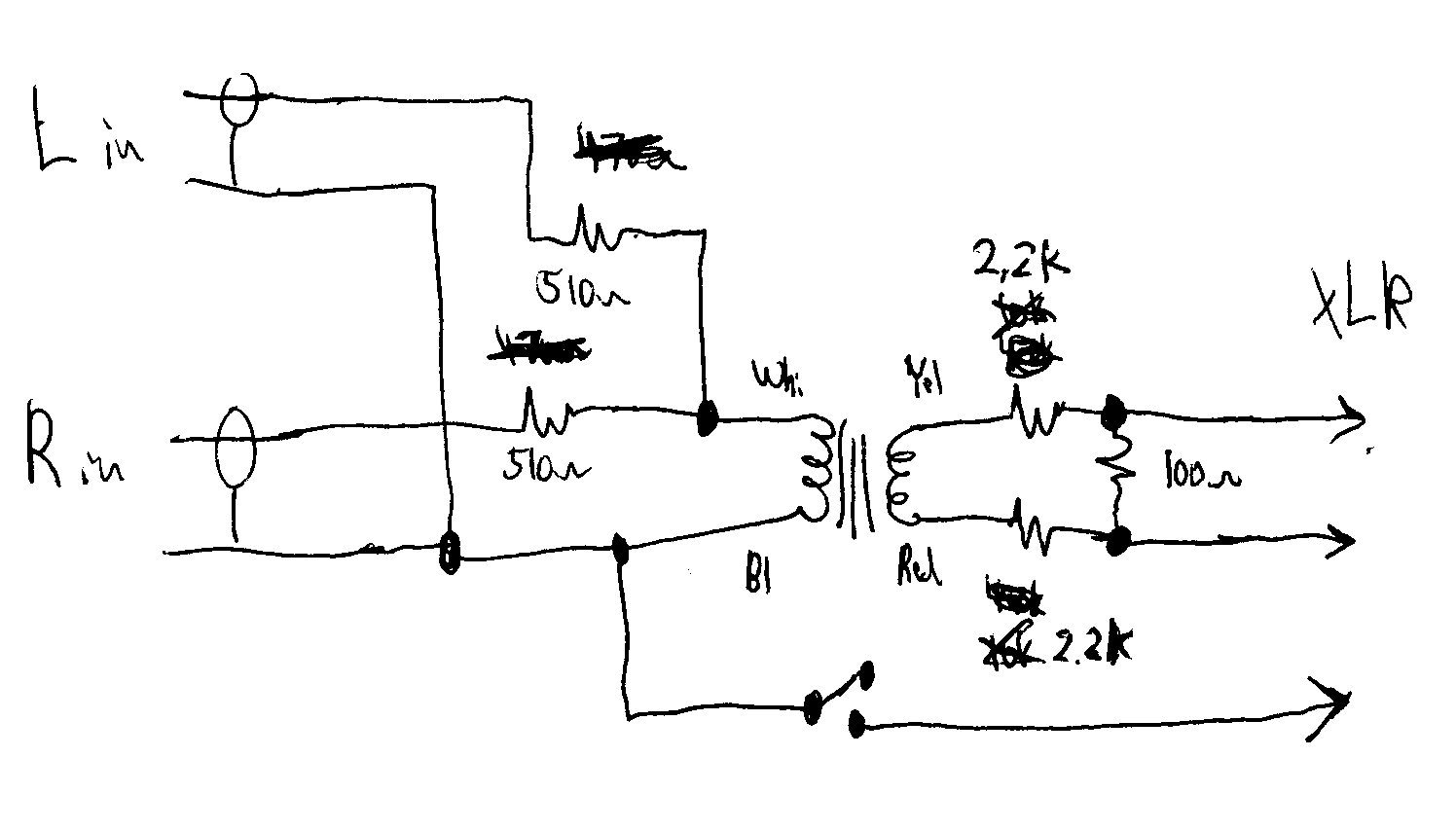
It's hand-drawn, but hopefully it will be legible enough to communicate the idea. I had to scale it down and convert to .jpg to squeeze under the file size limits. You may need to adjust the resistor values to get the attenuation right for your building's system. Or, you could use a dual audio-taper potentiometer to make a volume control.

The two signal wires from the voltage divider resistors go to pins 2 and 3 of the XLR connector.

The switch is for hum elimination. Connect its wire to pin 1 and shield of the XLR connector. Use whichever switch position gives the least hum. If there's no detectable hum in either position, it doesn't matter.

If anything's not legible enough, I'd be glad to clarify. Of course, use at your own risk, your mileage may vary, etc.
📎 z2.jpg (88.17 KiB)
Community Administrator
#14
Nice! All it needs is a volume control. (Remember to use a "audio taper" pot. Linear taper is too fussy.)
Have you searched the Help Center? Try doing a Google search and adding "site:churchofjesuschrist.org/help" to the search criteria.

So we can better help you, please edit your Profile to include your general location.
Community Moderators
#15

Microphone preamp schematic

If you want to get fancy with a volume control, you might be like the schematic at http://www.rolls.com/data/mp13man.pdf of a one-channel mike preamp.

I have no connection with the company that makes it, other than a friend of mine recommended it in response to a question I had a while ago.
New Member
#16

Not the Crab!!

The company you refer to is called Emtech Electronics. The device that you are refering to is known in church circles as a crab. There are a couple of different models that they have been used in lds installs. The EJ-10 comes in a gray zippered case with adapter cables wraped around the device. The EJ-8 comes in the same pouch but does not quite fill it. There is an adjusting pot for volume and a toggle that lifts the xlr ground pin. It is a handy little gizmo. I have purchased several replacement parts from Emtech over the years. The folks at Emtech are very easy to work with. If you watch ebay you can usually pick one up for $30 or so. In essence these little boxes are a transformer that drops the voltage from line level to mic level so that you can put any input into a standard xlr mic input. I use it like an insurance policy. I figure as long as that piece is that last in the signal chain before the amp in the locked cabinet, I am safe from scrutiny. I have used this device in several differnt buildings for numerous applications. I have never had any type of issue.
New Member
#17

Re: The Crab

I got the EJ-2 Plus.

My mantra over the years has become: if the meetinghouse library has one, I'll be needing one.
Member
#18

Radio Shack

Radio Shack sells a canned balanced to unbalanced adapter for $15. I added my own 1/4" to dual RCA adapter, and now I can plug just about anything into anything. It is small enough that I can keep it in my bag for 'emergencies'.

http://www.radioshack.com/product/index ... age=search
Community Moderators
#19
There are two potential problems with that adapter setup:

First, you'll need some attenuation. The microphone level signal the PA system is expecting through the XLR connector is about 1-5mV. The line-level signal and headphone level signals you're likely to see on the RCA connectors will probably be about 300mV. If the 1/4" jack on that adapter is intended for microphone level signals, it's not likely to provide enough voltage attenuation, and you'll get distorted sound due to overloading of the microphone input circuitry.

Second, if the dual RCA connection is a hard (zero ohm) connection between the two RCA jacks, there's a chance the device feeding it won't like it, especially if using headphone outputs if there is no series resistance inside the device with the headphone output. Damage to the device isn't too very likely, but it is possible. It will probably work okay, but there's some likelihood of distortion if the driving device presents a very low impedance source.
Community Moderators
#20
garylm wrote: Do you bring gadgets to church, and where do you personally draw the line?

I have a Toshiba e740-NW (No wireless) on which I take notes (sacrament meeting talks) and read the manuals/scriptures (Priesthood and GD).

As for drawing the line, as long as it doesn't beep or and the keyboard is quite it is alright.

Oh I also have an old 8086 laptop that when I was younger I would take with me to take General Conference notes on, though it was loud, since my family had it's own private viewing room (the High Council Room) it didn't bother anyone and taking notes kept me on track.
garylm wrote: Do you WAN from church?

No.
garylm wrote: What apps do you run at church and what materials do you access at church? Scriptures? Lessons? Conference talks? Church mags? Presentations? Attendance spreadsheet? Meeting minutes? Personal journal?

All except the attendance spreadsheet and personal journal. (I do make annotations in my digital scriptures that might be considered personal journal entries)
garylm wrote: What is the largest gadget you would feel comfortable powering up in a church meeting? Beeper? Cell phone? PDA? Tablet? Laptop?

Tablet in hand writing mode, unless the keyboard is quite too.
garylm wrote: What precautions do you take to keep from distracting yourself and others?

Since I am taking notes or reading along in the lesson, and I tried to read the lesson before going to church, I stay very focused. To avoid distracting others I make sure in sacrament meeting to be in handwriting mode only (people just assume you have a notebook or pad of paper if you have a pen in your hand) and in other meetings make sure that I look at the teacher to show that I am listening and can be called on at any time.
garylm wrote: Does the fit and finish of a gadget affect its church-ability?
[/quote]

Yes, small and un-obtrusive are great pluses, large and noisy are pitfalls.
- David
New Member
#21

Need Manuals or Training for Some Gadgets

After our building was recently remodeled, including the addition of a new A/V system, we started to notice some funny things. For example: sometimes the sound from the Primary room would be piped into the Relief Society room.

We fiddled around with the rotary dial in the back of the Primary room and found that what we had thought to be the minimum attenuation setting on a potentiometer was actually a switch setting for piping sound out of the Primary room. All of the other detent positions on the switch were hard-wired for certain attenuation levels, giving the impression that we were dealing with a potentiometer.

After that discovery I embarked on an exploration of the remodeled building and found several more surprises, including a never-before-used sound mixer panel for the multipurpose room, hidden in the dark recesses of the meetinghouse library. But I never found any schematics or manuals.
Community Moderators
#22
Based on what I saw in 2004 during an update at a stake center, the rotary control is probably a shaft encoder, and it tells the DSP what gain/attenuation to do. I would be pretty confident the behavior of sending Primary room sound to the Relief Society room is not intended and should be fixed, probably by replacing one or more of the DSP units. At least in 2004, the contractor (usually General Comminications) gave the Church a one-year warrantee, so any defects reported within that time would be fixed at contractor expense. The installer I worked with said they have had real reliability problems with the Ivie DSP units, and our stake center had one defective unit that had to be replaced before final tuning.

I would recommend reporting it (through your FM group) as a defect to be repaired under warrantee.

The contractor should have a DVD to train local folks how to operate the sound system. It is supposed to be given to the local units, but sometimes the FM group "forgets" to pass the DVD along. If you did not get the DVD, I would recommend bugging your FM group into coughing it up. Worst case, provided General Communications did your installation, you _might_ be able to buy a copy from them. I think they are headquarted in or near Bountiful, Utah. I may still have an address or other contact info if you need.

The unused mixer panel for the multi-purpose room sounds interesting. Is it old or new? If you could describe it, somebody here (maybe me) may be able to tell you more about it. However, unless it's part of the new system, chances are it's disconnected and of no further use in the building.
Community Administrator
#23
garylm wrote:We fiddled around with the rotary dial in the back of the Primary room and found that what we had thought to be the minimum attenuation setting on a potentiometer was actually a switch setting for piping sound out of the Primary room.
Sounds like a bug. All the installs I've seen, any switch is set up to select what that room hears, not where it sends to. So if you said the control allows the primary to hear the RS, that would be a possibility. But to have Primary force the audio onto the RS, that's not right. I would report that.

As for the mixer, either you've found the equipment rack, or you've found the remote control for the mixer. If it's the remote, it's a small box a little less then half the width of a laptop, with a sloped panel, 4 channels and a "master" control and a switch marked something like "voice-matic/manual". It has a single strange plug on the cable. No power connections. Depending on the vintage of your sound system, it may or may not be usable. I used to be able to use it on our chapel system, but not since the last renovation. I think I can still use it in the cultural hall, but that system hasn't been updated in several years.
Have you searched the Help Center? Try doing a Google search and adding "site:churchofjesuschrist.org/help" to the search criteria.

So we can better help you, please edit your Profile to include your general location.
Community Moderators
#24
The equipment rack is usually stored in a seperate closet that only the FM and Stake Tech has a key to. So if you stumpled upon that closet unlocked you might want to notify the Stake Tech. (Especially since little kids had a way of getting into everything and anywhere)
- David
Community Administrator
#25
thedqs wrote:The equipment rack is usually stored in a seperate closet that only the FM and Stake Tech has a key to.
Really? The Stake Tech gets a key? The rack at our place has these signs "Russell keep out". :D
Have you searched the Help Center? Try doing a Google search and adding "site:churchofjesuschrist.org/help" to the search criteria.

So we can better help you, please edit your Profile to include your general location.
Community Moderators
#26
Hmm, ours was Rob (the tech specialist) come fix this, the FM group broke it again. :D
- David
Community Moderators
#27

Interest in circuit for nearly-invisible choir mikes?

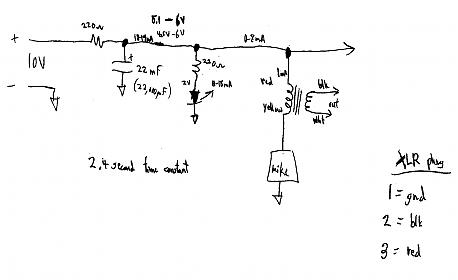
Would anyone be interested in a schematic and description for a nearly-invisible choir microphone (or tie-clip microphone)? It's not much more complex than the one I posted for going from line or headphone level to mike level.

The design uses a small electret condenser mike element, an audio isolation transformer, a couple of Rs and Cs, and a wall wart (to power the FET in the mike element). Some years ago, a youth choir was singing at stake conference, and the choir director asked for mikes. With this design, the mikes were much less vislble than with conventional metal poles and booms. I used the motorized projection screen to lift a brown-colored string, the mike element, and a thin coax cable to put the mike element above and a little in front of the choir.

Anybody want the schematic and description?
Community Administrator
#28
I'd be interested in it for the intellectual exercise, but microphones are one area that I prefer to buy quality pre-built ones. The elements you buy at the parts store just aren't in the same league. If you're using a good-grade of sound board, it probably will have the ability to "phantom power" the mics. Otherwise, I'm sure there must be commercial adapters for that. (Ones that don't require isolation transformers.)

At the request of the stake president, we have our mics permanently installed in the loft. :cool:
Have you searched the Help Center? Try doing a Google search and adding "site:churchofjesuschrist.org/help" to the search criteria.

So we can better help you, please edit your Profile to include your general location.
Community Moderators
#29
RussellHltn wrote:I'd be interested in it for the intellectual exercise, but microphones are one area that I prefer to buy quality pre-built ones. The elements you buy at the parts store just aren't in the same league. If you're using a good-grade of sound board, it probably will have the ability to "phantom power" the mics. Otherwise, I'm sure there must be commercial adapters for that. (Ones that don't require isolation transformers.)

At the request of the stake president, we have our mics permanently installed in the loft. :cool:
Quality pre-built mics do have advantages. The elements from the parts store sound a bit bright due to the textbook resonance of the diaphram boosting above about 5-10kHz by a few dB. Most Church building speaker systems roll off a little on the upper end, so the brightness of the mics is as likely to be an advantage. For boosting a small youth choir during stake conference so people in the cultural hall can hear the choir, very few people are going to hear a difference. The parts store elements have the advantages of minimal cost, small size (to help be nearly invisible), and adaptibility (stuck on perfboard 15 feet up on a string and RG-174 coax or hung from a piece of RG-174).

The attached schematic is actually for an 8-way box I built for overhead miking Saturday's Warrior. If I remember correctly, any configuration other than the mic element grounded and the transformer on the high side picked up buzz. The transformer keeps the mic's DC flow out of the PA system. I think I had tried a few configurations with op amps, but this simple configuration worked best. I found essentially no noise pickup with the mic element on 30 feet of RG-174 away from the box containing this circuit. One thing you don't want to do though, is plug or unplug the mic elements themselves while the system is live. The 1mA DC feed to the mic element makes for a rather loud pop.
choirmike.jpg
choirmike.jpg (13.28 KiB)
New Member
#30
Reading of tech gadgets, and the difficulty in finding a nearby power outlet, brings the following to mind:

A while back I home taught newlyweds Josh and Layne; Josh was bound for medical school. He related an event about his mission that changed his whole perception of it.

As a missionary, Josh was attending Sacrament meeting in a chapel in a poor area of Guatemala. It was hot; he was feeling dejected - the work had been difficult. He watched as a nearby Guatemalan woman dressed in her finery fanned herself. He noticed the pedestal fan oscillating in the corner of the room, it did not do much to cool the room. Josh thought, "the contributions of the members here probably don't even pay for the electricity to run that fan." His eyes traveled down the pedestal to the base of the fan, from the base to the line cord, and down the line cord to the power plug.

The plug was sitting on the floor.

The fan, though operating, was not plugged in.

From that time forward Josh knew whose work it was.
Community Moderators
#31
rmrichesjr wrote:The attached schematic is actually for an 8-way box I built for overhead miking Saturday's Warrior.
So you worked on the production of Saturday's Warrior?
- David
Community Moderators
#32
danbaker wrote: The plug was sitting on the floor.

The fan, though operating, was not plugged in.
Thanks for the story. ;)

Though I wonder if somebody next door had a large tesla coil and somebody had connected the pins of that fan together. :D
- David
Community Moderators
#33
thedqs wrote:So you worked on the production of Saturday's Warrior?
Several years ago, the stake I lived in at the time did the play with a youth cast and adult tech crew. I was assistant sound guy. I built the 8-way mike adapter unit, but the main sound guy chose to use three multi-hundred-dollar units instead. I wasn't convinced the expensive units did much if any better for sound, but they were more visible and provided a larger target to be hit by a wooden sword at least once. (ouch!)

(Please note: I understand current Church policy prohibits use of strobe lights.)

Another fun project I got to build for that show was a strobe light for one scene. It used four 4-foot 40W flourescent tubes, some induction motor capacitors charged to 170 or 350 volts, and some relays to switch the tubes between low-voltage filament heating and capacitive discharge flash. It lit up the stage quite nicely. However, it appeared the tubes and relays would have a rather short lifespan under that kind of abuse.
#34
rmrichesjr wrote:(Please note: I understand current Church policy prohibits use of strobe lights.)
Would you know where to find policy on this? Our DJ just bought some kind of stand lighting that basically flashes with the music playing. I found them disturbing when I watched them last night as I was getting dizzy from them it seemed.

Any thoughts appreciated!
Skip
Skip Taylor :eek:
Lancaster CA.
#35
garylm wrote:...
Do you bring gadgets to church, and where do you personally draw the line?

Yes. Cell phone, Ham Radio (small HT) and Pocket PC. All are kept off in Church except when I need the PDA to read scripture or hymns.
Do you WAN from church?
No.
What apps do you run at church and what materials do you access at church? Scriptures? Lessons? Conference talks? Church mags? Presentations? Attendance spreadsheet? Meeting minutes? Personal journal?

In the Pocket PC I use Yanceyware.com programs to keep many ebooks (Scriptures, lessons, conference talks, Ensign, leadership material) that I use in classes and in chapel (Hymns or scripture look-up). I occasionally use the notes program to take notes in classes and I use it to schedule broadcasts and other things I have to do with my calling.:D
What is the largest gadget you would feel comfortable powering up in a church meeting? Beeper? Cell phone? PDA? Tablet? Laptop?
PDA
What precautions do you take to keep from distracting yourself and others?
All are powered off once I'm in the building unless they are needed. On the one I use most (PDA) the sound and button chirps are shut off completely.
Does the fit and finish of a gadget affect its church-ability?
I'd say it's more size than what I think of as fit and finish. But if you need it to help you participate and learn I'm all for it. By that I mean assistive devices.

My 2¢ worth!
Skip
Skip Taylor :eek:
Lancaster CA.
Community Moderators
#36
avskip wrote:Would you know where to find policy on this? Our DJ just bought some kind of stand lighting that basically flashes with the music playing. I found them disturbing when I watched them last night as I was getting dizzy from them it seemed.

Any thoughts appreciated!
Skip
In theory, the best resource for policy matters is your local priesthood leaders. They can check their handbooks.

In practice, the Church web site has a ton of stuff. Going to lds.org and searching for the words "policy", "dance", and "strobe" produced a hit on the August 1992 Ensign, "I Have a Question" column. That column quotes from the 1990 "Activities Committee Handbook":

“3. Lights should be bright enough for people to see across the room. Strobe lighting is generally not advised; psychedelic lighting that pulsates with the beat is not acceptable. Lights on the floor, in the corners of the hall, or spotlighting creative wall and ceiling decorations are appropriate."

The column also mentions the contract for performing groups (which one might think would also apply to DJs):

"5. Solve issues related to lighting and music and atmosphere before the dance begins. Performing groups need to sign a suitable performance contract (one is available at no charge from Church distribution centers—Publication No. PXMU0028.)"
#37
Thanks for the info! I told the DJ to check with the Stake Presidency prior to using the lights with the equipment.

I'll try to remember the lds.org as a resource!

Skip
Skip Taylor :eek:
Lancaster CA.
Member
#38
---------snip----------

“3. Lights should be bright enough for people to see across the room. Strobe lighting is generally not advised; psychedelic lighting that pulsates with the beat is not acceptable. Lights on the floor, in the corners of the hall, or spotlighting creative wall and ceiling decorations are appropriate."

--------snip---------

Since this is the policy per handbook, it's too bad that this issue is not covered during construction and/or remodeling. It wouldn't take much work to have a few lights on a switch to provide adequate dance lighting that is dimmer than required for a basketball game in the cultural hall. A dimmer switch for some lights is another possibility.
Community Moderators
#39
scion wrote:Since this is the policy per handbook, it's too bad that this issue is not covered during construction and/or remodeling. It wouldn't take much work to have a few lights on a switch to provide adequate dance lighting that is dimmer than required for a basketball game in the cultural hall. A dimmer switch for some lights is another possibility.
At least in some buildings, that is being done. The cultural hall of a new meetinghouse built in 2004 in my previous stake had both the standard undimmable flourescent lights and recessed incandescent lights with dimmers as part of original construction. I'm told the stake center in the same stake was recently updated (using stake budget allowance funds, if I understood correctly) with incandescent lights with dimmers to supplement the standard undimmable flourescents. The meetinghouse for my current ward has both types of lights with dimmers for the incandescents, but I don't know the history of that installation.
Community Moderators
#40
Even in the old stake centers you could turn off selections of the cultural hall lights to get it quite dim. This was used for showing presentations on the cultural hall screen (not the chapel screen) or for stake dances.
- David
#41
I second the no tech toys in sacrament meeting.
"What have I done for someone today?" Thomas Monson
Community Moderators
#42
High on my wish list would be some incandescent lights in the chapel that could be dimmed low enough to see the screen during general conference, but left high enough to be able to take notes.

In our building, even one of the fluorescents provides too much light.
Community Moderators
#43
lajackson wrote:High on my wish list would be some incandescent lights in the chapel that could be dimmed low enough to see the screen during general conference, but left high enough to be able to take notes.

In our building, even one of the fluorescents provides too much light.
At least some facilities management (FM) groups will allow local units to hire professional electrical contractors (at local unit expense) to install additional lighting in buildings. Dimmable recessed incandescent lighting was being considered for the cultural hall in my previous stake.

There is one thing to watch out for when working with dimmers. Some buildings still have incandescent bulbs in the fixtures that were designed for incandescents. A dimmer can replace a switch in many of these situations, and all will be fine. However, if the FM group later relamps the room with compact fluorescents (CFL), then there will be a problem. I have heard conflicting reports about what happens in that case, from the CFLs just don't dim to a possibility of fire. (Yikes!) Dimmable CFLs exist, but they are expensive (US$15-17 per bulb).
Community Administrator
#44
What you want for projection viewing is room lights that beam straight down. The way to visualize it is to think of the screen as a mirror. It reflects all light that reaches it. So you don't want any room lighting to reach it as it creates glare

On the other hand, if you're using those recessed "cans", you probably want some overlapping circles of light so as to avoid dark spots or having some rows trying to write in their own shadow (which will happen of the lighting can is just behind that row.)

Done right, you can have a dark screen even with a bright room. When I throw the right breakers in our chapel, the only light that reaches the screen is the light bouncing off a sea of white shirts. ;)

There are other fixture types that work too, but for aesthetics and retrofitting, recessed cans will be high on the list of choices.

Upgrading/replacing the projector can help too. Newer ones are brighter. Our small little Sony can easily outdo our bigger, older Sharp.

Also, the projector bulbs frequently get dim long before they fail. You may find the bulb is all caked up and should be replaced even though the "lamp" indicator hasn't come on yet. That's what happened to our projector at work. It felt like we were watching a 3 candle power magic lantern show. :p
Have you searched the Help Center? Try doing a Google search and adding "site:churchofjesuschrist.org/help" to the search criteria.

So we can better help you, please edit your Profile to include your general location.
Senior Member
#45
RussellHltn wrote:Done right, you can have a dark screen even with a bright room. When I throw the right breakers in our chapel, the only light that reaches the screen is the light bouncing off a sea of white shirts. ;)
Maybe you could convince all of the brethren to wear black dress shirts...

Just kidding :D
Community Moderators
#46
The time is shortly coming when incandescents, florescents, CFLs, etc. will finally give way to LED lighting. IHOP just signed a contract with Cree to begin retrofitting all of their restaurants with LED lighting. (Story HERE.) It's still a bit pricey, but I foresee as the costs continue to erode, the benefit of much lower energy costs and very long life will finally tip the scales of the higher initial cost.

Yes, it's dimmable too! ;)
So we can better help you, please edit your Profile to include your general location.
Community Administrator
#47
To achieve lajackson's goal of television viewing, dimability is less important then controlling where the light is directed. In our chapel, we can have the lights on full yet the screen is dark.
Have you searched the Help Center? Try doing a Google search and adding "site:churchofjesuschrist.org/help" to the search criteria.

So we can better help you, please edit your Profile to include your general location.
#48
hi gary and rmrichesjnr, both of you hit on a subject that is dear to my heart, I had been traveling for work for a couple of years and had been used to the older style chapels in New Zealand where I come from and this last year I finally settled down in Singapore where we have a new Stake Centre, designed and built according to the latest of technologies.....lol.

Any way it includes these little..'adapter box" which are in fact a 'attenuator' unit, used as gary so rightly puts it...'allow signals from differing sources to be fed to a balanced mic line'....I am in the sound trade business and I find this the most abhorrant idea of all, no matter it is there to be used....untill you loose your little patch box, luckily our new stake centre still has our units...in their little black cases...so no need for us to go out an make some up....lol

Any way my point is on another issue...who is the Sound Design team exactly 'rmrichesjnr', I would like to discuss some stuff with them. In our stake centre...it was opened jan 2007....we have a 4 level building with the street level acting as entrance and lift access and carpark zone, the 2nd level has a recreation hall / meeting house with a high ceiling and with stack away seating and a removable podium and ballistrades....with small stage...the 3rd level has offices around the perimeter and the encroaching ceiling from below in the middle section and the 4th level has the official chapel with two over flow rooms with stackable chairs behind chapel with pews.

Any way my question is this...on the 2nd level where they put the removable podium, and removable balistrade and removable sacrament table, there is a performing stage area. At the rear of this stage against the walls that look so pretty during meetings, there is bars set on winches to carry stage drapes...and just in front of where the podium stands there is a electrically operated front curtain just like you see in old style movie theatres and performing arts theatres....and with all of this we still have no power for stage light FOH, or bars to hang anything and only the balanced mike lines to access the sound system for what ever we want to plug in....thru the little patch boxes....so would some one please put me in touch with the Sound Design and Lighting Design team at SLC....I am a Architect by trade during the week and work in stage light and sound during the weekends..have done so for 40 years...and have seen plans of new chapels to be built in New Zealand as they would pass around the different construction companies I worked for and as they passed by my desk...I would tell the salesmen.....'no need to try and redesign or reschedule this design boys....this church knows how to design things well and does not need to hold cake stall sales to raise funds to build their churches'....lol..yes well would someone give me some answers....and contacts please....thanks...
Community Moderators
#49
Dave In Singapore, I don't think I fully understand your question, but here's a try at what I think it might be:

I don't have contacts or anything useful at Church headquarters. If I did, I would probably not be allowed to give you the information. In case it might help, here's how sound stuff was done in the US in 2004. For upgrades to existing buildings, a "consultant" from a company called "Sound Design" would come out to the site to scope out the actual building. The consultant would design the upgrade based on general Church-supplied guidelines and rules. The Church would take that specific design and bid it out to contractors to do the installation. One US contractor was General Communications. The contractor would do the installation and rough tuning. Then, the consultant from Sound Design (again, that's a commercial consulting company) would do the fine tuning.

Power for lighting is a general problem. It appears the Church designs the buildings to handle weekly meetings, stake conferences, and some low-intensity theatrical and musical stuff, NOT a big-scale theatrical event. At least in the US, some FM groups can be agreeable to let local units bring in external contractors to do upgrades at local unit expense. Your mileage will likely vary.

Input to and control of the PA systems is likewise designed for religious meetings, some low-intensity musical and theatrical stuff, but nothing big or intense. The PA systems appear to be designed for simplicity of operation. A lot of units appear to lack hard-core techies. At least in 2004 in the US, most new PA systems have had line-level RCA jack inputs to go along with the mike-level inputs. Pretty much, if you want to do anything fancy for sound, you need to bring in outside mixers. If you want to feed into the building PA system, you do that with a line-level or mike-level feed, through the crab box or equivalent.

Did that come close to answering your question?
New Member
#50
I love having a Blackberry in Sunday School. I can’t count the number of times that some discussion would have taken 10 min while everyone speculated on the ‘true definition’ of some word or phrase, I just googled or went to dictionary.com! Priceless.
Member
#51

Bluetooth all-mute transmitter

I would like to see a Bluetooth transmitter in every chapel that reaches out to every Bluetooth-enabled phone and automatically puts the phone on Silent mode. That way people couldn't forget to silence their phones in church.

I'd also like to see this transmitter in every movie theater!
Community Administrator
#52
Are phones controllable that way by Bluetooth? Would it be legal for "us" to access the phone to change it's settings? How would you keep the effect confined to the chapel and out of the hallways?
Have you searched the Help Center? Try doing a Google search and adding "site:churchofjesuschrist.org/help" to the search criteria.

So we can better help you, please edit your Profile to include your general location.
Member
#53
The phone would also have to have bluetooth turned on. I for one do not have bluetooth turned on when not in use as it reduces battery life. Dispite the legal questions, you'd probally get a better result for less cost by just printing a reminder in the bulletin to turn cell phones off or to silent.

Community Moderators
#54
The Bluetooth transmitter does not communicate with any devices but rather jams the signals. It is not legal in some municipalities and some states. The device is used in such places as live performance theaters and similar places to prevent communications. It is not only Bluetooth that can be jammed but cell phones and other over-the-air communications devices. You can see why it is so controversial.

The military has used these devices for some time now in areas needing extra security.
JD Lessley
Have you tried finding your answer on the ChurchofJesusChrist.org Help Center or Tech Wiki?
Community Moderators
#55
jdlessley wrote:The Bluetooth transmitter does not communicate with any devices but rather jams the signals. It is not legal in some municipalities and some states. The device is used in such places as live performance theaters and similar places to prevent communications. It is not only Bluetooth that can be jammed but cell phones and other over-the-air communications devices. You can see why it is so controversial.

The military has used these devices for some time now in areas needing extra security.
Last time I studied FCC regulations, in the USA radio transmission devices that jam other communications are also pretty serious violations of said FCC regulations.
Community Moderators
#56
SingerGuy59 wrote:I would like to see a Bluetooth transmitter in every chapel that reaches out to every Bluetooth-enabled phone and automatically puts the phone on Silent mode. That way people couldn't forget to silence their phones in church.

I'd also like to see this transmitter in every movie theater!
Folks, I believe this was meant to be more sarcasm than a real suggestion.
So we can better help you, please edit your Profile to include your general location.
Member
#57
Mikerowaved wrote:Folks, I believe this was meant to be more sarcasm than a real suggestion.
Ding, ding, ding! ;)

Of course, it would be nice if there was an industry standard that could come about that would allow something like this to happen (on a per-phone opt-in basis of course).

Our Stake President insists that whoever is conducting gives a reminder at the beginning of meetings to silence the phones. The last meeting I was in one of the jokers on the high council sent a text message to the 1st Counselor during a Saturday leadership meeting, right as the Stake President was making that announcement. Yep, the counselor's phone hadn't been silenced.

That was the last time I ever heard a phone ring in a meeting. :D
Community Administrator
#58
rmrichesjr wrote:Last time I studied FCC regulations, in the USA radio transmission devices that jam other communications are also pretty serious violations of said FCC regulations.
Quoted for emphasis. It may be legal in other countries, but it's not legal in the US. However, Faraday cages are legal. Perhaps we'll see some new designs for a new generation of buildings? ;)

Mikerowaved wrote:Folks, I believe this was meant to be more sarcasm than a real suggestion.
I have a hard time applying sarcasm to that post. I think wistful desire is closer.

SingerGuy59 wrote:Of course, it would be nice if there was an industry standard that could come about that would allow something like this to happen (on a per-phone opt-in basis of course).
Yeah, it would be nice, but the question of confining the results to the desired room remains.
And it may move this conversation outside the realm of church tech.
Have you searched the Help Center? Try doing a Google search and adding "site:churchofjesuschrist.org/help" to the search criteria.

So we can better help you, please edit your Profile to include your general location.
Community Moderators
#59
Believe it or not, as I have sat on the stand I have received text messages about an event or something that needed to be announced or corrected from a member of the congregation. I for one am glad that technology can be used to further the work, and sometimes it needs to be during the meetings.
New Member
#60

Device Manners Policy

Although initially proffered "tongue in cheek", you might be interested to know that your wish may just be closer than you think. Microsoft calls it Device Manners Policy. You can read about it here:

http://www.engadget.com/2008/06/05/micr ... alking-zo/

My particular phone (MotoQ9c) allows me to schedule times for it to be automatically set to vibrate so no interruptions during Church meetings (as long as they are on the calender).

Be careful what you wish for...
New Member
#61
garylm wrote:...

Do you bring gadgets to church, and where do you personally draw the line?
Yes, but I only use my Palm T5 for scriptures and lesson manuals. And to take notes in church.
Do you WAN from church?
No.
What apps do you run at church and what materials do you access at church? Scriptures? Lessons? Conference talks? Church mags? Presentations? Attendance spreadsheet? Meeting minutes? Personal journal?
Mark My Scriptures, eReader
What is the largest gadget you would feel comfortable powering up in a church meeting? Beeper? Cell phone? PDA? Tablet? Laptop?
PDA and tablet if I had one for taking notes and looking up scriptures. Solitaire would have to be uninstalled by default.;)
What precautions do you take to keep from distracting yourself and others?
Only use it when I need it.
Does the fit and finish of a gadget affect its church-ability?
I find the nice silver finish on my PDA isn't too distracting and that a nice leather zipper case makes it fit in more with the scripture and planner crowd around me.;)
I'm alone in my own little world.
New Member
#62
The sound system trainer indicated that the principal reason for having a mic in the primary was to help children become familiar with using it and assist in overcoming public speaking.
Community Moderators
#63
junkman1989 wrote:The sound system trainer indicated that the principal reason for having a mic in the primary was to help children become familiar with using it and assist in overcoming public speaking.
That's what I was told by the consultant (trainer) a few years ago. Then, (as I might have mentioned earlier) he also said the main reason for a PA system in the Relief Society room is the sisters would complain if the Primary room had a PA system and the RS room didn't. However, my wife informs me there are sometimes sisters who can't hear well, and the PA system helps them.
New Member
#64

Cordless Mike

[rmrichesjr;13197 However, my wife informs me there are sometimes sisters who can't hear well, and the PA system helps them.

We also had a problem with our relief society sisters not being able to hear the teachers. We also had the same problem with many of our brothers and sisters in Sunday school. You hear the old saying of "My ward is mostly made up of newly weds and nearly deads." Our ward is made up of mostly nearly deads. :D We couldn't get the Sunday school teacher to use a microphone and the Sisters wouldn't have anything to do with it either. Our solution was to get a cordless clip on mike at the end of the year with surplus budget. We got a small Samsung which clips on easily to a tie or shirt front and is unobtrusive. The receiver plugs into your standard mike jack and runs off of 120a/c wall power. We have had great success with it and virtually all of the complaining over not being able to hear the teachers has been done away with. Our relief society sisters love it and the teacher (who initially hated it) likes it because she can crank up the volume over the sisters that feel they must keep socializing. ;) I want to say we paid about $300.00 for it but I'd have to dig my receipt out to double check. If anyone is interested let me know and I'll go back to last year's records and check. It has been a blessing for us. Thank heaven for great technology!
Member
#65
FltWilliam wrote:If anyone is interested let me know and I'll go back to last year's records and check. It has been a blessing for us.

I think it would be nice for you to post what you used, for other units to look at options.
Community Administrator
#66
I wonder what I'm doing wrong that I have such bad luck with lapel mics. I find that I can't get the volume that high before feedback. I'm sure it would work OK if the speaker maintained their "un-miced" volume, but many times the teacher will use a softer voice if they know they have a microphone. :(

It's possible that the RS room would work since the speakers are further away from the "stage". My bad luck has been in the chapel where the whole room has speakers.
Have you searched the Help Center? Try doing a Google search and adding "site:churchofjesuschrist.org/help" to the search criteria.

So we can better help you, please edit your Profile to include your general location.
Community Moderators
#67
That's great that the cordless/wireless lapel mike worked. If I remember correctly, at least a few years ago, a corded lapel mike was standard Church issue with new or upgraded PA systems. If anyone could make use of a lapel mike with a tail, it might be worth asking the FM group if they can get you one.

Feedback is the killer of PA systems. One of the best solutions is to get the mike very close to the speaker's mouth. Another phenomenon that can help a little is that reversing the polarity of the electronic signal path from the microphone to the speakers will disrupt the feedback energy in the room. In about 1975, I experimented a little with a polarity reversing switch in a signal processing device. I found that if I cranked the gain up so feedback would build up over a second or three, switching polarity would essentially instantly silence the feedback. If I left the polarity switch alone, the feedback energy would build back up. If someone made a way to periodically reverse polarity of the electronic channel a couple of times a second without a lot of popping and clicking, it should be possible to get at least 2-3dB more gain out of a system. A DSP setup that could scramble the phase without making the sound too weird might be able to allow for several dB of additional gain.
New Member
#68
:)
opee wrote:I think it would be nice for you to post what you used, for other units to look at options.
I will check today at church and post this information later today.

I'm back from church. Go to this link http://www.audiogear.com/Samson-Airline ... hones.html and scroll down to the Presentation System and click on it. This is the mike that our ward purchased. We have had great sucess with it. You can actually clip the whole transmitter onto your shirt front. It is small and has a built in mike in it. There is a lavalier mike that plugs into the transmitter thereby bypassing the mike in the transmitter. You can then clip the transmitter to your belt and run the lavalier mike up to your lapel or some other out of the way place. We don't generally use the lavalier mike as we have found that it is hard to get the volume right without feedback. It took some trial and error to figure out where to set the volume on both the receiver and the controls for the building (ie the volume knob for the podium in the chapel or the knob on the wall in the relief society room) without getting feedback. It works good now. There is also a mike gain on the microphone but we haven't had to mess with it. Anymore questions let me know. :)
Community Moderators
#69
garylm wrote:Do you bring gadgets to church, and where do you personally draw the line?
What apps do you run at church and what materials do you access at church? Scriptures? Lessons? Conference talks? Church mags? Presentations? Attendance spreadsheet? Meeting minutes? Personal journal?
Great question Gary.

I totally believe in using the tools which are available but I have a hard time seeing how many of them belong at church during lessons and especially sacrament meeting.
I personally draw the line at bringing any of them on a Sunday.

A few of those who bring their own gadgets have oftened looked at me and asked why I dont bring mine but to be honest I really love to bring my own scriptures and my lesson books and my printed out talks and lesson notes. For visuals during lessons I find the whiteboard will do.

I have yet to capture how portable electronic versions of the scriptures and lessons can enhance my usage of them during Sunday meeting. I simply fail to understand how I can effective make notes on them. I also find it hard to type on a PDA with small keyboard and stylus is even worse. It's much easier for me to use pen and paper.

I do however make plenty use of lds.org before I come to church but then bring that as additional lesson/talk material.

I think the only thing I do bring is my laptop sometimes. That is when I need to show a video clip to my Sunday School class. I will then download it from lds.org beforehand. It works well as I am in control myself and dont rely on booking TV, DVD etc. Yesterday it was the video clip "The Mediator", great clip.
garylm wrote:What apps do you run at church and what materials do you access at church? Scriptures? Lessons? Conference talks? Church mags? Presentations? Attendance spreadsheet? Meeting minutes? Personal journal?
During Sunday meetings I dont. Pen and paper is enough for me.
garylm wrote:What is the largest gadget you would feel comfortable powering up in a church meeting? Beeper? Cell phone? PDA? Tablet? Laptop?
For local unit leadership meetings I dont unless I get asked something that I need to check on my Windows Mobile calendar. When our Branch President felt we could do with more effective meeting minutes and actions assigned and for these to be distributed fairly quickly we discussed it and since we didnt have an Exec Sec he asked if I, as his counsellor, would take that onboard. My main concern was the additional time it would take so in order to save time he suggested I brought my laptop and did it during the meeting. You could hear the quiet keys slightly when nobody was talking but everyone felt the benefits of this change outweighted the downside.
After each meeting I still needed to type up a bit more and correct mistakes but the extra work was minimal.

Once as a Branch President I did bring a projector together with my laptop for a Branch Council meeting to aid me with a powerpoint presentation I gave but it was because I was using quotes mixed with pictures of new converts in order for the Aux leaders to appreciate the souls that had joined our branch that year.

I think we should use the tools available but also remember the difference between what is a tool and what is merely a gadget. Any item can be a tool to one person and just merely a shiny gadget to someone else. There are plenty places and situations when gadgets are not suitable.
Member
#70
More than once since I got my Treo Palm cell phone I have been in a class discussion that took a side track the instructor wasn't prepared to handle. I have done a quick search of lds.org and found a general conference talk that addressed the question and allowed the discussion to move back to the main lesson topic. Since I have never been a note taker I find that freeing my hands from the weight of scriptures and manuals has been a great blessing. I also like having my full appointment calendar with me for those times that I need to set up a home teaching visit, get reminded of a meeting, etc.
New Member
#71
garylm wrote:... Do you bring gadgets to church, and where do you personally draw the line?
When I had a PDA, I would bring it to church meetings regularly. It was really tough trying to take notes on it, though. I eventually stopped using it altogether, and maybe 6 to 8 months later I got a MacBook, which I bring to church every Sunday.
garylm wrote:... What apps do you run at church and what materials do you access at church? Scriptures? Lessons? Conference talks? Church mags? Presentations? Attendance spreadsheet? Meeting minutes? Personal journal?
As the ward clerk, I use my laptop throughout the entire Sunday block. I use it to take notes in bishopric, ward council, welfare, PEC, and sacrament meetings. In Sunday School and Elders Quorum, I pull up the scriptures and class manuals, and take additional notes as I feel inspired. Sometimes I'll open the dictionary if I feel like digging into the meaning of a word more deeply. If something needs to go on the calendar or into my address book, I've got them right there. If I need to print something, I transfer it from the laptop to the ward computer with a USB memory stick.
garylm wrote:... What is the largest gadget you would feel comfortable powering up in a church meeting? Beeper? Cell phone? PDA? Tablet? Laptop?
I wouldn't want to go any larger than the MacBook. It would be nice if Apple put out a tablet Mac, as I still get a little self-conscious opening and closing the screen sometimes.
garylm wrote:... What precautions do you take to keep from distracting yourself and others?
The keyboard is very quiet, but even with that I try use a softer touch when typing during a meeting. I try to keep it as low as possible, especially if I'm near the front of the chapel or a class, but most of the ward is used to seeing me with it at this point. Once I was asked to download one of the testimony videos that the church posted in the newsroom so it could be used in a class, and it worked very well.
Senior Member
#72

PDA

I have used a PDA for several years with all the scriptures and manuals loaded. I have also downloaded conference talks and Ensigns for the last several years. My sister and brother-in-law are waiting for their second mission call and after they saw and liked my PDA, I bought them each one and loaded all the scriptures, etc., on them as a gift. I found the same PDA I use, a very basic Palm Z22 on eBay for $65 and free shipping. The PDA has a color screen and 32 mgb of memory. (My wife still carries her scriptures so if I have a need for the paper kind, she kindly allows me to use hers..);)
New Member
#73

PDA at Church

garylm wrote:...

Do you bring gadgets to church, and where do you personally draw the line?

I have been using my PDA for several years both in administrative meetings and in classes. I have the MLS exported data for each family which allows me to know callings of each family member, who HT/VT each family, birthday, address, phone, email, etc. You get the idea. As a ward clerk I no longer have to leave the room to get infomation the Bishop is always needing. In our stake these are know as adult quiet books. Most of us who use them are as unobtrusive as possible and I for one never use it to take notes, paper and pencil work faster and better for me at least. I use Mobipocket for palm and have almost everything that is available from LDS.org on it. I find that I can turn to a scripture faster than using a traditional book and if I want to check the footnotes, cross references or the bible dicitionary I can do so without loosing my place and I am less distracting to others while I do it. I draw the line when anyone around me becomes more interested in me than the speaker, whether in Sacrament Meeting or Class. Off is the way I use it most of the time.
Gene Brown
Brookwood Ward
Hillsboro, OR
New Member
#74
I have a Dell x51v Pocket PC running windows 2003se and I use it within classes for scriptures. I also have installed almost everything I can download from LDS.org and it often comes in handy to reference information without struggling to find the printed material.
I find it a more subtle than sieving through multiple pages of various books. The amount of data that these devices can hold in such a convenient, accessible manner is quite an asset. We are blessed with technology and I enjoy showing my appreciation by using it where I can that provides convenience and efficiency.

I do not use this device in sacrament, outside of sacrament I use it whenever needed.

Regards
Vince.
New Member
#75
When I was on call, I used to take my Blackberry 8700C into the block. One time, during the sacrament, I heard the tell tale sounds of a Blackberry chattering into a mic, I quickly took my battery out.. Needless to say, I felt bad that I disrupted sacrament. No one other then Blackberry people would know what the sound is.
New Member
#76
garylm wrote:...

Do you bring gadgets to church, and where do you personally draw the line?

Do you WAN from church?

What apps do you run at church and what materials do you access at church? Scriptures? Lessons? Conference talks? Church mags? Presentations? Attendance spreadsheet? Meeting minutes? Personal journal?

What is the largest gadget you would feel comfortable powering up in a church meeting? Beeper? Cell phone? PDA? Tablet? Laptop?

What precautions do you take to keep from distracting yourself and others?

Does the fit and finish of a gadget affect its church-ability?
I always take my PDA (never go anywhere without it). It's a good replacement for bulky scriptures, I've always been frustrated carrying them around as they don't generally fit in your pocket and I have a tendency to accidentally leave things I have to carry in my hands under a chair somewhere or even in the chapel car park for 48 hours (yes, that actually happened).

I generally don't have a problem using a PDA during meetings, whether it be sacrament, priesthood, Sunday School etc. as long as it's related to the meeting (i.e. scripture application, lds.org etc). I don't think it is a distraction to others as it doesn't make any noise. The only potential problems I can see is young technology enthusiasts (e.g. the young men) who are easily distracted by anything that has a circuit board, though that's more their problem than mine IMHO. I've also known people to get told off for "being rude" while using their PDA to read scriptures during a lesson. This is generally due to a lack of understanding of how a device like that isn't just a toy.

Anything bigger though would have to be directly related to the meeting. I've taken a laptop to church as a visual aid in a lesson, and would expect it to be used to take minutes in a bishopic or high counsel meeting for instance, but wouldn't use one as a member of the audience in Sunday school.

I have also used it to access my home network and check e-mail while in the church corridor in-between lessons, but shhh.
Community Moderators
#77
Welcome to the forum, morph! You summed up my feelings about this pretty well. I used to have an HP iPaq PDA, but now I just carry a smartphone with WM6. I can usually popup footnotes and scriptural references during a lesson faster than it takes someone to reach for their tree versions. I once amazed an instructor by following along with a reading from a decades old conference talk.

But when I read the scriptures or conference reports at home, it's always from the printed version. I don't know. To me, there is something special about the printed word that's hard to describe. I personally feel a better spirit from it. The only reason I use an electronic version at church is I'm confined to a wheelchair and the scriptures, priesthood manual, SS manual, etc. are MUCH easier for me to carry in a little holster on my hip than balanced on my lap. :cool:
So we can better help you, please edit your Profile to include your general location.