New Member
I'm trying to submit a batch of donations through LCR on the website. I've done this successfully dozens of times. But this time I'm getting an error on the Balance Donations page. This is the page where you confirm each check's amount by checking them on the left, then entering in the amount of currency.
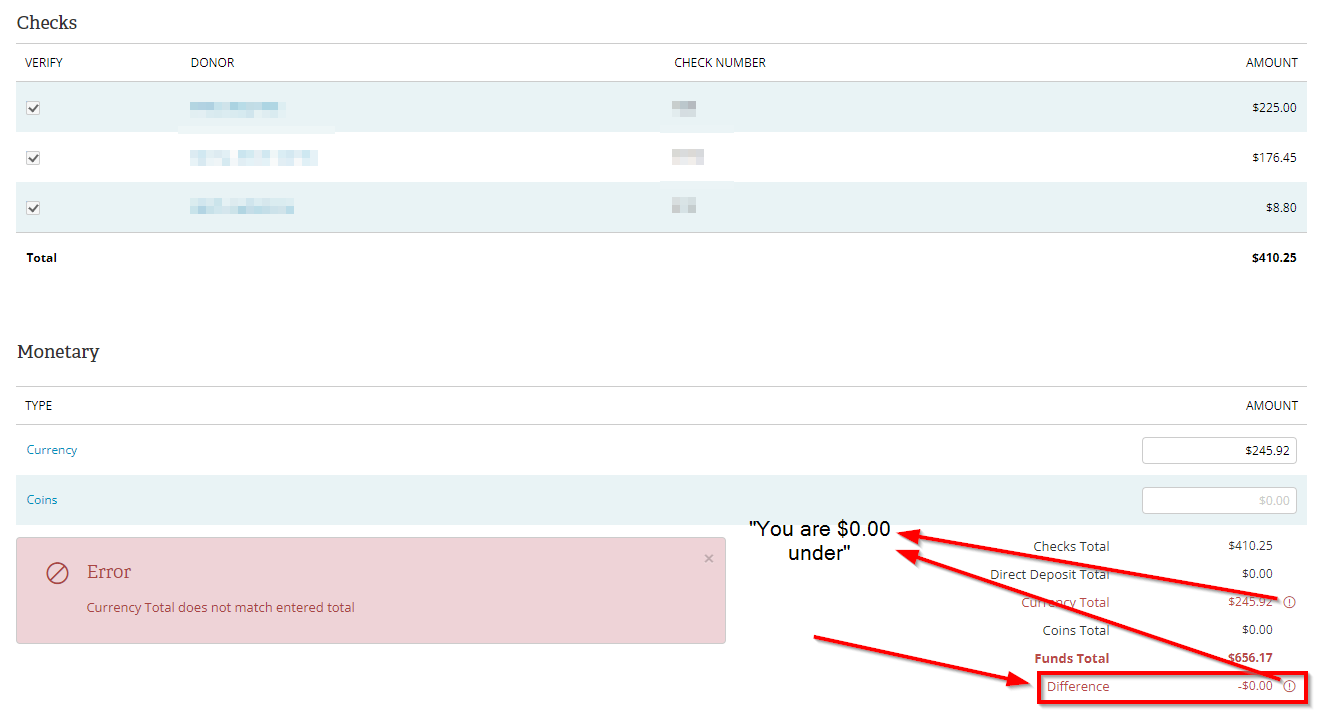
I'm doing this as normal, and the amounts add up. I have -$0.00 in the difference as expected, but for some reason I'm getting the error "Currency Total does not match entered total" when attempting to submit the batch. There are also some warnings thrown by the currency figures that say "You are $0.00 under" which doesn't make any sense - that's essentially saying that it's properly balanced!
Screenshot below. Please help if you can - we are unable to submit donations currently. I've submitted this as an issue to SLC support nearly a week ago but haven't heard anything back. Thanks so much in advance!
I'm doing this as normal, and the amounts add up. I have -$0.00 in the difference as expected, but for some reason I'm getting the error "Currency Total does not match entered total" when attempting to submit the batch. There are also some warnings thrown by the currency figures that say "You are $0.00 under" which doesn't make any sense - that's essentially saying that it's properly balanced!
Screenshot below. Please help if you can - we are unable to submit donations currently. I've submitted this as an issue to SLC support nearly a week ago but haven't heard anything back. Thanks so much in advance!