New Member
Hi,
I tried following these instructions (https://support.microsoft.com/en-us/off ... n-us&ad=us) to get the church calendar to sync to Outlook, but the events never appear in my outlook, even though the calendar does.
However, if I go to the link provided by the Calander Sync (LDS -> Calendar -> Sync -> Copy Url), I can a .cal file that when I open it, opens up the calendar as expected. I assume, however, that the latter method will not keep the calendar updated.
How do I get my calendar to properly sync using Outlook's "Internet Calendar" feature? Is there some step missing? Are there permissions that I need to set in order to properly sync? This is a work calendar, so there may be some work permissions denying access to the internet calendar.
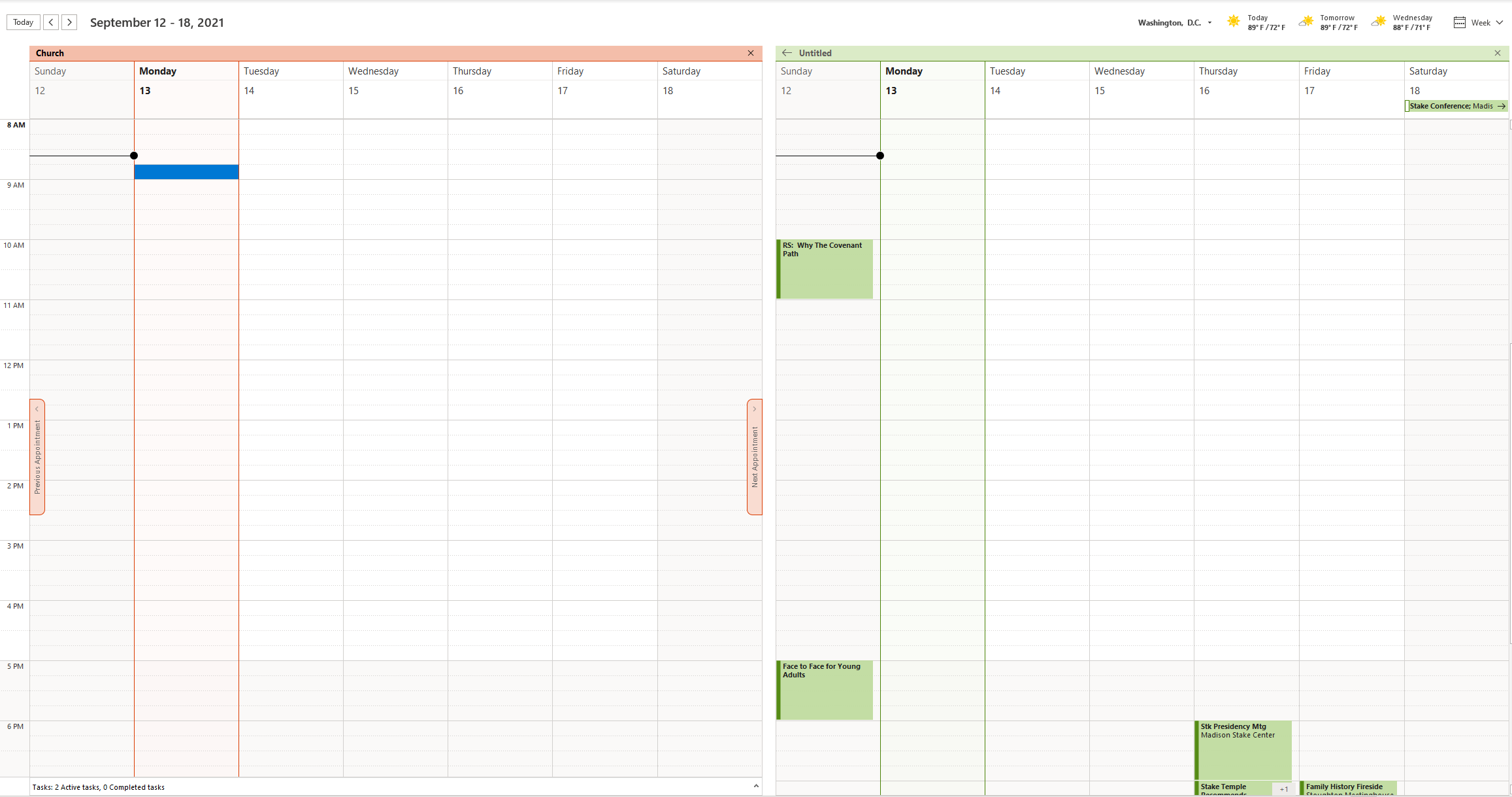
Attached is a screenshot showing the difference. On the left is the Calendar used by using Outlook's Internet Calendar feature (Field -> Account Settings -> Account Settings -> Internet Calendar) . The calendar on the right is the calendar manually opened when I opened up the calendar via sync, downloaded the .ical file, and opened it in Outlook.
I tried following these instructions (https://support.microsoft.com/en-us/off ... n-us&ad=us) to get the church calendar to sync to Outlook, but the events never appear in my outlook, even though the calendar does.
However, if I go to the link provided by the Calander Sync (LDS -> Calendar -> Sync -> Copy Url), I can a .cal file that when I open it, opens up the calendar as expected. I assume, however, that the latter method will not keep the calendar updated.
How do I get my calendar to properly sync using Outlook's "Internet Calendar" feature? Is there some step missing? Are there permissions that I need to set in order to properly sync? This is a work calendar, so there may be some work permissions denying access to the internet calendar.
Attached is a screenshot showing the difference. On the left is the Calendar used by using Outlook's Internet Calendar feature (Field -> Account Settings -> Account Settings -> Internet Calendar) . The calendar on the right is the calendar manually opened when I opened up the calendar via sync, downloaded the .ical file, and opened it in Outlook.