Videos on lds.org home page

16 postsstarted by lajackson 5,692 viewsoriginal topic

Community Moderators
#1
Tyler wrote:It was related to the sharing feature added to the videos we have on the home page.

There are videos on the home page? I did not know that. Never seen them.
Community Administrator
#2
lajackson wrote:There are videos on the home page? I did not know that. Never seen them.
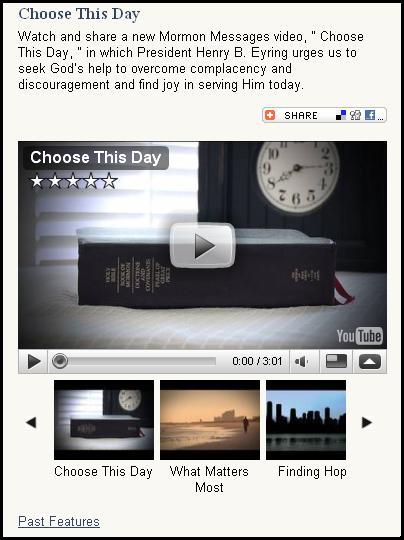
On the home page www.lds.org, in the center panel, the fourth item down is now "Choose This Day"; below the introductory paragraph is an embedded YouTube video. Below the video is a selector for more videos. The videos rotate periodically so that the content stays fresh.

If you're not seeing it, my guess is that you either don't typically scroll down far enough to see the video, or you have YouTube blocked in some way.
Questions that can benefit the larger community should be asked in a public forum, not a private message.
Community Moderators
#3
Alan_Brown wrote:On the home page www.lds.org, in the center panel, the fourth item down is now "Choose This Day"; below the introductory paragraph is an embedded YouTube video. Below the video is a selector for more videos. The videos rotate periodically so that the content stays fresh.

If you're not seeing it, my guess is that you either don't typically scroll down far enough to see the video, or you have YouTube blocked in some way.
I see the Choose This Day paragraph. The columns ends after "serving Him today." If I click on the Choose This Day link, I go to the Mormon Messages Channel at YouTube, where I am told:
"This web page is being redirected to a new location. Would you like to resend the form data you have typed to the new location?" If I click Ok, the next screen tells me that "An error occurred, please try again later."

If I repeat the process (or sometimes just wait a few minutes), the video comes up and plays.

It looks just like any other YouTube page. I watch things there from time to time. High tech stuff. [grin]
Community Administrator
#4
lajackson wrote:I see the Choose This Day paragraph. The columns ends after "serving Him today."
[BTW, I moved this discussion to a new thread, as it was not on the topic of the original thread.]

Hmm. I see the embedded YouTube video right on the home page. I can play it right there without going to the YouTube site. I see the image below.

I still would guess that you are somehow blocking YouTube. Perhaps it is being done at your ISP, or some client-side filtering software. But I would think you would still see the "Past Features" link. Curious.
ldsorg.JPG
ldsorg.JPG (42.39 KiB) Viewed 2345 times
Questions that can benefit the larger community should be asked in a public forum, not a private message.
Community Moderators
#5
@lajackson, what operating system and what web browser are you using?
JD Lessley
Have you tried finding your answer on the ChurchofJesusChrist.org Help Center or Tech Wiki?
Community Moderators
#6
To view the Youtube videos you also need to allow "addthis.com".
Have you read the Code of Conduct?
Community Moderators
#7
jdlessley wrote:@lajackson, what operating system and what web browser are you using?
WinXP Pro 2002 (SP2)
FireFox 3.5.3
Techgy wrote:To view the Youtube videos you also need to allow "addthis.com".
I can view any YouTube video I wish to see. Where do I check for addthis.com?
Alan_Brown wrote:I would think you would still see the "Past Features" link. Curious.
Ok, yes. I do see the Past Features link. After that, at the bottom of the center column and lower than the longer of the left or right column are the links for Rights and Use Information, Privacy Policy, etc.
Community Moderators
#8
Alan_Brown wrote:[BTW, I moved this discussion to a new thread, as it was not on the topic of the original thread.]
Thanks. Sorry about that. My surprise overcame my sense.
Community Moderators
#9
I am running WinXP Pro SP3. LDS.org is fine in IE8. Before I updated my FireFox from 3.5.2 to 3.5.3 I went to LDS.org and had no problems. But just a few minutes ago I upgraded and had the same problem you described. I re-ran the upgrade install. For the first three seconds the page was again as you described but then it must have completed loading the rest of the page.

I did note that there were two or three other site URLs (Read XXX.XXXX.com) that were displayed in the lower left of the browser status bar before the page completely rendered. The i2.ytimg.com site was the one that stayed in the status bar when the YouTube imbed was not displayed. Once it disappeared from the status bar the YouTube imbed appeared. You may have that site blocked.
JD Lessley
Have you tried finding your answer on the ChurchofJesusChrist.org Help Center or Tech Wiki?
Community Moderators
#10
Addthis.com is apparently used by the church on lds.org to provide support for the video buttons, etc. You don't need it in youtube.com

I mention it because, if you're using FF (and it appears that you are), and you also use the "NoScript" addon, it will block items such as "addthis.com" unless you give it permission.

If you're not using noscript then you shouldn't have any problems. Sorry I wasn't clear before. Are you running any firewall software that might be blocking this site?
Have you read the Code of Conduct?
Community Moderators
#11
Techgy wrote:Addthis.com is apparently used by the church on lds.org to provide support for the video buttons, etc. You don't need it in youtube.com

I mention it because, if you're using FF (and it appears that you are), and you also use the "NoScript" addon, it will block items such as "addthis.com" unless you give it permission.

If you're not using noscript then you shouldn't have any problems. Sorry I wasn't clear before. Are you running any firewall software that might be blocking this site?
I am not using the NoScript addon (although I am considering adding it, after what I read MS did to FF this year).

I do not know where to look to see if addthis.com is blocked. I have not blocked it.

I have looked in my BlueCoat settings and do not see anything blocked there.

I changed a MacroMedia Flash setting at the Adobe site and now the Share button shows up.

I am running the Windows firewall, and do not recall having specifically blocked it there, but I do not know how to see what is or is not blocked.

Yes, I am using FF 3.5.3.
Community Moderators
#12
lajackson wrote:.... I changed a MacroMedia Flash setting at the Adobe site and now the Share button shows up..
Since it works properly in IE8, it has to be a FF issue.
It sounds like it's a configuration setting on flash preferences. Is it working?
Have you read the Code of Conduct?
Community Moderators
#13
Techgy wrote:Since it works properly in IE8, it has to be a FF issue.
It sounds like it's a configuration setting on flash preferences. Is it working?
It does not work properly in IE6 for me, so I doubt it is a FF issue. I suspect something is blocked somewhere.

Other flash sites seem to work. As I mentioned, I changed a MacroMedia (Flash) setting. The site was locked out from storing flash data and I undid that. This seems to have caused the Share button to appear. I can also tell that the three little video windows below the main one are trying to poke their way through, as well.

I shut off ActiveX using the MS patch. Could that be affecting it?
Community Administrator
#14
lajackson wrote:I have looked in my BlueCoat settings and do not see anything blocked there.


Did you actually look at the log for BlueCoat? BlueCoat blocks whole categories of sites, depending on your filtering level. From everything you've described, my guess is that BlueCoat is most likely the thing that is doing the blocking.

In fact, I know that a couple of months ago it started blocking YouTube for the default security level. The "moderate" level allows YouTube, but of course you have to make your decision about what you allow. Even if you stick with the default level, you can add YouTube (and perhaps AddThis and who knows what else) to the Always Allow list.
Questions that can benefit the larger community should be asked in a public forum, not a private message.
Community Moderators
#15
lajackson wrote:It does not work properly in IE6 for me, so I doubt it is a FF issue. I suspect something is blocked somewhere.

Other flash sites seem to work. As I mentioned, I changed a MacroMedia (Flash) setting. The site was locked out from storing flash data and I undid that. This seems to have caused the Share button to appear. I can also tell that the three little video windows below the main one are trying to poke their way through, as well.

I shut off ActiveX using the MS patch. Could that be affecting it?
Have you tried to do an update for Adobe's flash player? I'm using v10 and it's working fine. Since I cannot duplicate the problem you're seeing, it's difficult to try and troubleshoot it from here.

Do you have any browser that does work?
Have you read the Code of Conduct?
Community Moderators
#16
Techgy wrote:Have you tried to do an update for Adobe's flash player? I'm using v10 and it's working fine.
Latest and greatest.
Alan_Brown wrote:From everything you've described, my guess is that BlueCoat is most likely the thing that is doing the blocking.
Bingo. When I totally unrestrict it, it works. So that is what is doing it.

The challenge now is to restrict the category again and allow YouTube.com PLUS whatever else I need that is keeping it from working properly. It appears to be something besides AddThis that is also needed.

Thanks for the help.