New Member
All,
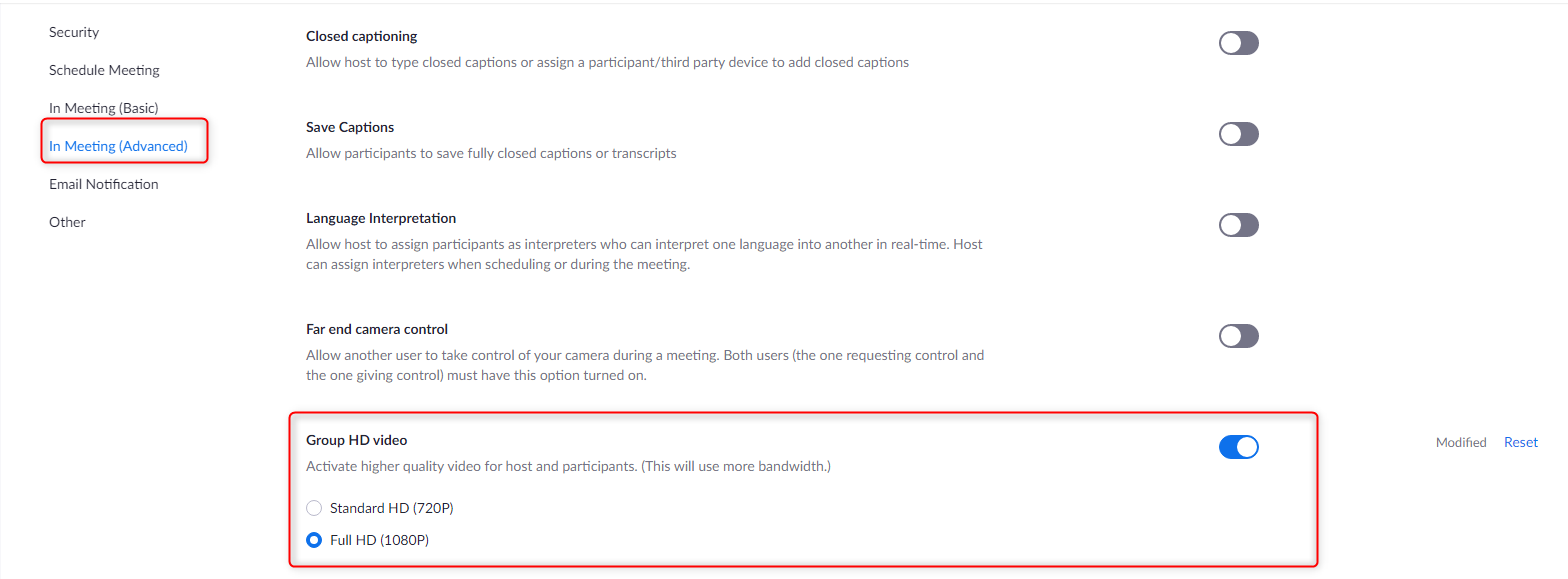
I noticed that my video quality was lower once we changed to the Church sponsored account. Please note by Default "Group HD video" is turned off
If you wish to enable this/
1. Ensure that your location has enough bandwidth.
2. log into your account on ZOOM.us website.
3. Select Settings on Left pane
4. Select In Meeting (Advanced) on the left
5. Scroll down to "Group HD video" and Toggle to on
6. Choose Standard HD (720P) or Full HD (1080P) Depending on your internet connection.
I noticed that my video quality was lower once we changed to the Church sponsored account. Please note by Default "Group HD video" is turned off
If you wish to enable this/
1. Ensure that your location has enough bandwidth.
2. log into your account on ZOOM.us website.
3. Select Settings on Left pane
4. Select In Meeting (Advanced) on the left
5. Scroll down to "Group HD video" and Toggle to on
6. Choose Standard HD (720P) or Full HD (1080P) Depending on your internet connection.