Availability of Zoom licenses for local unit virtual meetings

57 postsstarted by blythgoe 21,064 viewsoriginal topic

New Member
#1
On Dec. 11, a notice from the church was sent out indicating that each Stake, Ward, branch etc.., could get a Zoom license from the church.

The instructions in this notice direct the Stake Technology Specialist:
How do I sign up for a Zoom license?
Stake, mission, or district technology specialists can acquire licenses for their units at
meet.ChurchofJesusChrist.org. In order to access this website, the technology specialist’s
calling must be recorded in Leader and Clerk Resources (LCR).
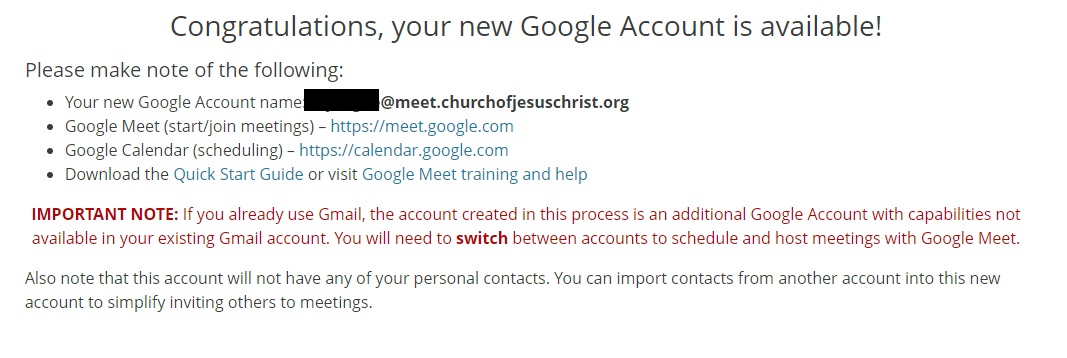
I was able to access that sight, however, all I ended up doing was signing up for a google account that is 'myname@meet.churchofjesuschrist.org'
The 'meet.ChurchofJesusChrist.org' website appears to only deal with Google Meet.

Is anyone aware how one can get the Zoom Licenses referred to this Church notice?
New Member
#2
When you log in to https://meet.chuchofjesuschrist.org you'll be presented with two large option boxes, one will say "Zoom Accounts for Church Units" and the other will say "A Google Meet Account". If you don't have these options available to you make sure your calling, as the Stake Technology Specialist, is entered into LCR.
New Member
#3
dafferngg wrote:When you log in to https://meet.chuchofjesuschrist.org you'll be presented with two large option boxes, one will say "Zoom Accounts for Church Units" and the other will say "A Google Meet Account". If you don't have these options available to you make sure your calling, as the Stake Technology Specialist, is entered into LCR.
Is the requirement to be a "Stake Technology Specialist" or would "Stake Assistant Technology Specialist" qualify as well?
Community Moderators
#4
yvan.j.garcia wrote:Is the requirement to be a "Stake Technology Specialist" or would "Stake Assistant Technology Specialist" qualify as well?
Assistant Stake Clerk -- Technology, aka Stake Technology Specialist (STS). Assistant Technology Specialists need not apply.
New Member
#5
lajackson wrote:
yvan.j.garcia wrote:Is the requirement to be a "Stake Technology Specialist" or would "Stake Assistant Technology Specialist" qualify as well?
Assistant Stake Clerk -- Technology, aka Stake Technology Specialist (STS). Assistant Technology Specialists need not apply.
Thank you for the Clarification. I've had them add me as the Assistant Stake Clerk - Technology Specialist. So far, nothing has changed, however, it may need some time to propagate.
GoogleAccount.jpg
(114.67 KiB) Not downloaded yet
I'll keep trying over the next few hours.
New Member
#6
Nothing has changed for me. Still getting the same screen that I attached in my previous message.
Church Employee
#7
blythgoe wrote:Nothing has changed for me. Still getting the same screen that I attached in my previous message.
There have been permissions issues for this reported for those with multiple callings
Church Employee
#8
blythgoe wrote:Nothing has changed for me. Still getting the same screen that I attached in my previous message.
Something else is going wrong for you. There isn't any significant propagation delay to this system. You don't have an issue with multiple positions.
New Member
#9
I'm going to have my Stake Clerk remove my other calling to see if that makes a difference.
Community Administrator
#10
Any possibility of being an "out of unit" member? I'd imagine that would create some issues.
Have you searched the Help Center? Try doing a Google search and adding "site:churchofjesuschrist.org/help" to the search criteria.

So we can better help you, please edit your Profile to include your general location.
New Member
#11
blythgoe wrote:I'm going to have my Stake Clerk remove my other calling to see if that makes a difference.
Didn't make a difference for me. Looks like something strange is going on. Hopefully they are working on it.
New Member
#12
russellhltn wrote:Any possibility of being an "out of unit" member? I'd imagine that would create some issues.
I'm not an 'out of unit' member.
New Member
#13
I'm having the same issue. The Stake Clerk added me to the position of STS on Saturday and it still is not working for me ... I still only get the option to create a Google account, nothing for Zoom.
New Member
#14
kd7hto wrote:I'm having the same issue. The Stake Clerk added me to the position of STS on Saturday and it still is not working for me ... I still only get the option to create a Google account, nothing for Zoom.
Thanks for posting. Nice to know I'm not the only one.
New Member
#15
I now have access to the Zoom portal. No changes on my side. It must have just taken a few days to get my position in LCR synced up.
New Member
#16
kd7hto wrote:I now have access to the Zoom portal. No changes on my side. It must have just taken a few days to get my position in LCR synced up.
Working for me as well. Thanks!
New Member
#17
I'm unable to see the zoom portion (only the google meet). The calling in LCR for me is "Stake Assistant Clerk--Technology Specialist", does it need to be something different than that?
Community Moderators
#18
dwesemann wrote:I'm unable to see the zoom portion (only the google meet). The calling in LCR for me is "Stake Assistant Clerk--Technology Specialist",
That is the correct calling. It usually takes 24 hours to spread through the system in case is was just recently entered.
Another challenge is if you also have another calling in LCR. If so, you may be subject to a multiple calling glitch that does not yet seem to have been solved.
New Member
#19
Edited 2 times, last by coldmist on
On the page to request Zoom licenses, it states this:
An activation email will be sent from Zoom to the email address provided above after clicking "Request License". Follow the instructions provided in the email to complete the activation process.
Would I "provide" my email, or the email of the Bishop of the ward asking for it, or the 'tech' person in that ward handling the broadcasts?
New Member
#20
Also, I can't open the PDF for this announcement. It gets to 12K and stops every time. If anyone is monitoring this topic, maybe you can review/update the pdf document.
Community Administrator
#21
coldmist wrote:Also, I can't open the PDF for this announcement. It gets to 12K and stops every time. If anyone is monitoring this topic, maybe you can review/update the pdf document.
Which one are you talking about? The one posted in the forum or the Official Communication Library? Either way, I can download fine.

I'd suggest trying private/incognito mode. If that works, you need to clear the cookies associated with church websites. The pages seems really struggle with old cookies. And yes, as strange as it sounds, I have had old cookies prevent downloading PDFs.
Have you searched the Help Center? Try doing a Google search and adding "site:churchofjesuschrist.org/help" to the search criteria.

So we can better help you, please edit your Profile to include your general location.
New Member
#22
the communication library. Even the download link.
Community Administrator
#23
coldmist wrote:the communication library. Even the download link.
Working fine for me.
Have you searched the Help Center? Try doing a Google search and adding "site:churchofjesuschrist.org/help" to the search criteria.

So we can better help you, please edit your Profile to include your general location.
New Member
#24
dafferngg wrote:When you log in to https://meet.chuchofjesuschrist.org you'll be presented with two large option boxes, one will say "Zoom Accounts for Church Units" and the other will say "A Google Meet Account". If you don't have these options available to you make sure your calling, as the Stake Technology Specialist, is entered into LCR.
I have 11 bishops, and several elders quorum presidents and relief society presidents in our stake contacting me throughout each day wanting a status on their Zoom accounts. I would very much like to help them — but cannot thanks to bugs in the Church's system.

I have callings in two stakes.

In my home stake I serve as a "Stake Assistant Clerk--Technology Specialist".

In a YSA stake I serve as a high councilor and "Stake Assistant Clerk--Technology Specialist".

In both stakes the calling has been entered correctly using standard callings and not as a custom calling, so that's not the problem.

The stake clerk of my home stake is taking care of the Zoom accounts for the home stake, so I'm trying to setup the 12 units of my YSA stake.

When I go to meet.churchofjesuschrist.org in MacOS Safari, the "Unit" dropdown pick list only lists the units from my home stake, preventing me from doing my calling for the YSA stake.

I read in these forums that there is a bug that prevents people with more than one calling, or out of unit callings from getting things set up.

So a young single adult whose records are in the YSA stake and who doesn't a calling changed his password and let me use his account.

The YSA stake clerk made him "Stake Assistant Clerk--Technology Specialist".

I logged in as him and tried to setup the Zoom accounts, but whenever I go to meet.churchofjesuschrist.org in MacOS Safari, it always welcomes me under MY login, not his.

And I'm concerned that his login shows the units of my home stake, not his YSA stake, in the pick list.

Of course I've logged out of the church site, closed all browser tabs, and cleared the cache, but no matter what I do in MacOS Safari, the meet subdomain always welcomes me, not the new login.

There is no option to logout on meet.churchofjesuschrist.org or do anything at all that would let me help myself with this problem.

So I tried logging in as him in Firefox.

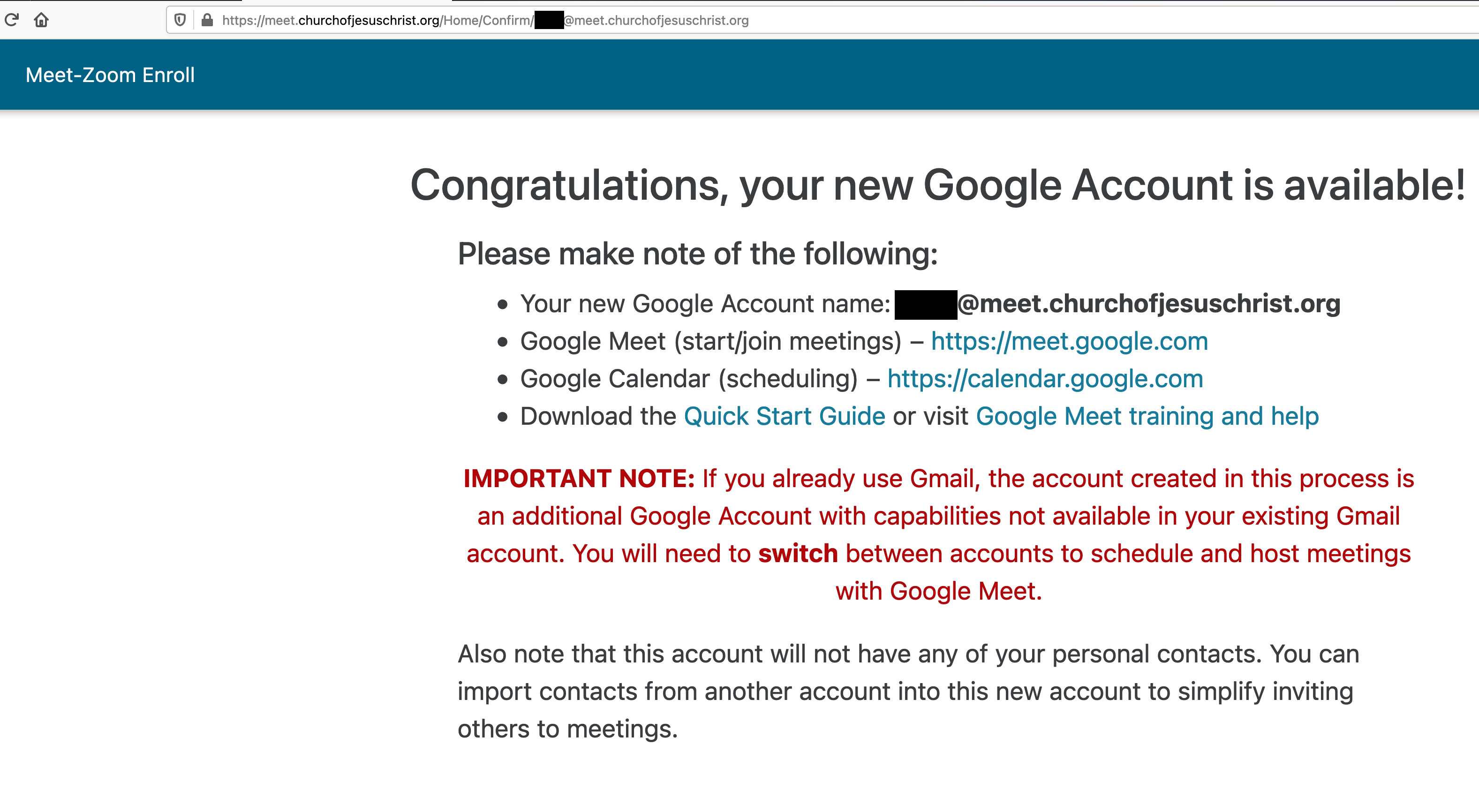
But when I go to meet.churchofjesuschrist.org, in MacOS Firefox, it instantly redirects me to the "Congratulations, your new Google Account is available!" page (see attached).

Seriously, no matter what I type, or what I click, meet.churchofjesuschrist.org always lands me on that page.

I'm stuck.

No matter what I try, I can't do my calling.

I don't know what else to try, and in the mean time I'm trying to stave off eager YSA bishops needing to use Zoom accounts.

Does anyone have anything else I can try?
📎 bugmeet01.png (487.65 KiB)
Community Administrator
#25
TomPittman7 wrote:The YSA stake clerk made him "Stake Assistant Clerk--Technology Specialist".
It takes time for the rights to go though the system. We usually advise 24 hours, but I think some people here saw it took longer.

That would be consistent with "meet" only seeing the Google option and no Zoom options.
TomPittman7 wrote:I have 11 bishops, and several elders quorum presidents and relief society presidents in our stake contacting me throughout each day wanting a status on their Zoom accounts.
Keep in mind there is only ONE account for each ward. As such, you might want to place it in the hands of the bishop (or perhaps the Executive Secretary) and steer clear of the EQ and RS presidents. Let the bishop decide how they will be accommodated.

Edit: I'll add there's very little "technical" about using the site. You select the ward, supply an email the account is to be connected to, and press "Request License". and that's it. You see a status and have the option of removing the license. There's really very little to manage. Everything after clicking the button is handled by whoever handles the email that was submitted. You might want to consider allowing the person who's account you're using handle it. (When the calling permissions works it's way to his account.)
Have you searched the Help Center? Try doing a Google search and adding "site:churchofjesuschrist.org/help" to the search criteria.

So we can better help you, please edit your Profile to include your general location.
Community Moderators
#26
coldmist wrote:Would I "provide" my email, or the email of the Bishop of the ward asking for it, or the 'tech' person in that ward handling the broadcasts?
You provide the email that will be used to sign in to the Zoom Account and manage it, setting up meetings, etc. This email will also receive notifications from Zoom about pending meetings, folks trying to enter meetings early, and other administrative stuff.

And each Zoom account for each unit has to have a different email address, unless you use the trick outlined in the link that describes how to manage multiple Zoom accounts from one Google email address.
Senior Member
#27
lajackson wrote: You provide the email that will be used to sign in to the Zoom Account and manage it, setting up meetings, etc. This email will also receive notifications from Zoom about pending meetings, folks trying to enter meetings early, and other administrative stuff.

And each Zoom account for each unit has to have a different email address, unless you use the trick outlined in the link that describes how to manage multiple Zoom accounts from one Google email address.
My STS sent me the Gmail "+" email address and the password for my ward Zoom account. So I can login to Zoom as the ward account admin, but I have no access to the Gmail "+" inbox or calendar. I asked the STS if I could change the email address to something that I can access, but he said the stake wanted to maintain control of my ward Zoom account.

Should I be concerned about that?
Dana Repouille, Plattsmouth, Nebraska
Community Moderators
#28
drepouille wrote:Should I be concerned about that?
As the stake STS, I asked the units not to change the address, but I cannot keep them from changing it. I told them that if they do change it, I will no longer be able to help them if they have any problems. If they get locked out or otherwise crater the account, my only option will be to totally remove the account and set it up all over again.

I do receive a number of emails for the accounts, most of which I feel comfortable ignoring, but some I feel the obligation to forward to the ward contact.

And on one account where the email address was changed in Zoom, the Church Meet site lost track of the account and it reverted to Setup Not Complete. They are working on fixing that, but for now I cannot do anything with the account. I cannot remove it, I cannot change it, I cannot help. If that problem got resolved, I would feel better about letting the units change their email addresses.

You mentioned not having access to the calendar function. That would cause me to lean toward letting the units change the email so they could access it. I am not really familiar with that function, but if it is needed and valuable, I can see letting the units have it.

Also, if the email message load from an account becomes excessive, that would be another reason to let them totally take over the account.

I think as things settle out over the next few weeks, I will probably adjust my approach to how the stake administers the account. But it seems the Church still wants them to oversee everything for now. The one-email-account makes it easier for me, but I am not averse to tracking a bunch of email addresses and passwords if there is benefit to the units involved.
Community Administrator
#29
lajackson wrote:Also, if the email message load from an account becomes excessive, that would be another reason to let them totally take over the account.
Something you might look into is auto-forwarding rules.
Have you searched the Help Center? Try doing a Google search and adding "site:churchofjesuschrist.org/help" to the search criteria.

So we can better help you, please edit your Profile to include your general location.
Senior Member
#30
I'll just use my personal Google calendar. I gave Zoom access to my Google Contacts and Calendar, and I installed the Zoom Client and the Zoom Chrome extension. So Zoom is pretty fat and happy that it has the keys to my kingdom.
Dana Repouille, Plattsmouth, Nebraska
New Member
#31
russellhltn wrote:
TomPittman7 wrote:Keep in mind there is only ONE account for each ward. As such, you might want to place it in the hands of the bishop (or perhaps the Executive Secretary) and steer clear of the EQ and RS presidents. Let the bishop decide how they will be accommodated.
Yes, of course I know that. :) They are bugging me because they itching to send out notifications to the YSA ward for things like virtual ward prayer, virtual FHE activities, and Sunday classes. The accounts will be turned over to the contact each bishop has given me as their ward Zoom account steward.
New Member
#32
russellhltn wrote:
TomPittman7 wrote:The YSA stake clerk made him "Stake Assistant Clerk--Technology Specialist".
It takes time for the rights to go though the system. We usually advise 24 hours, but I think some people here saw it took longer.

That would be consistent with "meet" only seeing the Google option and no Zoom options.
Thanks for letting me know that; it gives me hope.

However, it won't do me any good if the meet.churchofjesuschrist.org page keeps redirecting to the welcome page, instead of giving me the page that lets me setup Zoom accounts. :-(
Community Administrator
#33
lajackson wrote:And on one account where the email address was changed in Zoom, the Church Meet site lost track of the account and it reverted to Setup Not Complete. They are working on fixing that, but for now I cannot do anything with the account.
Which makes me wonder if there won't be some weeping and wailing when that account comes up for renewal.
Have you searched the Help Center? Try doing a Google search and adding "site:churchofjesuschrist.org/help" to the search criteria.

So we can better help you, please edit your Profile to include your general location.
Church Employee
#34
All,

We are still working with Zoom to figure out why certain accounts are not transferring as expected. I don't expect to have much more from them this week. If you really need the Church-provided Zoom account this weekend, please submit an alternative email address during the account creation process on the meet.churchofjesuschrist.org portal. We are hopeful an alternative account transfer option can be identified and deployed before the end of the month.

Thank you for all you do. I hope you have a great weekend.

Thanks,
Bart
New Member
#35
I'm getting the following error on an account that was just licensed.

"You cannot log into your Zoom account using this method. Contact your IT administrator for instructions. (2,025)"

This email account had a Zoom account before but it wasn't licensed. Any ideas on who to contact for support? Do we contact Zoom directly?
New Member
#36
bartj wrote:All,

We are still working with Zoom to figure out why certain accounts are not transferring as expected. I don't expect to have much more from them this week. If you really need the Church-provided Zoom account this weekend, please submit an alternative email address during the account creation process on the meet.churchofjesuschrist.org portal. We are hopeful an alternative account transfer option can be identified and deployed before the end of the month.

Thank you for all you do. I hope you have a great weekend.

Thanks,
Bart
Thank you for communicating to us.

FYI, for some of us, the meet.churchofjesuschrist.org portal doesn't work at all.

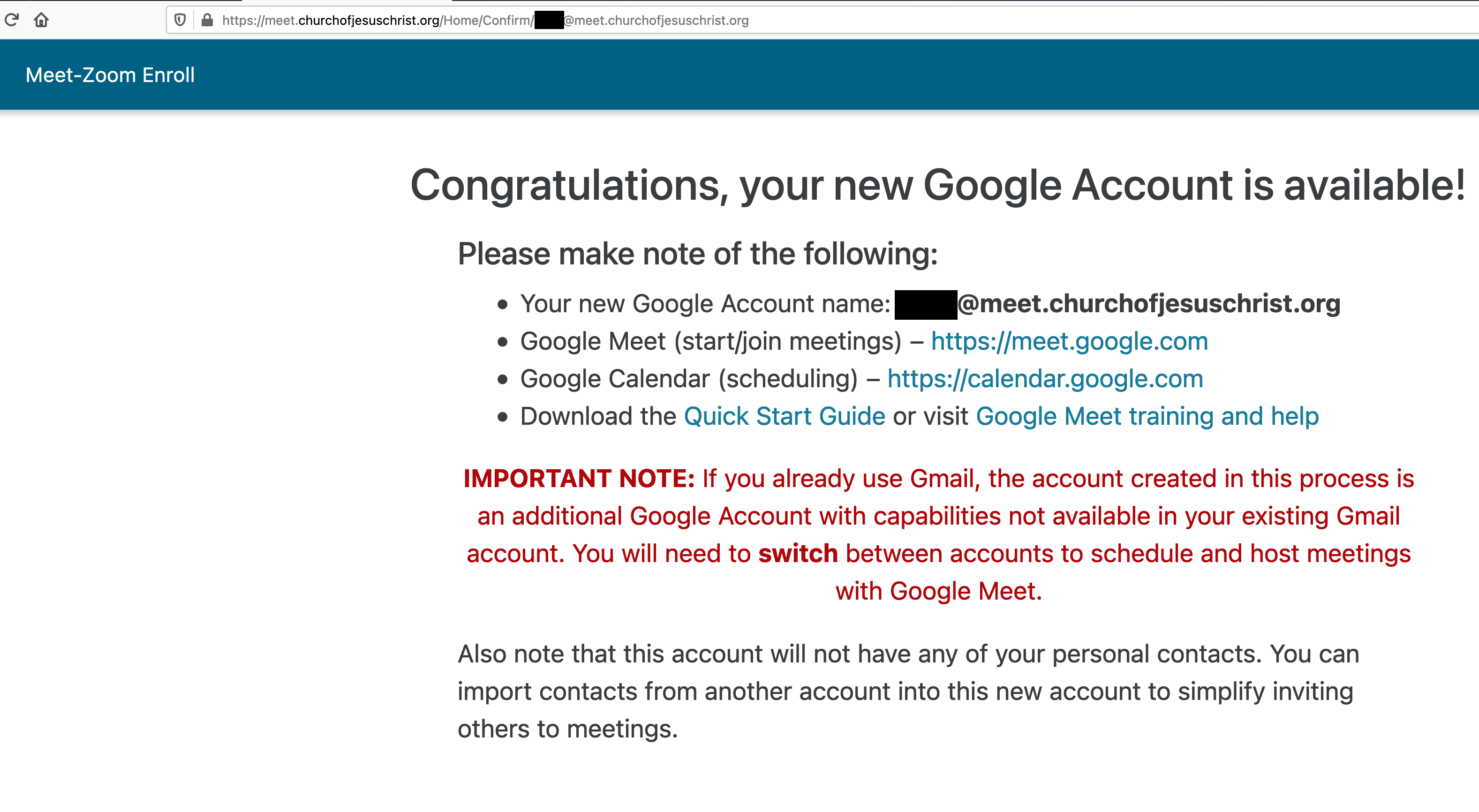
Whenever I go to meet.churchofjesuschrist.org, it instantly redirects to another page (see attachment).

I've cleared the cache, and tried it in Safari, Chrome, and Firefox (for MacOS), and the problem happens on all three platforms. No matter what I type or click, I'm automatically redirected to this page.

Some of us are just stuck, unable to create an alternate email address to try it as a work around.
📎 bugmeet01.png (487.65 KiB)
Community Moderators
#37
russellhltn wrote:Which makes me wonder if there won't be some weeping and wailing when that account comes up for renewal.
I intend to see that the weeping and wailing takes place long before the account comes up for renewal.
New Member
#38
I am stake clerk and STS And I have been successful in accessing the meet.ChurchofJesusChrist.org site And setting up several units with a license. I also have another calling and multiple callings have not impacted my ability to get into the zoom option and enter in a email for each unit.

Regarding the approach of managing the licenses for all of your units, our preference with 13 units, has been to Use the email address the Bishop of the unit prefers. In most cases, this is the Bishop’s email.

I like this approach, because it leaves the stewardship in the unit’s hands, Not mine. There is very little I can do, other than getting involved with Zoom directly, if there’s a problem. I think problem resolution most effectively happens between the unit leader that’s having the problem and the zoom help folks. I do ask any units that are having problems to keep me apprised of the problem and solution.
New Member
#39
Update: I did it! I did it! I did it! :)

I was finally able to assign the 12 licenses for our YSA stake to task-specific gmail addresses by:

• temporarily making a young single adult whose records are in the YSA stake the "Stake Assistant Clerk--Technology Specialist",

• temporarily removing his current calling from his records,

• waiting 24+ hours,

• and then logging in as him to get the task done!

• restoring his callings as before,

• he changed his password to something I don't know.

It feels so good to finally slay that dragon!

Thank you to everyone here for your comments. You guys left the bits and pieces that led to being able to figure this out and get it done. Cheers!
New Member
#40
thawkins3 wrote:... I like this approach, because it leaves the stewardship in the unit’s hands, Not mine.
We leave the Zoom accounts in the hands of the wards too, not ours, but we've done the task-specific gmail accounts as suggested.

Not all the bishops in our stake are tech savvy. In fact, some very much are not. There is no way some could host an online Sunday School, elders quorum, or Relief Society class.

So we asked every bishop to designate someone to be their ward Zoom administrator and email me their names and contact information. Because we are a YSA stake, we recommended it be a married adult leader serving in the bishopric, the ward clerk, or perhaps someone from a fellowshipping couple.

We asked that whoever the ward Zoom admin be, that he be someone familiar with Zoom, and someone who would ordinarily be attending the meetings that would be through Zoom anyway, like ward council, Sunday School, and elders quorum meetings.

This person sets up the zoom meetings for his ward, and makes the teacher co-host.

Two bishops chose themselves as their Zoom administrator; nine delegated it.

That makes me glad I didn't use the Bishops' email addresses from the get-go.
Community Administrator
#41
Our stake presidency all have "calling" accounts. Such as "SpringfieldUTStakePres@gmail.com". The account is turned over to the new stake president when he's released. (This started about 3 stake presidencies ago, so yes, it works.)

In our case, I set up the Executive Secretary's account for Zoom. It makes sense as he usually handles the calendar and coronating meetings anyway.

At this point, based on comments posted here, I'm thing that setting up the task specific emails so the STS is the point of contact for all the units probably isn't the best idea.
Have you searched the Help Center? Try doing a Google search and adding "site:churchofjesuschrist.org/help" to the search criteria.

So we can better help you, please edit your Profile to include your general location.
New Member
#42
I'm getting a 403 error ("Service Unavailable") and have been for the last few hours.

I've tried about 6 different browsers on a few different OSes, with combinations of Private/Incognito and regular. Can't seem to get the site to respond.

Is it just saturated with everyone trying to get accounts in place for tomorrow?!?
Community Administrator
#43
It's working ok for me, but does take a detour though "http" (non-secure) territory to get there.

Late Saturday night is probably not the time to dive in and try something new.
Have you searched the Help Center? Try doing a Google search and adding "site:churchofjesuschrist.org/help" to the search criteria.

So we can better help you, please edit your Profile to include your general location.
New Member
#44
I am getting the 403 error also.
Senior Member
#45
I'm getting the error too.
Craig
Saint George, UT
New Member
#46
I am getting the 503 error as well. A 503 error is a server side error and given that it is the weekend I would guess this won't be resolved until sometime tonight at the earliest but likely tomorrow or Tuesday.
Church Employee
#47
All,

We continue to work with Zoom on an automated solution to transfer accounts that have failed to transfer through the meet portal. In the meantime, we have identified an alternative method for getting these transferred. If you still have an account that could not be transferred through the portal that you would like transferred, please visit this Microsoft form survey and provide the requested information.

https://forms.office.com/Pages/Response ... VOUDRKTS4u

It is critical that you provide all the information requested and that it is accurate. We have successfully tested this with a number of accounts that could not transfer and hope this will be a means of resolving most of the outstanding transfer issues.

Thanks!
New Member
#48
conseguiu resolver se sim, como o fez? tenho esse mesmo problema
Community Moderators
#49
isaque28 wrote:conseguiu resolver se sim, como o fez? tenho esse mesmo problema
Google translation from Portuguese:
if so, how did you do it? I have this same problem
So we can better help you, please edit your Profile to include your general location.
Member
#50
I have just taken over as Stake Assistant Clerk - Technology Specialist, and they have added me in, however there was another STS and he has or is in progress of moving out of the stake. Could both of us being in the same calling recorded in LCR, the sticky wicket that is causing the issue of me not being able to see the zoom page in meet.churchofjesuschrist.org? Or could it be because I am also the Ward Technology Specialist? The stake clerk and President are scratching their heads on why I cannot gain access to the system. LCR says I do not have access rights, and CDOL is also saying I do not have access, for the technology manager for the internet equipment in the ward. Any ideas?
Community Administrator
#51
simph1 wrote:I have just taken over as Stake Assistant Clerk - Technology Specialist, and they have added me in, however there was another STS and he has or is in progress of moving out of the stake. Could both of us being in the same calling recorded in LCR, the sticky wicket that is causing the issue of me not being able to see the zoom page in meet.churchofjesuschrist.org?
I don't think it's possible to have two STS.

What is CDOL showing as your calling? Is it in Orange Text (indicating a custom position which has NO rights)?
Have you searched the Help Center? Try doing a Google search and adding "site:churchofjesuschrist.org/help" to the search criteria.

So we can better help you, please edit your Profile to include your general location.
Community Moderators
#52
simph1 wrote:I have just taken over as Stake Assistant Clerk - Technology Specialist, and they have added me in, however there was another
It normally takes up to 24 hours for a calling to propagate through the system. If you were just entered, that may be the reason you are not yet seeing access.

You can have more than one Stake Assistant Clerk--Technology Specialist.

If sufficient time has elapsed, there may be a dual calling issue. This problem has been seen in some cases. In your situation, you might try removing the ward calling. The stake calling can do everything you were doing, and more.
Community Moderators
#53
russellhltn wrote:
simph1 wrote:I don't think it's possible to have two STS.
Yes, it's possible. We have 3 in our stake.
So we can better help you, please edit your Profile to include your general location.
New Member
#54
Good afternoon. My name is Yoel Hernandez, and I am a bishop in the Moca Ward, Santiago East Stake, Dom Rep.
I would like to have access to the zoom account but we don't know how to do it, I read about meet.chuchofjesuschrist.org but it doesn't work for us, how can we get the unlimited access code?
Community Administrator
#55
argeny80 wrote:Good afternoon. My name is Yoel Hernandez, and I am a bishop in the Moca Ward, Santiago East Stake, Dom Rep.
I would like to have access to the zoom account but we don't know how to do it,
You need to contact your stake technology specialist. That's the only calling with the access to meet.chuchofjesuschrist.org to get Zoom licenses.
Have you searched the Help Center? Try doing a Google search and adding "site:churchofjesuschrist.org/help" to the search criteria.

So we can better help you, please edit your Profile to include your general location.
#56
Does anyone know where the official notification about the Zoom license went to? It is no longer in the Official Communications Library. This was dated 11 December 2020, and I received the email notification on 13 December.

Thanks in advance.
Community Administrator
#57
dkarbuckle wrote:Does anyone know where the official notification about the Zoom license went to? It is no longer in the Official Communications Library. This was dated 11 December 2020, and I received the email notification on 13 December.
It looks like the site was updated. I suspect a number of items are missing. There's only one letter from the First Presidency, and none from the Presiding Bishopric and Quorum of the Twelve.
Have you searched the Help Center? Try doing a Google search and adding "site:churchofjesuschrist.org/help" to the search criteria.

So we can better help you, please edit your Profile to include your general location.