New accounts for clerk computer

25 postsstarted by ackpack34 7,974 viewsoriginal topic

New Member
#1
I revisions a clerk's computer for our ward and we were able to get in using the admin account. However, this morning when we turned it on we now have a required password for administrator which we don't know. There are also two new users created that we don't know the passwords for either.
1. Our unit number
2. Dandc89
Anyone have any ideas on how I can get those passwords?
Senior Member
#2
Have you tried just hitting enter? I have found that often to be the solution.

When I did one recently the admin account didn't have a password and never did. The unit account password was assigned by me during setup. You should have been prompted for that.

D&C 89 is the support account, you won't get the password for that.
Craig
Saint George, UT
Community Moderators
#3
ackpack34 wrote:Anyone have any ideas on how I can get those passwords?
The DandC89 account is set up for Church ICS support for remote access to the computer. That account password is not available outside ICS support. The password for the account with your unit number should have been set up by the person who did the provisioning (setup). That account is the standard admin account for your unit. If your STS did the provisioning then speak to him to get the password.

Edit: I see craiggsmith posted just before me with some good info.
JD Lessley
Have you tried finding your answer on the ChurchofJesusChrist.org Help Center or Tech Wiki?
New Member
#4
I also have this same problem, but my advise for you is that contact your MSR there so that he can help you.
Community Administrator
#5
I've always seen the admin account as disabled. The Unit ###### account is the usual one you should be using.
Have you searched the Help Center? Try doing a Google search and adding "site:churchofjesuschrist.org/help" to the search criteria.

So we can better help you, please edit your Profile to include your general location.
Community Moderators
#6
russellhltn wrote:I've always seen the admin account as disabled.
The most recent provisioning tool I have seen does not do anything with the Administrator Account. So I give it a password. No one else can use it and they should be using the Unit Number account anyway.
New Member
#7
Does anyone know the size of the small provisioning tool? I have started the download more than an hour ago and it is still at 280 MB. It also does not say how much percentage of the file has been downloaded so far. Just wondering... Although, I guess I will find out sooner or later once the download completes. Thank you in advance for your comments. :D

I am still waiting for the provisioning tool to complete the download so I can proceed. I am just following the steps provided in the Help page. Any tips to avoid any issues during the provisioning setup?
New Member
#8
BALOTABJ wrote:Does anyone know the size of the small provisioning tool? I have started the download more than an hour ago and it is still at 280 MB. It also does not say how much percentage of the file has been downloaded so far. Just wondering... Although, I guess I will find out sooner or later once the download completes. Thank you in advance for your comments. :D

I am still waiting for the provisioning tool to complete the download so I can proceed. I am just following the steps provided in the Help page. Any tips to avoid any issues during the provisioning setup?
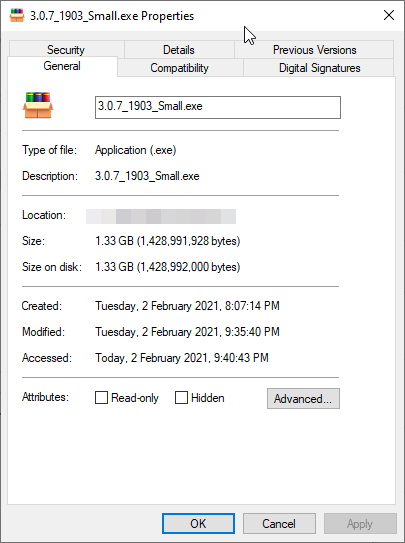
Finally, the download is done. I tried to download at home. It took me more than 2 hours in the meetinghouse and was not completed. It is kind of big for a "small file". hahaha Size of the file is 1.33 GB.
explorer_Wf8b4DXyaD.png
explorer_Wf8b4DXyaD.png (20.46 KiB)
New Member
#9
BALOTABJ wrote:
Finally, the download is done. I tried to download at home. It took me more than 2 hours in the meetinghouse and was not completed. It is kind of big for a "small file". hahaha Size of the file is 1.33 GB.
I wish we could add a comment to the Reimaging Local Unit Computers article so that the GSD can include the file size in the instructions. This will help so that we can estimate how much time we have to wait for the download to finish.
Community Administrator
#10
BALOTABJ wrote:I wish we could add a comment to the Reimaging Local Unit Computers article so that the GSD can include the file size in the instructions. This will help so that we can estimate how much time we have to wait for the download to finish.
I'd suggest giving feedback on that page.
Have you searched the Help Center? Try doing a Google search and adding "site:churchofjesuschrist.org/help" to the search criteria.

So we can better help you, please edit your Profile to include your general location.
New Member
#11
russellhltn wrote:I'd suggest giving feedback on that page.
The page does not have a comments section. Will just send an email to GSD to suggest an edit.
Community Administrator
#12
BALOTABJ wrote:The page does not have a comments section.
No, but as part of the standard footer, there is a feedback link.
Have you searched the Help Center? Try doing a Google search and adding "site:churchofjesuschrist.org/help" to the search criteria.

So we can better help you, please edit your Profile to include your general location.
New Member
#13
craiggsmith wrote:Have you tried just hitting enter? I have found that often to be the solution.

When I did one recently the admin account didn't have a password and never did. The unit account password was assigned by me during setup. You should have been prompted for that.

D&C 89 is the support account, you won't get the password for that.
I have found in our Stake that when people try to sign in to the Admin account it disables the token in MLS. I have posted instructions on every Ward Clerk's computer to never use the admin account. Use only the unit number account.
Is there any way to remove the Admin, D&C 89 account names in the bottom of the sign on screen. Tech support has said they can't remove them.
Community Moderators
#14
wcovey wrote:Is there any way to remove the Admin, D&C 89 account names in the bottom of the sign on screen. Tech support has said they can't remove them.
Yes, there is. It requires editing the registry. I don't recommend attempting this unless you are familiar with editing the registry and follow all the necessary safeguards. Modifying the Windows registry could be a dangerous game that can cause irreversible damage to your computer when changes are not done properly.

Another reason I don't recommend editing the registry is because the person making the edits may not be available to restore the registry at some future time when needed. A third issue is when user accounts are hidden the names of those accounts must be manually entered to gain access to those accounts. This is not a significant problem since those accounts are standard accounts on unit computers. The D&C 89 account is intended as a remote access account for support assistance from headquarters. They would have to be advised the account name is hidden whenever they attempt to access the computer remotely.
JD Lessley
Have you tried finding your answer on the ChurchofJesusChrist.org Help Center or Tech Wiki?
Community Administrator
#15
wcovey wrote:I have found in our Stake that when people try to sign in to the Admin account it disables the token in MLS.
That's curious on a few levels. Do you mean if they run MLS when logged in under Admin? I can't think of any reason that the token would get messed up. Even less so if MLS is never started.

I also wonder why they have the password to the admin account. Usually those are disabled, and some other account has admin rights.
Have you searched the Help Center? Try doing a Google search and adding "site:churchofjesuschrist.org/help" to the search criteria.

So we can better help you, please edit your Profile to include your general location.
New Member
#16
yes, when someone tries to log into Admin account (and the password is the same on the computers in my Stake as the unit password is) the computers were dropped off to the wards by my STS and the printed instructions for setting up and returning the old equipment with the new units.
The clerks set the admin account password the same as the unit login password. So once the Admin account is accessed the token is deleted and MLS does not connect (send receive) until I get the token reset. This also affects MLS when the unit # is logged in to after the admin account had been accessed. MLS no longer connects until the token is reset.
I have changed the Admin password on all of the Stake computers and not told the clerks what it is.
Thanks for the response.
Community Administrator
#17
Ok, but I don't think that account setup is church standard.

I'm still mystified why simply logging into an account would mess up the token. I know about where it lives, and it's in a church-specific folder.

Usually the issue is that permissions are not right and users have to run MLS "As Administrator" in order to get i to work.
Have you searched the Help Center? Try doing a Google search and adding "site:churchofjesuschrist.org/help" to the search criteria.

So we can better help you, please edit your Profile to include your general location.
New Member
#18
I did have to set run as administrator in all of the units and it still comes up with the box to authorize changes to Windows in order to open; on all of the units.
Senior Member
#19
Make sure the unit accounts are in the Administrators group in Windows.
New Member
#20
ok thanks.
Community Administrator
#21
wcovey wrote:I did have to set run as administrator in all of the units and it still comes up with the box to authorize changes to Windows in order to open; on all of the units.
All of the units have to be administrators, but there's more.

You need to grant all the units "modify" rights to C:\ProgramData\LDS Church (including subdirectories). It's not enough that the administrators group has the needed rights.
Have you searched the Help Center? Try doing a Google search and adding "site:churchofjesuschrist.org/help" to the search criteria.

So we can better help you, please edit your Profile to include your general location.
Community Moderators
#22
wcovey wrote:I did have to set run as administrator in all of the units and it still comes up with the box to authorize changes to Windows in order to open...
If you have "Run as administrator" set for the MLS program, then yes, Windows will always popup the authorization box.
russellhltn wrote:You need to grant all the units "modify" rights to C:\ProgramData\LDS Church (including subdirectories).
While this works if done properly, it's not a trivial task and probably shouldn't be attempted by someone without a good grasp of Windows file system permissions.
So we can better help you, please edit your Profile to include your general location.
Community Administrator
#23
Mikerowaved wrote:While this works if done properly, it's not a trivial task and probably shouldn't be attempted by someone without a good grasp of Windows file system permissions.
It may need detailed instructions, but I don't think it's that hard. What am I missing?
Have you searched the Help Center? Try doing a Google search and adding "site:churchofjesuschrist.org/help" to the search criteria.

So we can better help you, please edit your Profile to include your general location.
Community Moderators
#24
russellhltn wrote:It may need detailed instructions, but I don't think it's that hard. What am I missing?
Last time I did it, a few files refused to have their permissions or ownership changed without some serious tweaking.
So we can better help you, please edit your Profile to include your general location.
Community Administrator
#25
Mikerowaved wrote:Last time I did it, a few files refused to have their permissions or ownership changed without some serious tweaking.
It can be a problem if neither "Administrators" nor the currently logged in user has access. It's hard to give rights to something you don't have rights to.

If I get a chance, I may have to explore.
Have you searched the Help Center? Try doing a Google search and adding "site:churchofjesuschrist.org/help" to the search criteria.

So we can better help you, please edit your Profile to include your general location.