Remote chapel A/V wiring Pic (Zoom etc)

4 postsstarted by stephendoud 1,584 viewsoriginal topic

New Member
#1
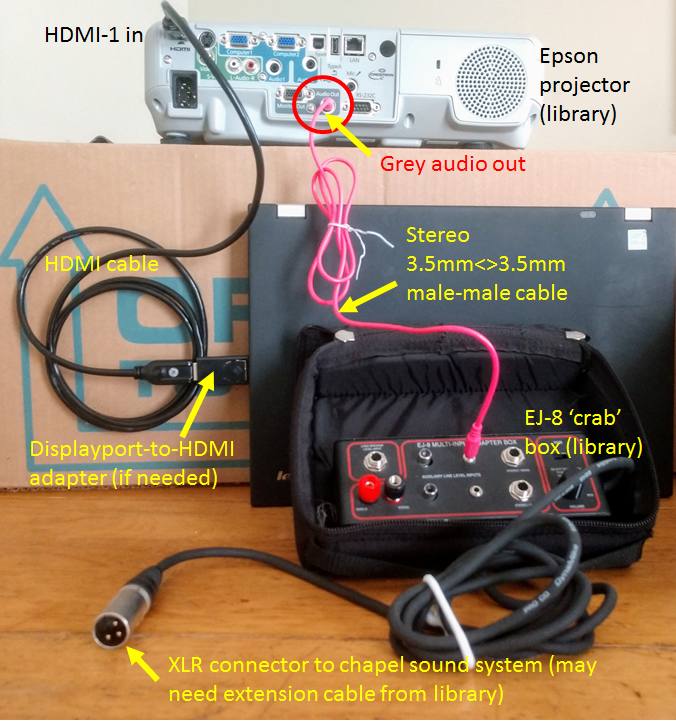
I'm setting up a Zoom-based stake conference, and remote chapels will receive the meeting via laptop and feed into a projector and chapel sound system.

Here is a simple picture of the basic wiring (excluding lan cable to the laptop):
chapel AV hookup.png
(1.13 MiB) Not downloaded yet
Best regards,
Stephen Doud
STS - CARTERSVILLE STAKE, GEORGIA, USA
New Member
#2
We've found that the Epson projectors have their own built-in volume control. we eliminate the crab box by connecting a cable with an 1/8" connector on one end and an XLR connector on the other. This simplifies the setup for us. We use the volume control on the Epson remote to bump up the volume if needed.
Community Administrator
#3
I like using the crab box as it gives me a knob to immediately get my hand on if there's a problem.

I'm a leery about using a 1/8" to XLR as that's likely a high level output going to a mic input. If something acts up, it's going to get loud. And since that connection if after the volume control, you don't have many options for dealing with it.
Have you searched the Help Center? Try doing a Google search and adding "site:churchofjesuschrist.org/help" to the search criteria.

So we can better help you, please edit your Profile to include your general location.
New Member
#4
it's worked great for us.