Webcast Sound Problem for Some

18 postsstarted by davidbann 7,748 viewsoriginal topic

New Member
#1
Hi there,

We have started broadcasting sacrament services using the church webcast system. Everything is working fine, and for most members they receive the broadcast with no problem. Some people on the other hand have problems with the sound - they have reported that either the sound is scrambled (making strange noises) or that there is no sound at all, but they can still see the video. Important to note is that these people can all hear the prerecorded tabernacle choir music perfectly, and only when the broadcast begins do they have problems with sound.

Any ideas on what could be causing this, and why it would only be problematic for some people and not for others?

We are broadcasting via Teradek where the chapel main sound system is fed directly into the Teradek, and an IP camera displayed on a laptop screen in full screen mode, with HDMI output from the laptop to the Teradek. The Teradek is configured using the webcast XML config.

Regards,
David
Community Administrator
#2
davidbann wrote:We are broadcasting via Teradek where the chapel main sound system is fed directly into the Teradek
What kind of connection are you using? If it's a standard 3.5mm to 3.5mm cable, I'd suggest setting the Teradek to "left only". The chapel is a single channel feed and the Teradek is expecting stereo.
Have you searched the Help Center? Try doing a Google search and adding "site:churchofjesuschrist.org/help" to the search criteria.

So we can better help you, please edit your Profile to include your general location.
New Member
#3
Hi Russell,

Yes, it is 3.5 to 3.5 - I will check it out and see if I have set to left only yet or not. If not, would that potentially cause that some viewers get the correct sound while others don't?
Community Administrator
#4
davidbann wrote:If not, would that potentially cause that some viewers get the correct sound while others don't?
Possibly. It depends on how the Teradek interpreted it and how the receiving device processed it.

The basis of my thinking is a common problem in stereo sound if one channel is somehow 180 degrees out of phase. People listening in stereo will say it's fine, but people listening in mono will hear next to nothing. in that situation, the problem is with the "sender" (encoder end) not the "receivers" (viewers).
Have you searched the Help Center? Try doing a Google search and adding "site:churchofjesuschrist.org/help" to the search criteria.

So we can better help you, please edit your Profile to include your general location.
New Member
#5
We've had the exact same problem reported in our stake transmissions. All users can hear the prerecorded music and other videos from the church website fine, but when the transmission starts, some hear garbled audio while the majority hear the sound just fine. I would love to be able to track down if there are some settings or browser versions I can tell people to turn on or off.
You mentioned maybe if the stereo channels were out of phase those listening in stereo could be fine while mono listeners could hear nothing. Is there a way to know if I am a stereo or mono listener in my computer's browser.
Community Administrator
#6
jimncyn wrote:Is there a way to know if I am a stereo or mono listener in my computer's browser.
Sorry, no, I don't. I was taking a wild guess and suggesting to pay attention to the details of the wiring going to the Teradek. While a simple 3.5mm stereo cable would connect the "record out" to the Teradek, that would connect a mono (TR) source to a stereo (TRS) encoder.

A mono 3.5mm cable would result in a 'left channel" only situation. That shouldn't be much of a problem unless the computer's left speaker isn't working.

Either way, some kind of mono to stereo adapter is needed, or else set the Teradek to mono using only the left channel.

The other thing may be to make sure the settings for encoding are in line with that the church's recommended settings.

I'm not ruling out a problem with the church servers, but I am focusing on what's in the STS's control.
Have you searched the Help Center? Try doing a Google search and adding "site:churchofjesuschrist.org/help" to the search criteria.

So we can better help you, please edit your Profile to include your general location.
New Member
#7
russellhltn wrote:
davidbann wrote:We are broadcasting via Teradek where the chapel main sound system is fed directly into the Teradek
What kind of connection are you using? If it's a standard 3.5mm to 3.5mm cable, I'd suggest setting the Teradek to "left only". The chapel is a single channel feed and the Teradek is expecting stereo.
This solved it for us - thanks for your help!
Community Administrator
#8
davidbann wrote:This solved it for us - thanks for your help!
Thanks for the feedback. I'm glad my guess worked out.
Have you searched the Help Center? Try doing a Google search and adding "site:churchofjesuschrist.org/help" to the search criteria.

So we can better help you, please edit your Profile to include your general location.
Member
#9
We had the same issue. Tech support said it was a known problem on smartphones and to recommend using a computer for listening. Sound was good for some viewers and bad for others even on computers. Then I found using a computer connected to a TV with surround enabled made the problem worse.

Yesterday I finally located the real issue.

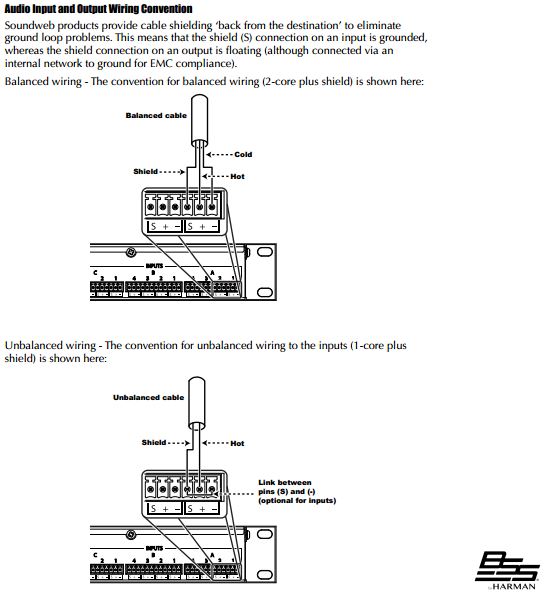
Our 1 year old sound system rack installed by a church approved contractor was wired incorrectly. The BLU-100 DSP outputs are "Shield, + and -. They had the 1/8" TRS Vidiu input audio jack wired to the BLU100 mixer with;
Shield to Shield, Ring (Right) to "+", Tip (Left) to "-".
This is totally wrong as it places a balanced signal across left and right.
The correct wiring is:
Shield to Shield, both Tip and Ring to +, with "-" wired through a jumper to Shield.

Attached is from the BLU100 DSP installation manual.

That fixed the problem. Changing the Vidiu from Stereo to Mono as suggested above works around this issue also.

Pretty disappointing to see audio experts who built the rack in a workshop miss that issue. Someone needs to correct this misunderstanding with the contractors.
BLU100 wiring.jpg
BLU100 wiring.jpg (52.07 KiB)
Community Administrator
#10
Interesting. In all of our chapels, a balanced output is sent to a jack that has a transformer in it. The result is a transformer isolated mono (tip and ring) output. I'd say the real issue is that they didn't use the right jack. The transformer isolation is nice because it prevents ground loops, resulting in hum.
Have you searched the Help Center? Try doing a Google search and adding "site:churchofjesuschrist.org/help" to the search criteria.

So we can better help you, please edit your Profile to include your general location.
Member
#11
russellhltn wrote:The result is a transformer isolated mono (tip and ring) output. I'd say the real issue is that they didn't use the right jack.
The "How-to Guide for Meetinghouse Webcast 3.0" says Vidiu Audio Settings should be "Analog" , "Stereo", "Line", Left Mute "Off", Right Mute "Off". That does not match the cabling they installed and connected to our Vidiu in the sound system installed in December 2020. There are many versions of sound systems. Ours is based on BLU 100 DSP Mixers with Extron HD (HDMI) video distribution and a Lumens 3G-SDI video camera.

What bothers me most is they are effectively sending a balanced (differential) signal connected across Left and Right. When you sum left and right to produce a mono signal you get .... theoretically nothing.
Community Administrator
#12
rknelson wrote:The "How-to Guide for Meetinghouse Webcast 3.0" says Vidiu Audio Settings should be "Analog" , "Stereo", "Line", Left Mute "Off", Right Mute "Off". That does not match the cabling they installed and connected to our Vidiu in the sound system installed in December 2020.
The documentation also suggests using an external mixer.

Either way, that 3.5mm jack isn't "Teradek ready" and requires some kind of adaption. I'll add that many jacks were installed long before the Teradek came along, and configured for a specific church-supplied cassette recorder. Where is the jack you're using? I think in many cases the vision was to have the Teradek installed in the rack using the AVDH-1 with a feed from the sound system, not using the record out jack by the podium.
rknelson wrote:What bothers me most is they are effectively sending a balanced (differential) signal connected across Left and Right. When you sum left and right to produce a mono signal you get .... theoretically nothing.
It's unusual on a 3.5mm jack, but pretty common on a 1/4" jack. The real issue is failure to communicate what the connection is. I can think of 5 different but valid 3.5mm pinouts.
Have you searched the Help Center? Try doing a Google search and adding "site:churchofjesuschrist.org/help" to the search criteria.

So we can better help you, please edit your Profile to include your general location.
Member
#13
The Teradek was connected by the install team as part of the install. The specific plans from Spectrum Engineers for this building install state on the second page:

"FM group Responsibilities ... Locate/provide Teradek Vidiu webcast encoder to AV contractor @ start of installation."

And then on sheet 9:

"1. Install patch-in & setup owner furnished LDS webcast encoder."

I agree there are many ways to wire a 1/4" jack, but this was a 3.5mm jack specifically engineered for and connected by the contractor to the Teradek Vidiu.
Community Administrator
#14
rknelson wrote:but this was a 3.5mm jack specifically engineered for and connected by the contractor to the Teradek Vidiu.
Seems like they didn't have the correct specs for what was needed.
Have you searched the Help Center? Try doing a Google search and adding "site:churchofjesuschrist.org/help" to the search criteria.

So we can better help you, please edit your Profile to include your general location.
Community Moderators
#15
We now have the newest audio/video upgrades in our stake center and doing some test runs with the Teradek brought a few things to light. There was a 3.5mm audio jack connected to our Teradek, but I had no idea the audio level the rack was providing. I started with the Teradek set to Line Level and adjusted the audio sliders as follows:

-24dB - barely perceptible audio
0 dB - Very slightly improved
+20dB - Very weak
+40dB - Still way too low

Switched the Teradek to Mic Level and retested.
-24dB - About like +40dB at Line Level
0dB - A bit soft, but much improved
+20 dB - Best so far - strong volume without [noticeable] distortion
+40dB - Too hot

BTW, there IS a way to adjust the volume level on the Teradek while it's broadcasting. There are no VU indicators, so you're shooting blind, but here's how:
1. While webcasting, the regular Settings link is not available; however, you can still navigate to it at http://192.168.108.20/#settings (using your device's IP address).
2. Once there, open the Audio/Video settings.
3. In the audio portion, move the sliders higher or lower. (Note, you won't hear any audio change yet.)
4. Press APPLY. NOW the audio level will reflect the new slider position.

As far as I can tell, this does NOT affect the live stream, except for having a new audio level.
So we can better help you, please edit your Profile to include your general location.
New Member
#16
If you use the Vidiu App on your phone, it monitors the Teradek and had audio vu meters on the side of the screen to check level.
Community Administrator
#17
Thyratronman wrote:If you use the Vidiu App on your phone, it monitors the Teradek and had audio vu meters on the side of the screen to check level.
That's how I've done it. You can even have the VidiU set up as a AP, so you can access it. But make sure you put a password on the AP, because for sure someone looking for free WiFi will try to connect to it.
Have you searched the Help Center? Try doing a Google search and adding "site:churchofjesuschrist.org/help" to the search criteria.

So we can better help you, please edit your Profile to include your general location.
Community Moderators
#18
Thyratronman wrote:If you use the Vidiu App...
The same 2.4-star app that has 3x as many 1-star reviews as 5-star? I'll pass. After much studying & reading, I bought a different encoder with my SP's blessing. I'll let others know if it's a keeper, or gets returned.
So we can better help you, please edit your Profile to include your general location.