Adding ATS to lds.org

19 postsstarted by ccordoba24 3,557 viewsoriginal topic

#1
Hi,

Have people been able to add the ward assistant tech specialist to lds.org? which gives that ATS access to technology manager and webcasting?

Because in our stake we have only one ward who added an ATS in the 'Other' tab for callings in their ward, and he shows up in cdol under other but he doesn't have access to Technology Manager. I suspect it is because its a stake calling, but since I don't have access I can't check or add anyone to the stake callings lists. (I'm a STS)

Any suggestions are welcomed. Oh, we did call the global help desk and they say that it's a stake calling but our stake exe clerk and stake clerk can't find it with their login in lds.org (to add ATS's).

So if anyone here has been able to add an assistant tech specialist as a stake calling could you give us some tips on how to do that please?

Cheers,
Senior Member
#2
Found in the Help Centre ATS FAQ.
1. To add an assistant technology specialist in LCR, a stake clerk:
2. Logs in to LCR, clicks Organizations > Other Callings, then clicks Technology.
3. Clicks Edit on the row with Assistant Technology Specialist.
4. Enters the person called, the date they were sustained, and if they were set apart or not.
Clicks Save.

Hope this helps!
Church Employee
#3
ccordoba24 wrote:Because in our stake we have only one ward who added an ATS in the 'Other' tab for callings in their ward, and he shows up in cdol under other but he doesn't have access to Technology Manager. I suspect it is because its a stake calling, but since I don't have access I can't check or add anyone to the stake callings lists. (I'm a STS)
The ward added the person by entering a custom position. Custom positions don't grant any rights to Church systems.
#4
"The ward added the person by entering a custom position. Custom positions don't grant any rights to Church systems."

So it is right that its a stake calling? and stake clerk needs to find it and add people as ATS?

Just to be certain.

Thanks for the replies too :D
Senior Member
#5
ccordoba24 wrote:So it is right that its a stake calling? and stake clerk needs to find it and add people as ATS?

Just to be certain.

Thanks for the replies too :D
That is correct. After the member/s being called, have had the appropriate interview/s with a member of the Stake Presidency.
Community Administrator
#6
That is correct. It is a stake calling, even if they are assigned to a ward.
Have you searched the Help Center? Try doing a Google search and adding "site:churchofjesuschrist.org/help" to the search criteria.

So we can better help you, please edit your Profile to include your general location.
Community Moderators
#7
So we can better help you, please edit your Profile to include your general location.
#8
Thankyou,

We got it fixed yesterday Sunday,

Cheers, :D
#9
Hi all,

I'm afraid I have to seek more help again.

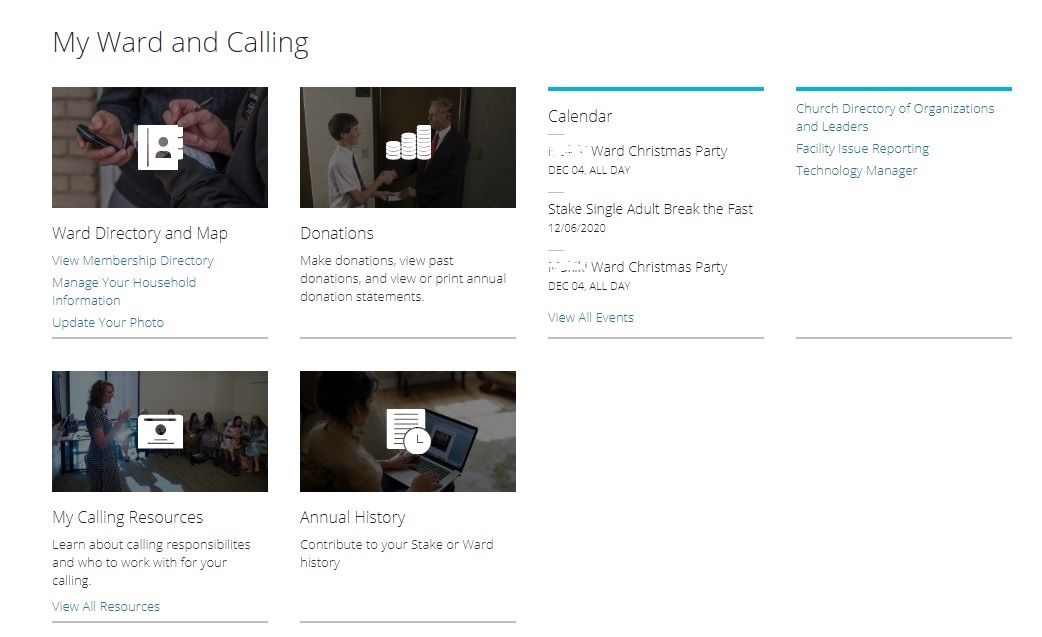
Our stake clerk added several people as Assistant Technology Specialist, they show up on lds.org under Directory>Entire Stake>All Organizations>Other Callings>Technology and there is a list there of all the ATS called. I just checked today with the stake clerk and all are ticked as called/set apart. But still none of those ATS can see Technology Manager under 'My Ward and Calling" and therefore they can't book streaming or schedule any for their wards.

I have been able to book streaming session without problems but no one else can.

So therefore, does anyone here have any suggestions? what could be wrong here? to get our wards to be able to book their own streaming sessions.

Any help is appreciated.

Cheers,

ps, i have some screen captures of that list of ATS and one persons lds.org screen showing Technology Manager missing for him, but I can't see how to paste pics here.
Senior Member
#10
First, has it been 24 hours since they were added? Although it usually happens faster we recommend waiting 24 hours to make sure the calling has fully propagated to all the church systems.

Second, the church has been testing alternative menus on the main home page. Have you asked your ASTSs to try going to the Technology Manager directly (https://tm.churchofjesuschrist.org/) just in case the version of the My Callings menu they are getting isn't one where they decided to try leaving Technology Manager off?
#11
eblood66 wrote:First, has it been 24 hours since they were added? Although it usually happens faster we recommend waiting 24 hours to make sure the calling has fully propagated to all the church systems.

Second, the church has been testing alternative menus on the main home page. Have you asked your ASTSs to try going to the Technology Manager directly (https://tm.churchofjesuschrist.org/) just in case the version of the My Callings menu they are getting isn't one where they decided to try leaving Technology Manager off?
Hi,

Thanks for the suggestion.

No, it's been since last Sunday. It was thursday night here when we tried it.

Ok, I'll ask one to try that. going directly to technology manager.

Also, could it be that their current calling is causing this? ie all bishops, ward clerks and a few Elder QP were all added as ATS plus a few youth but no one can see that Technology Manager tab.?

Cheers,
Community Administrator
#12
I'm an STS, but I had a real hard time finding TM by trying to navigate from the main page.

Main page, "My Account and Ward" -> All Tools -> Scroll down to "My Ward and Calling", look all the way to the right to the small links.

I've always gone to TM direct, as it seems simpler.
Have you searched the Help Center? Try doing a Google search and adding "site:churchofjesuschrist.org/help" to the search criteria.

So we can better help you, please edit your Profile to include your general location.
#13
russellhltn wrote:I'm an STS, but I had a real hard time finding TM by trying to navigate from the main page.

Main page, "My Account and Ward" -> All Tools -> Scroll down to "My Ward and Calling", look all the way to the right to the small links.

I've always gone to TM direct, as it seems simpler.
eblood66 wrote:First, has it been 24 hours since they were added? Although it usually happens faster we recommend waiting 24 hours to make sure the calling has fully propagated to all the church systems.

Second, the church has been testing alternative menus on the main home page. Have you asked your ASTSs to try going to the Technology Manager directly (https://tm.churchofjesuschrist.org/) just in case the version of the My Callings menu they are getting isn't one where they decided to try leaving Technology Manager off?
Hi all

Thank You for the help!.

Yes, the ATS can reach and log in by directly going to the page, ie going to the https://webcast.churchofjesuschrist.org/#/eventManager page, they get to log in and then access the page.

For whatever reason it seems the church doesn't add Technology Manager tab under "My Ward and Calling" for Assistant technology specialists, or at least it seems that way from our end.

Thanks for the suggestion, the ATS can now fulfil their calling.

Cheers,
Senior Member
#14
ccordoba24 wrote: For whatever reason it seems the church doesn't add Technology Manager tab under "My Ward and Calling" for Assistant technology specialists, or at least it seems that way from our end.
I would guess it's on their list, but they haven't gotten to it yet due to higher priority tasks. I have no special knowledge, but others have posted that the development team is very small.
Community Administrator
#15
Just to make sure we're on the same page, play "Where's Waldo" with this screen shot. Note that this is only about 1/3 of all that appears under "All Tools".
๐Ÿ“Ž TM.jpg (104.25 KiB)
Have you searched the Help Center? Try doing a Google search and adding "site:churchofjesuschrist.org/help" to the search criteria.

So we can better help you, please edit your Profile to include your general location.
Community Moderators
#16
russellhltn wrote:Just to make sure we're on the same page, play "Where's Waldo" with this screen shot. Note that this is only about 1/3 of all that appears under "All Tools".
Is Waldo the deacon in the second picture? [grin]

Yeah, they do not make it easy. Technology Manager.
New Member
#17
Has anyone figured out wether or not ATS can access Webcasting but not TM? That was my concern with calling ward specialist as ATS. I would want them to be able to schedule webcasting events but not have access to TM. Only the STS should have access to TM.
#18
kauihou wrote:Has anyone figured out wether or not ATS can access Webcasting but not TM? That was my concern with calling ward specialist as ATS. I would want them to be able to schedule webcasting events but not have access to TM. Only the STS should have access to TM.
HI,

Yes, that is the case in our stake. ATS can access Webcasting page and book events but they can't access TM
Community Administrator
#19
ccordoba24 wrote:ATS can access Webcasting page and book events but they can't access TM
Strange, according to Technology Manager Overview, they should.
Have you searched the Help Center? Try doing a Google search and adding "site:churchofjesuschrist.org/help" to the search criteria.

So we can better help you, please edit your Profile to include your general location.