Streaming Zoom Meetings on Church Webcasts

8 postsstarted by bretbassett 5,446 viewsoriginal topic

Church Employee
#1
Please find attached a PDF describing how to stream a Zoom Meeting through the Church's Webcast system.
Community Moderators
#2
Nice writeup, but there's an important step missing.

If not done previously:
  • Sign in to the Zoom web portal.
  • Click Account Management --> Account Settings.
  • Under In Meeting (Advanced), click the toggle next to Allow live streaming the meetings.
  • Click the Custom Live Streaming Service checkbox to enable it.
Update the instructions so the meeting host can configure the required settings when they schedule the meeting.

This can only be done by an account administrator. If you purchased a Zoom account for yourself, you are the administrator. If you're using a Zoom account from work or school, you are probably NOT an administrator.
So we can better help you, please edit your Profile to include your general location.
New Member
#3
Question, What access level does one need to initane a webcast? I am a clerk and usually have wide access but not for webcast.
Community Administrator
#4
halifaxhurst wrote:Question, What access level does one need to initane a webcast? I am a clerk and usually have wide access but not for webcast.
To setup a webcast, one needs to be a Stake Technology Specialist (STS) or Assistant Technology Specialist. Both are stake-level callings.
Have you searched the Help Center? Try doing a Google search and adding "site:churchofjesuschrist.org/help" to the search criteria.

So we can better help you, please edit your Profile to include your general location.
New Member
#5
Seems pretty dumb to not use it and refer people to all these other channels.
Community Moderators
#6
halifaxhurst wrote:Seems pretty dumb to not use it and refer people to all these other channels.
In trying to keep things simple, I think there has been recognition that many are more familiar with the other channels than they are with the Church webcast system. And while it is much better now, some have had poor experience with the Church system and are hesitant to try it again. So they go with what they are familiar with today because they have had success with it.
New Member
#7
So, I'm trying to get this set up and Zoom doesn't like the information I'm providing.

I just get an error: Unable to live stream to the custom service.

I tested out streaming from the Zoom account to a YouTube Live using the custom streaming option and that worked.

Not sure what I am missing. Any thoughts?

Custom streaming option is enabled.
๐Ÿ“Ž zoom.jpg (34.41 KiB)
Community Administrator
#8
jmarkbangerter wrote:So, I'm trying to get this set up and Zoom doesn't like the information I'm providing.
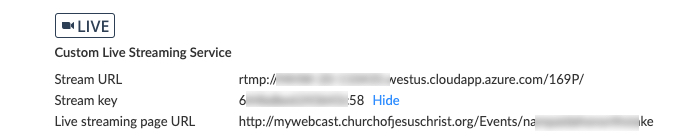
Have the servers for the stream started up yet? They start an hour before an event. Only 15 minutes before a test.

If they're not running (you can check the status on the webcast portal), that would explain why it doesn't work.
Have you searched the Help Center? Try doing a Google search and adding "site:churchofjesuschrist.org/help" to the search criteria.

So we can better help you, please edit your Profile to include your general location.