Senior Member
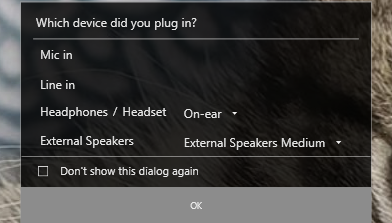
Windows 10 (or is it Realtek HD Audio Manager, or Waves MaxxAudio Pro?) displays the above pop-up each time I connect something to the TRRS jack on my Dell laptop. This implies that I can connect either a "Mic in" or a "Line in" device, and the computer will adjust to the given input voltage level.
Perhaps that is why I got such horrible results with the Comtek and Lavalier receivers? They are both powered devices. If my TRRS port is set to "Mic in" then perhaps it is expecting an unpowered microphone. So maybe I should have selected "Line in" when I connected the Comtek and Lavalier receiver output to my TRRS jack?
I just bought a wired Lavalier mic with a 16-foot cord and a male TRRS plug with a TRS adapter. I am hoping that will give me a better experience than using the powered Comtek and wireless Lavalier receivers.
Perhaps that is why I got such horrible results with the Comtek and Lavalier receivers? They are both powered devices. If my TRRS port is set to "Mic in" then perhaps it is expecting an unpowered microphone. So maybe I should have selected "Line in" when I connected the Comtek and Lavalier receiver output to my TRRS jack?
I just bought a wired Lavalier mic with a 16-foot cord and a male TRRS plug with a TRS adapter. I am hoping that will give me a better experience than using the powered Comtek and wireless Lavalier receivers.
Dana Repouille, Plattsmouth, Nebraska
