Best Cable Coax or s-video/Cat5

22 postsstarted by Paulbb1 11,091 viewsoriginal topic

Member
#1
We have a Sony camera on it's way and plan to install in the chapel over the 3rd clerks office. I want to take a cable from there through the wall, through the second floor to the Media Library where we have sound and Ethernet for the PC capture card.

I want the best video signal and therefore want s-video but it is a long way to the library. Maybe over 100 feet? The composite video will reach but not as good of images.

Anyone have any experience using the S-video cat5 adapter? Are the balun devices like Muxlab S-Video Balun (500016) best to use with the Cat5 cable?
Arlan Beebe
Ann Arbor Stake
Community Moderators
#2
We have run S-video for 100' many times with no loss in picture. Does this building have an "In-house Video distribution system?" If you use that then you get the picture everywhere else in the building that you will need and then also take that picture at the Satellite cabinet. Just a thought.
Troy
Member
#3

S-Video

What type of cable are we talking about. Normal 4 pin s-video cable or transmitted via cat5 cable? I have only seen 100 ft lengths for normal 4 pin cables and I am not sure that is long enough to get to the cabinet in the media library. I am also not sure I can get the cable down the conduit. I believe it is only 1/2 inch and there is an Cat5e cable in it already. Maybe I should cut the connector and pull it out put in the s-video through and pull the Cat5e back through. Lots of work.

Using coax (composite) is last choice because of drop in quality unless you see no difference between the two when uploading of a broadcast/streaming for of Stk Conf.

I have to go make some measurements.
Arlan Beebe
Ann Arbor Stake
Community Moderators
#4
Just make sure you use good quality cable and not the 100' for $9.95 stuff. Here and here are a few examples of the better stuff, and this one has audio cables too.

Some people can get by without an inline amplifier, but be ready to drop one in if you're not happy with the results at the other end. Any good S-Video distribution amplier would work fine if you don't happen to have the one tsheffield was referring to.
So we can better help you, please edit your Profile to include your general location.
Community Moderators
#5
S-video is actually two 75-ohm single-ended signals. As long as both the driving and receiving equipment has proper termination, the signal can be sent through TWO parallel coax cables for great distances with no loss of quality. Make sure the lengths of the cables match within a few feet. If commercial adapters between the standard four-pin connector and two F-connectors, it would be very easy to build one.
Community Moderators
#6
If you're dealing with a tight conduit you're probably better off pulling a solid Cat5e cable through and use a good quality S-Video to Cat5 transformer at each end, rather than cutting an end off an S-Video cable to try and squeeze it through. High quality S-Video cable has a pair of mini 75-ohm shielded cables built in and can be rather bulky to pull. (Some are almost as fat as the connector itself.) That's why I recommend Cat5e. If space wasn't at a premium, then yes, good S-Video cable, or a pair of coaxes might be a better choice.

Also, when you're done, be sure to leave a pull string in the conduit for the next poor fellow. ;)
So we can better help you, please edit your Profile to include your general location.
Member
#7

S-video Cat5

I went and measured and now estimate that the cable has to be 168 feet minimum. 180 to be safe. It is a five year old stake center. I have no tight places. The conduit from the attic (open to attic) to Satellite box is 3/4". Big enough for a full s-video connector or two RG-6 cables connected to an s-video.

I haven't found an adapter for two RG-6 cables to s-video. Haven't found an s-video cable over 150 feet. Looking for custom cable maker.

Will the s-video be good for 180 feet is my question?

It maybe cheaper to go Cat5e with Baluns. Anyone have experience with them?

I am sure others who will be installing these cameras will have the same issues. It would be nice to have some best and cheaper practices documented.

Arlan
Arlan Beebe
Ann Arbor Stake
Senior Member
#8
Maybe you already found this, but here is some guidance regarding the issue.

http://wiki.answers.com/Q/What_is_the_m ... _the_range
Community Moderators
#9
PaulBB1 wrote:I went and measured and now estimate that the cable has to be 168 feet minimum. 180 to be safe. It is a five year old stake center. I have no tight places. The conduit from the attic (open to attic) to Satellite box is 3/4". Big enough for a full s-video connector or two RG-6 cables connected to an s-video.

I haven't found an adapter for two RG-6 cables to s-video. Haven't found an s-video cable over 150 feet. Looking for custom cable maker.

Will the s-video be good for 180 feet is my question?

It maybe cheaper to go Cat5e with Baluns. Anyone have experience with them?

I am sure others who will be installing these cameras will have the same issues. It would be nice to have some best and cheaper practices documented.

Arlan
As long as the equipment on both ends of the cable are properly terminated, running s-video over even cheap coax for 180 feet would be fine. The highest frequency components are under about 5MHz, so attenuation and delay effects will be negligible. You could run much longer distances than 180 feet. You might start seeing detectable degradation at lengths of a mile or so.

If you can run a soldering iron, you could build the adapters between S-video and double coax. Take a short S-video cable, cut it within a few inches of the ends, strip back the insulation, and solder each of the internal mini-coax cables to a connector that will work for the coax.

I have seen the devices (not really baluns, but ...) that convert A/V signals to go over Cat5 used, and they worked very well. I know the guy who set that up if you'd like an introduction.
Member
#10

s-video Cat5

The soldering of double coax sounds messy even though I have the equipment to do it. I want a clean installation.

It looks like a Cat5 with s-video to Cat5 110 connectors would be best to try first. Cheaper. Add Baluns if needed.

A s-video std connectors at 180 feet might get expensive if I can find someone to make it.
Arlan Beebe
Ann Arbor Stake
Member
#11
OK, I have a recommendation from a salesman that for the distance I should go with Cat5 and Baluns. It seems to be the straight forward way of doing it. I have coaxial cable so I plan on running it with it. I have the room and it will be a backup.

Now to choose a Balun model and source. Any experience with these out there?
Arlan Beebe
Ann Arbor Stake
New Member
#12
PaulBB1 wrote:
Now to choose a Balun model and source. Any experience with these out there?

I'm looking at using the Muxlab 500016. If I get it, I'll let you know how it works.
Member
#13

Muxlab

I ordered two last night. Pulled the cat5e and wired the connectors yesterday. Now waiting for camera and the baluns to arrive.

Hope the baluns work well.
Arlan Beebe
Ann Arbor Stake
Member
#14

S-Video Via Cat5 and Baluns Results are in

We broadcasted Stk Conf via S-Video over Cat5 cable with baluns on both ends. Worked great. Great image.

Arlan
Arlan Beebe
Ann Arbor Stake
New Member
#15
We use Cat5e with baluns in two of our buildings, with only positive results.
#16
I’ve done audio/video reinforcement for a couple of decades and I have never had a problem with cable runs up to 200’ using simple RG-6U cable (years ago it was the thinner RG-59U). RG-6U cable is used extensively in satellite and cable installations and the price and quality of cable now available is much better than in years past.

I prefer to use compression RCA male connectors on each end but “F” to RCA adapters work just fine if the coax has the standard “F” screw-on connector on the ends. If you choose to use adapters, crimp the "F" connectors on the ends – avoid twist connectors. They will last much longer. Also, use solid copper, not copper clad wire (copper clad wire can be identified because it is very stiff).

Some coax cable is bonded - meaning the foam insulation sticks to the center copper conductor. If you run into this kind of cable, scrape the copper with a knife to ensure it is free from any insulation before you crimp. Also, make sure the outside braid does not touch the center copper conductor. Sometimes, removing insualtion by twisting may wrap the braided shielding around the center copper and 'short' your connection.

Make sure you route wire away from power lines, fluorescent fixtures, electric motors or anything that generates RFI (radio frequency interference). If you must go by power lines, cross the cable if possible rather than parallel power lines.
New Member
#17
I realize this is an old thread. I just purchased two Sony EVI-D70 cameras for our church. I built a nice computer with Vidblaster and Broadcam software to both stream and record our church services. Two years ago some wiring was being done at our church, and they installed CAT5 and coax along both sides of our church for future camera installation.

I am trying to figure out what the best configuration would be for the cameras. I intended initially to use the S-video out along with the RS - 422 for control. I was simply going to use the pinouts to wire directly from the camera to the capture card and serial ports via the CAT5. However, that would require nine conductors and the CAT5 only has 8.

So, with your experience, do you think I would be better off running the composite out through the coax and using the CAT5 for the controller?

I am looking for optimal video quality. Is there anyway to pair one of the grounds from the VISCA and the S-Video to only need 8 conductors?

Could I use the coax for the ground (9th conductor)?

I really don't want to have to spend more time and money in running another cable if possible.

Any help or advice on this would be appreciated..

Thanks,
Russ
Community Moderators
#18

Pointer to duplicate question.

A question has been asked in this thread:

https://tech.lds.org/forum/showthread.p ... #post79130

about running RS-422 control signals and S-video signals over COAX and CAT5. Please refer to that thread for any discussion of that question.
#19
We are getting ready to setup up our system and I have a couple of questions. How do you transmit video over CAT 5/6? What converters do you use?
Video can be sent hundreds of feet through CAT5 cable with the use of a baluns (balanced transformers) on each end. Several different types of baluns could be used such as these for Composite, Component and S-Video.
Composite:
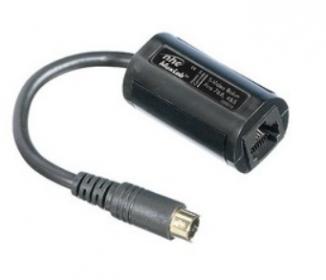
S-Video Balun.jpg
S-Video Balun.jpg (7.67 KiB) Viewed 2294 times
Component:
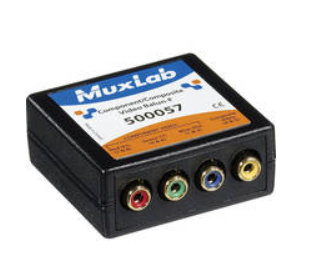
component balun.png
component balun.png (71.18 KiB) Viewed 2294 times
S-Video:
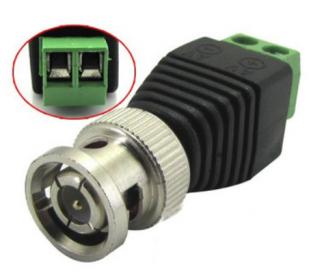
composite balun.jpg
composite balun.jpg (11.22 KiB) Viewed 2294 times


This first example requires stripping the ends of the CAT5 cable and screwing down the terminals. They only cost about $1.00 (eBay) but a BNC to RCA adapter may be required. Although these are really cheap (inferior) I have had some success, so I recommend getting extras and test them to weed out defectives. Also, I would only use them in a permanent installation as the solid CAT5 wires break easily.

The second and third examples (component and S-Video baluns) will cost anywhere from $15 (used) to $30+ (new). They employ an RJ45 jack on one end so simply plug in a CAT5 cable (with RJ45 ends) and connect the camera/mixer. The component (2nd) adapter will allow 4 video signals down the same wire. Remember to use the same type of balun on each end. Muxlab is a trusted manufacturer for these.
What length can you effectively run RCA cable without boosting? Our camera might be ~200 feet from our video mixer
The maximum length of cable for composite video signal (RCA) varies and depends on what kind of cable is used and other factors.

Coax:
For years, coax cable (shielded RG-59 or RG-6U) has been used to run composite video more than one hundred feet without significant loss. If possible, use only one length of cable and terminate the ends with the proper connector, since every adapter increases the chance of a failure. Always avoid running cables next to power lines or close to floresent lights since they induce radio frequency interference (RFI) or artifacts in the video (for example, a shaded bar moving from bottom to top of the picture).

CAT5:
If CAT5 cable and baluns are used, the maximum length increases significantly (500' is typical). CAT5 cable is commonly used but CAT6 is even better (heavier gauge and more twists per foot). Crimping RJ-45 connectors on the ends is not difficult but I'd recommend purchasing a CAT5 cable tester ($20 eBay) and check your work if you plan to make your own connections. Another advantage of using CAT5 cable and baluns is that by simply replacing the baluns with a different type, the same wire can be used to send S-Video, Component YPbPr, RGB, HD 720p, 1080i, 1080p, RS-242, RS-422, Infrared Remote signals, low voltage power, etc. Even HDMI can be run (but requires 2 CAT5 cables).
We would like to split the output of our video mixer to send to 6 different locations.
- 2 monitors at the front of the chapel
- 2 projectors at the corners of the gym
- 1 to the web cast
- 1 to the building video for projection in the R.S. room and other locations.

Do you have any recommendations on splitting?
To run composite video to all of these places would require a 6-port (or more) video distribution amplifier (D/A) and a home run (one cable run from the D/A to each device). Are you sure you are going to have projector in the R.S. room and other locations? That's a lot of projectors. I would recommend running composite video to the webcast, the building TV distribution system (in the satellite rack) and the projectors in the cultural hall. This will ensure the highest quality for broadcasting and projection. However, since RF (a television channel) quality is fine for small TV's, and is typically already installed in buildings, I would use TV's at the front of the chapel (I'm assuming on the stand), the R.S. room and other locations. Most Stake Centers already have RF for TV distribution set up in the Relief Society room, Primary room, Multi-Purpose room and sometimes even in the High Counsel room.
Community Administrator
#20
michaelfish wrote:For years, coax cable (shielded RG-58, RG-59 or RG-6U) has been used to run composite video ...

I think RG-58 is the wrong impedance for that.
Have you searched the Help Center? Try doing a Google search and adding "site:churchofjesuschrist.org/help" to the search criteria.

So we can better help you, please edit your Profile to include your general location.
Member
#21
We use this product from Extron and it works extremely well. You need T model to transmit and a R model to receive. I have seen these on ebay and such for anywhere from 25$ to 100$ per piece. Extron typically sells only through authorized dealers which we are fortunate enough to have one in our Stake.

http://www.extron.com/product/product.a ... type=4&s=4
Community Moderators
#22
RussellHltn wrote:I think RG-58 is the wrong impedance for that.

In case anyone is considering using RG-58 for video, that is correct. RG58 is 50-52 ohm impedance. RG-59, RG-6, and essentially all video and TV-related equipment is 75 ohm impedance. For all practical purposes, don't mix them.