Missing Spanish scriptures Gospel Library

4 postsstarted by edbarrios 1,308 viewsoriginal topic

New Member
#1
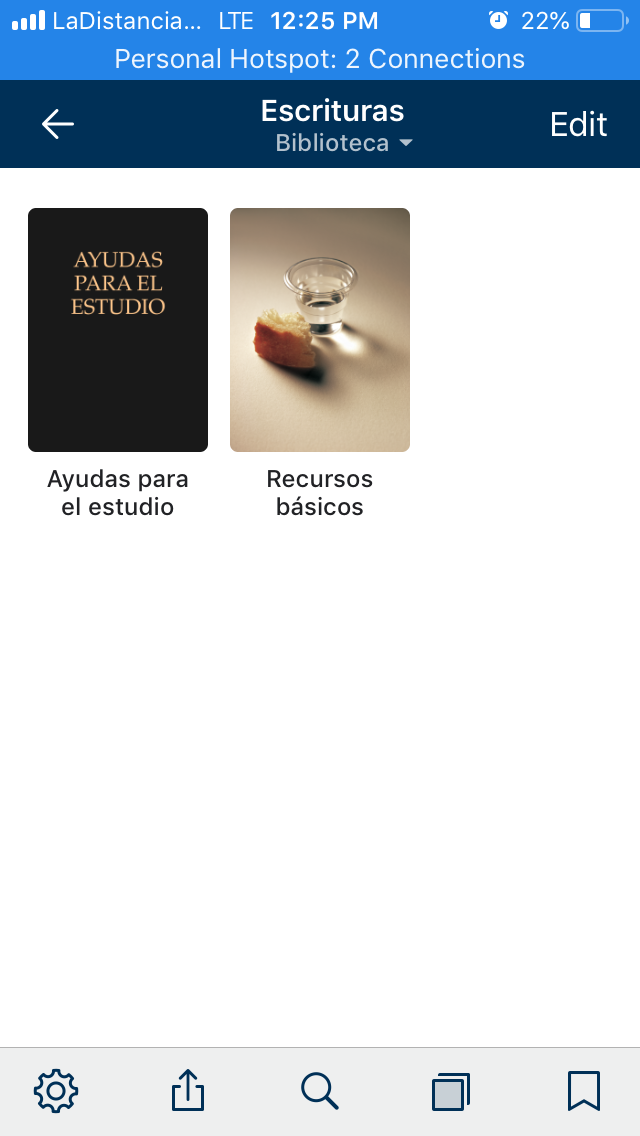
My iPhone has iOS 12.3.1 and the Gospel Library app version 5.9.0. The iPhone language is set up in English. In the app, everything is alright when I set the language in English but when I change to Spanish, a lot of things were erased and there is no download option. I updated it from the last app logo with Moroni to the new one with Christ and all my Spanish scriptures were erased with no downloading option.
Community Moderators
#2
I'm not sure what could cause that, but here's something you could try:
1. Switch to English content.
2. Delete Spanish from your list of downloaded languages by going to the languages menu and swiping Spanish out of the list. It might take up to a minute to delete, depending on how much Spanish content was installed.
3. Find Spanish in the list of languages, and tap to download it again.
Samuel Bradshaw • If you desire to serve God, you are called to the work.
New Member
#3
I’ve been having the same problem and I tried your suggestion and it worked! I didn’t even lose any of my marks or anything.
New Member
#4
I’ve had the same problem several times. All my Spanish contact disappears as does all my Russian content. In English everything stays just as it should be, but in those additional languages everything disappears except for the church handbook, the study notes, and the study plan. But when I tried this trick it worked and everything came back. I’ve had this problem a few times now and this is the best solution I’ve got up with. Thanks for the suggestion!