LDS Tools: Sync Fails with "Error Downloading"

46 postsstarted by caseycrookston 12,192 viewsoriginal topic

New Member
#1
I am on an iPhone 11 iOS 13.3.1, LDS tools v3.6.4 (6544)
I've just been put into a calling where I am going to use this app a LOT. I tried to sync but got this error. I deleted the app and re-installed it, but I get the same thing. And now I'm in an even worse place because while before the app still worked, now I can't use it all because it has no data until I sync but I can't sync.
Community Moderators
#2
Make sure you are using Member Tools, which replaced LDS Tools. It sounds as if you have the correct version and a current enough iOS. Others will chime in.
#3
I use an iPhone 6S that is operating with 13.4.1 software. For the last month, I have been seeing "Sign-in failed Please check your username and/or password" each time I try to log into my account, or try to sync. I did change my password, and the username and password work very well on the Main website.

How do I solve this?
My Exec. Sec. in my ward said that this happened to him and he had to have the pin reset by global support...
#4
I deleted the old app, downloaded the new "Member Tools" and I'm still getting the same "Sign-In Failed Please check your username and/or password".
What next?
#5
We are having same issue. Needs a fix from “the top” as I don’t think it is our phones.
New Member
#6
I am having the same problem. I am not getting the PIN view; it is a UN and PW view. When I hit submit, nothing happens. Working on an iphone XR. I am EQ Pres and need this to work! I hope it can be resolved soon.....
New Member
#7
Has anyone found out how to resolve this problem????
New Member
#8
LeAnnAsayDamron wrote:Has anyone found out how to resolve this problem????
Just did my daily delete and download the app, try to update things, and fail to log in to Member Tools. Sorry to say it’s definitely not fixed.
New Member
#9
I am having the same issue. It won't download the database.
New Member
#10
I am having the same issue...tried to Sync...stalls during download and asks again for my User ID and password...finished with Error Downloading, Failed Download, try again later. I have also deleted and reinstalled the App, but I am still having the same issue. I am working on an iPhone 6S.
New Member
#11
I have an iPhone 6 and my counselor has an iPhone 11. We both cannot access Member/LDS Tools. It keeps kicking us out. Actually, we cannot sign in.
New Member
#12
I’m having the same issues. I cannot download in my iPhone 11 or iPad Pro. Both tell me the download fails. I have uninstalled and reinstalled the Member Tools and have reset my password. Any other advice?
New Member
#13
I'm also having this issue with my iPad and my wife's iPhone. The iPad wasn't having an issue until I signed out and tried to sign in under my wife's account. Her account hasn't been working. When I went back to login to my account, I had the issue on my account. My iPhone, which I have not signed out of my Tools account, is not having the issue with syncing. We both use our app a lot and this is an issue.
New Member
#14
I’ve been having the same problem for months. I finally deleted it because it was useless. I thought I’d download the app just now to see if it was fixed but once again I got the “failed to download” error. I have iPhone 8 Plus with the 14.0.1 update. Didn’t work before the updates and doesn’t work after.
New Member
#15
Having same issue.
New Member
#16
Same. I deleted the app and reinstalled multiple times and cannot get it to work :(
New Member
#17
Cannot het sync to work on either iPhone nor iPad. Have not been able to do so since August. Cannot find a solution tonapp freezing in sync mode.
New Member
#18
I have Been Deleting the Member tools App and Reinstalling it to try to access the data and Ward Info and I can’t see anything the Sync “stalls” as has been previously stated and It reverts me back to sign on page. I don’t have a problem with the Website but the app is supposed to help me easily access important info but I’m not able to use it at all.
New Member
#19
I'm running into the same problem. My bishop asked us all to sync our LDS Tools apps during our zoom sacrament meeting. So I tried and it wouldn't work. I even did the same thing that so many other members of the church have tried to do and uninstalled and then reinstalled the app and accomplished nothing accept the same message of "Update Failed." If anyone else has a solution that would be great.

Thank you!
New Member
#20
I realize this is a user forum but without any moderation it’s not helpful. This issue of not updating has been going on for weeks now. Personally We have two iPhones and two of the 10.5 iPad Air tablets and none will update. Do we have a response from anyone about this?
New Member
#21
I’m having the same issue too. Tried reinstalling, starting my phone and nothing works.
New Member
#22
Same problem here. What’s worse is after I wait for download to fail and get the error, clicking ok takes me back to login screen- upon entering login credentials takes me back to update screen- download eventually fails- etc. etc. in an endless loop. If an update ever fail there is no way to use the app with existing data. The app is a brick until a successful update completes. This can be days or weeks. I can login to churchofjesuschrist.org directory but this doesn’t have ministering assignments which is what I need. Help, please.
New Member
#23
Same issue as others have described. Tried deleting and reloading the app. It asks for UN and PW then is stuck with a small box that says "Updating..." Nothing happens and eventually it just kicks me back to the initial login screen and then eventually gets the "Failed to download. Please try again later" message. Please help.
#24
jficklin wrote:Same problem here. What’s worse is after I wait for download to fail and get the error, clicking ok takes me back to login screen- upon entering login credentials takes me back to update screen- download eventually fails- etc. etc. in an endless loop. If an update ever fail there is no way to use the app with existing data. The app is a brick until a successful update completes. This can be days or weeks. I can login to churchofjesuschrist.org directory but this doesn’t have ministering assignments which is what I need. Help, please.
I have the exact same problem as described here. I've been trying for several days to sync. I've used three different iOS devices, and have the same problem with all three. I'm the stake executive secretary, and rely on this tool to be able to contact the members of our stake. It's pretty frustrating to have this broken for days.
New Member
#25
Updating failed for me yesterday 10/11/2020 AND then wouldn't recognize username/password.

I've deleted and reinstalled app on my iPhone, reinstalled and reset password 4-5 times so far.
Goes to Update screen and circle gets stuck about 1/4 way around and quits with
"Error Member Tools Services are unavailable. Please try again later."
Then after pressing "OK" I get "Failed to download. Please try again later."
Pressing "OK" from that screen goes to "twirly" Updating" on right side of screen. But updating hasn't occurred yet.

Very frustrating! Please help!!
#26
Quick update. I was able to finally able to sync this morning :D
New Member
#27
Just chiming in to say as of 10/18/2020 I am having the exact same problem. I really hope this can be solved soon. We just moved to a new area.
New Member
#28
I am having the same problem for a couple of weeks now. As is my eternal companion.
New Member
#29
Same problem here as well for several weeks. If anyone figures this out, post a solution here.
New Member
#30
Exact same issue with iPhone XR, iOS 14.0.1.
New Member
#31
Bump.

14.1 on iPhone 11.

Last sync was Sept 18 2020. Deleted and reinstalled.

Stalls out at 25% progress.
New Member
#32
Same problem
#33
My husband and I both are having this problem. I have seen that some of you just had it work out later. So I am hoping this happens for us. It would be nice if we knew that this was the case in this problem.
New Member
#34
Member Tools app is stuck in a loop. I have attempted to log in multiple times, verified password and deleted app and reinstalled. Same as everyone else here. In our bishopric meeting yesterday, several of us had the same issue on both iOS and Android devices. I even put in the wrong password specifically and it tells me that there is an authentication error vs. when I put in the correct password, it attempts to sync and the progress indicator gets to 25% and after a couple of minutes gives error message that it cannot download. This has been happening intermittently for months, but usually after I switch networks or give it a few hours, it will finally sync. No luck so far on this go around. This is really causing some challenges as we have become very dependent on this app for everything from looking up membership numbers for temple recommends to looking at interview reports and member info for Ward Council.

I
New Member
#35
Any fixes? Who can I contact?
New Member
#36
csession wrote:Bump.

14.1 on iPhone 11.

Last sync was Sept 18 2020. Deleted and reinstalled.

Stalls out at 25% progress.
Just tried again and waited patiently and eventually it finished!!
#37
Same issue here. Got notice to update Member Tools by Nov 2. Tried to sync. No dice. Same login loop mentioned in other posts.

Also, confirmed username and password by logging directly into churchofjesuschrist.org.

Deleted app. Reinstalled. Same behavior.
#38
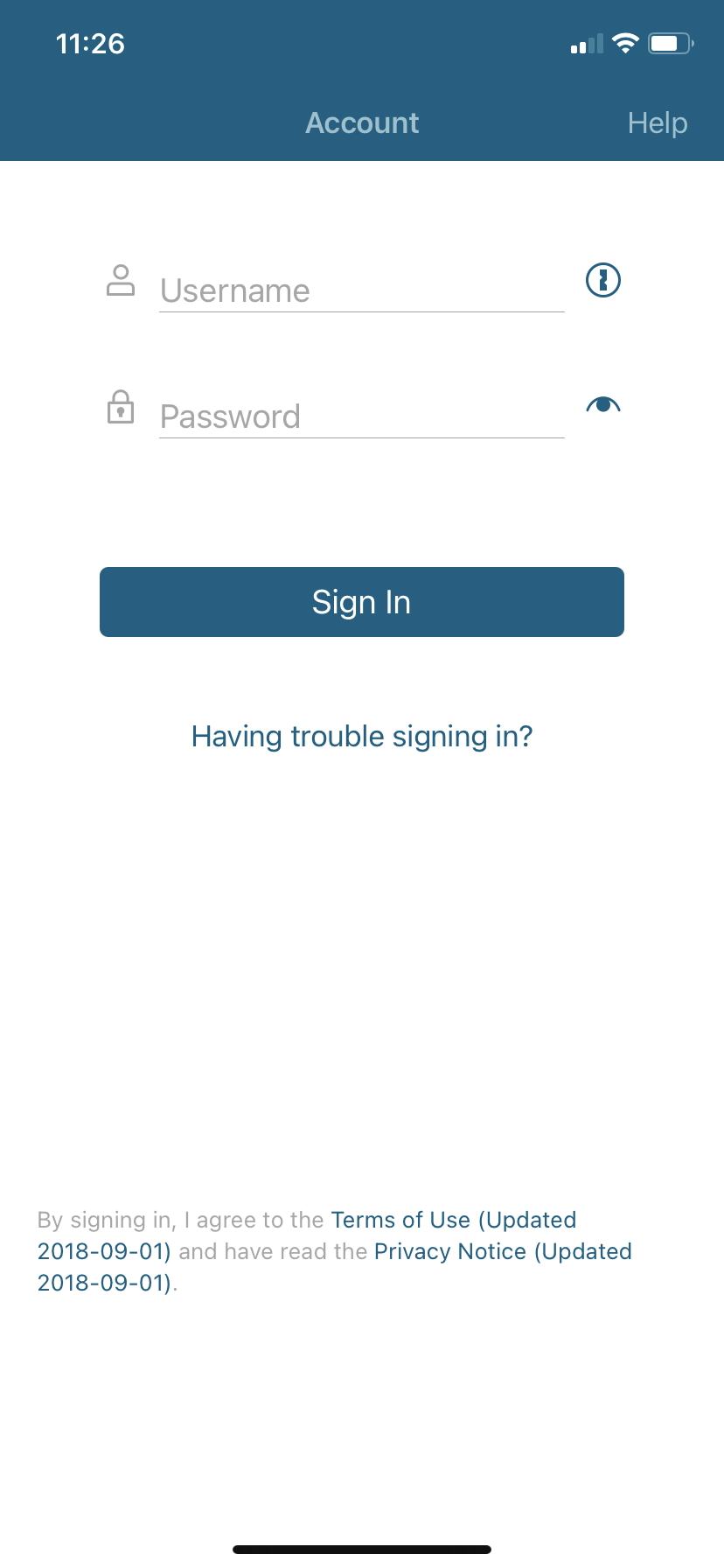
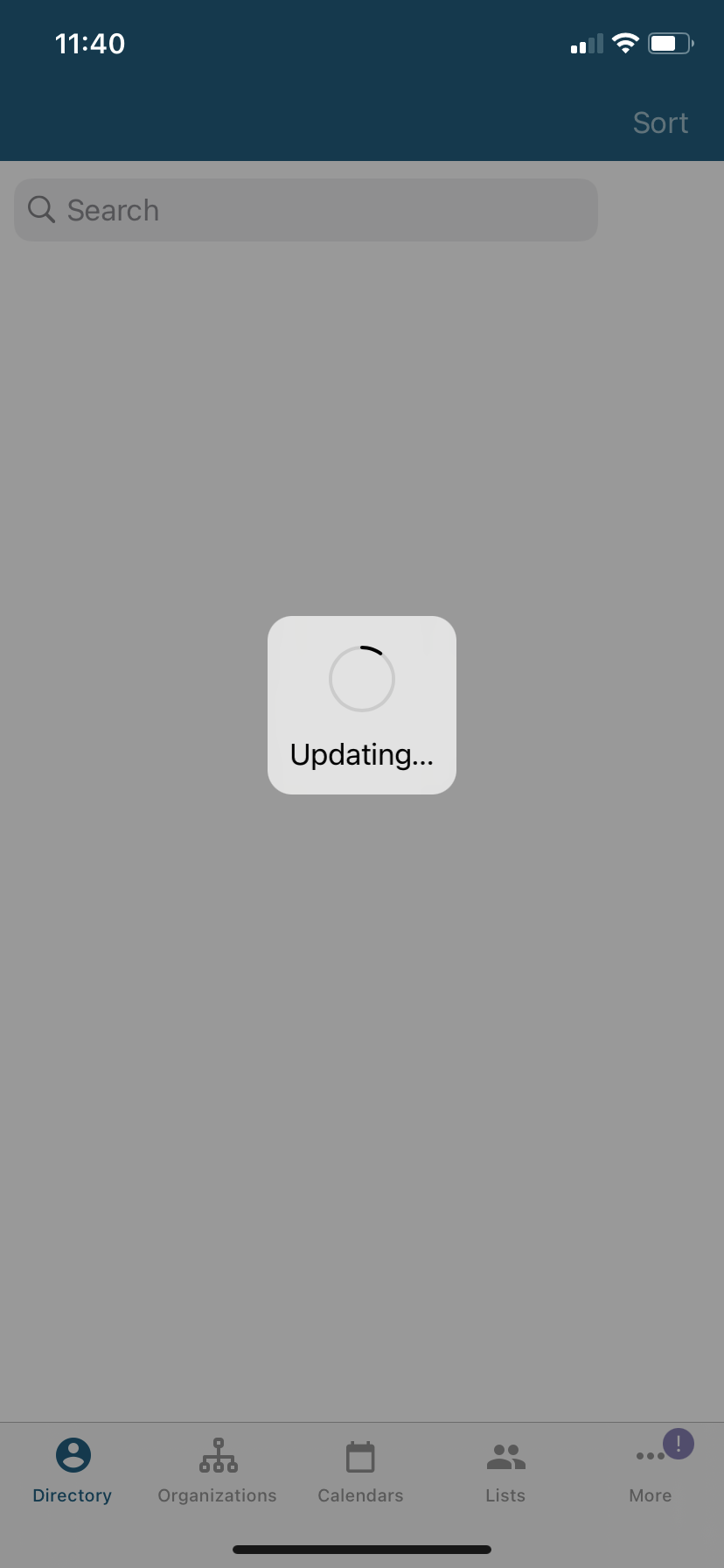
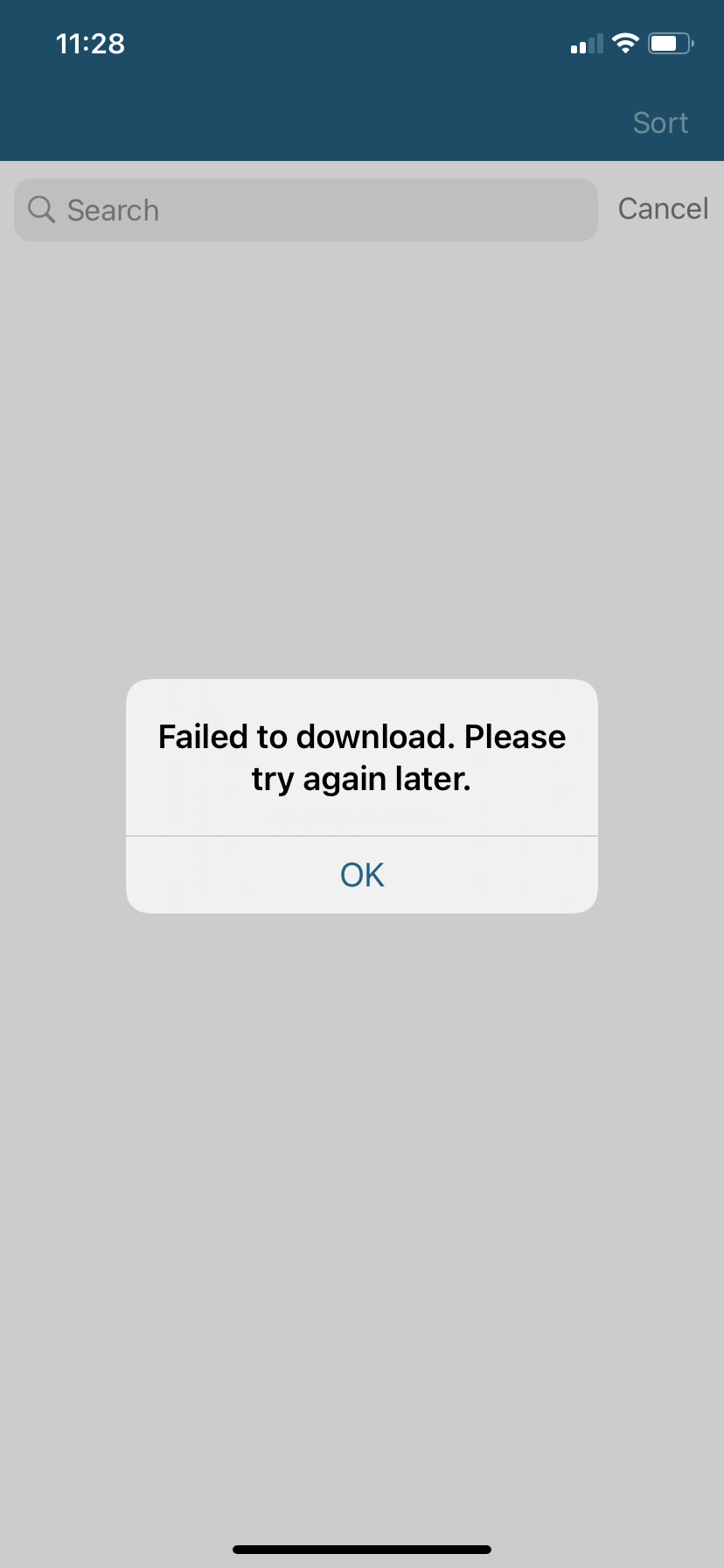
Hopefully helpful images of issue:

Step 1:
85C891A8-31F3-4181-8DFB-BFBB5341F6B1.png
Step 1
(144.71 KiB) Not downloaded yet
Step 2:
17C73E50-47C7-4331-9FAE-8DD26139B977.png
Step 2
(251.9 KiB) Not downloaded yet
Step 3:
28A7C271-D874-4914-8EE2-525EE1098B3A.png
Step 3 ... goes back to step 1.
(261.42 KiB) Not downloaded yet
...

Step 1 ....
New Member
#39
Signing out, then signing back in seems to have corrected the failed update problem for me.
New Member
#40
Having the same issues with syncing Member Tools. Is it possible that MFA is impacting the sync?
New Member
#41
I am on an iPhone 7 iOS 14.0.1, Member Tools app version 4.2.0
I tried to sync but got “Failed to download. Please try again later.” error. I deleted the app and re-installed it, but I get the same thing. And now I'm worse off because while before the app still worked, now I can't use it all because it has no data until I sync, but it has the failed to download error when I try to sync. Has this been resolved?
New Member
#42
I have been having the same issue all month.

iPhone XR iOS 14.3

Tried dumping the app and reloading, restarting my phone, still same problem.
Member
#43
Same problem, “Sign in failed.”

Any solutions?
New Member
#44
For those of you who haven’t reported the problem, here’s what I received back today. I’ve tried all of these BUT deleting the app and waiting a few hours... hope this does the trick.

Some login issues may be resolved by completely signing out of the app and then manually signing back in, by rebooting the device (turning the device off for a few minutes and then turning it back on), or by deleting the app, waiting a couple of hours and then downloading it again from the App Store or the Play Store. The wait time is crucial to ensure the old version isn't pulled back up. Additionally, if you have a space or special character in your password, the app is not accepting them. You will need to change your password in order to have access to the app. Please make sure you can sign in to other Church sites, like Family Search or at churchofjesuschrist.org to make a donation. Please try these options.
Member
#45
bsummie wrote:For those of you who haven’t reported the problem, here’s what I received back today. I’ve tried all of these BUT deleting the app and waiting a few hours... hope this does the trick.

Some login issues may be resolved by completely signing out of the app and then manually signing back in, by rebooting the device (turning the device off for a few minutes and then turning it back on), or by deleting the app, waiting a couple of hours and then downloading it again from the App Store or the Play Store. The wait time is crucial to ensure the old version isn't pulled back up. Additionally, if you have a space or special character in your password, the app is not accepting them. You will need to change your password in order to have access to the app. Please make sure you can sign in to other Church sites, like Family Search or at churchofjesuschrist.org to make a donation. Please try these options.
I hate to quote myself, but it worked!!! I just deleted the app, waited a few hours and downloaded it again. I’ve been lost without this thing ;)
New Member
#46
It’s months later and I am having this problem. Has anyone been able to resolve this?

Rick