Member
We're trying to do some budgeting for this year and I'd simply like to see a report of expenses for each category for LAST year so that we can see where the money was spent. For example, say I want to know what the Young Men spent their budget on last year. In LCR, I can get close by going to "Overview -> Income and Expense Details -> Previous Year" and then selecting "Young Men" in the Categories box. The problem with that is that it doesn't actually give the details of those expenses. It just gives who it was written to. I'd have to click on each one to see what it was actually for.
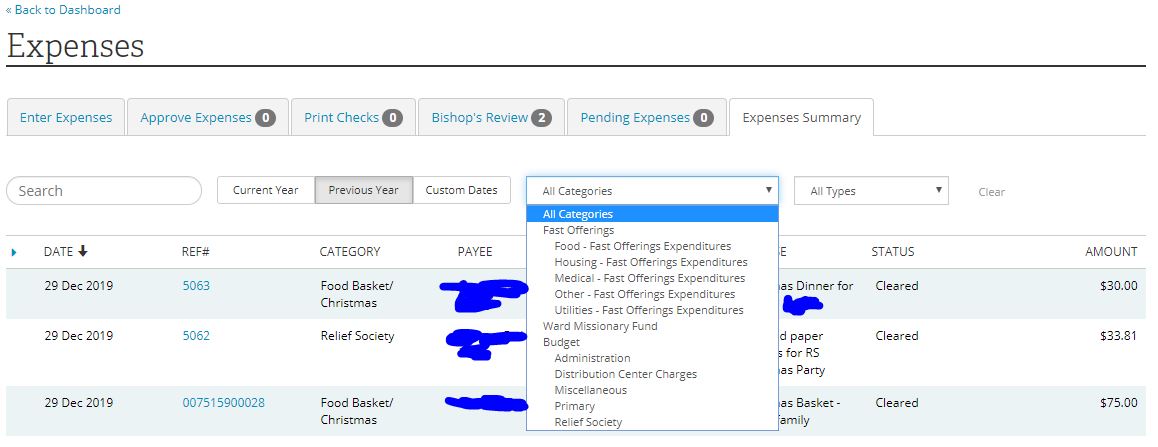
So, instead, I tried going to: "Expenses -> Expenses Summary -> Previous Year". That has exactly what I want. But, for some reason, "Young Men" does not show up in the Categories drop-down! Under "Budget" in that dropdown, all I have is "Administration", "Distribution Center Charges", "Miscellaneous", "Primary", and "Relief Society." So, a bunch of the usual budget categories are just missing from that list.
Is this just a bug? Is there some other way to generate such a report for each Category?
Note that I can "kinda" get what I need by just changing the Category there to "Budget" and then sorting by Category. So, then I've got a little section for "Young Men" on that big list and can use that for now. But it just seems like I should be able to just select "Young Men" and have the exact report I want -- if only "Young Men" showed up in the Category dropdown!
Thanks for any hints/tips!
So, instead, I tried going to: "Expenses -> Expenses Summary -> Previous Year". That has exactly what I want. But, for some reason, "Young Men" does not show up in the Categories drop-down! Under "Budget" in that dropdown, all I have is "Administration", "Distribution Center Charges", "Miscellaneous", "Primary", and "Relief Society." So, a bunch of the usual budget categories are just missing from that list.
Is this just a bug? Is there some other way to generate such a report for each Category?
Note that I can "kinda" get what I need by just changing the Category there to "Budget" and then sorting by Category. So, then I've got a little section for "Young Men" on that big list and can use that for now. But it just seems like I should be able to just select "Young Men" and have the exact report I want -- if only "Young Men" showed up in the Category dropdown!
Thanks for any hints/tips!